4K4D Review: 4K Dynamic View Synthesis in Python
[CVPR 2024] 4K4D: Real-Time 4D View Synthesis at 4K Resolution
At a glance
- What is it?
- 4K4D is a Python and CUDA research system for training and rendering dynamic volumetric video at 4K resolution. It fits computer vision researchers with compatible multi-camera datasets and GPU dependencies, but it is not a turnkey video application.
- Who is it for?
- Adopt 4K4D if you are reproducing dynamic-scene research, have CUDA-compatible hardware, and can supply the documented EasyVolcap dataset layout. Do not choose it as a general video player or an alternative for ordinary image generation.
- Can I use it commercially?
- Check first. The repository uses a licence we do not classify automatically, so read its LICENSE file before any commercial use.
- Is it still maintained?
- Yes. The repository last received commits 54 days ago.
- What is it written in?
- Mainly Python, according to GitHub's language statistics.
Answers come from the project's GitHub data, last synced on November 7, 2026, and from our analysis. They are not legal advice.
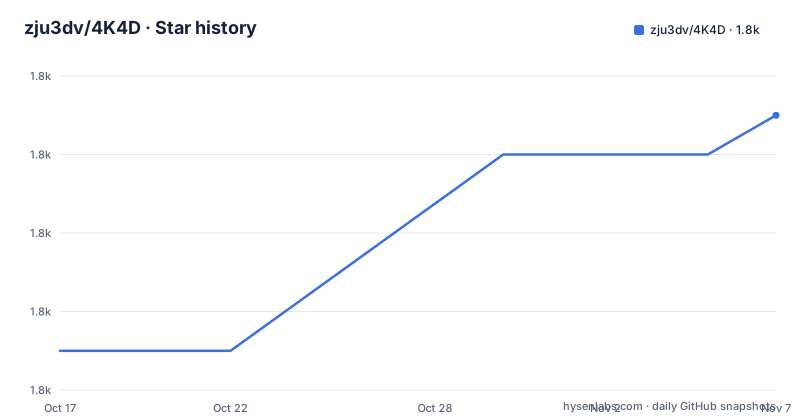
Star history
- zju3dv/4K4D1,821 ★ · +6
| Repository | 2026-10-17 | 2026-11-07 |
|---|---|---|
| zju3dv/4K4D | 1.8k | 1.8k |
6 Stars in the last 21 days, measured from the daily GitHub snapshot. Compare with other projects
Editorial analysis
What 4K4D Targets in Dynamic Scene Research
4K4D addresses dynamic view synthesis: reconstructing camera-dependent views of a scene whose subject or environment changes over time. Its stated target is real-time rendering at 4K resolution, and the CVPR 2024 paper title frames the project as a research contribution rather than a general-purpose graphics package. The intended users are computer vision researchers and engineers working with calibrated multi-camera recordings, especially researchers reproducing or extending the paper's training, inference, and rendering workflow.
The repository does not provide a conventional API for uploading a phone video and receiving a finished asset. Instead, it organizes work around EasyVolcap, datasets, configuration files, model samplers, renderers, and visual hulls. A sequence contains raw images, foreground masks, camera parameters, and optional processed geometry. This makes 4K4D a research codebase with an explicit data contract rather than a self-contained desktop application.
That distinction matters for adoption. A team that already has aligned multi-camera data and experience with neural rendering can work through the documented components. A team looking for drag-and-drop reconstruction should first confirm that the required camera calibration and masks are available. The README describes both full datasets and smaller encoded-video datasets for previewing pretrained models, so immediate evaluation does not necessarily require downloading every full-quality dataset.
Repository Architecture and 4K4D Data Flow
Based on the repository layout, 4K4D is implemented inside a fork or module arrangement of EasyVolcap rather than as a separate top-level application package. Relevant code appears under `easyvolcap/models/samplers`, where the README identifies `r4dv_sampler.py` for training and `super_charged_r4dv.py` for inference. Rendering components are grouped under `easyvolcap/models/renderers`, while experiment configuration is kept in `configs`.
The visible input pipeline starts with a sequence directory containing synchronized images and masks. Intrinsic and extrinsic camera parameters are represented by `intri.yml` and `extri.yml`. Optimized camera files can replace those top-level files when present. Visual hull geometry can be supplied as `vhulls`, while processed surfaces can be supplied as `surfs`. The README notes that `vhulls` is unnecessary when the optimized camera folder and `surfs` folder are present.
The code then divides model work into sampling, rendering, runners, evaluators, and visualizers. This division is visible in the explicit package lists in `pyproject.toml`, which include `easyvolcap.models.samplers`, `easyvolcap.models.renderers`, and several runner packages. The README does not expose enough algorithmic detail to explain the 4K representation or renderer internals precisely, so claims about its network architecture would go beyond the available evidence. What can be established is the repository structure: calibrated sequence data and optional geometry feed a Python training or inference system coordinated through EasyVolcap components.
Installing 4K4D After EasyVolcap
The README does not provide a standalone installation recipe. It directs users to the EasyVolcap installation guide for the base environment, then asks for the 4K4D modules to be registered from the repository root. Python 3.9 or newer is declared in `pyproject.toml`.
After completing the EasyVolcap environment setup, run this command in the root of the 4K4D repository:
pip install -e . --no-build-isolation --no-depsThe `--no-deps` option means this command does not install dependencies. The README says the environment should already contain `PyTorch`, `PyTorch3D`, and `tiny-cuda-nn` for rendering. Training also requires `Open3D`, particularly for extracting visual hulls. Those checks are separate from registering 4K4D itself.
Checking the CUDA-Capable First Setup
The documented first use is an import and hardware check rather than a rendering invocation. Run the following checks after installing the environment and repository modules:
python -c "from easyvolcap.utils.console_utils import *"
python -c "import torch; print(torch.rand(3,3,device='cuda'))"
python -c "from pytorch3d.io import load_ply"
python -c "import tinycudann"
python -c "import open3d"
The first command checks the EasyVolcap installation. The second requests a random tensor from CUDA, so it also exposes whether PyTorch can access the expected GPU path. The remaining commands verify imports for PyTorch3D, tiny-cuda-nn, and Open3D. Open3D is documented as training-only and is used when extracting visual hulls.
A complete import pass is necessary but not proof that a 4K render has succeeded. The README refers readers to its rendering documentation for model and dataset configuration, but the installation section does not include the actual rendering command. For the first real data use, prepare a sequence in the documented layout rather than treating a successful import as end-to-end validation.
Preparing DNA-Rendering and EasyVolcap Sequences
A prepared `0013_01` sequence from DNA-Rendering is used by the README to show the expected structure. The core inputs are `images`, `masks`, `extri.yml`, and `intri.yml`. An `optimized` directory can contain `extri.yml` and `intri.yml`, while `vhulls` and `surfs` hold PLY geometry at different processing stages.
data/renbody/0013_01/
images/
masks/
extri.yml
intri.yml
optimized/
vhulls/
surfs/
The README gives different destinations for the named datasets: `data/my_zjumocap` for ZJU-MoCap, `data/NHR` for NHR, and `data/renbody` for DNA-Rendering. ENeRF-Outdoor data goes under `data/enerf_outdoor`. It also warns that full datasets are large. Users interested only in the interactive GUI with pretrained models are directed to a minimal encoded-video dataset, although the README says full-quality rendering still requires the full data.
Dataset access is not uniform. ZJU-MoCap, DNA-Rendering, and NHR preparation is linked to Im4D's dataset guide. ZJU-MoCap and ENeRF-Outdoor require form submissions. The ENeRF-Outdoor section says that dataset is for non-commercial use only. These conditions are separate from the 4K4D repository license, and users must preserve any citations or dataset terms that apply.
Native and WebSocket Rendering Paths
4K4D offers two documented viewer paths: a native renderer and a WebSocket-based viewer for EasyVolcap. The README also records a tile-based CUDA renderer implemented for 4K4D, following the approach referenced for 3DGS through `diff-point-rasterization`. That renderer is materially different from a generic image-display viewer because it is tied to CUDA and neural rendering infrastructure.
The WebSocket option separates rendering from display more clearly. A WebSocket server can send rendered output to a client, which is useful when the renderer and interface need to run as separate processes or on separate machines. The native renderer keeps the viewer closer to the rendering application and avoids making WebSocket transport the central connection. The README does not include server startup flags, client addresses, or configuration files for either route, so their deployment requirements cannot be reduced to a reliable command here.
For a native application that already contains 4K4D and expects direct rendering integration, the native renderer is the less mediated path. For a decoupled visualization workflow around EasyVolcap, the WebSocket viewer is the relevant alternative. Neither choice removes the need for compatible CUDA libraries, prepared cameras, model assets, and a dataset.
License, Maintenance, and Upgrade Boundaries
The repository is not archived, and its last push was on 2026-09-15. It has no GitHub releases, so there is no documented tagged-release channel or published upgrade path in the repository metadata. The last push date is useful evidence of repository activity, but it does not by itself define compatibility between the code, PyTorch, CUDA extensions, datasets, and EasyVolcap components.
The license is classified as a custom license through the `license` file rather than a standard SPDX identifier that GitHub could classify. `pyproject.toml` points to that file with `license = { file = "license" }`. This review does not interpret the license or provide legal advice. Organizations should read the actual file and check model, dataset, and non-commercial restrictions separately. The README explicitly says to cite the corresponding dataset papers and identifies ENeRF-Outdoor as non-commercial.
Upgrades are likely to require care because the installation depends on CUDA-oriented packages such as `tinycudann` and custom rasterization components, while the base environment comes from EasyVolcap. The repository's package version is `0.0.0`, which does not communicate a stable release cadence. With no GitHub releases, adopting a revision means recording the repository state rather than relying on a documented semantic version.
Where 4K4D Is the Wrong Choice
4K4D is the wrong tool when the input is an uncalibrated single-camera clip, when there is no way to produce foreground masks, or when the required GPU and CUDA software stack is unavailable. The documented sequence format depends on synchronized images and camera parameters. Optional geometry can reduce some preprocessing, but it does not remove the need for a compatible sequence representation.
It is also a poor fit for a lightweight production viewer. The repository is organized around research code, experiment configurations, model samplers, renderers, and evaluation components. The presence of an interactive GUI and a WebSocket viewer does not turn it into a general asset delivery system. The README provides no API stability policy, release packaging, production deployment guide, or documented rollback procedure.
The main practical failure mode is environment mismatch. The editable installation intentionally omits dependency resolution, so an incomplete EasyVolcap environment can allow registration to finish while later CUDA imports or rendering steps fail. Another boundary is licensing and data availability: some datasets require forms, and at least ENeRF-Outdoor carries a stated non-commercial restriction. These are adoption constraints separate from the technical claims of the paper.
Editorial conclusion
Adopt 4K4D if you are reproducing dynamic-scene research, have CUDA-compatible hardware, and can supply the documented EasyVolcap dataset layout. Do not choose it as a general video player or an alternative for ordinary image generation. Verify the custom license, dataset access, EasyVolcap installation, and renderer path before committing engineering time.
Frequently asked questions
How do I install 4K4D?
The README sends users to the EasyVolcap installation guide for the base environment, then requires registration from the 4K4D repository root. The documented command is `pip install -e . --no-build-isolation --no-deps`. Rendering also requires PyTorch, PyTorch3D, and tiny-cuda-nn, while training requires Open3D.
What data does 4K4D require?
The documented sequence format includes images, masks, intrinsic parameters, and extrinsic parameters. Optional `optimized`, `vhulls`, and `surfs` directories can provide optimized camera parameters and processed geometry. Full datasets are described as large, while minimal encoded-video data is intended for previewing pretrained models.
Can I render 4K4D output with a WebSocket viewer?
The README says a WebSocket-based viewer was implemented for EasyVolcap alongside the native renderer. The installation section does not include the server startup command or client configuration, so those details must be taken from the repository's rendering documentation.
Official sources
Add this badge to your README
If you maintain this project, the badge below links readers to this analysis and shows its maintenance status from the daily GitHub snapshot. Paste the markdown into your README; add ?metric=license or ?metric=stars to the image URL for a different field.

[](https://hysenlabs.com/projects/zju3dv-4k4d)Star history chart for your README
[](https://hysenlabs.com/projects/zju3dv-4k4d)Was this useful?