LunarBar for macOS: A Compact Lunar Calendar for the Menu Bar
A compact lunar calendar for your macOS menu bar.
At a glance
- What is it?
- LunarBar is a free, open-source Swift application for macOS 26.0 and later. It places lunar-calendar information, public holidays, system calendars, and reminders in the menu bar, while its intentionally limited design leaves room for users who do not want a full calendar suite.
- Who is it for?
- LunarBar is a reasonable fit for Mac users who want a small menu bar calendar and regularly check lunar dates or public holidays. It is less suitable for people who need iOS, desktop widgets, or a broader calendar-management workflow.
- Can I use it commercially?
- Yes. MIT is a permissive licence: you can use, modify and sell software built on it, as long as you keep its copyright and licence notices.
- Is it still maintained?
- Yes. The repository last received commits 2 days ago.
- What is it written in?
- Mainly Swift, according to GitHub's language statistics.
Answers come from the project's GitHub data, last synced on October 23, 2026, and from our analysis. They are not legal advice.
Star history
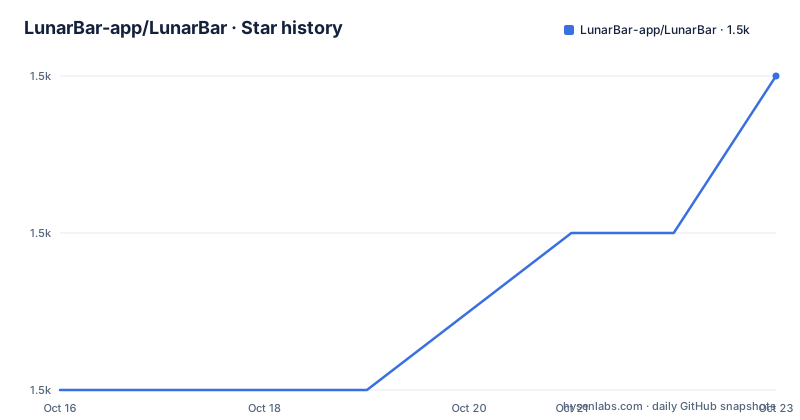
- LunarBar-app/LunarBar1,504 ★ · +2
| Repository | 2026-10-16 | 2026-10-23 |
|---|---|---|
| LunarBar-app/LunarBar | 1.5k | 1.5k |
2 Stars in the last 7 days, measured from the daily GitHub snapshot. Compare with other projects
Editorial analysis
What LunarBar Solves in the macOS Menu Bar
LunarBar addresses a specific gap for people who use a Mac but want calendar information without keeping a large calendar window open. The README describes it as a compact lunar calendar for the macOS menu bar, with support for the Chinese lunar calendar, public holidays, system calendars, and reminders. The intended user is someone who checks calendar information throughout the day and prefers a small status-bar presence to a conventional application window.
The project is not presented as a general-purpose calendar replacement. Its own wording is deliberately cautionary: users should not expect LunarBar to cover every calendar requirement. That boundary matters because the feature list combines lunar information and holiday awareness with macOS calendar and reminder access, but the README does not describe event creation, synchronization, sharing, advanced scheduling, or cross-device workflows.
The name is also a clue about its positioning. A menu bar application can provide a persistent calendar entry point without adding another prominent dock icon or a full window. The README’s screenshots show this visual approach, although it does not document every display mode or configurable field. Users who need detailed month navigation, event management, or extensive presentation controls should check the application’s current behavior before making it a primary calendar tool.
The Architecture Visible from LunarBar’s Repository Layout
The repository is written primarily in Swift and is organized around a macOS application entry point, a supporting kit, tools, and tests. The top-level directories include `LunarBarMac`, `LunarBarKit`, `LunarBarMacTests`, and `LunarBarTools`, along with `LunarBar.xcodeproj`. Based on that layout, the project separates the macOS application layer from reusable LunarBar components and from development tooling. The test directory also indicates that the project has an explicit automated testing area rather than consisting only of a single interface file.
The README does not expose a detailed runtime data flow, database schema, API, or calendar synchronization protocol. It does state that LunarBar supports system calendars and reminders, which implies that the app works with macOS-provided calendar and reminder information, but the repository material does not specify whether it duplicates those records locally, requests access through a particular framework, or refreshes them through a documented background service. Those implementation details should not be inferred beyond what the repository layout supports.
For developers, `DEV.md` is the documented starting point for learning how LunarBar was developed. The README directs readers there rather than reproducing the development workflow. The presence of `.swiftlint.yml`, `Build.xcconfig`, and `.periphery.yml` gives the project visible static-analysis and build configuration files. This is useful for someone deciding whether the source is understandable, but the README does not promise compatibility with every Swift toolchain or Xcode release.
Installing LunarBar Through Homebrew or the Signed DMG
The project offers two documented installation routes. The simplest command-line option is Homebrew. Run the following command in Terminal, then launch LunarBar from Applications or open the installed cask application:
brew install --cask lunarbarThe README also provides a direct installation path through the latest release page. Download `LunarBar.dmg`, open it, and drag `LunarBar.app` into the `Applications` folder. The page describes the app as sandboxed, signed, and notarized, so users who are concerned about distributing software outside the App Store can verify those claims against the downloaded artifact and Apple’s notarization information rather than relying only on an unsigned local build.
The current README badge states a platform requirement of `macOS 26.0+`. It also links to historical releases named `macos-13` and `macos-14`, which is important for users whose Macs cannot run the current version. The repository has a `main` default branch and is not marked archived. Its last push was on 2026-10-08, and the listed releases include `v1.9.2`, dated 2026-08-28, `v1.9.1`, dated 2026-07-01, and `v1.9.0`, dated 2026-03-22. These dates show recent release activity, but the README does not describe a formal support policy for older macOS versions or a documented upgrade path beyond the linked historical releases.
After installation, LunarBar is expected to appear as a menu bar item rather than as a conventional full-window calendar. The README does not give a documented command-line launch sequence, so there is no justified shell example for starting the app.
A First Use of the Lunar Calendar
The first useful check is to launch LunarBar and inspect the menu bar entry. From there, open the calendar interface and compare the displayed information with the lunar calendar, public-holiday information, system calendars, and reminders that the user needs to see. The README names these capabilities but does not provide a detailed click-by-click workflow, so the exact interaction sequence should be taken from the application itself or the project wiki.
The installation path and the application behavior should be kept separate in any evaluation. A successful `brew install --cask lunarbar` only confirms that Homebrew found and installed the cask. It does not confirm that a user’s preferred calendars are visible, that public holidays match the user’s locale, or that reminders appear without additional macOS permission. The README does not document permission prompts or privacy settings, so those points require direct inspection.
The app also has an update path. According to the README, LunarBar automatically checks for updates, and users can manually check for updates inside the application. Historical versions are available on the releases page. That is a small but relevant operational advantage for a menu bar utility because it gives the user a visible release history outside the App Store. The documentation does not state whether updates can be disabled, whether automatic checks occur on a fixed schedule, or what happens when an update fails.
LunarBar’s Deliberate Limits and Failure Cases
The clearest limitation is platform scope. LunarBar is a macOS menu bar application, and the project explicitly says that it does not have an iOS version because iOS does not have a menu bar. It also says that a widget version was not developed because the SwiftUI widgets available to the maintainers were not sufficiently complete. These are product boundaries, not missing installation instructions.
The second limitation is feature depth. The README lists calendars and reminders, but it does not document event creation, recurrence editing, invite handling, shared calendars, conflict resolution, or cross-device synchronization. A user who expects those workflows from a complete calendar application should not assume LunarBar supplies them.
The third limitation is operating-system coverage. The current platform badge requires `macOS 26.0+`, while older systems are directed to specific historical release tags. That creates a version split: users on an older Mac may need a separate release, and the README does not say whether all features or bug fixes are identical across those tracks. A failed app launch on an unsupported macOS version would therefore be a compatibility issue, not a Homebrew installation error.
The project also has no established feedback channel according to the README. That can make issue reporting and expectation-setting less convenient for users who encounter an undocumented behavior.
LunarBar Compared with Full Calendar Applications
The meaningful alternative is a full macOS calendar application with a large calendar window, event editing, multiple calendar management, sharing, and reminder workflows. The exact alternative product is not named in the README, so the comparison should stay at the level of architecture and intended use rather than naming an unverified competitor.
LunarBar keeps the calendar close to the macOS menu bar and limits its interface to a compact presentation. That can reduce screen space used by calendar information and suit users who mainly need to glance at lunar dates, public holidays, or reminders. A full calendar application offers more room for browsing time periods and editing records, but its larger interface is less focused on a persistent status-bar entry.
LunarBar is therefore the better fit when the main requirement is quick access to a small set of calendar facts. It is the wrong tool when the main requirement is managing a detailed calendar. The README’s warning not to expect too much is a direct statement that the project prioritizes a deliberately minimal design over feature breadth.
Maintenance, License, and Upgrade Implications
LunarBar is released under the MIT License, as stated in the repository license metadata and README project information. The license identifies the project’s copyright and redistribution terms, but this review does not provide legal advice or replace reading the `LICENSE` file. Users who distribute a modified build or incorporate its code should review that file and any dependency notices separately.
The repository is not archived, and the last push was on 2026-10-08. The recent release list also includes versions in March, July, and August 2026. Those facts indicate ongoing project activity, although the README does not promise a maintenance schedule, support window, or guaranteed response time. The absence of a documented feedback channel remains relevant when evaluating upgrade risk.
The README documents automatic and in-app update checks, plus historical releases on GitHub. It does not document migration behavior for user settings, calendar permissions, or reminders between versions. Since the app is sandboxed, any such migration or permission behavior should be verified against the specific release before relying on it for critical scheduling.
Editorial conclusion
LunarBar is a reasonable fit for Mac users who want a small menu bar calendar and regularly check lunar dates or public holidays. It is less suitable for people who need iOS, desktop widgets, or a broader calendar-management workflow. Before adopting it, verify that your macOS version is supported, inspect the release or repository requirements, and confirm that the menu bar presentation fits your workflow.
Frequently asked questions
How do I install LunarBar on macOS?
The README documents installing the `LunarBar.dmg` from the latest release page, then dragging `LunarBar.app` into `Applications`. It also documents the Homebrew command `brew install --cask lunarbar`. The current platform badge requires `macOS 26.0+`.
Does LunarBar include an iOS or desktop widget version?
No. The README says LunarBar does not have an iOS version because iOS does not have a menu bar. It also says the project does not have a widget version because the available SwiftUI widgets were not sufficiently complete for the maintainers.
Does LunarBar replace a full calendar application?
The README presents LunarBar as a minimalist menu bar calendar and warns users not to expect it to satisfy every need. It lists lunar calendar, public holiday, system calendar, and reminder support, but does not document event editing, sharing, synchronization, or other full-calendar workflows.
Official sources
Add this badge to your README
If you maintain this project, the badge below links readers to this analysis and shows its maintenance status from the daily GitHub snapshot. Paste the markdown into your README; add ?metric=license or ?metric=stars to the image URL for a different field.

[](https://hysenlabs.com/projects/lunarbar-app-lunarbar)Star history chart for your README
[](https://hysenlabs.com/projects/lunarbar-app-lunarbar)Was this useful?