pycdc: Decompyle++ turns .pyc files back into Python, and tells you when it cannot
C++ python bytecode disassembler and decompiler
At a glance
- What is it?
- Decompyle++ ships two command line binaries, pycdas for disassembly and pycdc for decompilation, in a flat C++ codebase built with CMake, and its README is honest about the one input that needs a version number typed on the command line.
- Who is it for?
- Adopt Decompyle++ when you hold a .pyc file with no source, need to see what it actually does, and are comfortable reading whatever quality of Python comes back rather than assuming it compiles. Do not adopt it as a general Python to Python converter or expect a package manager install, because there are no releases and the Windows path is a generated project.
- Can I use it commercially?
- Yes, with conditions. GPL-3.0 is a copyleft licence: if you distribute software that includes it, you must release that software's source code under the same licence. Running it internally without distributing it does not trigger that obligation.
- Is it still maintained?
- Activity is slowing. The repository last received commits 7 months ago.
- What is it written in?
- Mainly C++, according to GitHub's language statistics.
Answers come from the project's GitHub data, last synced on November 15, 2026, and from our analysis. They are not legal advice.
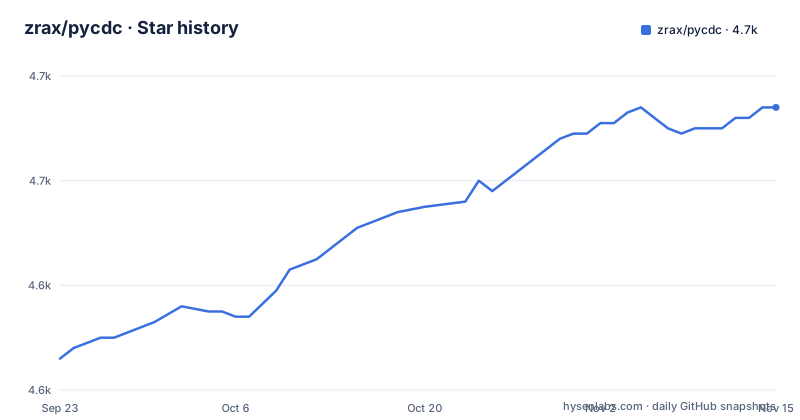
Star history
- zrax/pycdc4,674 ★ · +48
| Repository | 2026-09-23 | 2026-11-15 |
|---|---|---|
| zrax/pycdc | 4.6k | 4.7k |
48 Stars in the last 53 days, measured from the daily GitHub snapshot. Compare with other projects
Editorial analysis
Two binaries: pycdas prints instructions, pycdc prints Python
Decompyle++ is a single codebase that produces two command line tools, and the README names them by role. pycdas is the byte-code disassembler and pycdc is the decompiler. Both take one argument, the path to a .pyc file:
./pycdas [PATH TO PYC FILE]./pycdc [PATH TO PYC FILE]The output contract is simple and worth knowing before you wire it into anything. The disassembly from pycdas is printed to stdout. The decompiled Python source from pycdc is printed to stdout, and any errors are printed to stderr.
The project's aim is stated as translating compiled Python byte-code back into valid and human-readable Python source code. Whether any particular output deserves the word valid is the judgement you are making by running it, which is why the disassembler exists alongside it: when the decompiled source looks wrong, the instructions underneath are still there to check against.
Marshalled code objects carry no version, so you pass one
One input format needs an extra flag, and the reason is structural. Both tools support Python marshalled code objects, the kind of output you get from marshal.dumps(compile(...)).
A .pyc file has a header carrying the interpreter version that produced it. A marshalled code object does not, because the marshalled form contains the code object and nothing else. So the version has nowhere to live in the file, and the tool cannot infer it.
The fix is on the command line: specify -c -v <version>. The README says it plainly, that the version must be specified as the objects themselves do not contain version metadata.
For anyone scripting this, that is the difference between two invocations. A .pyc file needs nothing beyond its path, and a marshalled object needs the interpreter version repeated every time. There is no validation step described in the README, so the value is on you.
The C++ source is flat, with two entry points and an AST layer
The repository root is a flat C++ project rather than a src/ tree, and the file names describe the pipeline. Two of them are the entry points:
pycdas.cpp
pycdc.cpp
bytecode_ops.inl
The pyc_ prefixed files are the readers for the parts of a .pyc: pyc_module, pyc_code, pyc_object, pyc_string, pyc_numeric, pyc_sequence, alongside data.cpp and data.h. The AST layer is separate, with ASTNode and ASTree in their own files, and FastStack.h sits at the root as a stack structure. bytecode_ops.inl is an include rather than a translation unit, which is how the opcode definitions get into the reader.
The rest of the root is small: CMakeLists.txt, LICENSE, README.markdown, .gitignore, a .github/ directory, plus bytes/, scripts/ and tests/.
Two naming details worth recording. The README is README.markdown, not README.md, and the byte-reading sources sit beside the output-building ones with no intermediate directory, so reading the code means following a naming convention rather than a folder structure.
CMake with three debug switches, then make, then make check
The build instructions are a three-step list. Generate a project or a makefile with CMake, build the generated project or makefile, and optionally run the tests.
The interesting part is the option table, which passes three flags to CMake to control debug features:
-DCMAKE_BUILD_TYPE=Debug
-DENABLE_BLOCK_DEBUG=ON
-DENABLE_STACK_DEBUG=ON
-DCMAKE_BUILD_TYPE=Debug produces debugging symbols. The other two are Decompyle++'s own: ENABLE_BLOCK_DEBUG turns on block debugging output and ENABLE_STACK_DEBUG turns on stack debugging output. For a decompiler those two are the ones that matter, because reconstructing control flow and the operand stack is the hard part, and both features are off unless asked for.
After generating, the README splits by generator. For projects, for example MSVC, open the generated project file and build it. For makefiles, just run make. To run the tests on *nix or MSYS, run make check JOBS=4, with an optional FILTER=xxxx argument to run only certain tests.
That FILTER variable is the practical tool for a contributor: a failing test out of a large suite can be rerun alone.
Windows means opening a generated project, not running an installer
There is no binary release here. The repository has no GitHub releases, and the README documents no download of a prebuilt executable for any platform.
What it documents for Windows is the generator path. CMake produces a project, and for projects, for example MSVC, you open the generated project file and build it. There is no .exe, no installer and no package manager entry in the instructions.
That makes the Windows experience the same as the Unix one with a different build tool: configure, generate, compile. The tests are named as running on *nix or MSYS with make check.
The practical consequence is that anyone evaluating pycdc on Windows compiles it first, and that the compiler choice is theirs. Nothing in the README pins a toolchain version, a standard or a Visual Studio release.
Supporting any Python version is the stated goal, and the hard part
The ambition is stated in the second paragraph: while other projects have achieved this with varied success, Decompyle++ is unique in that it seeks to support byte-code from any version of Python.
That goal is the whole difficulty. Bytecode is an implementation detail of each interpreter release, the opcode set changes between versions, and a decompiler has to map those instructions back onto Python syntax that also changed. A tool that handles many versions is handling many opcode tables.
The repository shows how that work is arranged, with one reader per structural element of the .pyc format and an AST layer above it, which is the shape you would expect from someone trying to keep versions apart rather than blend them.
What the README does not provide is a compatibility table. There is no list of Python versions and no statement of which ones produce valid output, so the honest way to use the tool is to know which interpreter compiled the file and judge the output against it.
Two authors, four more contributors, and GPL v3
Decompyle++ is the work of Michael Hansen and Darryl Pogue, and the README lists four further contributors by name: charlietang98, Kunal Parmar, Olivier Iffrig and Zlodiy.
The licence is the GNU General Public License, version 3, with the README pointing at the LICENSE file for details. That matters more here than in most tools, because a decompiler is the kind of program whose output ends up in someone else's codebase or report, and the licence of the tool does not settle that.
Contributors are asked to fork the project on GitHub.
On maintenance, the facts are thin. The last push to master was on 2026-04-07, and there are no GitHub releases to anchor a version against. Nothing in the README promises support for particular Python releases, so anyone depending on this should plan to build it themselves and treat the source as the only artefact.
Editorial conclusion
Adopt Decompyle++ when you hold a .pyc file with no source, need to see what it actually does, and are comfortable reading whatever quality of Python comes back rather than assuming it compiles. Do not adopt it as a general Python to Python converter or expect a package manager install, because there are no releases and the Windows path is a generated project. Two things to verify before you lean on it: which Python version produced the bytecode, since the decompiler seeks to handle any version and the only version signal it has for marshalled objects is the flag you type, and whether the decompiled output needs a human pass before it is trustworthy evidence.
Frequently asked questions
how to use pycdc
Run ./pycdc with the path to a .pyc file. The decompiled Python source goes to stdout and any errors go to stderr. For marshalled code objects, as produced by marshal.dumps(compile(...)), add -c -v <version>, because those objects contain no version metadata of their own.
how to install pycdc
Build it from source. Generate a project or makefile with CMake, then run make for a makefile, or open the generated project file if the generator produced one such as an MSVC project. There is no package manager entry and the repository has no GitHub releases.
how to install pycdc windows
On Windows, CMake generates a project, for example an MSVC one, and you open the generated project file and build it. The README documents no installer or prebuilt executable for Windows, and it notes that tests run with make check on *nix or MSYS.
Official sources
Add this badge to your README
If you maintain this project, the badge below links readers to this analysis and shows its maintenance status from the daily GitHub snapshot. Paste the markdown into your README; add ?metric=license or ?metric=stars to the image URL for a different field.

[](https://hysenlabs.com/projects/zrax-pycdc)Star history chart for your README
[](https://hysenlabs.com/projects/zrax-pycdc)Was this useful?