ExcaliBrain: an Obsidian mind map built from the links you already wrote
A graph view to navigate your Obsidian vault
At a glance
- What is it?
- ExcaliBrain is an Obsidian plugin that turns a vault into an interactive mind map, inferring five kinds of relationship between notes from forward links, backlinks, mutual links and Dataview fields. It is built on top of the Dataview and Excalidraw plugins, so both have to be installed, and it is MIT licensed with a version in the 0.2 series.
- Who is it for?
- ExcaliBrain suits an Obsidian user whose vault already has links in it and who wants to see the structure that is implicit in those links, rather than the flat file tree. It is the wrong choice if your notes are mostly unlinked, because the map is derived entirely from relationships and a vault of loose notes produces a sparse graph, and a poor fit if you cannot install two other plugins, since Dataview and Excalidraw are hard prerequisites rather than optional integrations.
- Can I use it commercially?
- Yes. MIT is a permissive licence: you can use, modify and sell software built on it, as long as you keep its copyright and licence notices.
- Is it still maintained?
- Yes. The repository last received commits 21 days ago.
- What is it written in?
- Mainly TypeScript, according to GitHub's language statistics.
Answers come from the project's GitHub data, last synced on November 7, 2026, and from our analysis. They are not legal advice.
Star history
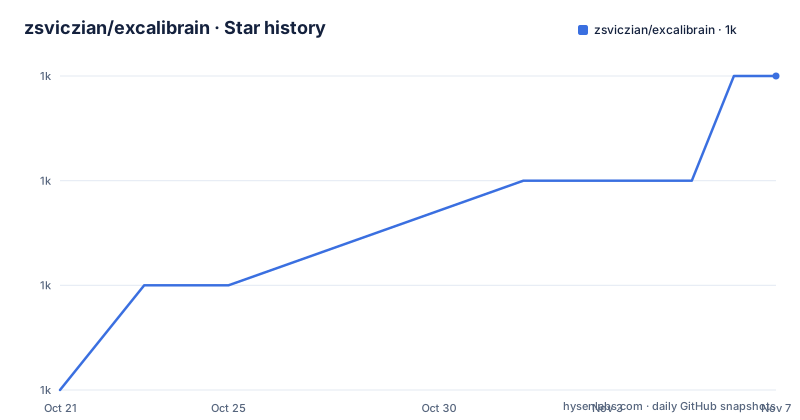
- zsviczian/excalibrain1,007 ★ · +3
| Repository | 2026-10-21 | 2026-11-07 |
|---|---|---|
| zsviczian/excalibrain | 1k | 1k |
3 Stars in the last 17 days, measured from the daily GitHub snapshot. Compare with other projects
Editorial analysis
What the plugin does: reads your vault and draws the structure
ExcaliBrain is described as an interactive, structured mind map of your Obsidian vault, generated from the folders and files in the vault by interpreting the links, Dataview fields, tags and YAML front matter in your markdown files. The project is inspired by TheBrain and by the Breadcrumbs plugin. What is different here is the source of the graph. You did not author a mind map, you authored notes, and the plugin reads the connections you already made and draws them as a navigable structure.
Five relationship types, and the vocabulary is not arbitrary
The plugin distinguishes five types of relationship between notes. Children, parents, friends, other friends, which are lateral relationships on the right side, and siblings. A friend is a mutual link, and the other friends category holds the lateral relationships drawn on the right. Having a distinct slot for lateral relationships is the difference between a graph that reads and one that is a hairball.
Where the relationships come from: explicit fields first, inference second
The derivation logic is stated in two layers. Relationships can be explicitly defined using Dataview fields, with an example given as Author:: [[Isaac Asimov]], where the value of the Author field in one note names another note. Otherwise they are inferred, and the rules are short. A forward link is inferred as a child, a backlink is inferred as a parent, if files mutually link to each other they are friends, and the children of the parents are siblings. So a one-way link gives you a direction and a two-way link gives you a peer, and the hierarchy emerges from the graph rather than from folders. Tags and YAML front matter are also read, which is how a note that never links to anything can still end up on the map, and the repository carries an EXCALIBRAIN_DETAILED_SPECIFICATION.md that spells the inference rules out more precisely than the README summary does.
The prerequisites are two other plugins, and that is the real constraint
ExcaliBrain is built on top of the Dataview plugin and on the author's own Excalidraw plugin, and the README is unambiguous that you must have both installed and enabled for it to work. That is a genuine dependency chain rather than an optional integration, and it shapes the evaluation. Dataview supplies the fields the explicit relationship definitions use, and the Excalidraw plugin named is the author's own, obsidian-excalidraw-plugin. The plugin is also optimised to work well with the Hover Editor plugin, so the editing experience in the map is a design goal rather than an accident. The primary language is TypeScript, the licence is MIT, and the recent releases are 0.2.18 from May 2026, a 0.2.19 beta in September and 0.2.19 at the end of the month.
The plugin build, which is a small TypeScript project
The repository is a small Obsidian plugin project. The manifest files are manifest.json and manifest-beta.json, which is the usual arrangement for shipping a stable build and a beta side by side, and the versions.json file alongside a version-bump.mjs script handles the version that goes into each. The build is esbuild, with an esbuild.config.json and an esbuild.config.mjs, and the scripts are dev to run the config, build to run it in production mode, typecheck with tsc and noEmit, and two repository scripts, repo:export to generate a repository zip and repo:update to update the repository. There is a rollup.config.js as well, which suggests the build has been through a bundler change, a findUpdated.js file, a hot-reload.bat for Windows development, a .replit configuration, and the src/, styles.css, tests/ and scripts/ directories. The dev dependencies are esbuild, the Obsidian API typings at 1.8.7 and TypeScript at 5.9.3, with an override pinning moment.
What a good vault for this looks like, and where the limits are
The inference rules make the plugin's requirements on your notes clear. A vault that is mostly prose with a few links will produce a graph with a few edges and a lot of isolated nodes, because the only relationships the plugin can find are the ones you expressed. A vault that uses wiki links throughout, or that fills in Dataview fields like Author or Project, produces the layered structure the layout is designed to show. That is a reasonable division of labour, since the plugin does not need to guess what a note means, but it means the tool is only as good as the linking discipline behind it, and the README's video walkthroughs are the way to judge that, since they show a vault in use rather than a diagram of the rules.
Where the project stands, and how to find the author
The last push to the repository was on 2026-09-29, the repository is not archived, and the version line is 0.2.19 with a beta released shortly before it, which is the pattern of a plugin iterating on layout behaviour. The README routes feedback through GitHub issues, and the author, zsolt, is reachable through a Ko-fi page, a Twitter account, a Discord server where the handle is zsviczian, and a personal blog at zsolt.blog. The blog is the more interesting of these for an evaluator, because a plugin about mind maps and knowledge structures is likely to be accompanied by writing about how the author thinks about note structure, and that writing tells you what the tool is for in a way the README cannot.
Editorial conclusion
ExcaliBrain suits an Obsidian user whose vault already has links in it and who wants to see the structure that is implicit in those links, rather than the flat file tree. It is the wrong choice if your notes are mostly unlinked, because the map is derived entirely from relationships and a vault of loose notes produces a sparse graph, and a poor fit if you cannot install two other plugins, since Dataview and Excalidraw are hard prerequisites rather than optional integrations. Before adopting it, check that your notes actually use links and Dataview fields, because the relationship inference has nothing to work from otherwise, and read EXCALIBRAIN_DETAILED_SPECIFICATION.md in the repository, since the inference rules are more precise than the README summary.
Frequently asked questions
What does the ExcaliBrain Obsidian plugin do?
It generates an interactive, structured mind map of your Obsidian vault, interpreting the links, Dataview fields, tags and YAML front matter in your markdown files. It is inspired by TheBrain and the Breadcrumbs plugin, and it is MIT licensed.
Which relationships does ExcaliBrain distinguish?
Five: children, parents, friends, other friends, which are the lateral relationships drawn on the right side, and siblings. Relationships can be explicit through Dataview fields such as Author:: [[Isaac Asimov]], or inferred, with a forward link treated as a child, a backlink as a parent, mutual links as friends, and the children of the parents as siblings.
What plugins do I need to install for ExcaliBrain to work?
Both the Dataview plugin and the Excalidraw plugin, and the README says they must be installed and enabled. The Excalidraw plugin named is the author's own, obsidian-excalidraw-plugin, and ExcaliBrain is also optimised to work well with the Hover Editor plugin.
How is the ExcaliBrain plugin built?
With esbuild, through an esbuild.config.json and an esbuild.config.mjs, with scripts for dev, build and typecheck, and two repository scripts, repo:export to generate a repository zip and repo:update to update it. The dev dependencies are esbuild, the Obsidian API typings at 1.8.7 and TypeScript at 5.9.3, and there is a manifest.json and a manifest-beta.json for the stable and beta builds.
How current is ExcaliBrain?
The recent releases are 0.2.18 from May 2026, a 0.2.19 beta from September 2026 and 0.2.19 at the end of that month, and the last push to the repository was on 2026-09-29. The repository is not archived, and issues and enhancement requests go through the GitHub issue tracker.
Official sources
Add this badge to your README
If you maintain this project, the badge below links readers to this analysis and shows its maintenance status from the daily GitHub snapshot. Paste the markdown into your README; add ?metric=license or ?metric=stars to the image URL for a different field.

[](https://hysenlabs.com/projects/zsviczian-excalibrain)Star history chart for your README
[](https://hysenlabs.com/projects/zsviczian-excalibrain)Was this useful?