BlackWidow crawls a site with Inject-X fuzzing the parameters it finds
A Python based web application scanner to gather OSINT and fuzz for OWASP vulnerabilities on a target website.
At a glance
- What is it?
- BlackWidow is a Python spider that harvests subdomains, URLs, parameters, emails and phone numbers from a target site, then hands the dynamic parameters to the bundled Inject-X fuzzer. It suits bug bounty hunters and authorized testers, and the dated dependency list plus the licence's naming condition are the two things to check before you adopt it.
- Who is it for?
- BlackWidow earns a place on a tester's own staging host, or on a bug bounty scope where fuzzing is in scope, because the crawl and the fuzz are one command instead of two. It is the wrong tool for anyone who needs a maintained scanner with current CVE payloads, for a Windows workstation without Python, or for a client whose legal team objects to a licence that demands the original project name and author credit stay intact.
- Can I use it commercially?
- Check first. The repository uses a licence we do not classify automatically, so read its LICENSE file before any commercial use.
- Is it still maintained?
- Activity is slowing. The repository last received commits 6 months ago.
- What is it written in?
- Mainly Python, according to GitHub's language statistics.
Answers come from the project's GitHub data, last synced on November 7, 2026, and from our analysis. They are not legal advice.
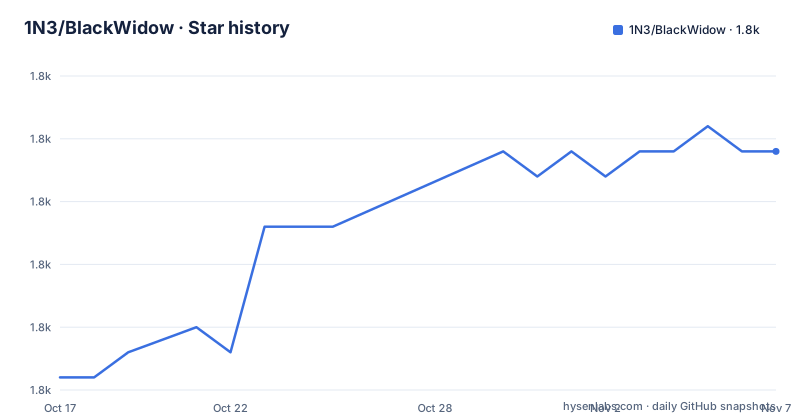
Star history
- 1N3/BlackWidow1,837 ★ · +9
| Repository | 2026-10-17 | 2026-11-07 |
|---|---|---|
| 1N3/BlackWidow | 1.8k | 1.8k |
9 Stars in the last 21 days, measured from the daily GitHub snapshot. Compare with other projects
Editorial analysis
One command covers both the crawl and the fuzz
Most reconnaissance tooling hands you a list and stops there. BlackWidow is two programs in one wrapper: a spider that collects URLs, subdomains, dynamic parameters, form URLs, email addresses and phone numbers, and Inject-X, the fuzzer bundled in the same repository as injectx.py, which takes those dynamic URLs and probes them for common OWASP top ten issues. The README names the output categories explicitly, and the repository layout matches that claim: a blackwidow entry point, injectx.py sitting next to it, and a Dockerfile whose ENTRYPOINT is python3 blackwidow.
That combination is the reason the tool exists. A parameter that a crawler discovered is the same parameter the fuzzer can act on, so the handoff happens inside one run rather than through a file you have to convert between formats. For a bug bounty hunter triaging a single subdomain, that saves the manual step of copying query strings out of a report and pasting them into another tool.
BlackWidow answers a narrower question: given the URLs this site exposes, which parameters misbehave.
The install script and what is actually on the dependency list
The Linux install is a single script run from the repository root:
sudo bash install.shRunning it as root is what the README asks for, and that is the first thing to think about before you run it, since a shell script executed with sudo will do whatever it contains. Read install.sh first if the machine is anything other than a throwaway box.
The dependency set is small and pinned only by name, which is the project's most concrete weakness for a security tool. requirements.txt lists six packages and nothing else:
coloredlogs
beautifulsoup4
requests
lxml
cookies
urllib3
No version constraints appear in that file. A scanner that issues live attack payloads against a target should ideally be reproducible, and an unpinned list means two people installing on different days can end up with different parser and HTTP behaviour. The last push was on 2026-04-17 and the newest tagged release is v1.3 from 2020-07-19, so unpinned installs may resolve to much newer dependency versions.
Crawling with depth, cookies and verbose output
The usage block is worth reading closely, because the flags map to crawl behaviour rather than to scan severity. A single URL scan:
blackwidow -u https://target.comDepth is set per domain with -l, and the README pairs it with verbose logging:
blackwidow -d target.com -l 5 -v yThe flag combination that does both jobs is the one that adds -s:
blackwidow -d target.com -l 5 -s y -v yHere y is a literal yes value rather than a bare switch, and the README describes that combination as crawling to five levels and fuzzing all unique parameters. The word unique is the interesting part: the README describes fuzzing all unique parameters rather than every occurrence separately.
Authenticated areas are reached with -c, which takes a raw cookie pair:
blackwidow -d target.com -l 5 -c 'test=test'There is no documented flag for a header, a bearer token, a proxy, an authentication method or a request rate limit. On a site behind a login that is not cookie-based, the crawl will simply not see the authenticated pages, and nothing in the README tells you so.
Inject-X runs on its own against one URL
Once the crawler has done its job, the fuzzer is a separate entry point you can point at anything, including a URL you found by hand. It takes a full URL with parameters inline:
injectx.py -u 'https://test.com/uers.php?user=1&admin=true' -v yThe README calls this fuzzing all GET parameters, so the standalone path is GET only. There is no documented POST body handling, no way to feed a saved request, and no JSON payload input. The sample path is reproduced from the README. The URL is quoted so the shell passes both query parameters to Inject-X instead of interpreting the ampersand as a control operator.
Running Inject-X on its own is the practical way to retest a single finding without re-crawling a whole site, and it is the mode to prefer when the crawl phase has already burned time or rate limit. What the output looks like is only conveyed through the sample report image committed as blackwidow-report1.png; the README does not document an output format, an exit code, or a way to export findings in a machine-readable form. Findings live in sorted text files, per the feature list, which is workable for a human reading a report and awkward for anything you want to pipe into a tracker.
The Dockerfile builds from a 2020 Alpine base
A container path exists, and it is the cleaner installation route for the reasons that matter: it does not need root on the host, and it does not touch the machine's Python.
git clone https://github.com/1N3/BlackWidow.git
cd BlackWidow
docker build -t blackwidow .
docker run -it blackwidow
Two details in Dockerfile deserve attention. The base image is alpine:3.10. The build also clones the repository from GitHub inside the image rather than copying the local source, so the container you build may contain code that differs from the working tree you just cloned. Second, CMD is set to --help, which is why the plain docker run prints usage instead of scanning anything; you must pass arguments explicitly to do real work.
The installed Python packages come from the same apk and pip commands as the shell install, so the Docker route fixes the privilege problem and nothing else. It does not add pinned versions, a non-root user, or any network restriction.
The licence requires you to keep the author's name on it
LICENSE.md is a custom licence that GitHub cannot classify, and its condition is unusual enough to read before you deploy this anywhere. You may modify and redistribute the software, but only as long as the project name BlackWidow, the credit to the author xer0dayz, and the website URL https://sn1persecurity.com are not modified. The licence states that breaking this will break the agreement and trigger a takedown notice.
Practically, that rules out rebranding the tool, folding it into an internal scanner platform under your own name, or stripping the attribution banner for a client deliverable. It is not a question of legal interpretation so much as a literal condition: change the name, lose the licence. Anyone wrapping this into an internal toolchain should read that clause and get a decision before the integration work starts.
The README also carries a disclaimer placing responsibility for any damage on the user. Combined with the fuzzing behaviour, that means the only defensible way to run BlackWidow is against hosts where you have written permission, and the permission should name fuzzing rather than just crawling.
Where this sits against dedicated fuzzers
The nearest comparison is not another spider but a standalone fuzzer plus a separate crawler, which is how most testers already work. Spidering with one tool and fuzzing with another means you choose how aggressively to probe, and you can review a parameter list before sending a single payload. BlackWidow collapses that choice into a single -s flag, which is faster and gives you less control over the blast radius.
Inject-X is documented as fuzzing for common OWASP vulnerabilities, and the newest release tag dates from 2020. That gap is the practical reason to treat BlackWidow output as reconnaissance and triage rather than as a substitute for a maintained scanner.
For pure subdomain discovery, a dedicated enumerator will generally find more, since BlackWidow's subdomain collection is one item in a broad harvest rather than the tool's purpose.
Editorial conclusion
BlackWidow earns a place on a tester's own staging host, or on a bug bounty scope where fuzzing is in scope, because the crawl and the fuzz are one command instead of two. It is the wrong tool for anyone who needs a maintained scanner with current CVE payloads, for a Windows workstation without Python, or for a client whose legal team objects to a licence that demands the original project name and author credit stay intact. Before running anything, confirm that install.sh still resolves against a current Python interpreter, read the exact arguments your target's terms allow, and check whether the parameters it collected include anything you are not authorised to send traffic to.
Frequently asked questions
How do I install BlackWidow on Linux?
The README gives one command, run from the repository root: sudo bash install.sh. Dependencies come from requirements.txt, which lists coloredlogs, beautifulsoup4, requests, lxml, cookies and urllib3 without version constraints. A Docker build is also documented, and it does not require root on the host.
What does BlackWidow do with the URLs it finds?
The spider collects URLs, subdomains, dynamic parameters, form URLs, email addresses and phone numbers, and writes them to sorted text files. Adding the -s flag makes it fuzz all unique parameters it collected for common OWASP top ten issues.
Can I fuzz a single URL without crawling the whole site?
Yes, by calling the bundled Inject-X script directly on a full URL, as in injectx.py -u https://test.com/uers.php?user=1&admin=true -v y. The README describes that as fuzzing all GET parameters; no POST body or saved-request input is documented.
Is BlackWidow still being updated?
The last push was on 2026-04-17, while the newest tagged release is v1.3 from 2020-07-19. requirements.txt carries no version pins and the Dockerfile builds from alpine:3.10, so an install now resolves against much newer upstream packages than the code was written for.
Can I scan a site that requires a login?
Only cookie-based sessions are documented, through the -c flag, for example blackwidow -d target.com -l 5 -c 'test=test'. No header, bearer token or proxy option appears in the README, so other authentication schemes are not covered.
Can I rename BlackWidow or ship it inside my own product?
The licence allows modification and redistribution only while the project name BlackWidow, the credit to xer0dayz and the URL https://sn1persecurity.com stay unmodified, and it states that changing them breaks the agreement. Check that clause before integrating it into a tool you distribute.
Official sources
Add this badge to your README
If you maintain this project, the badge below links readers to this analysis and shows its maintenance status from the daily GitHub snapshot. Paste the markdown into your README; add ?metric=license or ?metric=stars to the image URL for a different field.

[](https://hysenlabs.com/projects/1n3-blackwidow)Star history chart for your README
[](https://hysenlabs.com/projects/1n3-blackwidow)Was this useful?