MACE for training equivariant interatomic potentials
MACE - Fast and accurate machine learning interatomic potentials with higher order equivariant message passing.
At a glance
- What is it?
- MACE is a PyTorch reference implementation for machine learning interatomic potentials using higher order equivariant message passing. It targets materials and molecular modeling, while v0.3.x remains supported as the project prepares an incompatible v1.0 rewrite.
- Who is it for?
- MACE fits teams training potentials from atomic-structure data in Python and PyTorch, especially those needing higher order equivariant message passing and documented foundation models. It is a poor fit for users requiring v1.0 APIs today, direct loading of future v1.0 checkpoints, or a non-PyTorch training workflow.
- Can I use it commercially?
- Check first. The repository uses a licence we do not classify automatically, so read its LICENSE file before any commercial use.
- Is it still maintained?
- Yes. The repository last received commits 10 days ago.
- What is it written in?
- Mainly Python, according to GitHub's language statistics.
Answers come from the project's GitHub data, last synced on November 6, 2026, and from our analysis. They are not legal advice.
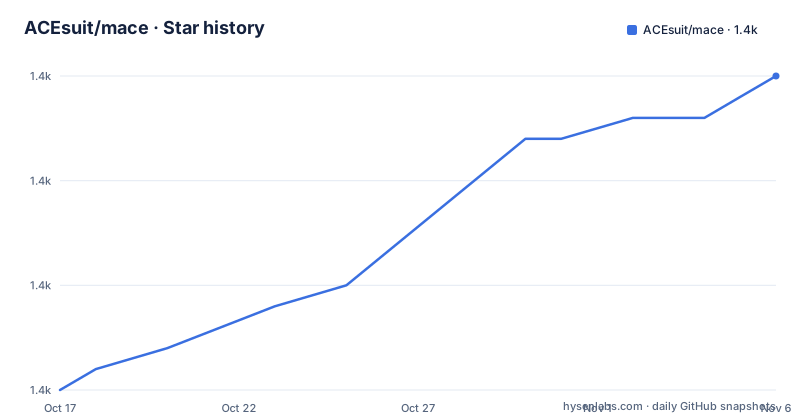
Star history
- ACEsuit/mace1,405 ★ · +15
| Repository | 2026-10-17 | 2026-11-06 |
|---|---|---|
| ACEsuit/mace | 1.4k | 1.4k |
15 Stars in the last 20 days, measured from the daily GitHub snapshot. Compare with other projects
Editorial analysis
MACE's role in atomic-scale machine learning
MACE addresses the need to learn interatomic potentials from atomic structures rather than relying only on fixed functional forms for a particular material or chemical system. The README describes its scope as machine learning potentials that predict atomic interactions for materials and molecular modeling. Its central technical approach is higher order equivariant message passing, which is relevant when the representation must account for three-dimensional geometry and changes in atomic neighborhoods.
The intended users are researchers and engineers who have training data, understand equivariant models, and need to train or apply potentials in a Python workflow. The repository identifies itself as the MACE reference implementation, rather than as a general-purpose machine learning package. It also links to pretrained foundation models, including MACE-MP for Materials Project force fields, MACE-OFF for transferable organic force fields, and MACE-Polar for electrostatics foundation models. Those models address distinct domains, so selecting one is part of deciding whether MACE fits the data and application.
The documentation is partial. The README gives detailed training guidance but does not fully explain every supported model or evaluation path. That limitation matters for adoption. A team needs compatible training data, reference energies, a target property, and a validation procedure. The repository layout includes the `mace/` package, tests, scripts, requirements, and packaging files. The Python implementation and command-line entry points are therefore separate from foundation model checkpoints that may be obtained when those features are used.
Equivariant message passing in MACE
The documented mechanism is higher order equivariant message passing. In practical terms, the model represents information from neighboring atoms while respecting symmetry properties of three-dimensional space. The README exposes this choice through the `hidden_irreps` option. Its examples use invariant messages such as `128x0e` and invariant plus first-order odd features such as `128x0e + 128x1o`. A larger model can include higher order features such as `128x2e` or increase the channel count to `256`.
That configuration is model construction, not a guarantee of accuracy. The README says model size is controlled through `--hidden_irreps`, and it also states that a model can be specified with `--num_channels=128` and `--max_L=1`. The representation affects capacity and computational cost, but the README does not give a universal rule for selecting the best configuration. Training data quality, reference energies, cutoff behavior, and validation results remain separate decisions.
MACE also exposes a two-stage training pattern through `--stage_two` and `--start_stage_two`, along with exponential moving average options and `--amsgrad`. The training example includes `--r_max=5.0`, which sets the neighborhood cutoff for that configuration, and `--batch_size=10`. These values belong to the documented example rather than serving as defaults for every dataset. The project is intended to produce and use atomic interaction potentials, but the README does not document a complete data schema for every property or explain all model variants.
Installing `mace-torch` on Python and PyTorch
The README specifies Python 3.11 or later and PyTorch 2.5 or later. It tells users to install PyTorch separately using the official PyTorch installation instructions, which matters because the correct PyTorch build depends on the user's platform and accelerator. After that prerequisite is installed, the recommended PyPI route is `mace-torch`, not the homonymous `MACE` package.
This installation path is intended for users who want the supported v0.3.x package without cloning the repository. The source route is useful when working directly with the repository, including development and contribution work. The README points contributors to `CONTRIBUTING.md` because the project is dividing changes between the current release line and the v1.0 rewrite.
The first real use documented by the repository is training from atomic-structure data. The command below is the README's training example. It creates a model named `MACE_model`, uses `train.xyz` and `test.xyz`, reserves five percent for validation, specifies example `E0s`, and trains on `cuda`.
mace_run_train \
    --name="MACE_model" \
    --train_file="train.xyz" \
    --valid_fraction=0.05 \
    --test_file="test.xyz" \
    --config_type_weights='{"Default":1.0}' \
    --E0s='{1:-13.663181292231226, 6:-1029.2809654211628, 7:-1484.1187695035828, 8:-2042.0330099956639}' \
    --model="MACE" \
    --hidden_irreps='128x0e + 128x1o' \
    --r_max=5.0 \
    --batch_size=10 \
    --max_num_epochs=1500 \
    --stage_two \
    --start_stage_two=1200 \
    --ema \
    --ema_decay=0.99 \
    --amsgrad \
    --restart_latest \
    --device=cuda
The command assumes that the input files and CUDA environment already exist. A machine without a usable CUDA device would need a different device choice, but the README excerpt does not give a complete CPU command. No replacement flag can be confirmed from the repository information.
Reference energies and data preparation for `mace_run_train`
MACE's training guidance places significant weight on atomic reference energies. The README says isolated atoms are usually better added to the training set, with `config_type=IsolatedAtom` stored in their info fields. The `E0s` values shown in the training command are therefore an explicit alternative, not a harmless placeholder. Those values identify elements such as hydrogen, carbon, nitrogen, and oxygen with numeric energies, but their suitability depends on the training setup.
For a model trained from scratch, the README offers `--E0s="average"` when isolated-atom energies are unavailable or unknown. It states that this estimates atomic energies with least squares regression. It also draws an important distinction: fitting atomic energies means fitting deviations from the average, whereas isolated-atom `E0s` fit atomization energy. According to the README, the former is more likely to produce less stable potentials for molecular dynamics applications. This is a direct trade-off, not a claim that both workflows are equivalent.
When fine-tuning a foundation model, the documented option is `--E0s="estimated"`. The README says this solves a linear system to correct the foundation model's predictions on the training data. Fine-tuning therefore has a different reference-energy path from scratch training. The README excerpt does not show the complete fine-tuning command, so it supports the option and its stated purpose but not a full recipe for invoking it.
The validation split is configurable through `--valid_file`, and validation batches can be enlarged with `--valid_batch_size`. This is useful when a user has a specific held-out set rather than accepting the example `valid_fraction`. The README does not document the full accepted XYZ schema, so data preparation beyond the named fields and files should be checked in the project documentation or repository code before training begins.
Foundation models and MACE-JAX as an alternative
MACE has separate routes for training and for using pretrained foundation models. The README names MACE-MP for Materials Project force fields, MACE-OFF for transferable organic force fields, and MACE-Polar for electrostatics foundation models. It also includes a fine-tuning section and references the latest recommended foundation models. The README is truncated before the complete ASE examples, so it does not establish the exact loading command or the full set of supported foundation model versions.
That gap affects adoption. A user who only needs a pretrained model may care less about training internals than about checkpoint availability, input compatibility, and the ASE interface. A user training a new potential needs the CLI, reference-energy choices, representation settings, and evaluation workflow. The project supports both directions, but the README provides more detail for training than for applying each foundation model.
MACE-JAX is the alternative named in the README. It is described as currently about two times faster at evaluation, while PyTorch is recommended for training to obtain optimal performance. That is a different implementation and workflow, not merely another MACE model. MACE also links to `mace-layer` for constructing higher order equivariant graph neural networks for arbitrary 3D point clouds. Users who need general graph-network components may prefer that layer-focused project, while users who need the MACE training and foundation-model workflow should stay with the main package. The README does not document API compatibility between these projects.
MACE v0.3.x support, v1.0 migration, and licensing
The repository is not archived, and its last push was on 2026-10-15. The README says MACE is being rewritten toward v1.0 on the `mace-reforge` branch, with progress tracked on a public project board. It states that v0.3.x remains supported and continues to receive bug fixes. The rewrite will not preserve code compatibility. Checkpoints will migrate through an explicit converter rather than loading directly, while the README says functionality will be preserved.
That creates a concrete maintenance cost for teams that build training scripts around the current Python API. Code written for v0.3.x may need changes before v1.0 adoption, and existing checkpoints may require conversion. The supported release line is therefore relevant when planning upgrades, dependency management, and experiment reproducibility. The latest listed releases are `v0.3.16` on 2026-05-10, `v0.3.15` on 2026-02-22, and `v0.3.14` on 2025-08-05.
License classification needs separate attention. Repository metadata identifies the license as a custom license that GitHub cannot classify and points to `LICENSE.md`. The README contains an MIT 2.0 badge. Those statements are not identical, and this article does not resolve the discrepancy or provide legal advice. Users should read `LICENSE.md` and confirm the terms that apply to the code, pretrained models, and any separately distributed data before adoption.
Editorial conclusion
MACE fits teams training potentials from atomic-structure data in Python and PyTorch, especially those needing higher order equivariant message passing and documented foundation models. It is a poor fit for users requiring v1.0 APIs today, direct loading of future v1.0 checkpoints, or a non-PyTorch training workflow. Before adoption, verify Python and PyTorch requirements, confirm that the v0.3.x checkpoint format is acceptable, and inspect `LICENSE.md` because the repository metadata and README badge do not provide a consistent license classification.
Frequently asked questions
How do I install MACE for PyTorch?
Install Python 3.11 or later and PyTorch 2.5 or later first, then install the documented package from PyPI with `pip install mace-torch`. The README warns that the homonymous `MACE` package is unrelated to this project.
Which command starts MACE training?
The README uses `mace_run_train` with input files such as `train.xyz` and `test.xyz`, model options such as `--model="MACE"`, and a device selection such as `--device=cuda`. The command requires the training files and the selected compute environment to be available.
Will MACE v0.3 checkpoints load directly in v1.0?
No. The README states that v1.0 will not preserve code compatibility and that trained checkpoints will migrate through an explicit converter rather than loading directly. It says functionality will be preserved, but the README does not provide the converter procedure.
Official sources
Add this badge to your README
If you maintain this project, the badge below links readers to this analysis and shows its maintenance status from the daily GitHub snapshot. Paste the markdown into your README; add ?metric=license or ?metric=stars to the image URL for a different field.

[](https://hysenlabs.com/projects/acesuit-mace)Star history chart for your README
[](https://hysenlabs.com/projects/acesuit-mace)Was this useful?