YAAW for Chrome: an aria2 web frontend packaged as a browser extension
Yet Another Aria2 Web Frontend in pure HTML/CSS/Javascirpt Powered by Chrome
At a glance
- What is it?
- YAAW for Chrome wraps the YAAW aria2 web frontend in a Chrome extension, so download tasks are sent to a running aria2 daemon from the browser toolbar instead of a hosted page. It suits people who already run aria2 and want a per-site whitelist and blocklist over browser downloads.
- Who is it for?
- Adopt YAAW for Chrome if you already keep an aria2 daemon running and want to route selected downloads to it from the browser, and if Chrome is the only browser you care about. Skip it if you need Firefox or a mobile client, or if you want a self-hosted web UI you can reach from any device, because the project ships no such build.
- Can I use it commercially?
- Yes, with conditions. GPL-3.0 is a copyleft licence: if you distribute software that includes it, you must release that software's source code under the same licence. Running it internally without distributing it does not trigger that obligation.
- Is it still maintained?
- Yes. The repository last received commits 128 days ago.
- What is it written in?
- Mainly JavaScript, according to GitHub's language statistics.
Answers come from the project's GitHub data, last synced on October 23, 2026, and from our analysis. They are not legal advice.
Star history
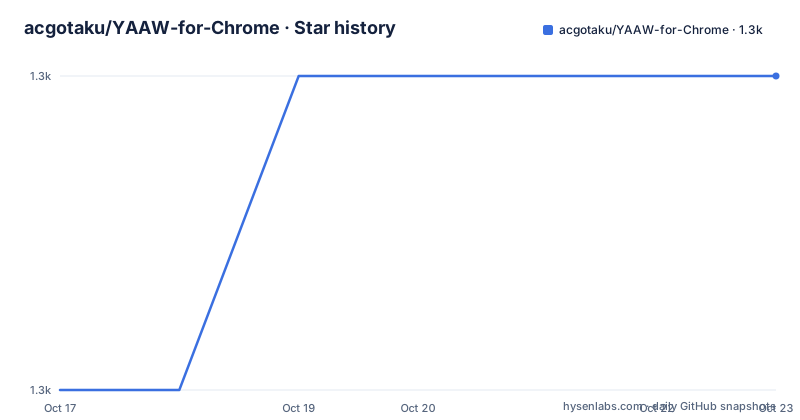
- acgotaku/YAAW-for-Chrome1,276 ★ · +1
| Repository | 2026-10-17 | 2026-10-23 |
|---|---|---|
| acgotaku/YAAW-for-Chrome | 1.3k | 1.3k |
1 Stars in the last 6 days, measured from the daily GitHub snapshot. Compare with other projects
Editorial analysis
A download manager frontend that lives in the toolbar
YAAW for Chrome takes the YAAW project, a web frontend for the aria2 download daemon, and packages it as a Chrome extension. The repository description calls it a yet another aria2 web frontend in pure HTML, CSS and JavaScript, powered by Chrome. That framing matters: nothing here replaces aria2 itself. Aria2 still has to be running somewhere with its RPC interface enabled, and the extension is the client that talks to it. The target user is therefore narrow but clear: someone who already keeps an aria2 daemon on a home server or a box, and who wants to add downloads to it from Chrome without opening a browser tab to a separate dashboard. The project carries a GPL-3.0 licence, is written in JavaScript, and its last push was on 2026-06-17. The repository has no GitHub releases, so there is no version history to consult beyond the manifest.
The JSON-RPC path is the setting everything depends on
The one configuration step that decides whether the extension works at all is the JSON-RPC path. The usage notes say to click the YAAW icon for the dashboard and not to forget to set the JSON-RPC Path, and that this lives in the options menu reached by right clicking the extension icon. The icon opens the dashboard, the options page holds the settings, and the JSON-RPC path tells the extension where the aria2 daemon is listening. Beyond that, the option surface is small: a website whitelist and a website blocklist, and the documentation states that websites are split with enter. The smallness is itself a signal. There is no tuning panel for connection count, download speed or per-site directory structure, because those belong to aria2 configuration rather than to the client.
Whitelist and blocklist decide which downloads leave the browser
The per-site rules are the feature that goes beyond a plain web frontend. The whitelist is documented as ignoring the file size limit so that all file downloads on matching sites are imported into Aria2c, and the blocklist as letting all file downloads be handled by the browser instead. The matching rules accept a couple of forms, and the documentation gives examples: a wildcard domain such as `*.baidu.com` to match every Baidu subdomain including pan.baidu.com and www.baidu.com, and a full URL or a bare hostname such as `https://github.com/` or `github.com` to match that site. One constraint is easy to miss. The download interception feature only uses the first RPC address, so if you list several servers, only the first one receives intercepted downloads. That is a real limitation for anyone running a pool of aria2 instances, and the documentation does not explain how the rest of the list is used.
Installing from the Chrome Web Store
The documented install path is the Chrome Web Store, not a package manager and not a build from source. The project links the extension listing and states that you can use YAAW as a Chrome extension. There is no npm package to add to a project, and the package manifest is marked private with the name yaaw-for-chrome, so the manifest describes the extension bundle rather than a publishable library. After installing, the first real use is short: click the toolbar icon to open the dashboard, right click the same icon, open the options menu, and set the JSON-RPC path to the address of your running aria2 daemon. If the path is wrong, the dashboard opens but the connection fails, which is the most common first-run failure. The repository also carries a `_locales` directory, so the extension ships translated interface strings.
Building the extension yourself with the gulp pipeline
For anyone who wants to modify the extension rather than install the published one, the build is a gulp pipeline driven by npm scripts, with pnpm as the package manager, since the repository carries a pnpm lockfile. The scripts in the package manifest are explicit about how the bundle is produced:
"dev": "cross-env NODE_ENV=development gulp serve",
"build": "cross-env NODE_ENV=production gulp publish",
"clean": "gulp clean"
The development entry point in the same manifest delegates to pnpm:
pnpm run devLint runs ESLint over the source and the background script and Stylelint over the SCSS files, and the manifest wires the two together:
pnpm run stylelint:fix && pnpm run eslint:fixThe build dependencies show the shape of the project: gulp as the orchestrator, rollup with a CommonJS and node-resolve plugin for bundling, sass with gulp-sass and postcss with autoprefixer for styles, terser and gulp-clean-css for minification, mustache for templating, and gulp-zip for packaging. The repository root holds `background.js` as the extension entry point named in the manifest, a `src` directory, and a `yaaw` directory, with a `.gitmodules` file suggesting the frontend is pulled in as a submodule rather than vendored by hand.
Where the Chrome-only packaging becomes a problem
The obvious limitation is the platform. This is a Chrome extension, so Firefox and Safari users are out, and there is no mobile client mentioned anywhere in the documentation. The second limitation is the RPC rule described earlier, where interception uses only the first configured address. The third is the absence of a hosted multi-user story: session handling, a user database and cross-device access are all aria2 and infrastructure concerns, not things the extension handles. A user who wants to check download progress from a phone has no path through this project. The repository also has no homepage set and no published GitHub releases, so there is no release announcement to skim and no stable version stream to track. Everything in the extension is versioned only by the manifest and the last commit.
Extension frontend versus running the YAAW web UI yourself
The real alternative is to run the YAAW web frontend as a hosted page and bookmark it, which is the arrangement the extension is derived from and which many aria2 users already use. The difference in approach is where the code lives and what it can reach. A hosted web UI is a full application you open in any browser, including on a phone, and it is a single target for every device on your network. The extension trades that reach for one specific capability: it can act on downloads in the browser you are already using, applying the whitelist and blocklist rules automatically to sites you visit, without you opening a dashboard first. If your workflow is to start a download and then forget about it, the hosted UI is simpler. If your workflow is to browse a file host and have every file pushed into the download manager automatically, the extension does something the hosted page cannot do from inside a normal tab.
Editorial conclusion
Adopt YAAW for Chrome if you already keep an aria2 daemon running and want to route selected downloads to it from the browser, and if Chrome is the only browser you care about. Skip it if you need Firefox or a mobile client, or if you want a self-hosted web UI you can reach from any device, because the project ships no such build. Before installing, verify that your aria2 instance exposes a JSON-RPC endpoint and note that the extension sends download interception only to the first configured RPC address, so a multi-server list will not balance or fail over between daemons.
Frequently asked questions
How do I configure YAAW for Chrome to find my aria2 daemon?
Right click the YAAW icon, open the options menu, and set the JSON-RPC Path to the address of the running aria2 instance. Clicking the icon opens the dashboard, but the JSON-RPC path is what the extension needs to connect.
What is the difference between the website whitelist and the blocklist in YAAW for Chrome?
The whitelist ignores the file size limit so that all downloads on matching sites are imported into Aria2c, while the blocklist leaves all file downloads to the browser. Entries are separated with enter.
Can YAAW for Chrome send downloads to more than one aria2 server?
The documentation states that the download interception feature only uses the first RPC address, so intercepted downloads go to a single configured server.
What licence is YAAW for Chrome released under?
It is licensed under the GNU General Public License version 3 or later, and the package manifest lists the licence as GPL-3.0.
Official sources
Add this badge to your README
If you maintain this project, the badge below links readers to this analysis and shows its maintenance status from the daily GitHub snapshot. Paste the markdown into your README; add ?metric=license or ?metric=stars to the image URL for a different field.

[](https://hysenlabs.com/projects/acgotaku-yaaw-for-chrome)Star history chart for your README
[](https://hysenlabs.com/projects/acgotaku-yaaw-for-chrome)Was this useful?