MultiQC for Aggregate Bioinformatics Quality Control Reports
Aggregate results from bioinformatics analyses across many samples into a single report.
At a glance
- What is it?
- MultiQC scans directories for recognized bioinformatics logs, parses their results, and produces interactive HTML reports for multiple samples and analysis tools. It suits pipeline teams that need a consolidated quality-control view, while custom formats and dependency-heavy plot export add setup constraints.
- Who is it for?
- MultiQC is appropriate for teams that regularly review many samples across supported bioinformatics tools and can standardize log discovery and data output. It is less suitable when inputs are unusual custom logs, report generation must remain lightweight, or a fixed upstream installation cannot provide its Python dependencies.
- Can I use it commercially?
- Yes, with conditions. GPL-3.0 is a copyleft licence: if you distribute software that includes it, you must release that software's source code under the same licence. Running it internally without distributing it does not trigger that obligation.
- Is it still maintained?
- Yes. The repository last received commits 17 days ago.
- What is it written in?
- Mainly JavaScript, according to GitHub's language statistics.
Answers come from the project's GitHub data, last synced on October 23, 2026, and from our analysis. They are not legal advice.
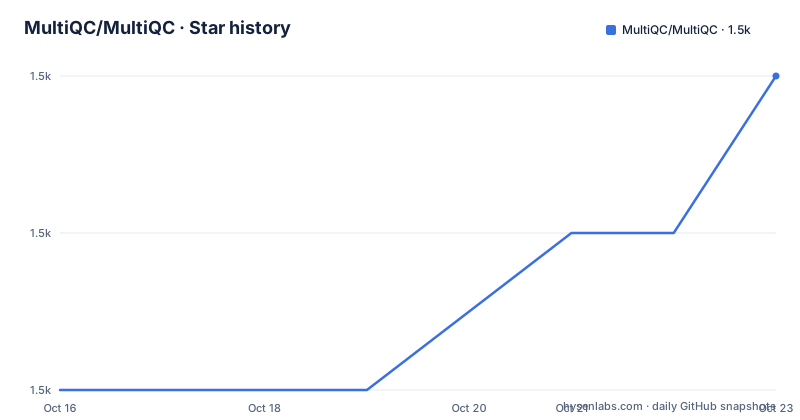
Star history
- MultiQC/MultiQC1,496 ★ · +2
| Repository | 2026-10-16 | 2026-10-23 |
|---|---|---|
| MultiQC/MultiQC | 1.5k | 1.5k |
2 Stars in the last 7 days, measured from the daily GitHub snapshot. Compare with other projects
Editorial analysis
Why MultiQC Consolidates Sample QC
MultiQC addresses a specific bioinformatics reporting problem: quality-control results are often spread across separate directories, one directory per sample, or one output format per analysis tool. The README describes reports that can combine multiple analysis steps and large numbers of samples within a single plot, including results from multiple analysis tools. That makes the project most relevant to sequencing pipelines, workflow operators, and researchers who want a common review surface instead of opening dozens of individual log files.
The central design is aggregation, not a new bioinformatics analysis engine. MultiQC scans a directory for recognized log files, parses their statistics, and writes one HTML report summarizing what it found. The same report can therefore represent several samples and several stages of an analysis. It is useful for routine quality control because reviewers can inspect a common collection of plots and tables rather than manually reconcile results produced by separate commands.
The report is not limited to files from one tool. The README points to a large set of supported bioinformatics tools and links to the complete module list. It also documents Custom Content for data produced by custom scripts, provided that the data is formatted or configured correctly. That extension point matters for pipeline-specific metrics, but it also means adoption is easiest when the team uses recognized tools or is willing to configure the custom format.
The intended result is an HTML file named `multiqc_report.html` by default. Additional tab-delimited files are written under `multiqc_data/`, and the documentation also offers `yaml` or `json` through `--data-format`. This separation gives reviewers an interactive report while preserving machine-readable or spreadsheet-friendly data for inspection. The generated report is therefore both a visual summary and a starting point for checking extracted values.
How Directory Scanning Produces One HTML Report
The execution path starts with a filesystem target. MultiQC receives a directory, scans it for files it recognizes as bioinformatics logs, applies the relevant parsing modules, and combines the extracted statistics into report sections. The README gives the basic operation as a scan of the current directory, but the repository documentation describes broader configuration and customization options. The practical data flow is therefore directory to recognized files to parsed statistics to HTML and data outputs.
Recognition is central to the behavior. A file that looks like a log to a human is not necessarily a file that MultiQC can parse. The tool depends on its modules and their expectations about tool output. If a pipeline changes a log format, produces an unfamiliar layout, or writes results outside the scanned directory, the generated report may omit those results. This is a meaningful constraint for automated pipelines, where a successful command does not necessarily mean that every expected sample appears in the report.
Configuration can alter report behavior and content selection. MultiQC reads YAML configuration, with search paths and available options described in its configuration documentation. The project also provides a browser-based MultiQC Configuration Wizard that presents options as form fields and validates YAML as it is edited. The README does not reproduce a complete configuration file, so exact keys and precedence rules must be taken from the linked documentation rather than inferred from the basic command.
The output has two practical layers. `multiqc_report.html` is the interactive report intended for human review, while `multiqc_data/` contains additional data. By default the data files are tab-delimited and can be inspected in Excel. The `--data-format` option can request `yaml` or `json` instead. Users who automate downstream checks should therefore treat the data directory as an explicit output contract, not merely as temporary report content.
Installing MultiQC and Running a First Report
The README gives three package-manager routes. The `uv` route avoids requiring a separate Python installation, `pip` installs from PyPI, and Conda installs from Bioconda after its channels are configured. Choose the route that matches the environment management policy of the analysis host. The following commands are copied directly from the README.
For an isolated command-line installation with `uv`, run:
uv tool install multiqcThis installs MultiQC as a `uv` tool. The README does not describe any additional initialization step, so after installation the command should be available to the shell according to the environment's `uv` configuration.
For a Python environment managed with `pip`, use:
pip install multiqcThis installs the package from PyPI into the active Python environment. The reader should confirm that the intended Python executable is active before invoking it in a pipeline.
For Conda environments, the README says to configure Bioconda channels first, then install with:
conda install multiqcAfter installation, navigate to an analysis directory or a parent directory and scan it:
multiqc .The `.` means the current directory. The README says that MultiQC scans the directory and reports what it finds. A successful use should produce `multiqc_report.html` and the `multiqc_data/` directory. The project also documents `multiqc -h` for more detailed options.
Supported Inputs, Custom Content, and Report Limits
MultiQC's breadth is its main practical advantage, but breadth creates a dependency on compatible inputs. The README says many bioinformatics tools are supported and directs users to the website for the complete module list. It does not claim that every arbitrary log file is parsed. Before adopting MultiQC as a pipeline gate, teams should compare their actual tool names, versions, output paths, and log layouts with the documented modules.
Custom Content broadens the input model beyond built-in tools. The README says data from custom scripts can be parsed when it is correctly formatted or configured. That is useful for metrics that no supported module emits, such as an application-specific summary line. However, the README does not provide a complete custom-content schema or a list of required fields, so a team cannot safely infer a production configuration from the short example. The linked Custom Content documentation is the source for those details.
There is also a dependency and compatibility constraint visible in `pyproject.toml`. The project requires Python `>=3.9, !=3.14.1`. It pins `kaleido==0.2.1` for flat plot export and restricts `plotly` to `>=5.18,<6.1`; the comment explains that Plotly 6.1 dropped the Kaleido 0 export backend and requires a newer Kaleido with system Chrome. MultiQC also depends on packages including `numpy`, `pandas`-adjacent data-processing libraries through its declared stack, `pyarrow`, `pyyaml`, `jinja2`, and `Pillow`. The exact operational impact depends on which features are used, but the project is not a dependency-free report generator.
The repository version is `1.36dev`, while the listed releases include v1.35, v1.34, and v1.33. The README describes the project as released under GPL v3 or later. Users distributing a modified or bundled application should review the license obligations for that distribution context. This is a licensing observation, not legal advice.
Docker Deployment and Maintenance Context
The repository includes a Dockerfile, so containerized execution is part of the available deployment surface. The Dockerfile starts from `python:3.14-slim`, installs `procps`, installs MultiQC with `pip`, and removes unnecessary Python files and build artifacts. It also accepts `INSTALL_PANDOC=false` as a build argument. Setting that argument to `true` adds Pandoc and TeX components for PDF support. The README also mentions Docker and Singularity images, Galaxy wrappers, and other distribution methods, but it does not document every command or image name, so those details should be taken from the installation documentation rather than reconstructed here.
The repository is not archived. Its last push was on 2026-10-06, so it has current development activity. Recent releases are v1.35 on 2026-05-13, v1.34 on 2026-04-21, and v1.33 on 2025-12-09. This indicates recent release work, but it does not guarantee compatibility with every tool version or that a particular report format will remain unchanged.
Upgrade cost comes mainly from validating inputs and outputs. A new MultiQC release can change parser behavior, supported tools, configuration handling, dependencies, or report generation. Teams that depend on `multiqc_report.html` for interactive review should also decide whether the additional files in `multiqc_data/` need a stable format. The repository's Dockerfile and YAML configuration documentation provide concrete places to inspect when deployment or upgrade behavior matters.
MultiQC Compared With Direct Log Inspection
A real alternative is to inspect each tool's logs directly or write a small custom parser and dashboard for the exact metrics needed. That approach avoids MultiQC's module recognition model and dependency set, but it requires maintaining parsing logic, report layout, sample naming, and output handling for every analysis tool. It is more transparent when the workflow has one tool and a small number of stable metrics.
MultiQC takes a different approach. It searches directories, uses tool-specific modules to recognize output, combines results across samples, and renders interactive plots in a common HTML report. This is more useful when the workflow includes many samples or several supported tools, because reviewers receive a shared summary rather than a collection of unrelated files. The trade-off is that results depend on MultiQC's supported formats and configuration, and custom logs require extra work.
The choice should therefore follow the reporting requirement. Use direct inspection for a narrow, bespoke workflow where log formats are unusual and only a few values matter. Use MultiQC when recurring quality control across samples and tools is the main need, especially when the repository's documented modules already cover the tools in use. Neither choice removes the need to verify that sample counts and reported values match the original logs.
Editorial conclusion
MultiQC is appropriate for teams that regularly review many samples across supported bioinformatics tools and can standardize log discovery and data output. It is less suitable when inputs are unusual custom logs, report generation must remain lightweight, or a fixed upstream installation cannot provide its Python dependencies. Verify first that the relevant tool logs are recognized, that the intended directory contains the expected files, and that the generated data format fits downstream review workflows.
Frequently asked questions
How do I install MultiQC?
The README documents installation with `uv`, `pip`, or Conda from Bioconda. It also provides development-version commands using the GitHub repository.
What files does MultiQC generate?
The default HTML output is `multiqc_report.html`. Additional data is written under `multiqc_data/`, with tab-delimited output by default and `yaml` or `json` available through `--data-format`.
Can MultiQC parse logs from tools it does not support?
MultiQC can parse data from custom scripts through Custom Content when the data is correctly formatted or configured. The README does not provide the full custom-content schema, so the linked documentation is required for configuration details.
Does MultiQC require Python 3.14?
No. The repository's `pyproject.toml` specifies Python `>=3.9, !=3.14.1`.
Official sources
Add this badge to your README
If you maintain this project, the badge below links readers to this analysis and shows its maintenance status from the daily GitHub snapshot. Paste the markdown into your README; add ?metric=license or ?metric=stars to the image URL for a different field.

[](https://hysenlabs.com/projects/multiqc-multiqc)Star history chart for your README
[](https://hysenlabs.com/projects/multiqc-multiqc)Was this useful?