Goodtime's three timer modes and the Android battery fight behind them
A productivity app that combines pomodoro timers and flow techniques to boost focus and efficiency.
At a glance
- What is it?
- Goodtime is a GPL-3.0 Kotlin productivity timer for Android and iOS offering pomodoro, long break and count-up flow modes. The interesting part is the timer model it settles on, and the vendor battery restrictions that can still break its alarms.
- Who is it for?
- Goodtime suits a reader who wants one ad-free timer with no account and no tracking across Android and iOS, and who is willing to change battery settings for a vendor. It is a poor fit for anyone who needs team reporting, a shared timer server, or a desktop client, and the premium extras are labelled premium rather than explained.
- Can I use it commercially?
- Yes, with conditions. GPL-3.0 is a copyleft licence: if you distribute software that includes it, you must release that software's source code under the same licence. Running it internally without distributing it does not trigger that obligation.
- Is it still maintained?
- Yes. The repository last received commits 8 days ago.
- What is it written in?
- Mainly Kotlin, according to GitHub's language statistics.
Answers come from the project's GitHub data, last synced on November 7, 2026, and from our analysis. They are not legal advice.
Star history
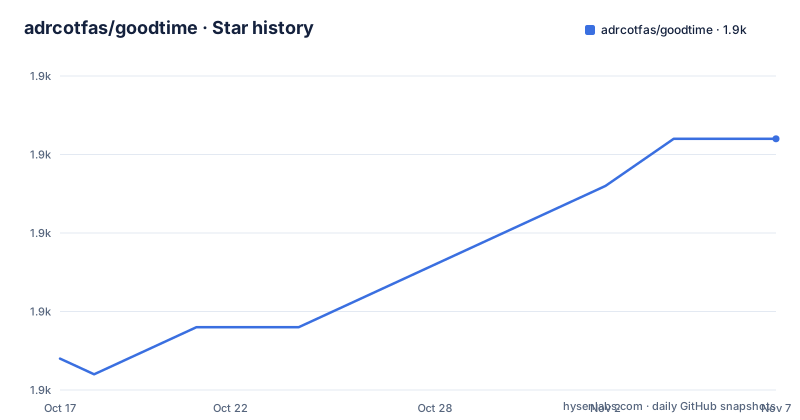
- adrcotfas/goodtime1,931 ★ · +14
| Repository | 2026-10-17 | 2026-11-07 |
|---|---|---|
| adrcotfas/goodtime | 1.9k | 1.9k |
14 Stars in the last 21 days, measured from the daily GitHub snapshot. Compare with other projects
Editorial analysis
Three timer shapes, not one timer with sliders
Most productivity timers ship a single configurable interval you set yourself. Goodtime is organised around three named modes instead, and the difference between them is not cosmetic.
The pomodoro mode runs a focus session followed by a short break. The longer break mode only arrives after several pomodoro sessions, which means the cadence of your rest is tied to how many sessions you have actually completed rather than to a clock reading. The count-up flow timer is the odd one out: it has no target duration at all. It measures uninterrupted time upward and, according to the feature list, accumulates a break budget as you reach a flow state, so the break is something the session earns rather than something the app schedules.
That third mode is the reason the project exists as more than a Pomodoro clone. Count-up mode leaves the stop decision to the user, so the app cannot set an advance stopping point. You get the measurement, and the judgement stays with you.
Swipe gestures instead of settings screens
The configuration surface is deliberately narrow. Pause, skip and add extra time are all described as intuitive swipe gestures on the timer display, which means the corrections you make most often during a work block are one-handed and immediate, not a trip through a preferences menu.
The deeper customisation sits behind the labelled premium tier. Coloured labels, archiving of finished sessions, full customisation of the timer display, label-based visualisation of your statistics, manual editing of recorded sessions, per-session notes, backup and export, and advanced alerts using screen flash, torch and persistent notifications all sit in that group. The practical split is this: the timer itself stays configurable for everyone, while the record of what you worked on is premium.
Daily statistics are not premium. You can track accumulated focus time, set a daily reminder, and customise where the start of your day and your week falls, which matters for anyone on a rotating or late schedule. Focus protection by routing sessions through the system Do Not Disturb mode is also in the base feature set.
Where you actually get the app, and why there is no build command
There is no install snippet to copy here, and it is worth being clear about why. Goodtime is distributed as signed, store-built binaries, not as a library you add to a project. The README links three destinations: a Google Play listing under the package id com.apps.adrcotfas.goodtime, an F-Droid entry for the same package id, and a TestFlight invite for the iOS build.
The repository itself is a multi-module Gradle project, with top-level directories androidApp/, iosApp/ and shared/, plus a baselineProfile/ module, a fastlane/ directory holding the store metadata and the screenshots referenced in the README, an appKillTest/ module, a scripts/ directory, a crowdin.yml for translations and a renovate.json for dependency updates. There is a gradlew and gradlew.bat at the root, so a maintainer can drive a local build, but the README does not publish a clone-and-assemble recipe, a JDK version, an Android SDK level or a signing setup. Treat the source as the reference implementation rather than as a supported self-build path.
The failure mode: your phone kills the alarm
The most concrete problem the project admits is not a bug, it is a platform conflict. The README has a dedicated section headed "Trouble with Goodtime getting killed by Android?" and it is worth reading as the product's main operational risk.
The stated cause is that different phone OEMs take an aggressive approach towards apps that rely on background work and alarms in order to save battery. The documented fix is to disable battery optimisation for the app so its alarms stay accurate. The documented fallback, if that is still not enough, is to keep the phone plugged in and or the screen on while working.
Both workarounds cost something. Disabling battery optimisation pushes the app onto the vendor's aggressive list and can shorten battery life during a long session. On a device from a vendor known for strict background limits, a pomodoro session can therefore be the one thing that does not run to completion while you are relying on it.
Why this is not just a platform timer in Kotlin
Two structural choices set Goodtime apart from the category it sits in. The first is distribution and privacy as a stated design position rather than a settings screen: the README describes the app as lightweight, ad-free and tracking-free, indie and open source, and it publishes through F-Droid and TestFlight alongside Google Play. The second is the licence. The project is GPL-3.0, with COPYING.md at the repository root and Renovate wired in for dependency bumps, and translations run through Crowdin so the string catalogue is decoupled from the code.
GPL-3.0 has a practical consequence for anyone considering Goodtime as a base for their own timer: modifications you distribute have to be released under the same licence. That rules out dropping the codebase into a proprietary product without relicensing. It also means the code can be reused under those licence terms.
Note what the app is not. There is no account, no sync service and no web dashboard described anywhere in the README. The backup and export feature is how data leaves the device, and the manual session editing is how data gets corrected. There is no team layer here to evaluate.
Where a plain system timer or a server-based tracker fits better
Goodtime is a single-device, single-person instrument. If your need is a shared or supervisory view of time, the difference in approach matters more than feature lists.
A server-backed tracker keeps timer state on a server you control, which means multiple people can run sessions against one record and a manager can see them. The cost is an account system, a backend to run, and telemetry leaving the device, which is exactly the trade Goodtime's ad-free and tracking-free positioning refuses. For a research lab or a small team that needs shared visibility, the server approach is the right shape. For one person on one phone who wants no login, it is overhead with no payoff.
The other alternative is the operating system's own timer or clock app. Goodtime adds a count-up flow timer and a record of accumulated focus time per label, with manual edits and notes.
Release cadence and what an upgrade costs you
The repository is not archived and the last push was on 2026-10-13. The three most recent releases are 3.2.6 on 2026-08-02, 3.2.5 on 2026-07-30 and 3.2.4 on 2026-07-25, so version numbers carry a patch-level suffix and ship roughly weekly over that window.
Upgrading appears cheap on the surface, but the README does not document any migration path, and it does not say whether session history, labels or premium entitlements survive an upgrade or a reinstall. The presence of a backup and export feature suggests the data is portable in some form, but the export format, its destination and whether export can restore are not specified. Because there is no server copy, that export is the only thing standing between you and losing your history if you switch devices or change build channel from Play to F-Droid.
Editorial conclusion
Goodtime suits a reader who wants one ad-free timer with no account and no tracking across Android and iOS, and who is willing to change battery settings for a vendor. It is a poor fit for anyone who needs team reporting, a shared timer server, or a desktop client, and the premium extras are labelled premium rather than explained. Before adopting, install from F-Droid or the Play listing under the package id com.apps.adrcotfas.goodtime, turn off battery optimisation for it, and confirm on your own device that the alarm fires in the background before you commit a work block to it.
Frequently asked questions
Is Goodtime free and does it show ads?
The README describes Goodtime as indie, open source, ad-free and tracking-free. It also lists labels, pro statistics, backup and export and advanced alerts as premium features, so the free tier is the timer itself rather than the full feature set.
How do I install Goodtime on Android and iOS?
The README links a Google Play listing and an F-Droid entry for the Android package com.apps.adrcotfas.goodtime, plus a TestFlight invite for iOS. The README does not publish a self-build recipe, so a source build is not a documented install path.
Why does my Goodtime timer alarm not fire reliably?
The README states that some phone vendors aggressively restrict apps that rely on background work and alarms. Its recommended fix is to disable battery optimisation for Goodtime, and if that is not enough, to keep the phone plugged in or the screen on while working.
What is the difference between pomodoro mode and count-up flow mode?
Pomodoro runs a focus session followed by a short break, with a longer break after several sessions. The count-up flow timer has no fixed target, measures uninterrupted time upward and accumulates a break budget that you spend when you choose.
Can I use Goodtime without creating an account?
No account, sign-in or sync service is described in the project. Backup and export are listed as a premium feature, and the README does not document the export format or the destination.
Official sources
Add this badge to your README
If you maintain this project, the badge below links readers to this analysis and shows its maintenance status from the daily GitHub snapshot. Paste the markdown into your README; add ?metric=license or ?metric=stars to the image URL for a different field.

[](https://hysenlabs.com/projects/adrcotfas-goodtime)Star history chart for your README
[](https://hysenlabs.com/projects/adrcotfas-goodtime)Was this useful?