Nacos 3.x: Service Discovery and Configuration for AI-Native Cloud Stacks
Nacos is a platform for dynamic service discovery, configuration, and service management for cloud-native apps, supporting Dubbo, gRPC, Spring Cloud, and Kubernetes.
At a glance
- What is it?
- Nacos is a Java-based platform that combines service discovery, dynamic configuration, health checks, and DNS-based routing. This review focuses on what the repository actually offers, how to run it, and where its design choices may not fit your stack.
- Who is it for?
- Adopt Nacos if you are building microservices or AI cloud-native applications in Java, Spring Cloud, Dubbo, or Kubernetes and need a single platform for service discovery, configuration, and health checks. Do not adopt it if you require a lightweight, embedded solution or if your team lacks Java operational experience, since the server is a standalone Java process that must be deployed and monitored.
- Can I use it commercially?
- Yes. Apache-2.0 is a permissive licence: you can use, modify and sell software built on it, as long as you keep its copyright and licence notices.
- Is it still maintained?
- Yes. The repository last received commits 1 day ago.
- What is it written in?
- Mainly Java, according to GitHub's language statistics.
Answers come from the project's GitHub data, last synced on November 13, 2026, and from our analysis. They are not legal advice.
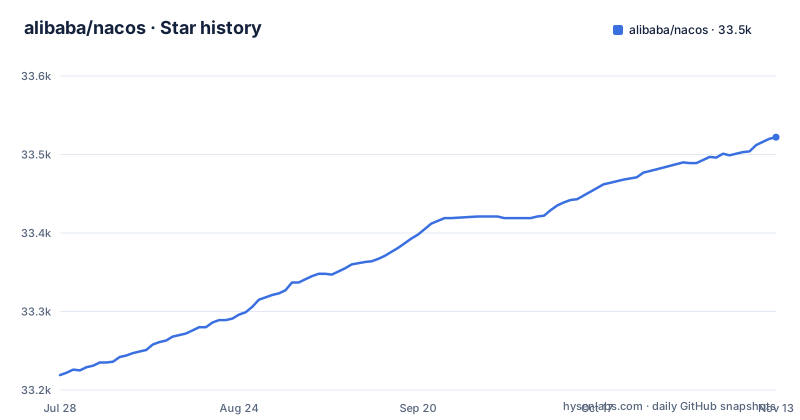
Star history
- alibaba/nacos33,522 ★ · +303
| Repository | 2026-07-28 | 2026-11-13 |
|---|---|---|
| alibaba/nacos | 33.2k | 33.5k |
303 Stars in the last 108 days, measured from the daily GitHub snapshot. Compare with other projects
Editorial analysis
What Nacos Actually Solves
Nacos is a dynamic naming and configuration service. The name expands to Na ming and Co nfiguration Service, which tells you its two primary jobs. It lets services register themselves and discover other services through a DNS or HTTP interface. It also centralizes configuration management so that updating a config does not require redeploying applications. The README positions it for building cloud-native applications and microservices platforms, and the description adds AI cloud native applications as a target. The concrete problems are: how do services find each other, how do you push config changes without restarts, and how do you avoid sending traffic to unhealthy instances. Nacos answers those three with one server.
The Four Functions and How They Fit Together
The README lists four major functions. Service discovery and health check are the first: services register, and Nacos performs real-time health checks to prevent requests going to unhealthy hosts. Dynamic configuration management is the second: you manage configs for all services in a centralized way across environments, and updates take effect without redeployment. The third is dynamic DNS service, which supports weighted routing for load balancing, flexible routing policies, flow control, and simple DNS resolution inside a data center. The fourth is service and metadata management: a dashboard for managing service metadata, configuration, Kubernetes DNS, health, and metrics. These four overlap. The DNS service is a form of discovery, and the dashboard is an interface to the other three. But the separation gives you a clear picture of what the platform covers: registration, config, routing, and visibility.
How It Works Under the Hood
Services register themselves with the Nacos server, which then acts as a registry. Other services query that registry via DNS or HTTP to find instances. The health check is real-time, so requests are not sent to unhealthy hosts or instances. The dynamic configuration function lets you update configurations without redeploying applications. The DNS function translates service names to IP addresses, with weighted routing so you can control traffic distribution. The README lists Kubernetes services among the service types Nacos supports. The actual data flow is: client registers, server stores and checks, other clients query, and config changes propagate.
Getting It Running: Commands That Work
The quick start is straightforward. Download the binary package from the releases page, unzip it, and go to the bin directory. On Linux, Unix, or Mac, start the server in standalone mode with `sh startup.sh -m standalone`. On Windows, run `startup.cmd -m standalone` or double-click the cmd file. That is it for a single-node setup. The README also mentions deploying on cloud, with a link to Alibaba Cloud's MSE service. For local development or a small test, the standalone mode is enough. The README links a Kubernetes quick start. If you need a cluster, the standalone command is not enough; you would need to configure clustering. So the verified path is: download, unzip, run one command.
Limitations and Cases Where It Is the Wrong Tool
The first limitation is that Nacos is a separate server. You must deploy and operate it, which adds a moving part to your infrastructure. For a small project, that overhead may not be worth it. The second limitation is that the README points to the documentation website for operational details. The third limitation is that the health check and DNS features are only as good as your network and your service registration. If your services do not register correctly, discovery fails. If you need a pure configuration server without service discovery, Nacos might be overkill. If you need a lightweight embedded registry, Nacos is not that.
Alternatives and the Difference in Approach
The obvious alternative is etcd, which is a distributed key-value store that can serve as a service registry and configuration store. The difference is that etcd is a general-purpose store, not a service-centric platform. You would build discovery and health checks on top of etcd, whereas Nacos gives you those as built-in features. Another alternative is Consul, which also offers service discovery, health checking, and a key-value store for config. Consul uses a different architecture, with agents on each node, whereas Nacos is a central server. The distinction matters: Nacos is opinionated about service management, while etcd and Consul give you more primitives. If you already use Kubernetes, you might rely on its built-in DNS and ConfigMaps, which cover some of what Nacos does. The choice depends on whether you want a dedicated platform or a set of building blocks.
Maintenance and Upgrade Cost
The repository shows active maintenance. The last push was October 29, 2026, and there are recent releases: 3.3.0, 2.5.5, and a 3.3.0-RC. This means you have a choice between a stable 2.x line and a 3.x line. The 3.x line is newer, and 3.3.0 was released on October 29, 2026. The license is Apache-2.0, which is permissive and allows commercial use with attribution. You should check the license file for exact terms, but Apache-2.0 is a standard open source license. The maintenance cost includes monitoring the server, handling upgrades, and dealing with the health check logic. The community channels are listed: Gitter, Twitter, Weibo, and mailing lists. That gives you places to ask questions, but it also means you are relying on community support unless you buy enterprise service support.
Editorial conclusion
Adopt Nacos if you are building microservices or AI cloud-native applications in Java, Spring Cloud, Dubbo, or Kubernetes and need a single platform for service discovery, configuration, and health checks. Do not adopt it if you require a lightweight, embedded solution or if your team lacks Java operational experience, since the server is a standalone Java process that must be deployed and monitored. Before committing, verify the current stable release (3.3.0 or 2.5.5) against your workload, test the standalone startup with `sh startup.sh -m standalone`, and confirm that the DNS and health-check features meet your routing and failover requirements. The project is actively maintained with recent releases, but you must evaluate the operational overhead of running a separate Nacos cluster for production.
Frequently asked questions
What does NACOS stand for?
It stands for a dynamic naming and configuration service, with the letters from naming and configuration picked out in the project title. The platform covers service discovery and health checks, dynamic configuration, dynamic DNS, and service and metadata management.
What does Nacos do?
It registers services and lets them discover each other over a DNS or HTTP interface, with real-time health checks so requests avoid unhealthy instances. It manages configuration centrally across environments so a change does not require redeploying, it offers weighted DNS routing for load balancing and flow control, and it provides a dashboard for service metadata, configuration, Kubernetes DNS, health and metrics.
How do I start a Nacos server?
Download the package from the latest stable release, unzip it and change into the binary directory, then start it in standalone mode. On Linux, Unix and Mac that is `sh startup.sh -m standalone`, and on Windows it is `startup.cmd -m standalone` or double-clicking that file. The README's worked example names a 1.0.0 archive, while the latest release is 3.3.0.
What is an alternative to Nacos?
The README names the projects around it rather than replacements: a separate Spring integration project, an organisation repository holding the ecosystem tools including an SDK and a synchronisation tool, and a one-stop Spring solution that includes Nacos among other Alibaba middleware. It also points to the company's own microservice engine as a managed option, which is a commercial product rather than an open source alternative.
Official sources
Add this badge to your README
If you maintain this project, the badge below links readers to this analysis and shows its maintenance status from the daily GitHub snapshot. Paste the markdown into your README; add ?metric=license or ?metric=stars to the image URL for a different field.

[](https://hysenlabs.com/projects/alibaba-nacos)Star history chart for your README
[](https://hysenlabs.com/projects/alibaba-nacos)Was this useful?