VRAG: a multimodal RAG framework with a FAISS retriever you can build yourself
Multimodal Retrieval-augmented Generation Framework Built by Tongyi Lab, Alibaba Group.
At a glance
- What is it?
- VRAG is a Python research framework from Alibaba's Tongyi Lab that pairs a purely visual retrieval agent with a training stack for multi-turn multimodal reasoning, and ships a working FAISS search engine over images, PDFs and video. It suits a researcher experimenting with multimodal retrieval, and the local model path wants an A100.
- Who is it for?
- Adopt VRAG as a research base if your question is about multimodal retrieval rather than plain text RAG, because the retriever is a real FAISS index you build over your own corpus of images, PDF pages and video chunks, and the embedding models are interchangeable. Do not adopt it for a text-only retrieval service, and do not expect the local model path to be cheap, because the VRAG demo requires an A100 80G.
- Can I use it commercially?
- Not without permission. GitHub finds no licence file in the repository, and without a licence all rights are reserved by default: you may read the code but not reuse it. Check the README, or ask the authors, before using it.
- Is it still maintained?
- Activity is slowing. The repository last received commits 6 months ago.
- What is it written in?
- Mainly Python, according to GitHub's language statistics.
Answers come from the project's GitHub data, last synced on November 7, 2026, and from our analysis. They are not legal advice.
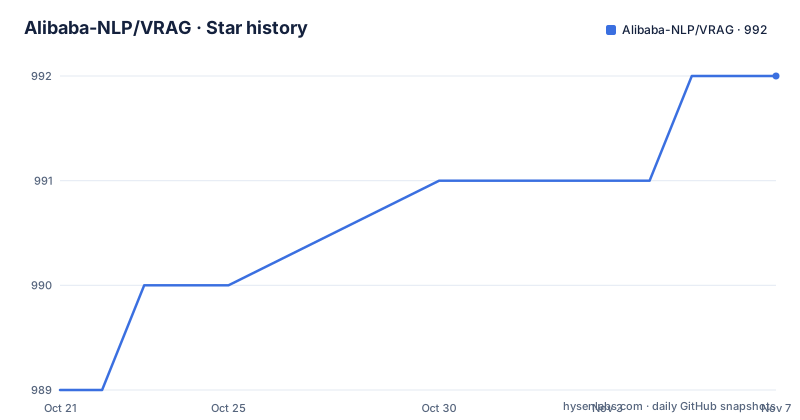
Star history
- Alibaba-NLP/VRAG992 ★ · +3
| Repository | 2026-10-21 | 2026-11-07 |
|---|---|---|
| Alibaba-NLP/VRAG | 989 | 992 |
3 Stars in the last 17 days, measured from the daily GitHub snapshot. Compare with other projects
Editorial analysis
Two different projects under one repository
VRAG is described as a multimodal retrieval-augmented generation framework built by Tongyi Lab at Alibaba Group, and the repository actually contains two research contributions that are easy to confuse.
The first is VimRAG, described as a novel framework tailored for multimodal Retrieval-Augmented Reasoning across text, images and videos. The second is VRAG, described as a purely visual RAG agent that enables vision language models to progressively gather information from a coarse-grained to a fine-grained perspective. Alongside them sits VRAG-RL, a multi-turn and multimodal training framework with strong extensibility, capable of supporting training with various tools.
The top level listing shows how they are separated: VRAG-RL/, VimRAG/, assets/, demo/, requirements.txt, run_demo.sh and search_engine/. The demo/ directory holds a Streamlit app and agent, app, prompt and utils modules, with vimrag_agent.py, vimrag_app.py, vimrag_prompt.py, vimrag_utils.py and vrag_agent.py among them, which is the clearest sign of which one is the newer work.
The two papers are linked as arXiv entries, VimRAG as 2602.12735v1 and VRAG as 2505.22019, and the model and dataset artefacts are published on Hugging Face and ModelScope under Alibaba-NLP, including a VRAG collection, a Qwen2.5-VL-7B-VRAG model, and the ViDoSeek and XVBench datasets.
The repository is MIT-free in the sense that the licence is reported as unknown, the last push was on 2026-04-29, and there are no GitHub releases.
The retriever is the part you can actually run today
The News section is the most useful paragraph in the README for anyone deciding where to start, because it separates what is available from what is not.
The project is still under ongoing development, and the training code of VimRAG will be available after being reviewed by the company. That is a clear statement that a piece of the work is not public yet. What is released includes the VimRAG report, a retriever based on FAISS enabling retrieval with GVE embedding and Qwen3-VL-Embedding, a demo of VRAG-RL that lets you customise your own VRAG, and a framework that integrates state of the art visual embedding models so you can create your own retriever.
So the practical shape of the project is a search engine you build yourself, with the agent frameworks layered on top.
The retriever supports four embedding models with different dimensions and different costs: Alibaba-NLP/GVE-3B at 2048 dimensions as a Qwen2.5-VL based embedding, Alibaba-NLP/GVE-7B at 3584 described as higher quality and more VRAM, Qwen/Qwen3-VL-Embedding-2B at 2048, and Qwen/Qwen3-VL-Embedding-8B at 4096 with the same higher quality more VRAM note.
Building the index is a short Python call:
from search_engine.search_engine import SearchEngine

# Initialize with your chosen embedding model
engine = SearchEngine("/path/to/Qwen3-VL-Embedding-2B")

# Build index from your corpus
engine.build_index(
    input_dir="search_engine/corpus/image",
    index_output_path="search_engine/corpus/image_index",
    corpus_output_path="search_engine/corpus/image_index",
    bs=16  # Adjust based on memory
)
The batch size argument is left to the reader with a comment to adjust based on memory, which is a hint about where the constraint actually is. There is also a note that the index is automatically saved periodically, and that re-running after an interruption resumes from the last checkpoint, which matters when indexing a large video corpus.
The corpus is images, and PDFs and videos become images first
The corpus preparation step is where the multimodal nature of the retriever becomes concrete, and it is worth reading because the transformations are not optional.
Images go straight in. You copy the image files directly into the corpus directory:
cp /path/to/your/images/*.jpg search_engine/corpus/image/PDFs have to be converted to images, which is what makes the retriever visual rather than textual. You make the directory, copy the documents in, and run the conversion script:
mkdir -p search_engine/corpus/pdf
cp /path/to/your/documents/*.pdf search_engine/corpus/pdf/
python search_engine/corpus/pdf2images.py
Videos are split into shorter chunks, with a script that takes an input directory, an output directory and a duration:
./search_engine/corpus/splitVideo.sh -i /path/to/videos -o search_engine/corpus/video -d 60The 60 is the chunk length in seconds, and the point of splitting is that a video frame is the unit of retrieval, so a long video has to be broken into retrievable units before it can be indexed at all. The PDF path is the same idea for documents, since a page is the unit and the page is rendered as an image.
So the retriever does not read text. It embeds pictures of things. That is a coherent design for a visual RAG agent, and it is also the practical constraint: the quality of the retrieval is bounded by how legible the rendered page or frame is to the embedding model.
The search API, and how the demo is launched
The search engine is served as an HTTP API, and the configuration is a two line edit in a file you have to open yourself.
model_path = "/path/to/your/embedding/model"
corpus_path = ["search_engine/corpus/image_index"]
The corpus path is a list, which is the mechanism for indexing several corpora at once, and the model path is the local embedding model. The server then starts with:
python search_engine/search_engine_api.pyand the README shows a test with curl, posting to the search endpoint on port 8001 with a Content-Type header.
The demo itself has a one-command launcher, and the README asks you to refer to run_demo.sh for the quick path before the longer step-by-step guide.
# VimRAG (API-based, recommended for quick start)
export DASHSCOPE_API_KEY=your_api_key
./run_demo.sh vimrag
# VRAG (Local model, requires A100 80G)
./run_demo.sh vrag
# Search engine only
./run_demo.sh search
The three modes are the practical map of the project. VimRAG is API based, so it needs a DashScope key and no local GPU, and it is the recommended quick start. VRAG runs a local model and the README says it requires an A100 80G. And the search mode runs the retriever alone, which is the sensible way to confirm that your index and your embedding model are working before adding an agent on top.
The dependency list explains the stack. torch, transformers and numpy for the core, pillow and torchcodec and qwen-vl-utils for vision, vllm and openai for serving and API access, faiss-gpu with a note to use faiss-cpu if no GPU is available, and fastapi with uvicorn and streamlit for the web layers. The optional extras are more specific: peft for GVE model LoRA support, sentence-transformers for the bge-m3 embedding model, and pdf2image for corpus preparation from PDF files.
What the research contribution actually claims
The Overview section is where the technical claims live, and it is short.
VimRAG is introduced as a framework tailored for multimodal Retrieval-Augmented Reasoning across text, images and videos. The proposed method is the Multimodal Memory Graph together with Graph-Guided Policy Optimization, which models the reasoning process as a dynamic directed acyclic graph. By pruning memory nodes associated with redundant actions, GGPO enables fine-grained credit assignment and accelerates training convergence.
The graph is the interesting part, and the parallel with a build system is not far off. A retrieval agent that looks at a document, decides it is not enough, retrieves more, and looks again is doing something that looks like a dependency graph of partial beliefs. Modelling that reasoning as a dynamic directed acyclic graph gives you a structure to prune redundant branches from, and pruning redundant branches is what makes the credit assignment finer, because a credit signal can be attached to the specific step that contributed rather than to the whole trajectory.
VRAG is introduced as a purely visual RAG agent that enables vision language models to progressively gather information from a coarse-grained to a fine-grained perspective. The distinction from a text RAG pipeline is that the retrieval is over images, and the agent narrows in rather than pulling in a fixed set of documents.
The three contributions then fit together as a research programme rather than a product. VimRAG is the reasoning framework, VRAG is the agent design, and VRAG-RL is the training framework, described as novel, multi-turn and multimodal, with strong extensibility and support for training with various tools. The released demo of VRAG-RL is what lets you customise your own VRAG, and the training code for VimRAG is the piece still pending review.
Editorial conclusion
Adopt VRAG as a research base if your question is about multimodal retrieval rather than plain text RAG, because the retriever is a real FAISS index you build over your own corpus of images, PDF pages and video chunks, and the embedding models are interchangeable. Do not adopt it for a text-only retrieval service, and do not expect the local model path to be cheap, because the VRAG demo requires an A100 80G. Before you start, read the News section, because the training code for VimRAG is stated to still be under development and pending company review, and confirm the corpus preparation step, since PDFs have to be converted to images and videos have to be split into chunks before anything is indexed.
Frequently asked questions
What is the difference between VimRAG and VRAG in the Alibaba VRAG project?
VimRAG is a framework for multimodal Retrieval-Augmented Reasoning across text, images and videos, introducing the Multimodal Memory Graph and Graph-Guided Policy Optimization, which models reasoning as a dynamic directed acyclic graph. VRAG is a purely visual RAG agent that lets a vision language model gather information progressively from coarse-grained to fine-grained.
How do I prepare a corpus for the VRAG retriever?
Images are copied directly into search_engine/corpus/image/. PDFs are copied into search_engine/corpus/pdf/ and then converted to images with `python search_engine/corpus/pdf2images.py`. Videos are split into chunks with `./search_engine/corpus/splitVideo.sh -i /path/to/videos -o search_engine/corpus/video -d 60`, so a 60 second chunk length.
Which embedding models does the VRAG search engine support?
Four: Alibaba-NLP/GVE-3B at 2048 dimensions, Alibaba-NLP/GVE-7B at 3584, Qwen/Qwen3-VL-Embedding-2B at 2048, and Qwen/Qwen3-VL-Embedding-8B at 4096. The 7B and 8B models are described as higher quality and needing more VRAM, and the index is built with SearchEngine.build_index using a batch size you adjust for available memory.
How do I run the VRAG demo?
Use run_demo.sh, with three modes. `./run_demo.sh vimrag` is API based and recommended for a quick start, needing a DASHSCOPE_API_KEY. `./run_demo.sh vrag` runs a local model and requires an A100 80G. `./run_demo.sh search` starts the search engine only. The project itself needs conda with Python 3.10, a git clone of the repository and pip install -r requirements.txt.
Official sources
Add this badge to your README
If you maintain this project, the badge below links readers to this analysis and shows its maintenance status from the daily GitHub snapshot. Paste the markdown into your README; add ?metric=license or ?metric=stars to the image URL for a different field.

[](https://hysenlabs.com/projects/alibaba-nlp-vrag)Star history chart for your README
[](https://hysenlabs.com/projects/alibaba-nlp-vrag)Was this useful?