mamba.py: A Mamba Implementation You Can Read Line by Line
A simple and efficient Mamba implementation in pure PyTorch and MLX.
At a glance
- What is it?
- mamba.py reimplements the Mamba selective state space model in pure PyTorch and MLX, with a Blelloch parallel scan replacing the sequential recurrence, plus Mamba-2, Jamba, Vision Mamba and muP support. It targets readers who want to understand the architecture rather than only call it.
- Who is it for?
- mamba.py is the right choice for an engineer who wants to read, debug or extend the Mamba architecture, and the wrong choice for a production training run, since the stated primary goal is educational and the project depends on the official CUDA implementation for the Mamba-2 path and for the speed comparison.
- Can I use it commercially?
- Yes. MIT is a permissive licence: you can use, modify and sell software built on it, as long as you keep its copyright and licence notices.
- Is it still maintained?
- Activity is slowing. The repository last received commits 6 months ago.
- What is it written in?
- Mainly Python, according to GitHub's language statistics.
Answers come from the project's GitHub data, last synced on November 7, 2026, and from our analysis. They are not legal advice.
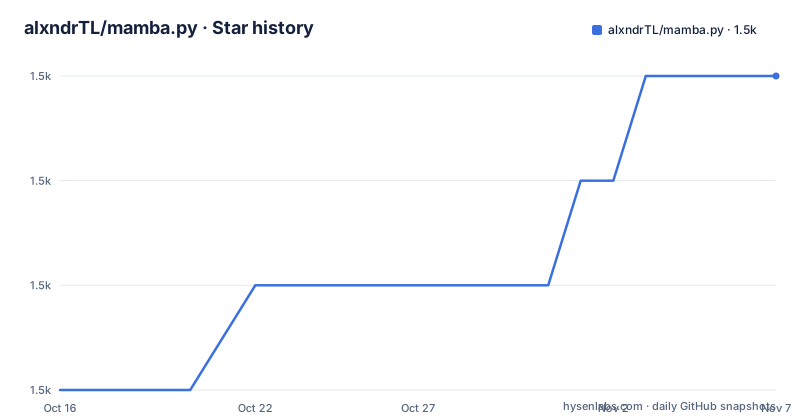
Star history
- alxndrTL/mamba.py1,484 ★ · +3
| Repository | 2026-10-16 | 2026-11-07 |
|---|---|---|
| alxndrTL/mamba.py | 1.5k | 1.5k |
3 Stars in the last 22 days, measured from the daily GitHub snapshot. Compare with other projects
Editorial analysis
An Educational Reimplementation, Not a Drop-In Accelerator
mamba.py is a from-scratch implementation of the Mamba architecture in pure PyTorch, with a second implementation in MLX for Apple hardware. The project states its primary goal plainly: it is educational. The ambition is that you can open a file, read the selective scan, and understand what it is doing.
That goal shapes the design. The official Mamba repository is a CUDA implementation, and it is fast, but its kernels are not the place to start if you want to understand the equations. mamba.py keeps the maths in readable Python and PyTorch, and layers on a parallel scan so that the time dimension can be parallelised rather than walked one step at a time.
The audience is researchers, students and engineers who need to modify the architecture, port it to a new framework, or teach it. The repository is MIT licensed, and the PyPI package is published as mambapy, so the code is also usable as an ordinary dependency.
The Parallel Scan Is the Core Mechanism
The heart of the repository is a file named pscan.py, described as a PyTorch implementation of Blelloch's parallel scan. Mamba's selective scan is a recurrence over the sequence, and a recurrence is inherently sequential, which is the usual bottleneck. Expressing the same computation as a scan lets the work be split across the time dimension and run in parallel.
The README describes the result in terms of training time for a single Mamba layer with d_model=16 and d_state=16, comparing three methods: the official CUDA implementation, this repository, and a sequential RNN-like implementation of the selective scan. The graph in the repository assets is presented as showing the forward and backward pass.
Two separate updates report speedups from the parallel scan. A step function for inference uses the RNN formulation of Mamba to speed up inference, and a later performance update claims that for small sequences under 128 it speeds up training by more than 20 percent against the first version, and by 10 percent for setups closer to what is found in practice in NLP. Those are the project's own reported numbers, and the documentation does not describe the hardware or batch settings behind them.
MambaConfig, Mamba, and the Shape Contract
The basic unit is the Mamba object with a MambaConfig, and the interface is deliberately narrow. There is no embedding and no head. Input is (B, L, D) and output is (B, L, D), which makes the block easy to drop into a larger stack and easy to test in isolation:
import torch
from mambapy.mamba import Mamba, MambaConfig

config = MambaConfig(d_model=16, n_layers=2)
model = Mamba(config)

B, L, D = 2, 64, 16
x = torch.randn(B, L, D)
y = model(x)

assert y.shape == x.shape
The README states that the Mamba model is numerically equivalent to the version in the paper, covering initialization as well as the forward and backward pass. That equivalence claim is the one to test first if you plan to rely on it, because the sequential and parallel formulations compute the same function in different orders and numerical behaviour can diverge at the margins.
The docs/ folder contains annotated explanations of the code, with the parallel scan as the current focus, which is what to read if you want the mechanism rather than the API.
LM Wraps the Block in an Embedding and a Head
The lm.py file encapsulates a Mamba or Mamba-2 object so it can be used as a language model, adding an embedding layer, a final normalization and a language modeling head. The usage in the README is short:
import torch
from mambapy.lm import LM, MambaConfig

config = MambaConfig(d_model=16, n_layers=4) # core model
model = LM(config, vocab_size=32000) # encapsulate it in a LM

x = torch.randint(high=32000, size=(16, 64))
logits = model(x) # (B, L, vocab_size)
The repository defines the wrapper class as `LM`; the upstream README example uses a different name, so this example uses the class actually exported by the module.
The inference path was updated to support a custom sampling temperature and batch size, and pretrained Mamba weights can be loaded directly:
from mambapy.lm import from_pretrained
from transformers import AutoTokenizer

model = from_pretrained('state-spaces/mamba-130m').to("cuda")
tokenizer = AutoTokenizer.from_pretrained('EleutherAI/gpt-neox-20b')

output = model.generate(tokenizer, "Mamba is a type of")
Jamba, Mamba-2 and Vision Mamba in the Same Package
The package carries three more architectures, each in its own file, which is the fastest way to see the design as a family rather than a single model.
mamba2.py holds the Mamba-2 model as described in the Mamba-2 paper, and it is marked beta. The README states that it requires CUDA because it is adapted from the original version, so the fast path is not available outside a CUDA environment. lm.py works with both Mamba and Mamba-2.
jamba.py implements Jamba, the architecture from AI21 that mixes Mamba layers with attention layers, by interleaving them. The API is the same as for Mamba and MambaLM, and a pretrained Jamba model loads the same way:
from mambapy.jamba_lm import from_pretrained
from transformers import AutoTokenizer

model = from_pretrained('TechxGenus/Mini-Jamba').to("cuda")
tokenizer = AutoTokenizer.from_pretrained('TechxGenus/Mini-Jamba')

output = model.generate(tokenizer, "def min(arr):")
vim.py implements Vision Mamba. There is also an onnx directory inside the package for exporting a trained Mamba model to ONNX for inference. The mlx/ directory mirrors the PyTorch code, and examples/ holds two usage notebooks plus a training file.
Installing mambapy and Running the First Forward Pass
Installation is a single pip command, and the alternative is to download the repository and work from it directly:
pip install mambapyThe package is published on PyPI since 27/06/2024, and setup.py declares version 1.2.0, a single install requirement of torch, python_requires of 3.6 or newer, and classifiers for Python 3, MIT and OS Independent. That thin dependency list is itself informative: the only hard requirement is the deep learning framework itself, because the selective scan is written in plain PyTorch rather than a custom CUDA extension.
The repository also carries a tests/ directory and an examples/ folder with example_e2e_training.ipynb, example_llm.ipynb, trainMamba.py, buffer.py and tinyhome.py. The README warns that some of these examples may be outdated, which is worth knowing before you base a workflow on one of them.
For the MLX version, the code sits in the mlx/ directory rather than in the installed package, so running it means working from a checkout rather than from PyPI.
muP for Hyperparameter Transfer and the MLX Port
Two features sit outside the core architecture. The first is muP, the maximal update parameterisation, implemented for both Mamba and Mamba-2 and added in the 03/08/2024 update. Its purpose, as described in the project, is to let you sweep for optimal hyperparameters on a small model and transfer them directly to a large model. For anyone working on Mamba-2, where hyperparameter tuning is a recurring cost, that is the feature most likely to change your experiment loop.
The second is the MLX port, added 22/01/2024, which supports both inference and training and mirrors the PyTorch code closely. The project states that it was tested on the largest Mamba trained to date, at 2.8 billion parameters, and its stated purpose is to let Mac users experiment with Mamba models.
Two pieces of history are worth knowing for context. The project reports that mamba.py became part of the transformers library in July 2024, and the official CUDA implementation was added as an available backend in April 2024 alongside the Jamba file. The version numbers tell the rest of the story: the newest release is v1.2.0 from 2024-07-31, after v1.0.0 in June 2024, and the last push was on 2026-05-03, with the repository not archived. The gap between the newest tag and the most recent push means the working tree is ahead of the published release.
Editorial conclusion
mamba.py is the right choice for an engineer who wants to read, debug or extend the Mamba architecture, and the wrong choice for a production training run, since the stated primary goal is educational and the project depends on the official CUDA implementation for the Mamba-2 path and for the speed comparison. Before building on it, check that your sequence lengths match the regimes the parallel scan was tuned for, note that the Mamba-2 file is marked beta and requires CUDA, and remember that the newest release is v1.2.0 from 2024-07-31 while the last push was on 2026-05-03, with no newer tag to pin against.
Frequently asked questions
How do I install mamba.py?
The package is published on PyPI as mambapy, so `pip install mambapy` is enough. You can also download the repository and work from the tree, which is what you need for the MLX version, since that code lives in the mlx/ directory rather than in the installed package.
What is the difference between mamba.py and the official Mamba implementation?
The official implementation is a CUDA codebase, while mamba.py keeps the model in pure PyTorch and adds a Blelloch parallel scan over the time dimension, with an MLX port for Apple hardware. The repository compares the two, alongside a sequential implementation, in its training time graph.
Can I use mamba.py with a pretrained Mamba model?
Yes. The lm module provides from_pretrained, and the README loads state-spaces/mamba-130m with a tokenizer from EleutherAI/gpt-neox-20b before calling model.generate. Jamba checkpoints load the same way from mambapy.jamba_lm.
Does mamba.py support Mamba-2 and Jamba?
Both are included. mamba2.py holds the Mamba-2 model and is marked beta, and the README states it requires CUDA because it is adapted from the original version. jamba.py implements Jamba by interleaving Mamba layers with attention layers.
What does the muP implementation in mamba.py do?
It is implemented for Mamba and Mamba-2, and the project describes it as a way to sweep for optimal hyperparameters on a small model and transfer them directly to a large model.
Official sources
Add this badge to your README
If you maintain this project, the badge below links readers to this analysis and shows its maintenance status from the daily GitHub snapshot. Paste the markdown into your README; add ?metric=license or ?metric=stars to the image URL for a different field.

[](https://hysenlabs.com/projects/alxndrtl-mamba-py)Star history chart for your README
[](https://hysenlabs.com/projects/alxndrtl-mamba-py)Was this useful?