NDKVoice: A C++ and FMOD Template for Android Voice Effects
[Blog] Implementing QQ-style voice-changing effects with Android Studio + CMake.
At a glance
- What is it?
- NDKVoice is a blog-style Android project that shows how to use CMake, JNI, and the FMOD engine to apply six voice effects to an audio file. It is a learning resource, not a production library, and its value depends on your willingness to supply FMOD binaries yourself.
- Who is it for?
- Adopt NDKVoice if you are an Android developer learning to bridge C++ audio processing with JNI and CMake, and you already have an FMOD license or are evaluating FMOD for a project. Do not use it as a drop-in library: it has no Gradle artifact, no package manager integration, and no releases.
- Can I use it commercially?
- Not without permission. GitHub finds no licence file in the repository, and without a licence all rights are reserved by default: you may read the code but not reuse it. Check the README, or ask the authors, before using it.
- Is it still maintained?
- Probably not. The repository last received commits 111 months ago, on September 2, 2017.
- What is it written in?
- Mainly C, according to GitHub's language statistics.
Answers come from the project's GitHub data, last synced on October 19, 2026, and from our analysis. They are not legal advice.
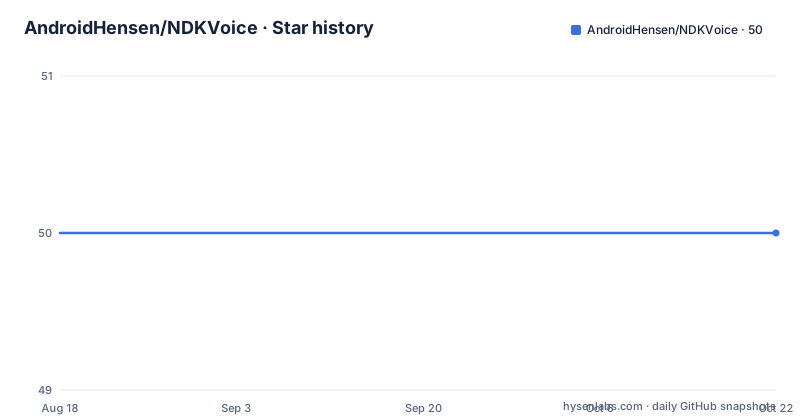
Star history
- AndroidHensen/NDKVoice50 ★ · +0
| Repository | 2026-08-18 | 2026-10-19 |
|---|---|---|
| AndroidHensen/NDKVoice | 50 | 50 |
0 Stars in the last 62 days, measured from the daily GitHub snapshot. Compare with other projects
Editorial analysis
What NDKVoice Actually Is
NDKVoice is a repository that contains a Chinese-language blog post explaining how to create an Android app that applies voice effects to an audio file. The project name suggests a native (NDK) approach, and the content confirms that. It targets developers who want to see how to combine Android Studio, CMake, and the FMOD audio engine to produce effects like a child's voice (luoli), a deep male voice (dashu), a horror tremolo (jingsong), a funny speed-up (gaoguai), and an ethereal reverb (kongling). The README is a step-by-step tutorial, not a polished library. There is no release, no version tag, and no license file. The primary language is C, but the code is split between Java for the Android UI and C++ for the audio processing. If you are looking for a ready-made component, this is not it. If you are looking for a worked example of JNI and CMake with a real audio SDK, it serves that purpose.
The Mechanism: FMOD DSP Chains Inside a JNI Call
The core of the project is a native method called fix(String path, int type) defined in a Java Utils class. That method is implemented in C++ in sound.cpp. The README shows the essential flow. First, you create an FMOD system with System_Create, then initialize it with system->init(32, FMOD_INIT_NORMAL, NULL). After that, you load a sound file with system->createSound, passing the path as a C string. Then you create a DSP effect using system->createDSPByType, where the type determines the effect. For example, FMOD_DSP_TYPE_PITCHSHIFT is used for the pitch changes that produce the child and adult male voices. You play the sound with system->playSound, and then you attach the DSP to the playing channel with channel->addDSP. The effects are not applied to the file on disk; they modify the playback in real time. The README lists six effect types, mapping each to a constant: MODE_NORMAL plays the audio unchanged, MODE_LUOLI raises the pitch by an octave, MODE_DASHU lowers it by an octave, MODE_JINGSONG adds a vibrato, MODE_GAOGUAI increases playback speed, and MODE_KONGLING adds reverb. The implementation follows examples from the FMOD SDK, as the README states. This is a straightforward DSP chain, and the project's value is in showing how to wire that chain into an Android app through JNI.
Getting It Running: Manual Steps and Exact Config Keys
The README gives a precise setup sequence. You start by creating a new Android Studio project with C++ support, selecting C++11 and the C++ standard library. Then you download the FMOD Android SDK from the official site, which the README notes may require a VPN. You copy all files from api/lowlevel/lib into your project's libs directory, and all files from api/lowlevel/inc into your cpp (jni folder) directory. You also add fmod.jar as a library dependency. You place an audio file in the assets folder; the example uses hensen.mp3. The Gradle configuration is shown with compileSdkVersion 25, buildToolsVersion "25.0.3", and an externalNativeBuild block that sets cppFlags to "-std=c++11 -frtti -fexceptions" and abiFilters to "armeabi","arm64-v8a","armeabi-v7a","x86". The CMakeLists.txt file is also provided. It declares cmake_minimum_required(VERSION 3.4.1), finds the log library, and defines a distribution_DIR variable pointing to ${CMAKE_SOURCE_DIR}/libs. It then imports fmod and fmodL as shared libraries, setting their IMPORTED_LOCATION to ${distribution_DIR}/${ANDROID_ABI}/libfmod.so and libfmodL.so. Finally, it adds a sound library as a shared library built from src/main/cpp/sound.cpp. The Java side includes a Utils class that loads three native libraries: fmodL, fmod, and sound. The MainActivity sets up click listeners for each effect type and calls the native fix method with the asset path. The README also instructs you to run javah to generate the JNI header file before writing sound.cpp.
Why This Is a Tutorial, Not a Maintained Project
Several signs point to NDKVoice being a snapshot from a blog post rather than a living codebase. The Gradle configuration uses compileSdkVersion 25 and buildToolsVersion "25.0.3", which are from 2017. The README is written as a numbered list of steps, with screenshots implied but not included in the cleaned text. The project has no releases and no license, which makes it legally ambiguous to reuse in a commercial product. The last push date is unknown, and the repository is not archived, but the absence of any recent activity in the retrieved metadata suggests it is dormant. The code itself is minimal: a single native method, a handful of constants, and a UI with clickable LinearLayouts. There is no error handling shown, no asynchronous callback for completion, and no support for recording or streaming audio. The fixedThreadPool and PlayerThread classes appear in the MainActivity snippet, but the README does not explain how they interact with the native call. This is a teaching artifact. If you need a robust voice changer, you would have to add thread management, file I/O, and error checks yourself.
Real Limitations and the Wrong Tool Cases
The most obvious limitation is that the project depends on proprietary FMOD binaries that you must download separately. The README warns that you may need a VPN to get them, and it does not link to the exact version. That means the build is not reproducible from the repository alone. Another limitation is the hardcoded asset path: MainActivity uses "file:///android_asset/hensen.mp3", so the demo only works with that specific file. The native method takes a path string, but the README does not explain how to handle real device file paths or content URIs. The effect types are fixed to six constants, and there is no interface to adjust parameters like pitch shift amount or reverb intensity. If you want a configurable voice effect, this project does not offer it. The ABI list includes armeabi, which is obsolete for modern Android, and omits x86_64, which is common for emulators. The project is also a poor fit if you need real-time voice processing from a microphone; the example only plays a pre-recorded file. Finally, the code loads fmodL and fmod libraries via System.loadLibrary, but the README does not clarify whether fmodL is the low-level or low-level-plus library, and that distinction matters for licensing.
Alternatives: FMOD Directly or Other Audio Engines
The natural alternative is to use FMOD directly without the wrapper that NDKVoice provides. The README itself says the implementation is based on FMOD examples, so you could skip this repository and write your own JNI bridge. That gives you full control over effect parameters, error handling, and ABI support. The difference in approach is that NDKVoice hardcodes a small set of effects, whereas using FMOD's API directly lets you chain multiple DSPs, adjust parameters in real time, and process microphone input. Another alternative is to use a different audio engine like OpenAL or the Android Oboe library. Oboe is open source and designed for low-latency audio on Android, but it does not include built-in DSP effects like pitch shifting; you would need to implement those yourself or use a separate DSP library. FMOD is a commercial product, so licensing is a consideration. NDKVoice does not address licensing, and the README only says to download from the official site. If you want to avoid proprietary dependencies, you could use a pure-Java approach with Android's MediaPlayer and SoundPool, but that limits you to playback speed changes, not pitch shifting or reverb.
Maintenance and Upgrade Cost
The maintenance cost is high relative to the functionality. The project uses Android Studio 2.x era APIs, so you will need to migrate to the AndroidX libraries and update the Gradle plugin. The README references com.android.support.test.runner.AndroidJUnitRunner, which is deprecated. The CMakeLists.txt uses version 3.4.1, which is old but still works. The bigger issue is that FMOD updates frequently, and the binary interface may change; you will need to verify that the version you download matches the headers you copied. The project has no test suite, no CI configuration, and no release process. Upgrading to a new FMOD version means re-copying the lib and inc files and recompiling. There is also no documentation for extending the effect list; you would have to read the FMOD API to add new DSP types. The license is unknown, which is a red flag for any serious use. If you adopt this project, budget time for modernization and for understanding the FMOD API yourself.
Editorial conclusion
Adopt NDKVoice if you are an Android developer learning to bridge C++ audio processing with JNI and CMake, and you already have an FMOD license or are evaluating FMOD for a project. Do not use it as a drop-in library: it has no Gradle artifact, no package manager integration, and no releases. Before you start, verify that your FMOD download matches the ABI filters in the Gradle file (armeabi, arm64-v8a, armeabi-v7a, x86) and that you can legally redistribute the FMOD .so files. The project is a tutorial snapshot from 2017, so expect to adapt the code to current Android Studio versions and to replace the hardcoded asset path with your own file handling. If you need a production voice changer, build your own pipeline on FMOD or consider a higher-level library; if you want to understand the mechanics, this repository is a compact starting point.
Frequently asked questions
What effects does the NDKVoice Android project support?
Six modes are defined as Java constants: normal, a high-pitched voice, a low-pitched voice, a tremolo style effect, a speed-up effect and an echo effect. The README describes them as playing the file directly, raising the pitch by an octave, lowering it by an octave, adding tremolo, increasing playback speed and adding echo.
What does building NDKVoice require from the audio engine vendor?
You download the engine's Android low-level source from the vendor's download page yourself. The README notes that this needs a virtual private network or contact with the vendor's customer service, and the files are then copied by hand into the project's libs and native folders.
How does NDKVoice wire native code into the Android app?
A Java class declares one static native method taking a file path and an effect type, and a static block loads three native libraries. Headers are generated with the NDK header tool into the native folder, the JNI implementation is built by CMake as a shared library, and an Activity wires one click handler per effect.
Official sources
Add this badge to your README
If you maintain this project, the badge below links readers to this analysis and shows its maintenance status from the daily GitHub snapshot. Paste the markdown into your README; add ?metric=license or ?metric=stars to the image URL for a different field.

[](https://hysenlabs.com/projects/androidhensen-ndkvoice)Star history chart for your README
[](https://hysenlabs.com/projects/androidhensen-ndkvoice)