vim-matchup: Making the % Motion Match Language Keywords
vim match-up: even better % :facepunch: navigate and highlight matching words :facepunch: modern matchit and matchparen. Supports both vim and neovim + tree-sitter.
At a glance
- What is it?
- vim-matchup extends Vim's % motion to language-specific words, adds motions and text objects around them, and highlights every match so you can see where % will jump. It works in both Vim and Neovim, with tree-sitter support in Neovim.
- Who is it for?
- vim-matchup is a good fit for Vim and Neovim users who edit languages where keywords come in pairs, and a poor fit if you rely on the standard matchparen behaviour for parentheses, since the plugin deliberately takes over that job.
- Can I use it commercially?
- Yes. MIT is a permissive licence: you can use, modify and sell software built on it, as long as you keep its copyright and licence notices.
- Is it still maintained?
- Yes. The repository last received commits 63 days ago.
- What is it written in?
- Mainly Vim Script, according to GitHub's language statistics.
Answers come from the project's GitHub data, last synced on November 7, 2026, and from our analysis. They are not legal advice.
Star history
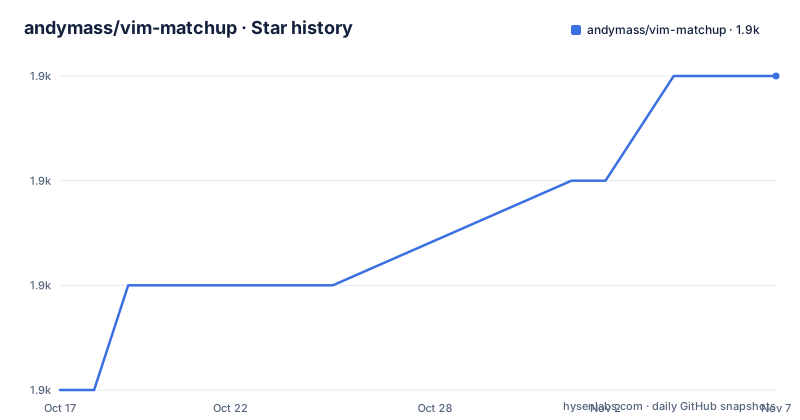
- andymass/vim-matchup1,935 ★ · +3
| Repository | 2026-10-17 | 2026-11-07 |
|---|---|---|
| andymass/vim-matchup | 1.9k | 1.9k |
3 Stars in the last 21 days, measured from the daily GitHub snapshot. Compare with other projects
Editorial analysis
What % Does in Vim and What match-up Changes
In stock Vim, the % motion jumps between a pair of characters such as brackets. vim-matchup extends that motion to language-specific words, so a function keyword in one language or a block keyword in another becomes something % can jump between. The plugin highlights the symbols and words under the cursor that % can work on, and highlights their matches, which means you can see the destination before you jump.
It is positioned as a drop-in replacement for the classic matchit.vim plugin, aiming to keep matchit's features, fix a number of its deficiencies and bugs, and add capabilities matchit does not have. It also replaces the standard matchparen plugin, so all of matchit's words are highlighted together with the matchpairs, which are the (), {} and [] characters.
The mechanism is straightforward. match-up uses the same b:match_words variable as matchit, so existing configurations carry over, and the filetype plugins that supply those words are the ones Vim already loads. The language list covers the usual suspects, from bash, c, cpp and clojure through fortran, lua, ocaml, perl, php, ruby, sql, typescriptreact, verilog, vim, xml and zsh, with ada, cobol, entries such as hog and hamster, and pdf among them.
Where match-up Goes Beyond matchit and matchparen
The project publishes a feature comparison across three plugins, and it is worth reading carefully rather than assuming the supersets are equal. match-up supports jumping between matching words, jumping to open and close words, and jumping inside with z%, where matchit and matchparen do not offer the last of these.
The text object story is the biggest difference. match-up provides the full set of text objects, while matchit's implementation is marked as poorly implemented or uncertain, and matchparen does not cover words at all. match-up also adds deleting surrounding matched words, which neither of the older plugins manages.
On the highlight side, matchit does not highlight the matchpairs characters at all, and matchparen does that but nothing wider. match-up does both: the (), [] and {} symbols, and all matching words, including every instance of a word, not just the one under the cursor. It also adds two navigation aids that the other plugins do not have: display of matches that are off-screen, and breadcrumbs showing where you are. The Neovim tree-sitter integration is likewise listed as a match-up only feature.
The Motions: g%, [% , ]% and the i% and a% Text Objects
Beyond the familiar %, match-up adds four motions. g% is the counterpart for words where % covers characters. [% and ]% jump backwards and forwards to the boundary of a matched region. z% jumps inside a pair, which the comparison table lists as a feature neither matchit nor matchparen can offer, and which is useful for landing on the first element of a list or the body of a block.
Those motions combine into text objects: i% for the inside of a match and a% for the surrounding region. Because a text object can be used with any operator, this is what gives the plugin its most practical reach. You can use it to delete surrounding matched words, and the same text objects work with visual mode selection.
The documentation distinguishes inclusive and exclusive motions, which is the usual reason a motion that looks right in one context does not behave as expected in another. Since the text objects are built on those motions, reading the two sections together matters if you are comparing behaviour against a different plugin you already use.
Highlighting and Breadcrumbs for Situating the Cursor
The visual part of match-up is what changes the feel of editing. Highlighting the symbol or word under the cursor that % can work on, and highlighting the matching symbol or word, answers a question stock Vim leaves open: where will this jump take me.
Two further features handle the case where the answer is off-screen. Displaying matches that are off-screen means the destination is still visible in some form when it is outside the current window, and the breadcrumbs feature shows where you are within a nested structure. In a deeply nested file, that is the difference between guessing and reading.
The off-screen display has a configuration wrinkle. There is an option g:matchup_matchparen_offscreen, and the packer example in the README sets it to a method of popup, which suggests the off-screen match is rendered in a floating window rather than in a text column. Since the whole feature is Neovim-oriented in practice, that popup method is worth checking against your own configuration before you rely on it.
Tree-sitter Parsing Works Only in Neovim
On Neovim, match-up can use language syntax provided by tree-sitter, and the list of supported languages lives in the after/queries directory of the repository, where the query files are kept. The feature is enabled automatically in Neovim and does not require other plugins to work.
The constraints are stated plainly in the documentation. This feature is currently possible in Neovim only, and only the latest stable version of Neovim is supported. So a Vim user gets the classic b:match_words behaviour, while a Neovim user on a current release gets syntax-derived matching, and a Neovim user on an older release may not get it at all.
Configuration for the tree-sitter side uses the g:matchup_treesitter prefix, and the project points at :h g:matchup_treesitter_enabled for the list of options. The lazy.nvim example sets g:matchup_treesitter_stopline to 500, which is a bound on how far down the file the parser is asked to look.
Installing With lazy.nvim, packer or vim-plug
The plugin loads with any manager, and the README shows the common ones. With vim-plug, add a single line to the plugin section of your vimrc and run :PlugInstall:
Plug 'andymass/vim-matchup'With lazy.nvim, the config block in the README shows both a raw variable assignment and the bundled setup helper, plus the opts mechanism that calls require('match-up').setup for you:
{
  'andymass/vim-matchup',
  init = function()
    vim.g.matchup_treesitter_stopline = 500

    require('match-up').setup({
      treesitter = {
        stopline = 500
      }
    })
  end,
  opts = {
    treesitter = {
      stopline = 500,
    }
  }
}
With packer, the same option is set inside the setup function of the use block, and :PackerSync does the work. The project advises against lazy loading strategies such as event = 'VimEnter' or event = 'CursorMoved', on the grounds that match-up already loads a minimal amount of code on start-up.
One conflict to handle: match-up should disable matchit and matchparen automatically, and if you still have trouble the README suggests placing this near the top of your vimrc:
let g:loaded_matchit = 1The Test Suite Runs in Docker Against Real Vim Builds
match-up is a Vim script project with a test directory, and the Makefile at the repository root shows how those tests are meant to be run. Rather than depending on whatever Vim happens to be installed on your machine, the targets build a container from vim.Dockerfile and run the suite inside it.
The build arguments are pinned in the Makefile, which tells you what the project considers its supported range. NVIM_VERSION defaults to stable and NVIM_ARCH to -linux-x86_64, while VIM_VERSION is pinned to v9.1.1287. The runtime command differs by target, since Neovim is invoked as nvim --headless while Vim is invoked as vim -T dumb --not-a-term -n, the flags that keep a headless run from trying to open a terminal.
There are three test targets. docker_test_old runs test/vader/run, which is the Vader test suite, docker_test_new runs the newer tests under test/new with a make target of its own, and docker_test_shell opens the built container for interactive poking. The repository also carries a .luacheckrc, a .vintrc.yml for Vim script linting and a .gitlab-ci.yml, so the linting and CI configuration is part of the tree rather than an external setup.
Editorial conclusion
vim-matchup is a good fit for Vim and Neovim users who edit languages where keywords come in pairs, and a poor fit if you rely on the standard matchparen behaviour for parentheses, since the plugin deliberately takes over that job. Before adopting it, check that your file type is in the supported list, because other languages need filetype plugins that match-up does not ship, and remember that tree-sitter support is limited to Neovim on the latest stable version while the classic keyword support comes from b:match_words. The plugin is MIT licensed, the newest release is v0.8.0 from 2025-07-08, and the last push was on 2026-09-05.
Frequently asked questions
What does vim-matchup do differently from the built-in matchparen plugin?
match-up takes over the matchparen job and adds word-level matching on top. It highlights the (), [] and {} matchpairs and also highlights all matching words, including every instance, and it adds motions and text objects that matchparen does not provide.
Does vim-matchup work with Neovim and tree-sitter?
Yes, with a caveat the README states directly: the tree-sitter integration is currently possible in Neovim only, and only the latest stable version of Neovim is supported. The feature is enabled automatically in Neovim and needs no other plugins, with the supported languages kept in the after/queries directory.
How do I install vim-matchup with lazy.nvim?
Add the plugin entry to your spec and either set variables directly, such as vim.g.matchup_treesitter_stopline, or use the opts mechanism that calls require('match-up').setup under the hood. The README advises against lazy loading with event = 'VimEnter' or event = 'CursorMoved'.
Does vim-matchup conflict with matchit.vim?
The project says match-up should automatically disable matchit and matchparen. If problems persist, the README suggests putting let g:loaded_matchit = 1 near the top of your vimrc. match-up uses the same b:match_words variable as matchit, so existing word definitions carry over.
How do I run the vim-matchup test suite?
The Makefile provides Docker based targets. docker_build builds an image from vim.Dockerfile, docker_test_old runs test/vader/run inside the container, and docker_test_new runs the tests under test/new. The Makefile pins NVIM_VERSION to stable and VIM_VERSION to v9.1.1287.
Official sources
Add this badge to your README
If you maintain this project, the badge below links readers to this analysis and shows its maintenance status from the daily GitHub snapshot. Paste the markdown into your README; add ?metric=license or ?metric=stars to the image URL for a different field.

[](https://hysenlabs.com/projects/andymass-vim-matchup)Star history chart for your README
[](https://hysenlabs.com/projects/andymass-vim-matchup)Was this useful?