waka-readme-stats: WakaTime coding metrics inside your GitHub profile README
This GitHub action helps to add cool dev metrics to your github profile Readme
At a glance
- What is it?
- anmol098/waka-readme-stats is a GitHub Action that writes WakaTime coding time and commit statistics between two comment markers in a profile README. It is a scheduled bot, not a hosted service, and it asks for a GitHub token with repo and user scope.
- Who is it for?
- Adopt it if you already run the WakaTime plugin in your editor and want your profile README to update itself on a cron schedule, and if you are comfortable storing a GitHub token with repo and user scope as a repository secret. Do not adopt it if you only want commit graphs and language bars, because Anuraghazra/github-readme-stats returns those as images with no secrets and no scheduled commit.
- Can I use it commercially?
- Yes. MIT is a permissive licence: you can use, modify and sell software built on it, as long as you keep its copyright and licence notices.
- Is it still maintained?
- Yes. The repository last received commits 8 days ago.
- What is it written in?
- Mainly Python, according to GitHub's language statistics.
Answers come from the project's GitHub data, last synced on November 24, 2026, and from our analysis. They are not legal advice.
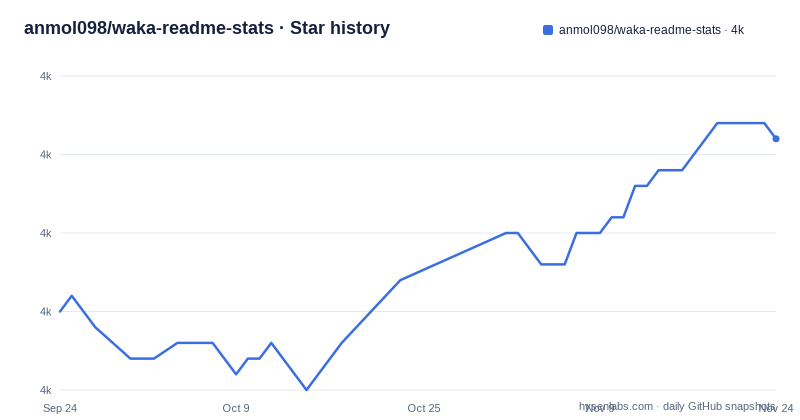
Star history
- anmol098/waka-readme-stats4,011 ★ · +11
| Repository | 2026-09-24 | 2026-11-24 |
|---|---|---|
| anmol098/waka-readme-stats | 4k | 4k |
11 Stars in the last 61 days, measured from the daily GitHub snapshot. Compare with other projects
Editorial analysis
What waka-readme-stats writes into a profile README
A profile README is static text. WakaTime knows how long you spent in each editor, language and project, but that data lives on WakaTime's servers. This project is the bridge: a GitHub Action that runs on a schedule, pulls your WakaTime summaries and your commit history, formats them as Markdown, and commits the result back to your repository.
The audience is narrow. You need a profile repository (the one named after your username), a WakaTime account with the editor plugin installed, and a willingness to let a bot push commits to that repository. The README answers the questions it poses up front: are you an early bird or a night owl, when are you most productive, which languages do you actually write. Those come from WakaTime, not from GitHub, which is the whole distinction from image-based stats cards.
Comment markers, flags and the commit-back loop
The mechanism is a replace-in-place loop. You put two HTML comments in the Markdown file, and the action treats everything between them as its own territory:
<!--START_SECTION:waka-->
<!--END_SECTION:waka-->
The README states that `waka` can be replaced by any string set in the `SECTION_NAME` flag, so the marker name and the flag have to agree or the action has nothing to write into. On each run the action reads the section, regenerates it, and commits the file back to the branch named by `PUSH_BRANCH_NAME`.
Everything else is gated by flags. The README notes that all flags are enabled by default except the lines-of-code flag, which it describes as a heavy operation. That default matters: a first run with no `with:` block beyond the two secrets will already produce timezone, projects, editors, OS, languages, profile views, commit counts and a day-of-week breakdown. The `.env.example` file lists the full set, including `INPUT_SHOW_LINES_OF_CODE`, `INPUT_SHOW_LOC_CHART`, `INPUT_SHOW_AI_CODE_TIME`, `INPUT_COMMIT_SINGLE` and colour keys such as `INPUT_BAR_COLOR`.
The GitHub side is where the design gets opinionated. Commit metrics require a personal access token with `repo` and `user` scope, and the README acknowledges the concern directly: enabling the `repo` scope seems dangerous, but the action, as documented, only reads commit timestamps and the number of lines added or deleted in repositories you contributed to. That is a claim about behaviour, not a sandbox. A fine-grained token scoped to specific repositories would be the obvious mitigation, and the README does not walk through that path.
Installing the action and running it for the first time
There is no package to install. Distribution is through the GitHub Actions marketplace, referenced as `anmol098/waka-readme-stats@master`. The prep work is three things: a WakaTime API key from your WakaTime account settings, a GitHub token with `repo` and `user` scope, and the two comment markers in your README.
Store both credentials as repository secrets. The README specifies the exact names:
WAKATIME_API_KEY=<your wakatime API Key>
GH_TOKEN=<your github access token>
Then add a workflow file. The README gives this example, which runs daily at 18:30 UTC and also exposes a manual trigger:
name: Waka Readme

on:
  schedule:
    # Runs at 12am IST
    - cron: '30 18 * * *'
  workflow_dispatch
jobs:
  update-readme:
    name: Update Readme with Metrics
    runs-on: ubuntu-latest
    steps:
      - uses: anmol098/waka-readme-stats@master
        with:
          WAKATIME_API_KEY: ${{ secrets.WAKATIME_API_KEY }}
          GH_TOKEN: ${{ secrets.GH_TOKEN }}
Commit the workflow, then open the Actions tab, select the workflow and click Run workflow. The README says to wait a minute or two and the section between the markers will be filled in. To trim the output, pass flags in the same `with:` block, for example `SHOW_OS: "False"` and `SHOW_PROJECTS: "False"`.
For local runs the repository ships a Makefile. `make run-locally` creates a virtual environment, installs `requirements.txt` and executes `python3 ./sources/main.py` against the values in `.env.example`; `make run-container` builds the Dockerfile image and runs it with `--env-file .env.example`. The Makefile notes that local testing needs Python 3.8 or newer and that container building needs Docker 20 or newer.
The token scope and the lines-of-code flag are the real costs
Two constraints deserve attention before you enable this.
First, the credential. A token with `repo` and `user` scope is broad, and it sits in repository secrets where any workflow in that repository can read it. The README's reassurance about what the action accesses is a statement of intent, not a technical restriction. If you are not comfortable with that trade, the commit-metric half of the output is the part you are buying with it, and the WakaTime half does not need a GitHub token at all.
Second, `SHOW_LINES_OF_CODE`. The README calls it a heavy operation and leaves it off by default, and the reason is structural: computing lines of code across your repositories means cloning and walking them, which is why the Dockerfile installs `git` and why the requirements list `GitPython`. Enabling it changes the runtime profile of every scheduled run, not just the first.
There is also a quieter failure mode. The action rewrites whatever sits between the markers. If you hand-edit that section, the next run discards your edit. And if the marker string and `SECTION_NAME` drift apart, the action has no target: the README documents the pairing but does not document what happens when they mismatch.
waka-readme-stats compared with Anuraghazra/github-readme-stats
The closest thing people search for alongside this project is Anuraghazra/github-readme-stats, and the two solve different halves of the same problem.
Anuraghazra's project is a hosted card service. You paste an image URL into your README and a server renders your GitHub statistics on each page load. Nothing is committed, no secret is stored in your repository, and no schedule is involved. The data source is GitHub alone.
waka-readme-stats inverts every one of those choices. It runs inside your repository as a scheduled job, it commits Markdown rather than embedding images, and its primary data source is WakaTime, which is where the editor, language and time-of-day numbers come from. The commit metrics exist, but they are the secondary half.
The practical difference: if you want your README to change when your GitHub activity changes, the image approach is simpler and has no credential. If you want your README to say how many hours you spent in Go last week and which editor you used, no image service has that data, because it never leaves WakaTime. That is the gap this action fills.
Licence, maintenance and what an upgrade costs
The project is MIT licensed, which permits commercial and private use, modification and redistribution provided the copyright notice and permission text are retained. That is the standard permissive position; if you fork it and ship it inside a product, keep the LICENSE file. Nothing here is legal advice, and the repository's own LICENSE file is the authority.
The last push to the repository was on 2026-08-24, and the repository is not archived. The v5 release is dated 2026-01-04; before that, v4 was 2021-07-01 and V3 was 2020-08-16. That release cadence is worth reading carefully: a four-and-a-half-year gap between v4 and v5 means the project moves in bursts rather than continuously.
Upgrade cost is low in the usual sense, because there is no library to bump in your own code. You reference `anmol098/waka-readme-stats@master`, so you are tracking the default branch, and every upstream commit is a potential change to your output. Pinning to a tag such as `v5` would make upgrades deliberate instead of automatic, and the README's example does not do that. The Dockerfile is based on `python:3.13-alpine` and the requirements pin `PyGithub==2.8.1` with looser ranges elsewhere, so a rebuild can pull newer transitive versions. The Makefile's `lint` target runs flake8 and black at a 160-character line length if you plan to modify the source.
Editorial conclusion
Adopt it if you already run the WakaTime plugin in your editor and want your profile README to update itself on a cron schedule, and if you are comfortable storing a GitHub token with repo and user scope as a repository secret. Do not adopt it if you only want commit graphs and language bars, because Anuraghazra/github-readme-stats returns those as images with no secrets and no scheduled commit. Before enabling it, check the SECTION_NAME value against the markers in your README, and read action.yml to confirm which inputs the master branch actually accepts.
Frequently asked questions
How can I get GitHub readme stats with waka-readme-stats?
waka-readme-stats does not render images. It runs as a GitHub Action that writes Markdown between two comment markers in your README, using a WakaTime API key for coding stats and a GitHub token with repo and user scope for commit metrics.
How can I see my GitHub stats through waka-readme-stats?
Add the START_SECTION and END_SECTION comments to your README, store WAKATIME_API_KEY and GH_TOKEN as repository secrets, and add the workflow file the README provides. Then trigger the workflow from the Actions tab and wait a minute or two for the section to be filled in.
What is waka-readme-stats and who is it for?
It is a GitHub Action that adds WakaTime coding metrics, such as editors, languages, projects and time of day, to a GitHub profile README. It suits developers who already track their coding time with the WakaTime editor plugin and want that data committed to their profile repository on a schedule.
Does waka-readme-stats need a GitHub token with repo scope?
The README states that a GitHub API token with repo and user scope is required if you run the action to get commit metrics. It notes that the repo scope seems dangerous but says the action only accesses commit timestamps and lines added or deleted in repositories you contributed to.
Can I turn off parts of the waka-readme-stats output?
Yes. The README says all flags are enabled by default except the lines-of-code flag, and you can disable features by passing flags such as SHOW_OS and SHOW_PROJECTS with the value False in the workflow's with block.
Official sources
Add this badge to your README
If you maintain this project, the badge below links readers to this analysis and shows its maintenance status from the daily GitHub snapshot. Paste the markdown into your README; add ?metric=license or ?metric=stars to the image URL for a different field.

[](https://hysenlabs.com/projects/anmol098-waka-readme-stats)Star history chart for your README
[](https://hysenlabs.com/projects/anmol098-waka-readme-stats)Was this useful?