ArdysaModsTools: A Windows App That Manages Dota 2 Cosmetic Mods with Rollback Safety
ArdysaModsTools - A user-friendly Windows app for installing, disabling, and updating Dota 2 mods with ease.
At a glance
- What is it?
- ArdysaModsTools is a .NET 8 desktop app for installing, disabling, and updating client-side Dota 2 mods. It wraps file writes in a transactional pipeline with SHA-256 verification, but its reliance on manual re-patching after game updates and its Windows-only scope define its limits.
- Who is it for?
- Adopt ArdysaModsTools if you are a Windows 10/11 Dota 2 player who wants a curated, one-click way to apply client-side cosmetics and performance tweaks, and you value the ability to revert to vanilla instantly. Do not use it if you are on Linux or macOS, if you want to inject scripts into the game process, or if you are unwilling to accept the ToS risk of modifying game files.
- Can I use it commercially?
- Yes, with conditions. GPL-3.0 is a copyleft licence: if you distribute software that includes it, you must release that software's source code under the same licence. Running it internally without distributing it does not trigger that obligation.
- Is it still maintained?
- Yes. The repository last received commits 2 days ago.
- What is it written in?
- Mainly HTML, according to GitHub's language statistics.
Answers come from the project's GitHub data, last synced on October 22, 2026, and from our analysis. They are not legal advice.
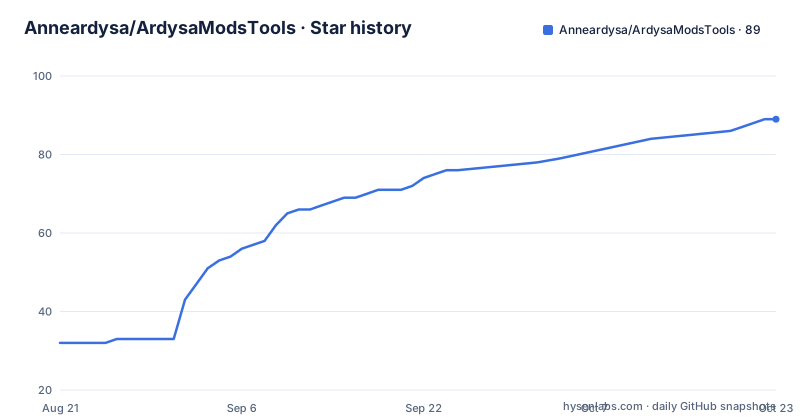
Star history
- Anneardysa/ArdysaModsTools89 ★ · +57
| Repository | 2026-08-21 | 2026-10-22 |
|---|---|---|
| Anneardysa/ArdysaModsTools | 32 | 89 |
57 Stars in the last 62 days, measured from the daily GitHub snapshot. Compare with other projects
Editorial analysis
What Problem It Solves and Who It Is For
ArdysaModsTools (AMT) solves a specific annoyance for Dota 2 players who use client-side cosmetic mods: keeping those mods installed, updated, and reversible without manually editing game files. The README positions it as a one-click manager for hero skins, terrains, weather, HUDs, music, couriers, and performance tweaks. It is aimed at Windows users who play Dota 2 through Steam and who want a graphical interface rather than file juggling. The target user is someone who wants the full curated ModsPack or who wants to pick individual items from a gallery, then revert to vanilla when needed. The tool explicitly writes only local files and does not inject anything into the Dota 2 process, so it is not for players who want gameplay cheats or server-side modifications. It is for cosmetic customization and performance tuning, nothing more.
How It Works: Transactional Writes and Verification
The core mechanism is a transactional file pipeline. According to the README, every download is verified against a SHA-256 manifest before it is applied. Writes to the game folder go through a sequence: extract, verify, atomic swap, and rollback on failure. This means the app stages changes, checks them, then swaps them into place, and if anything fails, it reverts automatically. The design avoids overwriting official VPKs in place, which is what makes the one-click Disable Mods feature possible. The UI is a hybrid WinForms and WebView2 shell, with JavaScript and C# communicating only over the WebView message bridge. The architecture follows a strict MVP pattern with constructor-based dependency injection, and every service sits behind an interface. That is a deliberate choice for maintainability, but it also means the app is not a simple script; it is a full desktop application. The README states that nothing is injected into the Dota 2 process, so the tool operates purely at the file system level.
Getting It Running: Installation and Configuration
To install, you download the setup executable from the Releases page or the project website. The README gives the file name pattern: ArdysaModsTools_Setup_<version>.exe. You run the installer, then launch the app from the desktop shortcut or Start Menu. Requirements are Windows 10 64-bit Build 19041 or later, or Windows 11, plus Dota 2 via Steam and the Microsoft WebView2 Runtime, which is pre-installed on those systems. After launch, the app auto-detects your Dota 2 install, or you can use Manual Detect to pick the dota 2 beta folder. Configs and presets live in %AppData%\ArdysaModsTools, separate from the app, so they survive updates. The quick start involves closing Dota 2, launching AMT, then either clicking Install ModsPack or using the Skin Selector to generate a custom set. After a Dota 2 update overwrites your patch, you click Patch Update or rely on PatchWatcher to re-apply automatically.
The PatchWatcher Caveat: Auto-Patching Is Not Fully Automatic
The README describes auto-patching as detecting Dota 2 updates in the background and re-applying active mods. However, the quick start says to click Patch Update after an update, or let PatchWatcher re-apply it automatically. That wording suggests the feature exists but may require a manual trigger in some cases. The distinction matters. If PatchWatcher truly runs in the background, it would be a hands-off experience. If it only detects the update and waits for you to click, then the promise of auto-patching is weaker. The README does not clarify the exact behavior, and I cannot verify it from the material. This is a limitation worth checking before you rely on it. If you play Dota 2 frequently and updates happen often, you could find yourself re-patching manually more than you expect.
Safety Features and Their Limits
The safety claims are strong: integrity checks, transactional writes, resilient downloads via a multi-CDN chain with failover, and one-click revert. The SHA-256 manifest verification is a concrete mechanism that reduces the risk of corrupted or tampered downloads. The transactional pipeline with atomic swap is a genuine engineering approach to file writes. However, these features do not protect you from Valve's Terms of Service. The README includes a caution that modifying game files can violate the ToS and that all mods are client-side only, meaning no one else sees them. The tool cannot prevent a VAC ban or account action if Valve decides to enforce its rules. Also, the safety pipeline only covers the files AMT manages. If a mod pack contains a malformed file that passes the manifest check, the rollback mechanism would restore the previous state, but the mod itself might still cause a game crash. The README does not describe any sandboxing or validation beyond the manifest, so the safety net is about file integrity, not mod compatibility.
Maintenance and Upgrade Cost
The project is under active development, with three beta releases in four days: v2.4.4-beta, v2.4.3-beta, and v2.4.2-beta, each with a build number. That cadence suggests frequent fixes and feature additions, but it also means you should expect to update often. The configs and presets are stored in %AppData%\ArdysaModsTools, separate from the app, so your settings survive updates. The installer is a standard Windows executable, so upgrading likely means downloading a new setup file and running it. The README mentions a changelog, which is the place to review what changed between builds. The license is GPL-3.0, which means the source is open and you can modify it, but if you distribute your own version, you must keep it under the same license and make the source available. That is a consideration if you plan to fork the project. The project is not archived, and the last push is recent, so maintenance appears active, but the beta status means you should expect occasional instability.
Alternatives: Manual Modding and Other Managers
The obvious alternative is manual modding: downloading mod files and placing them in the Dota 2 folder yourself. That approach gives you full control but no verification, no rollback, and no UI. You would have to track which files you changed and restore them manually after each game update. Another alternative is using a generic file manager or a script to copy files, but that lacks the transactional safety. There are other Dota 2 mod managers, such as the now-defunct Dota 2 Mod Manager or community tools, but I cannot confirm their current status from the material. The key difference with AMT is its explicit focus on rollback safety and its curated ModsPack. A manual approach is more flexible because you can use any mod from any source, whereas AMT likely only supports mods that are in its curated catalog or that match its expected format. If you want to use a mod that is not in the app's list, you may need to wait for a request or manually install it, which defeats the purpose.
Editorial conclusion
Adopt ArdysaModsTools if you are a Windows 10/11 Dota 2 player who wants a curated, one-click way to apply client-side cosmetics and performance tweaks, and you value the ability to revert to vanilla instantly. Do not use it if you are on Linux or macOS, if you want to inject scripts into the game process, or if you are unwilling to accept the ToS risk of modifying game files. Before adopting, verify that your Dota 2 install path is correctly detected, that your WebView2 runtime is up to date, and that you have a stable internet connection for the multi-CDN downloads. Check the changelog for the latest beta build, since the project ships frequent beta releases and auto-patching is still a manual trigger after game updates.
Frequently asked questions
Is DotA 2 mod skin bannable?
The project states that it is not affiliated with Valve or Steam, that all its mods are client-side only so no one else sees them, and that modifying game files can violate Valve's Terms of Service. Its stated position is that you use it at your own risk.
What does ArdysaModsTools do to my Dota 2 files?
All writes to the game folder go through a transactional pipeline of extract, verify, atomic swap and rollback, and every downloaded file is checked against a SHA-256 manifest before it is applied. Official VPKs are never overwritten in place, and Disable Mods restores the vanilla game in one click.
What happens after a Dota 2 update overwrites my mods?
Auto-Patching detects Dota 2 updates in the background and re-applies your active mods. You can also click Patch Update yourself, or let PatchWatcher do it automatically, which is why the quick start asks you to close Dota 2 before launching the app.
What are the system requirements for ArdysaModsTools?
Windows 10 64-bit at Build 19041 or newer, or Windows 11, plus Dota 2 via Steam. The Microsoft WebView2 Runtime is also required and is pre-installed on Windows 10 and 11. The platform itself is .NET 8 with C# on Windows 10 and 11 x64.
Where does ArdysaModsTools keep my configs and presets?
In %AppData%\ArdysaModsTools, which is separate from the application files so they survive updates. The app itself is installed from ArdysaModsTools_Setup_<version>.exe and launched from a desktop shortcut or the Start Menu.
Official sources
Add this badge to your README
If you maintain this project, the badge below links readers to this analysis and shows its maintenance status from the daily GitHub snapshot. Paste the markdown into your README; add ?metric=license or ?metric=stars to the image URL for a different field.

[](https://hysenlabs.com/projects/anneardysa-ardysamodstools)Star history chart for your README
[](https://hysenlabs.com/projects/anneardysa-ardysamodstools)