Microsoft ships an official Azure DevOps MCP server, and this one says so first
An MCP server for Azure DevOps
At a glance
- What is it?
- A community Model Context Protocol server for Azure DevOps that positions itself around on-premises installations and older server versions rather than the cloud service. Three authentication methods, three test tiers, and a published package four directories wide.
- Who is it for?
- This fits a team running an on-premises Azure DevOps Server, particularly an older version that the vendor's own server does not handle, or anyone who needs a tool the official one has not shipped yet. It does not fit a cloud-only shop, where the readme says to start with the supported server instead.
- Can I use it commercially?
- Yes. MIT is a permissive licence: you can use, modify and sell software built on it, as long as you keep its copyright and licence notices.
- Is it still maintained?
- Yes. The repository last received commits 1 day ago.
- What is it written in?
- Mainly TypeScript, according to GitHub's language statistics.
Answers come from the project's GitHub data, last synced on November 15, 2026, and from our analysis. They are not legal advice.
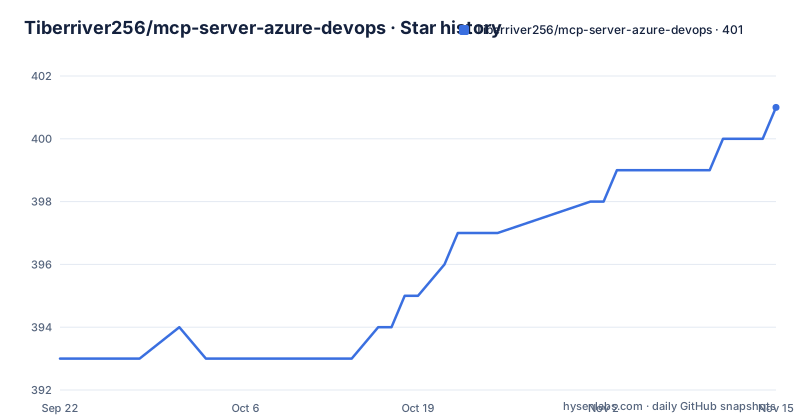
Star history
- Tiberriver256/mcp-server-azure-devops401 ★ · +8
| Repository | 2026-09-22 | 2026-11-15 |
|---|---|---|
| Tiberriver256/mcp-server-azure-devops | 393 | 401 |
8 Stars in the last 54 days, measured from the daily GitHub snapshot. Compare with other projects
Editorial analysis
The readme's first act is to point you elsewhere
The most useful paragraph in the documentation is the one that recommends a different repository.
The vendor maintains a product-supported server, and the instruction for anyone using the cloud service is to start there. This repository is then positioned for two narrower cases: on-premises server installations, especially older versions that the official server may not work with, and features not yet available upstream.
That framing is unusual and worth taking at face value, because it changes what you are evaluating. You are not choosing between two comparable servers on features; you are choosing whether the gap the official one leaves is one you actually have.
The documentation points at a specific discussion thread for the reasoning and at a roadmap file for where this server intends to differentiate. Reading both before installing is cheaper than discovering the positioning later.
The functional scope, once you are past that, is the ordinary surface: projects, work items, repositories, pull requests, branches and pipelines, exposed as tools over the protocol.
Running the published package needs no checkout:
npx -y @tiberriver256/mcp-server-azure-devopsFrom a checkout, the sequence is install from the lock file, copy the environment example and edit it, compile, then start the built entry point.
On-premises means personal access tokens, full stop
Three authentication methods are supported, and the split between them is not even.
A personal access token is the simple option. Azure Identity, through the standard credential chain, is the default. Azure CLI login is the third. The first two are described as flexible, and each has a configuration example in the documentation directory.
Then the constraint that decides most deployments: the on-premises server supports the personal access token only. The other two are for the cloud service.
That falls out of how those two methods obtain credentials. Both resolve through Azure's identity stack, which is a cloud service, so an installation that has no Azure login to offer has nothing for them to resolve against.
The configuration block for an on-premises install looks different for that reason. The organisation URL is a collection path on a server address rather than a cloud URL, and the authentication method is fixed to the token.
So if you are on-premises, the token is not the first option to try, it is the only option.
The token carries six scopes, and two of them write
The example environment file lists the scopes a token needs, and the distribution of them is worth reading.
Two are read and write: code, and work items.
Three are read and execute: build, project and team, and release.
One is read only: graph.
That is a reasonably tight set for a server that creates branches and pull requests, since a pull request cannot be created without write access to code. What it means in practice is that a token scoped to read-only code will get you a server that can look at repositories and fail when asked to change them, and that the graph scope is needed for user and identity lookups rather than for the repository tools.
The file also carries a commented-out API version variable, described as optional and defaulting to the latest. Pinning it is the way to stop a vendor-side default change from altering behaviour under you.
And it documents the transport: standard input and output, not HTTP. Several variables in the same file are marked as being for scripts rather than for the server.
Three test tiers, three config files
The repository runs its tests as three separate suites rather than one, and the split is visible in the root directory as three separate runner configurations for unit, integration and end-to-end tests.
The aggregate test script runs all three in order, which means the fast feedback loop is not the default one.
A second configuration file exists for compiling the tests, and the build itself is a single TypeScript compilation step. The development script runs the entry point through a reloading runner with respawn enabled and type checking turned off in the transpile, which is a common combination for a server that restarts on change.
There is also a script that builds and then launches the protocol inspector against the built server at a pinned version of the inspector package. Pinning that version in a script rather than invoking whatever is current is the right call for reproducing a debugging session.
Release handling is automated by a conventional-changelog tool configured to bucket changes into features, fixes, chores, documentation, performance and refactoring, and commits are validated and formatted by a hook installed from the repository.
The published package is four entries wide
The manifest's file list is short enough to enumerate, and the omissions are informative.
Four paths are published: the built output directory, the documentation directory, the licence and the readme. That is the whole distributed artifact.
Everything else in the repository root stays local. That includes the environment example, several assistant rule files, editor directories, shell scripts for creating a branch and finishing a task, a task definition file, a memory directory and a project management directory.
The packaging step makes the built entry point executable before packing, which is why the binary field and the start script both point at the same file.
So an installed copy contains no environment template and no setup scripts. A user who installs from the registry gets the server and the documentation and nothing else, which means the authentication guide in the readme is the only route to a working configuration.
The package is scoped and published publicly, and the version is still in the zero point range.
The client configuration is three variables and a command
Wiring it into a desktop assistant is a configuration-file edit rather than a setup step, and the two documented blocks differ only in authentication.
Both name the command as a package runner, pass the package name as an argument, and supply three environment values: the organisation URL, the authentication method, and a default project so calls need not name one every time.
The identity variant adds the instruction to sign in with the Azure command-line tool first, since the credential chain reads that login. The token variant adds the token itself.
That is the whole integration, and the reason the on-premises case is fiddly is the URL: a collection path on a server address rather than the cloud host.
Two variables in the documented set are not covered by those blocks and are documented separately. Service principal authentication needs a tenant, client and secret, and those three appear only in the environment example, commented out, with a note that they are required only for that specific combination.
The root layout is an agentic development setup, not just a server
Looking at the repository rather than the readme explains more about how this is maintained.
There are instruction files for several coding assistants side by side, plus a shared agent instruction file and a skills lock file. There is an editor configuration, a hooks directory, and a commit message convention configuration with matching formatter and linter configuration files.
There is also a shell script to set up the environment, one to create a branch and one to finish a task, and a task definition file alongside a memory directory and a project management directory.
None of that ships, as noted, but it explains the shape of the work: this is a repository where the server is developed by an agent-assisted process with its own conventions checked into version control.
It also predicts the kind of maintenance you get. The readme asks for issues rather than pull requests, there is a roadmap, a changelog and a contributing guide, and the most recent release landed the same day as the last commit, which is a fast cadence for a version still at the first zero point release.
Editorial conclusion
This fits a team running an on-premises Azure DevOps Server, particularly an older version that the vendor's own server does not handle, or anyone who needs a tool the official one has not shipped yet. It does not fit a cloud-only shop, where the readme says to start with the supported server instead. Two things to check before adopting it. The version is still in the zero point releases and the project positions itself as a community server rather than a supported product, so plan for maintenance. And the personal access token needs six scopes, so decide deliberately which ones you grant rather than granting everything the example lists.
Frequently asked questions
What does this Azure DevOps MCP server do?
It bridges AI assistants and the Azure DevOps APIs over the Model Context Protocol, covering projects, work items, repositories, pull requests, branches and pipelines, with tools for creating and updating work items, branches and pull requests.
Should I use this instead of Microsoft's Azure DevOps MCP server?
Not for the cloud service: the readme says Microsoft maintains a product-supported server and tells cloud users to start there. This one is positioned for on-premises installations, particularly older versions, and for features the official server has not added.
Which authentication methods does the Azure DevOps MCP server support?
A personal access token, Azure Identity through the default credential chain, or an Azure CLI login. The default method is Azure Identity, and the on-premises server supports the personal access token only.
What scopes does the Azure DevOps personal access token need?
Six: code read and write, work items read and write, build read and execute, project and team read, graph read, and release read and execute.
How do I run the Azure DevOps MCP server without building it?
Run the published package through a package runner, or add it to a client configuration with the command, the package name as an argument, and the organisation URL, authentication method and default project in the environment block.
What transport does the Azure DevOps MCP server use?
Standard input and output rather than HTTP, which the example environment file states explicitly. The same file also notes that some listed variables are for scripts and are not read by the server.
Official sources
Add this badge to your README
If you maintain this project, the badge below links readers to this analysis and shows its maintenance status from the daily GitHub snapshot. Paste the markdown into your README; add ?metric=license or ?metric=stars to the image URL for a different field.

[](https://hysenlabs.com/projects/tiberriver256-mcp-server-azure-devops)Star history chart for your README
[](https://hysenlabs.com/projects/tiberriver256-mcp-server-azure-devops)Was this useful?