NeuMan trains a background NeRF, then a human NeRF conditioned on SMPL
Official repository of NeuMan: Neural Human Radiance Field from a Single Video (ECCV 2022)
At a glance
- What is it?
- NeuMan reconstructs a background scene and an animatable human from a single video using neural radiance fields, in two training stages: a background model, then a human model loaded on top of it. The reference implementation pins Python 3.7 and PyTorch 1.8.0 because pytorch3d requires that combination, which is the single biggest obstacle to running it today.
- Who is it for?
- Adopt NeuMan if you are reproducing a 2022 paper or need novel-pose rendering of a person captured on a single video, and be prepared to work inside a Python 3.7 environment. Skip it if you want a maintained library, since the repository has no releases.
- Can I use it commercially?
- Check first. The repository uses a licence we do not classify automatically, so read its LICENSE file before any commercial use.
- Is it still maintained?
- Yes. The repository last received commits 57 days ago.
- What is it written in?
- Mainly Python, according to GitHub's language statistics.
Answers come from the project's GitHub data, last synced on November 7, 2026, and from our analysis. They are not legal advice.
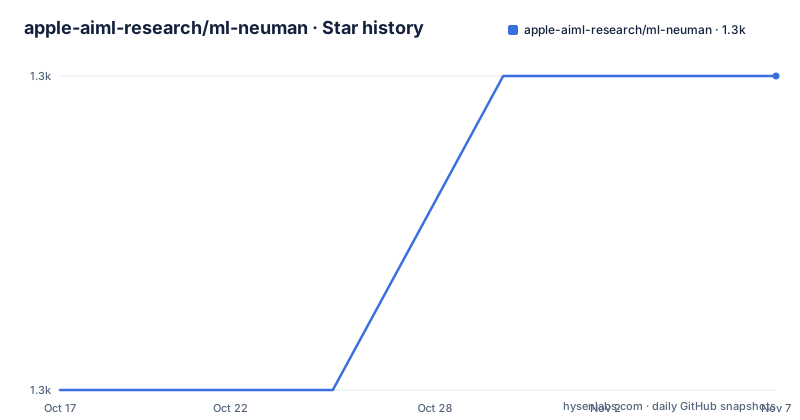
Star history
- apple-aiml-research/ml-neuman1,286 ★ · +1
| Repository | 2026-10-17 | 2026-11-07 |
|---|---|---|
| apple-aiml-research/ml-neuman | 1.3k | 1.3k |
1 Stars in the last 21 days, measured from the daily GitHub snapshot. Compare with other projects
Editorial analysis
Two NeRFs, trained in order
NeuMan reconstructs both the background scene and an animatable human from a single video using neural radiance fields, and the training instructions make the structure explicit because it takes two commands.
The first trains the background:
python train.py --scene_dir ./data/bike/ --name=bike_background --train_mode=bkgThe second trains the human, naming the background checkpoint it loads:
python train.py --scene_dir ./data/bike --name=bike_human --load_background=bike_background --train_mode=smpl_and_offsetThe `--train_mode` values are the interesting part, because they say what each stage optimises. `bkg` is the background radiance field. `smpl_and_offset` names two things jointly: a body model and a per-person offset.
That is the paper's contribution in one flag. The human is not modelled as a rigid articulated mesh alone; it is a radiance field driven by an SMPL body plus a learned offset, so the appearance that does not come from the body shape, such as clothing and hair, is represented separately.
Two consequences follow for anyone using this. First, order matters: the human stage needs the background checkpoint, so a missing or mismatched background produces a model with nothing correct behind the person. Second, the dataset layout matters, because `--scene_dir` points at a per-scene directory and the pretrained weights are named after the scene, as in `./out/bike_human/checkpoint.pth.tar`.
The repository root confirms the separation: `models/`, `trainers/`, `cameras/`, `scenes/`, `datasets/`, `geometry/`, `data_io/` and `options/` are the training side, while the four render scripts sit at the top level next to `train.py`.
The environment pins PyTorch 1.8.0 and says why
The environment section is the part that will decide whether you can run this today.
The preferred path is `conda env create -f environment.yml`, which is the route to take. The alternative is a manual sequence that creates an environment with `python=3.7` and installs `pytorch==1.8.0`, `torchvision==0.9.0` and `cudatoolkit=10.2` from the pytorch channel.
Then the note that explains everything: `pytorch3d` requires a specific version of pytorch, in this case 1.8.0.
So the pin is not conservatism, it is a hard dependency. pytorch3d is installed from its own channel, and the rest of the stack follows: fvcore and iopath, nvidiacub from the bottler channel, igl from conda-forge, and then a pip line with opencv-python, joblib, open3d, imageio, tensorboardX, chumpy, lpips, scikit-image, ipython and matplotlib.
There is also a CUDA 11 branch in the instructions for RTX 30 series GPUs, which installs the same PyTorch 1.8.0 with `torchaudio==0.8.0` and `cudatoolkit=11.1` from pytorch and conda-forge. That is the path if your card is newer than the CUDA 10.2 default supports.
Python 3.7 is the harder constraint. It reached end of life years ago, so this environment will need older conda behaviour, older CUDA wheels and, in many organisations, an exception to whatever pins you have on your build images.
SMPL weights need registration and a manual rename
Before any of the render scripts run, three sets of files have to be assembled, and one of them is not a simple download.
The first is the SMPL body model, and the README is explicit that registration is required to download the UV map in OBJ format from the SMPL site. The second is the neutral SMPL weights, `SMPLIFY_CODE_V2.ZIP`, from SMPLify, which must be extracted and the resulting `basicModel_neutral_lbs_10_207_0_v1.0.0.pkl` renamed to `SMPL_NEUTRAL.pkl`.
That rename is not cosmetic. The code looks for `SMPL_NEUTRAL.pkl`, so a download left under its original name is silently not found.
The destination layout is given as a tree:
.
└── data
  └── smplx
    ├── smpl
    │   └── SMPL_NEUTRAL.pkl
    └── smpl_uv.obj
The second dataset is the project's own, available as `dataset.zip` on the same asset host, with pretrained models in `pretrained.zip`. Both can be fetched by hand or by running `bash setup_data_and_models.sh`.
The third is optional and specific. AMASS is used for rendering novel poses, in `render_reposing.py` and `render_gathering.py` specifically, and the README says the SFU mocap subset with SMPL+H G was used, downloaded from AMASS and placed in `./data/SFU` with one numbered directory per motion.
Five render scripts, one per capability
The demo section is a list of scripts, and each one isolates a different capability of the model.
`render_360.py` takes a `--mode`, with `canonical_360` for 360 views of a canonical human and `posed_360` for 360 views of a posed human. The canonical mode shows what the body model reconstructs on its own and the posed mode shows the same body driven by a pose, which is the difference between the two that makes the decomposition legible.
`render_test_views.py` renders test views of a sequence and evaluates the metrics, so this is the script to run when you want a number rather than an image.
`render_reposing.py` renders novel poses with the background, taking a `--motion_name`, with `jumpandroll` as the example. This is the compositing step, where the human is placed in a pose it was never trained in and the background is rendered behind it.
`render_gathering.py` renders a telegathering, and it is the one that takes more than a scene: `--actors parkinglot seattle citron --scene_dir./data/seattle --weights_path./out/seattle_human/checkpoint.pth.tar`. So the human model comes from the seattle scene while other actors are placed into it, which is what demonstrates compositional synthesis across separately captured people.
The examples take a scene directory and a weights path for each rendered scene.
The demo videos in the README are split the same way, with six clips for novel view and novel pose synthesis across bike, citron, parking lot, jogging, lab and Seattle, and two for compositional synthesis, handshake and dance.
Reference implementation, custom licence, no releases
Three facts about the project's status shape any decision to use it.
First, the README calls this a reference implementation. That is a specific kind of repository: it exists so the paper's results can be reproduced, not so that a production system can be built on it. The layout reflects that, with the paper's scene names as the demo data and one checkpoint per scene.
Second, the licence is not a standard one. The repository is recorded as having a custom licence that GitHub cannot classify, and the README says only that the code is released under the LICENSE terms. If you need to know whether you can use the code commercially or modify it, you have to read that file yourself; it is not one you can assume from the paper's venue.
Third, there are no GitHub releases. There is no version to install, nothing on PyPI, and no stable tag to pin. The last push was on 2026-09-11, so commits continue, but without releases a fork and a commit pin are the only reproducible options.
The paper is on arXiv at 2203.12575 and appeared at ECCV 2022, with the citation to copy given in the README.
There is also a `preprocess/` directory with its own README, referenced from the Use your own video section. That is the path for input that is not the provided dataset, and it is the part of the repository most likely to be needed in practice, since the demo data covers six scenes and nothing else.
Editorial conclusion
Adopt NeuMan if you are reproducing a 2022 paper or need novel-pose rendering of a person captured on a single video, and be prepared to work inside a Python 3.7 environment. Skip it if you want a maintained library, since the repository has no releases. Verify first that your GPU driver supports the pinned CUDA 10.2 stack, and that you can obtain the SMPL model weights, which require registration and are not downloadable anonymously.
Frequently asked questions
How do I set up the NeuMan environment?
Run `conda env create -f environment.yml`, then activate it with `conda activate neuman_env`. The manual alternative creates a Python 3.7 environment with pytorch 1.8.0, torchvision 0.9.0 and cudatoolkit 10.2, because pytorch3d requires that specific PyTorch version. An RTX 30 series card uses the CUDA 11.1 variant instead.
How is a NeuMan scene trained?
In two stages with `train.py`. First `--train_mode=bkg` for the background radiance field, then `--train_mode=smpl_and_offset` with `--load_background` pointing at the background run, so the human model is conditioned on the background checkpoint.
What do I need to download before rendering?
SMPL and SMPLify weights, which require registration, extracted so the body model is renamed to `SMPL_NEUTRAL.pkl` inside `./data/smplx/smpl`, plus the UV map OBJ file. The project dataset and pretrained models come as `dataset.zip` and `pretrained.zip`, or you can run `bash setup_data_and_models.sh`. AMASS mocap data is optional and only needed for reposing.
Official sources
Add this badge to your README
If you maintain this project, the badge below links readers to this analysis and shows its maintenance status from the daily GitHub snapshot. Paste the markdown into your README; add ?metric=license or ?metric=stars to the image URL for a different field.

[](https://hysenlabs.com/projects/apple-aiml-research-ml-neuman)Star history chart for your README
[](https://hysenlabs.com/projects/apple-aiml-research-ml-neuman)Was this useful?