Arcticons is an icon pack held together by a Gradle project and a community pipeline
A monotone line-based icon pack for android
At a glance
- What is it?
- Arcticons is a line based Android icon pack with a small Java launcher app, thousands of contributed SVGs and a build that regenerates and repackages them. Two licences apply, and the contribution pipeline is the part most adopters never think about.
- Who is it for?
- Adopt Arcticons if a monochrome line set suits how you read your home screen and you want the pack sourced from F-Droid rather than a closed store. Do not adopt it if you need per-app colour control beyond what the pack ships or if your policy requires assets under a single licence.
- Can I use it commercially?
- Yes, with conditions. GPL-3.0 is a copyleft licence: if you distribute software that includes it, you must release that software's source code under the same licence. Running it internally without distributing it does not trigger that obligation.
- Is it still maintained?
- Yes. The repository received new commits within the last day.
- What is it written in?
- Mainly Java, according to GitHub's language statistics.
Answers come from the project's GitHub data, last synced on October 23, 2026, and from our analysis. They are not legal advice.
Star history
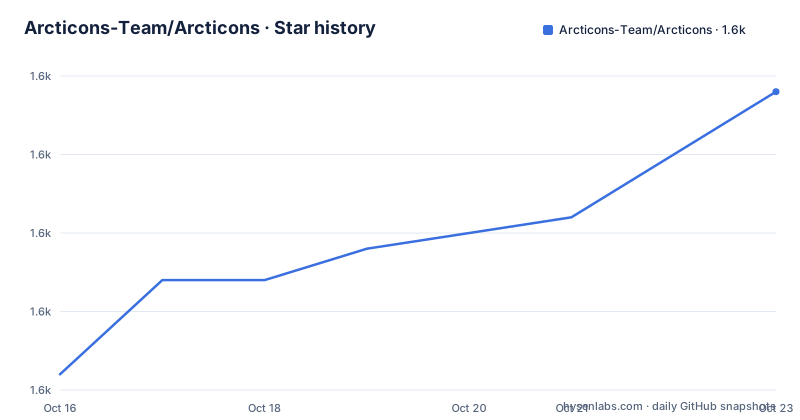
- Arcticons-Team/Arcticons1,592 ★ · +9
| Repository | 2026-10-16 | 2026-10-23 |
|---|---|---|
| Arcticons-Team/Arcticons | 1.6k | 1.6k |
9 Stars in the last 7 days, measured from the daily GitHub snapshot. Compare with other projects
Editorial analysis
A launcher app in Java, and 15000 SVGs that are not Java at all
The primary language of this repository is Java, which misleads anyone who assumes icon packs are code. They are not. Arcticons is a set of vector drawings, and what the repository wraps around them is the machinery that turns loose SVG files into an installable Android icon pack.
Read the top-level entries and the structure explains itself. icons/ is the existing library, newicons/ is the intake area for contributions, generated/ holds output, and templates/ supplies the per-app template skeletons that let a new icon appear for every launcher slot a device exposes. preparehelper/ and scripts/ are the build tooling. app/ is the Java launcher you see when you open the pack from your home screen, and build.gradle, settings.gradle and gradle.properties make the whole tree a Gradle project rather than a folder of images.
The README states there are over 15000 icons and attributes the coverage to a community of icon creators around the world. That number is the practical argument for the pack: coverage is what determines whether a theme feels finished or spotty, and covering tens of thousands of app labels by hand is exactly the work a contribution pipeline exists to absorb.
Two less visible entries matter for anyone evaluating the build. CNAME sits at the repository root for the documentation site, and Privacy_Policy.md is present as a separate file, which is consistent with an app that has a settings screen.
Installing it, and the choice between F-Droid and Google Play
The README contains no install command, because this is not a build-from-source tool for most people. It links to F-Droid at the package identifier com.donnnno.arcticons and to a Google Play listing under the same identifier, and the download counters at the top of the README point at the GitHub releases page. Those are the three documented routes to the built artifact.
For a reader who wants the pack rather than the sources, the practical sequence is short: pick F-Droid if you want the package built from this repository's tags, or Google Play if you already manage updates that way. Apply the pack through your launcher, which for Android means selecting it in the icon theme settings after installation, and the pack's launcher activity is what appears if you open Arcticons itself.
For a reader who wants to build it, the Gradle layout is the documentation. The repository root is the Gradle project with build.gradle and settings.gradle, the gradle/ directory holds the wrapper, and the app/ module holds the Java code. There is no documented gradlew invocation in the README, so the build entry point has to be read from build.gradle rather than copied from the project's own instructions.
Two licences, and they do not cover the same files
The licence section splits the work in two. Arcticons uses the GPL-3.0 license, and all icons are licensed under CC BY-SA 4.0. That pairing is standard for this kind of project and it matters more than it first appears, because the two licences impose different obligations on different files.
GPL-3.0 covers the code: the Java launcher, the Gradle build, the generation scripts. CC BY-SA 4.0 covers the drawings, and its share-alike condition attaches to derivative icon artwork rather than to your application. No legal advice is offered here, but the practical consequence is that a team shipping an icon pack of its own has two separate compliance tracks, attribution and share-alike for the artwork on one side and the GPL terms on the code on the other.
The dual structure also shapes redistribution. The README links both licences, the GPL text at gnu.org and the Creative Commons deed for CC BY-SA 4.0, and the repository carries a single LICENSE file at the root alongside the icons themselves. If you are auditing a downstream copy, verify which licence accompanies which asset rather than assuming one file answers the whole question.
The release cadence: a numbered line plus an automated nightly
Recent releases show two tracks running at once. 15.0.5 was published on 2026-08-15 and 15.3.2 on 2026-09-19, both titled as numbered releases. Between and after them sits an entry titled nightly, an Automated Prerelease, dated 2026-10-10.
That is the release design of a project with a steady volunteer inflow: the numbered versions are what a normal user installs, and the nightly build exists so new contributed icons are visible quickly without waiting for a version bump. The repository carries BuildNightly and Sync to Codeberg workflow badges. The sync badge is a hint about the project's hosting philosophy rather than something a user needs to configure.
The repository is not archived and the last push was on 2026-10-14. For an adopter the practical read is that new icons arrive on a much shorter cycle than new versions do, so a complaint about a missing app label is more likely to be resolved by an update of the same version number than by a release upgrade. CHANGELOG.md at the root is where to look for what changed.
Why a monochrome line set is a trade-off, not a free win
The pack's identity is consistency: every icon is a single weight line drawing, which is what produces the clutter free result the README advertises. The cost is equally straightforward. A monochrome set conveys almost no category information, so an app store and a settings app look alike until you read the label, and users who rely on shape or colour to distinguish apps lose that signal entirely.
There is a second boundary for anyone planning a themed device. Arcticons is a pack for Android, not a cross platform icon set, and the repository's build pipeline is an Android Gradle project rather than a generator that emits other platforms' formats. If your reason for a monochrome theme spans a phone and a desktop, this pack covers the phone half and nothing else.
The obvious case where it is the wrong tool is a device with a small, specific app list. For a phone with a dozen apps, a curated premium pack hand tuned to that exact set will look better than fifteen thousand icons most of which are irrelevant, and the contributor pipeline that makes Arcticons valuable at scale does nothing for a short list.
Documentation lives outside the repository
The README is short because the documentation was moved out. Contributors and anyone with a question are pointed to a knowledge base hosted at docs.arcticons.com, and the repository carries a.github directory with workflows, a CODE_OF_CONDUCT.md, a CONTRIBUTING.md and the community assets under github/.
CONTRIBUTING.md is the file that matters for anyone adding an icon, since the newicons/ directory exists precisely to receive those files and the templates/ directory presumably encodes the naming rules a new icon has to follow for every launcher slot to pick it up. Neither the naming convention nor the template contract is described in the README, so both live in the contribution guide and the knowledge base.
The community infrastructure is also visible from the README: a Matrix room at arcticons-central on matrix.org, donation links through Liberapay and Ko-fi, and a sponsorship by GitBook. None of that affects your install, and all of it points at a project whose energy comes from contributors rather than from a commercial team, which is the honest lens for both the pace of icon additions and the limits on what gets built around them.
Editorial conclusion
Adopt Arcticons if a monochrome line set suits how you read your home screen and you want the pack sourced from F-Droid rather than a closed store. Do not adopt it if you need per-app colour control beyond what the pack ships or if your policy requires assets under a single licence. Verify first that the icons directory and the app carry the two licences the README names, GPL-3.0 for the app and CC BY-SA 4.0 for the icons,
Frequently asked questions
How do I install Arcticons on Android?
Install it from F-Droid or Google Play under the package identifier com.donnnno.arcticons, then select it as the icon theme in your launcher. Built artifacts are also linked from the GitHub releases page, and the README gives no build-from-source command.
What licence applies to Arcticons icons and to the app?
The README states two separate licences: Arcticons uses GPL-3.0, while all icons are licensed under CC BY-SA 4.0. The GPL terms cover the Java launcher and build tooling, the Creative Commons terms cover the artwork.
How do I contribute a new icon to Arcticons?
New artwork belongs in the newicons/ directory, with templates/ supplying the per-launcher-slot skeleton. The README itself documents nothing further and refers contributors to the knowledge base at docs.arcticons.com and to CONTRIBUTING.md.
Does Arcticons publish updates automatically?
There are two tracks: numbered releases such as 15.3.2 on 2026-09-19, and an Automated Prerelease tagged nightly, dated 2026-10-10 in the recent release list. The nightly build is produced by a Build Nightly workflow in the repository.
Official sources
Add this badge to your README
If you maintain this project, the badge below links readers to this analysis and shows its maintenance status from the daily GitHub snapshot. Paste the markdown into your README; add ?metric=license or ?metric=stars to the image URL for a different field.

[](https://hysenlabs.com/projects/arcticons-team-arcticons)Star history chart for your README
[](https://hysenlabs.com/projects/arcticons-team-arcticons)Was this useful?