Axolotl: A Config-Driven Fine-Tuning Framework That Tracks the Model Release Cycle
Go ahead and axolotl questions
At a glance
- What is it?
- Axolotl is an Apache-2.0 Python framework for fine-tuning large language models, with support for a wide range of architectures, LoRA, RL methods, and parallel training. This review covers its config-based workflow, setup, and the trade-offs of adopting a fast-moving project.
- Who is it for?
- Adopt Axolotl if you need to fine-tune or RL-tune a recent open-weight model and you prefer a declarative YAML config over writing training scripts. The project supports a broad range of architectures and keeps pace with new releases, which is valuable when your model must be current.
- Can I use it commercially?
- Yes. Apache-2.0 is a permissive licence: you can use, modify and sell software built on it, as long as you keep its copyright and licence notices.
- Is it still maintained?
- Yes. The repository received new commits within the last day.
- What is it written in?
- Mainly Python, according to GitHub's language statistics.
Answers come from the project's GitHub data, last synced on November 13, 2026, and from our analysis. They are not legal advice.
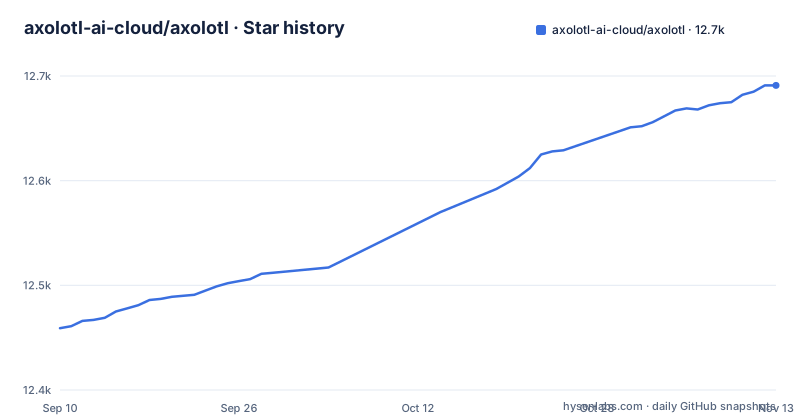
Star history
- axolotl-ai-cloud/axolotl12,691 ★ · +232
| Repository | 2026-09-10 | 2026-11-13 |
|---|---|---|
| axolotl-ai-cloud/axolotl | 12.5k | 12.7k |
232 Stars in the last 64 days, measured from the daily GitHub snapshot. Compare with other projects
Editorial analysis
What Axolotl Solves and Who It Serves
Axolotl is a free and open source LLM fine-tuning framework. It is a Python project, licensed under Apache-2.0, that turns a YAML configuration file into a training run for a large language model. The intended user is an engineer or researcher who needs to adapt a pretrained model to a specific task, but who does not want to write the training loop, the data collator, and the distributed logic from scratch. The project's update log shows a steady stream of new model support and new training techniques, which suggests the target audience is people who fine-tune recent open-weight models and who need the framework to keep pace with model releases. The README does not state a minimum hardware requirement, but the presence of multi-GPU features like Expert Parallelism and FSDP2 implies that serious use of Axolotl assumes access to multiple accelerators.
The Core Mechanism: YAML Config to Training Run
Axolotl's central design is a declarative configuration file. You describe the model, the dataset, the training hyperparameters, and the optimization method in YAML, and the framework interprets that file to build and execute the training job. The documentation site at docs.axolotl.ai is where the structure is explained; the README update notes name keys such as quantize_moe_experts and context_parallel_size. The framework then handles data loading, tokenization, and the forward-backward pass. This approach is different from writing a Python script with a training library directly, because the config file is data, not code. You can version it, diff it, and share it with a colleague, and the same config should produce the same training run on a given environment. The trade-off is that any behavior not exposed as a config key requires either a workaround or a contribution to the project.
Setup and First Run: Commands from the Documentation
The project homepage is the documentation site at docs.axolotl.ai. The repository is described as "uv-first" as of a 2026/04 update, which means the project's own development and likely its installation path are built around the uv package manager. The README does link to a Colab notebook in the examples directory, which is a concrete starting point for someone who wants to try Axolotl without setting up a local GPU environment. For a local run, you create a YAML config and use the axolotl command-line tool; the README mentions its axolotl export subcommand, and the documentation covers the rest. The practical lesson is that Axolotl is not a pip-install-and-go tool in the same way as a small library; it expects you to follow the project's environment setup, which may include specific versions of PyTorch, CUDA, and other dependencies.
Breadth of Support: Models, MoE, and RL Methods
The update log is the most informative part of the README for judging the project's scope. In 2026 alone, Axolotl added support for Ling 3.0, Muse Glimmer, North Micro Vision Instruct, Shieldstral, Mistral Medium 3.5, Gemma 4, Qwen3.5 and Qwen3.5 MoE, GLM-4.7-Flash, GLM-4.6V, and GLM-4.5-Air. That list spans dense models, MoE models, and vision-language models. The framework also supports multiple training paradigms: standard supervised fine-tuning, LoRA, DPO, Generalized DPO (GDPO), and asynchronous GRPO. The GRPO update claims "up to 58% faster steps," but the README does not specify the baseline or hardware, so treat that as a vendor claim rather than a benchmark you can rely on. For MoE models, the project has added ScatterMoE LoRA, expert quantization via quantize_moe_experts, and NVFP4 4-bit MoE LoRA training. This breadth means that if you work with a model that is not on the supported list, Axolotl may not work out of the box, and adding a new architecture requires either waiting for the project to support it or writing the integration yourself.
Parallelism and Advanced Features: Where the Complexity Lives
Axolotl does not hide distributed training complexity; it exposes it as config. The README mentions Expert Parallelism (EP) for distributed MoE training via DeepEP, Context Parallelism for hybrid SSM models like Nemotron-H and Falcon-H1, and FSDP2 compatibility for MoE expert quantization. There is also a distributed Muon optimizer for FSDP2 pretraining. These features are not trivial to enable. Each one likely requires specific hardware, a specific version of a library like DeepEP, and a config that matches the model's architecture. For example, NVFP4 LoRA training via ScatterMoE or SonicMoE is a specialized path that probably demands a GPU that supports that quantization format. The README does not provide a step-by-step guide, so you would rely on the documentation pages linked in the updates. The practical implication is that Axolotl can be a thin wrapper over PyTorch FSDP or a deep integration with custom kernels, depending on which features you turn on. The more advanced the feature, the more you need to understand the underlying technology to debug it.
Genuine Limitations and When It Is the Wrong Tool
The most obvious limitation is the project's velocity. The last push to the main branch was 2026-11-02, and releases are frequent: v0.21.1 on 2026-10-27, v0.21.0 on 2026-10-16, v0.20.0 on 2026-09-30. That cadence means the configuration schema and the command-line interface can change between releases. A config written for v0.20.0 may not work unchanged in v0.21.1. For a production team that needs a stable training pipeline, this is a real risk. Another limitation is that the framework is only as good as its model coverage. If your model is not in the supported list, you are out of luck unless you are willing to contribute. The advanced features like Expert Parallelism and NVFP4 assume a multi-GPU or specialized hardware setup.
Alternatives and How They Differ
The most direct alternative to Axolotl is Hugging Face Transformers with the Trainer API, or the TRL library for reinforcement learning. Hugging Face's approach is code-first: you write a Python script that defines the model, the dataset, and the training arguments. That gives you full control and a stable API that is widely documented, but it also means you must write more glue code for each new model or training method. Axolotl's config-driven approach aims to reduce that glue code by making the training setup declarative. If you value a stable, well-known codebase and do not mind writing scripts, Transformers is a safer choice. If you want to fine-tune a newly released model with minimal code and are willing to adapt to the project's release cycle, Axolotl is the more direct path.
Maintenance, Upgrades, and License Considerations
The repository is active, with the last push on 2026-11-02 and the latest release, v0.21.1, on 2026-10-27. The README carries a codecov badge, and the repository has cicd/ and tests/ directories. The Apache-2.0 license is permissive, so you can fork the project and modify it for internal use without releasing your changes, but if you distribute a modified version, you must comply with the license terms, including retaining the license notice. Upgrading Axolotl is likely to be a recurring task, and each upgrade may require updating your YAML config to match new keys or changed defaults. The documentation site is the place to check for a changelog or migration guide. In short, the project is alive and well maintained, but it is not a set-and-forget dependency.
Editorial conclusion
Adopt Axolotl if you need to fine-tune or RL-tune a recent open-weight model and you prefer a declarative YAML config over writing training scripts. The project supports a broad range of architectures and keeps pace with new releases, which is valuable when your model must be current. Do not adopt it if you require a stable, minimally changing API, if you need to fine-tune a model that is not in the supported list, or if you cannot tolerate debugging issues that may stem from the project's rapid release cycle. Before committing, verify that your exact model and training method (SFT, LoRA, DPO, GRPO, etc.) appear in the documentation and examples, and check the pinned dependency versions in the repository to ensure they match your environment. Also confirm the disk and VRAM requirements for your chosen parallelism strategy, because the documentation's advanced features assume multi-GPU setups. The project's value is tied to its breadth and currency, so your decision should rest on whether that breadth matches your model roadmap.
Frequently asked questions
What does Axolotl require before a fine-tuning run?
Python 3.12 or newer, since pyproject.toml sets requires-python to >=3.12, plus the pinned stack around it: torch>=2.13.0,<2.16.0, transformers==5.22.0, trl==1.14.1 and peft==0.21.2.
Can Axolotl fine-tune mixture of experts models on macOS?
MoE support runs through several paths, including quantize_moe_experts: true for FSDP2, DeepEP and torch all-to-all expert parallelism. bitsandbytes, triton and xformers are excluded on darwin in pyproject.toml, so the run belongs on a Linux host with an NVIDIA device.
How do I export an Axolotl model for llama.cpp or Ollama?
GGUF export is available through the axolotl export subcommand, with optional quantization for deployment with llama.cpp and Ollama. NVFP4 LoRA support also includes merging an adapter back into a plain NVFP4 checkpoint.
Does Axolotl collect telemetry, and can it be turned off?
posthog==6.7.11 appears as a pinned dependency under a telemetry comment in pyproject.toml.
What license is Axolotl released under?
Apache-2.0, with a LICENSE file at the repository root. The license field in pyproject.toml is commented out, while the version is derived dynamically through setuptools_scm.
Official sources
Where this project is recommended
Add this badge to your README
If you maintain this project, the badge below links readers to this analysis and shows its maintenance status from the daily GitHub snapshot. Paste the markdown into your README; add ?metric=license or ?metric=stars to the image URL for a different field.

[](https://hysenlabs.com/projects/axolotl-ai-cloud-axolotl)Star history chart for your README
[](https://hysenlabs.com/projects/axolotl-ai-cloud-axolotl)Was this useful?