qBitController for Remote qBittorrent Management
Control qBittorrent from any device
At a glance
- What is it?
- qBitController is an open-source client for controlling qBittorrent from Android, iOS, Windows, Linux, and macOS devices. It suits existing qBittorrent users, but the README does not document connection setup or feature parity.
- Who is it for?
- qBitController is appropriate for existing qBittorrent users who need a client on another supported device and are comfortable supplying their own connection details. It is less suitable for users who require documented SSO, offline operation, or a clearly stated compatibility matrix.
- Can I use it commercially?
- Yes, with conditions. GPL-3.0 is a copyleft licence: if you distribute software that includes it, you must release that software's source code under the same licence. Running it internally without distributing it does not trigger that obligation.
- Is it still maintained?
- Yes. The repository last received commits 2 days ago.
- What is it written in?
- Mainly Kotlin, according to GitHub's language statistics.
Answers come from the project's GitHub data, last synced on November 6, 2026, and from our analysis. They are not legal advice.
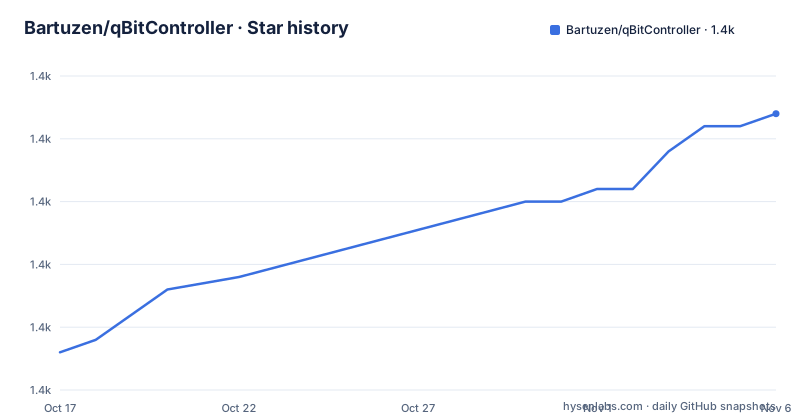
Star history
- Bartuzen/qBitController1,372 ★ · +19
| Repository | 2026-10-17 | 2026-11-06 |
|---|---|---|
| Bartuzen/qBitController | 1.4k | 1.4k |
19 Stars in the last 20 days, measured from the daily GitHub snapshot. Compare with other projects
Editorial analysis
qBitController's Remote qBittorrent Use Case
qBitController addresses a specific problem: qBittorrent normally runs on a computer, while its users may be away from that computer or using a different device. The app provides a separate client interface for interacting with qBittorrent from Android, iOS, Windows, Linux, or macOS hardware. The target user is therefore an existing qBittorrent operator who wants access to the desktop client from another supported platform.
This is a companion application, not a standalone torrent client. The repository does not say that qBitController can manage a torrent without an existing qBittorrent instance. It also does not claim that the qBittorrent computer must run on the same operating system as qBitController. That is useful because the stated platform support spans desktop and mobile systems, although the README does not publish a connectivity diagram.
The project's scope is control of qBittorrent, not management of an arbitrary collection of downloaders. Users looking for one interface for several unrelated torrent backends may find the narrow focus limiting. Conversely, people who use qBittorrent and want access from a second device fall directly into the problem this repository addresses. The name should not be read as a remote desktop tool: the repository describes application-level control of qBittorrent rather than display streaming or general computer administration.
The README remains deliberately short. It confirms the supported device families, distribution channels, screenshots, and localization process, but it does not enumerate individual commands such as adding, pausing, deleting, or prioritizing torrents. Those operations may exist in the app, but this documentation does not provide enough evidence to turn them into adoption criteria.
Repository Structure for Android and iOS Clients
The repository layout exposes two named application areas, `composeApp/` and `iosApp/`. It also includes shared or platform-adjacent directories named `preferences/`, `baselineProfile/`, `buildSrc/`, and `gradle/`. Based on those names, the project is organized around Kotlin-oriented Android tooling with a separate iOS application area. The top-level `build.gradle.kts`, `settings.gradle.kts`, and `gradle.properties` provide the Gradle build structure visible in the repository.
That structure supports the README's cross-platform claim, but it does not reveal the network protocol or internal data flow. The README does not say whether qBitController calls qBittorrent's Web API directly, how connection profiles are represented, or whether commands pass through any intermediate service. It would be inaccurate to describe an unconfirmed proxy or synchronization architecture.
The presence of `fastlane/` explains one visible part of the Android distribution workflow. Its metadata directory contains the screenshots linked by the README, while the project also links to Google Play, F-Droid, and IzzyOnDroid. Localization is handled through Weblate rather than only through text files visible at the repository root. Contributors are directed to the project's Weblate page for translation work.
The repository does not include a `desktopApp/` directory with an obvious name, despite Windows, Linux, and macOS appearing in the supported-platform description. This may reflect reuse of the Kotlin or Compose code, packaging outside the most visible source folders, or another arrangement not described in the README. The source layout alone cannot settle that question. Engineers evaluating reuse should inspect build targets and platform-specific networking implementation before assuming one shared UI codebase.
Installing qBitController and Completing the First Launch
qBitController is distributed as prebuilt app packages rather than through a documented command-line installation procedure. Android users can choose Google Play, F-Droid, or IzzyOnDroid. Users who want a GitHub build can open the repository's Releases page. The README does not give equivalent direct download instructions for iOS, Windows, Linux, or macOS, so the available build for those platforms should be checked on the Releases page before installation.
For Android, the documented choice is between three channels:
Google Play Store
F-Droid
IzzyOnDroid
These are distribution names rather than commands. Readers should expect to locate the listing using the application identifier `dev.bartuzen.qbitcontroller`, which appears in the README's store links.
For GitHub-based installation, use the `qBitController/releases` page linked by the README. The repository lists a recent release named `v2.2.1`, but the README does not identify a universal package, operating-system-specific filename, or checksum. Those details must come from the release page rather than being inferred from the project name.
After obtaining a build, the first real step is to connect the app to the user's qBittorrent instance. However, the README does not document the exact fields, menu, URL format, or authentication sequence shown on first launch. It would be misleading to invent a host entry, port, username, password prompt, or setup button. Before installing, users should consult the current application interface or release documentation for those connection details.
A practical first use can still be scoped precisely. Launch qBitController on the second device, configure access to the existing qBittorrent service using the app's documented process, and confirm that the client recognizes the server. The README does not state which connection checks are presented, so it cannot establish whether authentication errors, TLS handling, or network failures receive explicit diagnostics.
Distribution Choices and Upgrade Boundaries
qBitController offers a meaningful distribution choice on Android. Google Play provides a conventional managed storefront, F-Droid serves users who follow that catalog, and IzzyOnDroid provides another APK source. GitHub Releases add a repository-controlled channel. Each channel can produce a different update cadence, packaging experience, and review process, but the README does not document whether all channels always contain the same build.
The available release history provides concrete upgrade markers. `v2.2.0` was released on 2026-05-05, and `v2.2.1` was released on 2026-07-28. The earlier `v2.1.0` release is dated 2025-09-01. These tags establish that versioned releases exist, but the repository does not include migration notes, API changes, database migrations, or compatibility requirements for qBittorrent versions.
The repository is not archived. Its last push was on 2026-10-05, which is after the listed `v2.2.1` release. That supports treating the repository as receiving recent development activity, but it does not promise a release schedule or guarantee compatibility with future qBittorrent changes.
The upgrade cost appears low for ordinary app users if their chosen store handles replacement automatically. It is less predictable for people distributing signed or manually managed packages across multiple platforms. Because the README does not document automatic updates, signing arrangements, or whether desktop packages update themselves, those are concrete checks rather than assumptions. An evaluator should compare the installed version with the Releases page before diagnosing a connection problem.
GPL-3.0 Implications for qBitController Users
qBitController is released under `GPL-3.0`. For users who only install an official package, the most visible implication is that the project is free and open source rather than proprietary software. Developers who modify qBitController or distribute modified copies must examine the GPL obligations themselves. This review does not provide legal advice, and it does not establish how an app-store distribution has been configured beyond the stated license and download links.
Organizations that package the app internally should also preserve the applicable license text and notices. The repository includes a `LICENSE` file, while `CONTRIBUTING.md` provides a project-level contribution entry point.
The multi-platform nature does not change the core fact that the repository carries `GPL-3.0`. Anyone embedding its code into another client, adding a network-facing service, or publishing a modified build should review the actual obligations for that distribution. Reading the repository license and keeping records of build sources are more specific than assuming that use on a phone is categorically separate from distribution of the application.
Where qBitController Falls Short for Evaluation
The clearest limitation is documentation coverage. The README does not explain how a qBittorrent server is configured, whether the qBittorrent Web API is enabled, which authentication settings are required, or which qBittorrent versions work with qBitController. It also does not state whether remote connections use HTTP, HTTPS, or another transport. For a remote-control application, those omissions matter because connection setup and server-side exposure are central adoption details.
The screenshots indicate that the application has a developed user interface, but image files do not provide reliable details about every feature or platform. The repository does not include a written feature matrix for Android, iOS, Windows, Linux, and macOS. Users who depend on a particular operation should verify that it is available in the release for their platform rather than assuming that one native client has complete parity with every other client.
Alternative access methods may exist, but the README does not compare them with qBitController.
Another unsuitable case is a user with no qBittorrent instance. The project is a controller for that software, not a replacement torrent engine. It is also a weak choice when centralized policy documentation is mandatory, because the README does not establish enterprise authentication, audit logging, deployment controls, or a tested compatibility matrix.
Editorial conclusion
qBitController is appropriate for existing qBittorrent users who need a client on another supported device and are comfortable supplying their own connection details. It is less suitable for users who require documented SSO, offline operation, or a clearly stated compatibility matrix. Before adoption, verify the qBittorrent connection workflow, Web API availability and authentication requirements, platform-specific release availability, and the exact features needed in the v2.2.1 client.
Frequently asked questions
Which platforms support qBitController?
The README lists Android, iOS, Windows, Linux, and macOS. It does not specify feature parity or release-package availability for each platform.
How do I install qBitController on Android?
The README provides download links for Google Play, F-Droid, and IzzyOnDroid. GitHub Releases are also linked for users who want to obtain a release directly.
Does qBitController include a torrent client, or does it require qBittorrent?
It is described as an app for controlling qBittorrent from other devices. The repository presents it as a remote controller rather than a replacement for qBittorrent.
What is the latest listed qBitController release?
The latest listed release is `v2.2.1`, dated 2026-07-28. The repository's last push was on 2026-10-05.
How does qBitController connect to a qBittorrent server?
The README does not document the connection workflow, required fields, ports, or authentication sequence. Those details need to be verified from the application or its release documentation before setup.
Official sources
Add this badge to your README
If you maintain this project, the badge below links readers to this analysis and shows its maintenance status from the daily GitHub snapshot. Paste the markdown into your README; add ?metric=license or ?metric=stars to the image URL for a different field.

[](https://hysenlabs.com/projects/bartuzen-qbitcontroller)Star history chart for your README
[](https://hysenlabs.com/projects/bartuzen-qbitcontroller)Was this useful?