The Unlocker patches VMware binaries and keeps backups for a reason
VMware Workstation macOS
At a glance
- What is it?
- BDisp's Unlocker removes the checks that stop VMware Workstation and Player from booting an Apple operating system, by patching vmware-vmx and vmwarebase across a matrix of product versions and keeping the originals in a backup folder. Its most useful documentation is the list of failure modes, from the core dump on Windows to the darwin.iso not appearing in the menu.
- Who is it for?
- Adopt this tool only if you have a specific need to run an Apple operating system inside VMware on hardware Apple does not certify, and you are willing to manage a patched VMware installation. Do not adopt it casually: it modifies an installed VMware application, and the README warns that a botched uninstall can leave VMware unusable, and running macOS on non-Apple hardware conflicts with Apple's software licence terms, which is a decision to make yourself.
- Can I use it commercially?
- Yes. MIT is a permissive licence: you can use, modify and sell software built on it, as long as you keep its copyright and licence notices.
- Is it still maintained?
- Yes. The repository last received commits 80 days ago.
- What is it written in?
- Mainly Python, according to GitHub's language statistics.
Answers come from the project's GitHub data, last synced on November 7, 2026, and from our analysis. They are not legal advice.
Star history
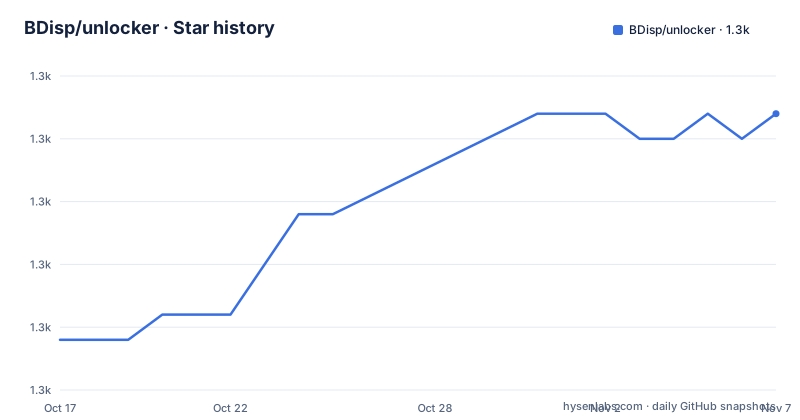
- BDisp/unlocker1,261 ★ · +9
| Repository | 2026-10-17 | 2026-11-07 |
|---|---|---|
| BDisp/unlocker | 1.3k | 1.3k |
9 Stars in the last 21 days, measured from the daily GitHub snapshot. Compare with other projects
Editorial analysis
What the patch actually changes
The patch code carries out three modifications, depending on which product is being patched.
First, it fixes `vmware-vmx` and its derivatives to allow macOS to boot. Second, it fixes `vmwarebase`, either the `.dll` on Windows or the `.so` on Linux, to allow Apple to be selected as an operating system during VM creation. Third, a separate step downloads a copy of the latest VMware Tools for macOS.
So this is binary patching of an installed application, not a configuration change.
The version matrix is explicit. Unlocker 3 targets VMware Workstation 11 through 26H1 and Player 7 through 25H2, and it has been tested against Workstation 11, 12, 14, 15, 16, 17, 25H2 and 26H1 on Windows and Linux, and Player 7, 12, 14, 15, 16, 17 and 25H2 on the same two platforms. Anyone on an earlier product is directed to Unlocker 1.
The code is written in Python.
Install, uninstall and the two warnings that matter
The scripts come in matched pairs for each platform. On Windows there is `win-install.cmd`, `win-uninstall.cmd` and `win-update-tools.cmd`; on Linux there is `lnx-install.sh`, `lnx-uninstall.sh` and `lnx-update-tools.sh`.
Windows needs Administrator rights, either by running cmd.exe as Administrator or by right-clicking the command file and choosing Run as administrator. Linux needs root or sudo, and the scripts may need execute permissions:
chmod +x lnx-install.sh lnx-uninstall.shTwo warnings appear before anything else, and they are the most important content in the README.
Never delete the backup folder before uninstalling. And always uninstall the previous version of the Unlocker before using a new one. The stated consequence of not following this is that it could render VMware unusable.
That is not boilerplate. The tool's own release history shows the same lesson arriving repeatedly in the form of small breakages: separate backup folders per operating system added in 3.0.4, an install guard that prevents installing the unlocker more than once added in 3.1.3, and a Windows registry fix for VMware 26H1 in 3.1.4. Each of those is a symptom of a script that touched something it should not have.
In all cases VMware must not be running and any background guests must be shut down before the scripts execute.
The failure modes are documented, which is rare and useful
Section three of the README is a list of limitations, and it is the part most worth reading before you run anything.
On Windows, VMware Player or Workstation may produce a core dump, in particular when creating a new VM. Latest Linux products are stated to be fine and not to show the problem.
Two workarounds are given for the Windows case. Change the VM to hardware version 10, which the README says does not affect performance. Or edit the VMX file and add:
smc.version = "0"That is the kind of detail that explains why this is not a one-line patch. Unlocking the boot path gets you a VM that starts and then fails on hardware that VMware does not emulate, and the fix is a per-VM configuration change that nobody tells you about until it goes wrong.
A second limitation concerns the Tools ISO. Not all products recognise darwin.iso through the install tools menu item, and on Workstation 11 and Player 7 it has to be mounted manually.
The repository root makes the shape of the project visible: `unlocker.py` and `gettools.py` alongside their `.exe` builds, `dumpsmc.py` and `dumpsmc.exe` for dumping the SMC value, helper function files per platform, test scripts `win-test-install.cmd` and `win-test-update-tools.cmd` plus `test-unlocker.py`, packaging scripts in PowerShell and shell, and a `pyrightconfig.json` for type checking the Python.
Platform packaging and the release record
The README handles Windows and Linux users differently, and the difference is about distribution rather than about the tool.
Windows users are directed to the Releases section, where they get a bundled Python distribution that the README says avoids virus warnings and Python-not-found errors. That is the PyInstaller packaging, and it explains the `.exe` files committed at the repository root.
Linux users get no bundled Python and are asked to have Python 3.0 or later installed. If they hit a Python not supported error despite having Python, the suggested workaround is to run the script with `PYVERSION=python3.7`.
That variable is a leftover from an era when the script detected the interpreter in a fragile way, and it is still documented. The 3.1.1 release removed Python 2 support, which is the more substantive change.
The release table is long and specific, which is the best evidence about the maintenance reality. It runs from 3.0.0 on 27/09/2018 through 3.1.4 on 16/05/2026, and most entries are fixes to the tools downloader: a Python 3 port in 3.0.1, false positives from antivirus software in 3.0.2, VMware 15.5 in 3.0.3, build 18760230 in 3.0.4, then a long series of version-specific fixes for Workstation 16.2, 17.0.0, 17.0.1, an HTTP 403, a missing darwin file, an IndexError in 3.0.7 to 3.0.9, a shell error in 3.1.0 and CI workflows in 3.1.2.
That pattern says what the project is: the patching is stable and the maintenance is a treadmill following VMware's own releases. Each new VMware build can break the tools download, and the project responds.
Recent tags are 3.1.4 on 2026-05-16, 3.1.3 on 2026-02-17 and 3.1.2 on 2025-10-29, and the last push was on 2026-08-20. The licence is MIT, and the README credits Zenith432 for the original C++ unlocker plus Mac Son of Knife for testing and support, and Sam B for the ESXi 6 work including the Python 3 port for ESXi 6.5.
Editorial conclusion
Adopt this tool only if you have a specific need to run an Apple operating system inside VMware on hardware Apple does not certify, and you are willing to manage a patched VMware installation. Do not adopt it casually: it modifies an installed VMware application, and the README warns that a botched uninstall can leave VMware unusable, and running macOS on non-Apple hardware conflicts with Apple's software licence terms, which is a decision to make yourself. Verify first that your exact product version is in the tested list, that you run the uninstall for the previous version before installing a new one, and that you never delete the backup folder.
Frequently asked questions
Which VMware versions does the Unlocker support?
Unlocker 3 is designed for VMware Workstation 11 through 26H1 and Player 7 through 25H2, and has been tested against Workstation 11, 12, 14, 15, 16, 17, 25H2 and 26H1 and Player 7, 12, 14, 15, 16, 17 and 25H2 on Windows and Linux. Earlier products need Unlocker 1.
How do I undo the Unlocker patch?
Run the matching uninstall script: `win-uninstall.cmd` on Windows, `lnx-uninstall.sh` on Linux. The README insists you never delete the backup folder before uninstalling and that you uninstall the previous version before installing a new one, because failing to do so could render VMware unusable.
What do I do if VMware crashes with a core dump after patching?
The README offers two workarounds for the Windows case: change the VM to hardware version 10, which it says does not affect performance, or edit the VMX file and add `smc.version = "0"`. It notes that latest Linux products do not show this problem.
What does the Unlocker actually patch?
It fixes vmware-vmx and derivatives to allow macOS to boot, fixes vmwarebase as a .dll or .so so Apple can be selected during VM creation, and can download a copy of the latest VMware Tools for macOS. Not all products recognise darwin.iso through the install tools menu, so on Workstation 11 and Player 7 it must be mounted manually.
Official sources
Add this badge to your README
If you maintain this project, the badge below links readers to this analysis and shows its maintenance status from the daily GitHub snapshot. Paste the markdown into your README; add ?metric=license or ?metric=stars to the image URL for a different field.

[](https://hysenlabs.com/projects/bdisp-unlocker)Star history chart for your README
[](https://hysenlabs.com/projects/bdisp-unlocker)Was this useful?