pipx isolates Python apps with uv or pip, then hands you ensurepath
Install and Run Python Applications in Isolated Environments
At a glance
- What is it?
- pipx installs Python applications into one environment each, exposes only their command line entrypoints, and never calls sudo. Installing it takes two lines on every platform, and the second line is the one the README never explains.
- Who is it for?
- Adopt pipx when what you want are command line applications and a shared site-packages directory keeps breaking them. Do not reach for it to install libraries, and do not skip pipx ensurepath after a brew, scoop or distribution install, because that is the step the README leaves undefined.
- Can I use it commercially?
- Yes. MIT is a permissive licence: you can use, modify and sell software built on it, as long as you keep its copyright and licence notices.
- Is it still maintained?
- Yes. The repository last received commits 1 day ago.
- What is it written in?
- Mainly Python, according to GitHub's language statistics.
Answers come from the project's GitHub data, last synced on November 14, 2026, and from our analysis. They are not legal advice.
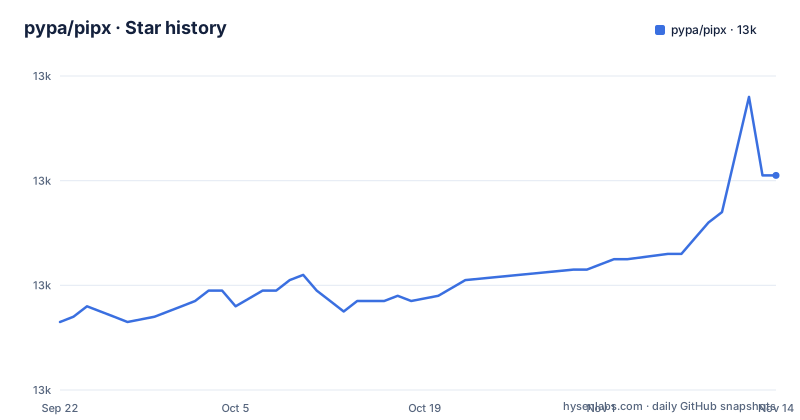
Star history
- pypa/pipx13,001 ★ · +28
| Repository | 2026-09-22 | 2026-11-14 |
|---|---|---|
| pypa/pipx | 13k | 13k |
28 Stars in the last 53 days, measured from the daily GitHub snapshot. Compare with other projects
Editorial analysis
One environment per app, one entrypoint set, no sudo
pipx exists for the specific case where somebody wrote a Python application you run from a terminal. It installs with uv when available and pip otherwise, and it installs each such package into its own environment and exposes only that package's command line entrypoints, so two applications that disagree about a library version stop fighting over one site-packages directory. The README calls the result dependency conflicts avoided and clean uninstalls, and the line worth quoting is the one about privileges: pipx runs with regular user permissions, never calling `sudo pip install`. Installing and running takes two commands:
pipx install pycowsay
pycowsay mooo
The second line works because install put pycowsay's entrypoint somewhere your shell can reach.
pipx run builds a temporary environment for one command
The second half of pipx is a runner. `pipx run pycowsay moo` takes the latest published version of an application, puts it in a temporary environment and executes it, which is why running an application without installing it gets its own bullet in the feature list instead of being left to pip.
pipx run pycowsay mooThat is the same shape as npx in the JavaScript world. Two things are missing from the explanation. The README does not say whether that temporary environment is reused on the next invocation, so an environment rebuild on every call is a cost you cannot rule out from the text. It says nothing about pinning a version through run either, which leaves a trial of an unreleased tool dependent on whatever the index serves at that moment. For a one-off look at a command line tool this is the right command. For something you will call every day, install puts it in a place pipx manages for you.
Three install routes, one ensurepath at the end
Install routes differ, the last command does not. macOS uses `brew install pipx`, Windows uses `scoop install pipx`, and for Linux the project points at your distribution's package manager and its own installation page instead of giving a command. All three end with the same line:
pipx ensurepathThe macOS sequence runs brew install pipx and then pipx ensurepath; the Windows sequence runs scoop install pipx and then pipx ensurepath, while the Linux instructions on the documentation site carry the same closing step. Nothing in the README says what ensurepath modifies, and that gap lands on the exact file a new user forgets to check. When a shell cannot find pipx after a package manager reported success, this is the documented step to look at, and because the effect is undefined in the README you may have to read the installation page at pipx.pypa.io to settle it.
argcomplete, colorama, and a userpath version left out
pipx's own dependency list describes more of what it does than the feature list does. Six runtime dependencies are declared:
dependencies = [
  "argcomplete>=3.7.2",
  "colorama>=0.4.6; sys_platform=='win32'",
  "filelock>=4.2",
  "packaging>=26.3",
  "platformdirs>=4.12.2",
  "userpath!=1.9,>=1.9.2",
]
platformdirs resolves the per-user directories that differ between operating systems, so this is where the location of your environments and configuration comes from. filelock is pinned at 4.2 or newer, and the project does not say which operations it locks. userpath is constrained to 1.9.2 or newer and explicitly excludes 1.9.
Python 3.10 is the floor, and completion has no setup step
pyproject.toml sets requires-python to >=3.11 and the classifiers stop at 3.15, so a workstation still on 3.10 cannot run current pipx, and each new Python release waits for a classifier before the project claims it. argcomplete is a hard runtime dependency rather than an extra, which means the code that hooks into shell completion is already on every machine that has pipx. What is missing is the instruction. The installation section covers brew, scoop, distribution packages and ensurepath, and says nothing about wiring completion into bash or zsh, so the feature lives in the dependency tree and nowhere in the setup steps. A shell that offers no completions after installing pipx is not evidence of a broken install. On Windows the same list adds colorama behind a sys_platform marker, which is why colour output takes a different path there.
Libraries and machine-wide installs sit outside pipx
Two categories of Python software have no home here. A package with no command line entrypoint, such as a library your own code imports, has nothing for pipx to expose, so installing one through pipx does not give you an importable library in your project. Each application gets its own environment under your own user, so disk use grows with the number of tools rather than sharing one copy of a common dependency. That is the trade the project makes on purpose: isolation between applications instead of one environment per machine. If you want a system-wide tool with one dependency set, the distribution package manager stays the right instrument.
Where pipx sits against brew, npx and apt
The README places pipx beside macOS's brew, JavaScript's npx and Linux's apt, and links a documentation page that compares it with other tools including pipsi. The instructive split is npx, because run behaves like a fetch and execute with no persistent install, which is exactly the temporary environment pipx run builds for a package on the Python package index. brew and apt lean the other way: they install from a curated channel into locations the package manager owns, while pipx installs through pip but keeps the result inside your account. That difference in where things land is why the comparison lives on its own documentation page rather than in the README, and why the README keeps sending readers to pipx.pypa.io for anything past the two quick start commands.
MIT licence, a dynamic version, three patch releases in four days
The project is MIT licensed, with LICENSE at the repository root, and the README routes anyone touching the codebase, the issue tracker or chat through the PSF Code of Conduct. The version is not written into pyproject.toml. It is declared dynamic and produced by hatch-vcs, a build requirement sitting beside hatchling and docutils, so the release number comes from the repository's own tagging rather than from a line a maintainer edits. Recent releases show that stream in patch form: 1.18.10 on 2026-10-29, 1.18.11 on 2026-10-30 and 1.18.12 on 2026-11-03, and the last push to the repository landed on 2026-11-02. For a tool whose job is installing other people's tools, the version number on your machine is a patch number that moves several times a week. A separate bootstrap script, get-pipx.py, sits in the repository root where no installation section links it.
Editorial conclusion
Adopt pipx when what you want are command line applications and a shared site-packages directory keeps breaking them. Do not reach for it to install libraries, and do not skip pipx ensurepath after a brew, scoop or distribution install, because that is the step the README leaves undefined. Check first that your Python is 3.11 or newer, since pyproject.toml sets requires-python to >=3.11.
Frequently asked questions
Why is pipx not recognized by my shell?
Every installation route in the README ends with pipx ensurepath, after brew on macOS, scoop on Windows or a distribution package on Linux. The README does not document what ensurepath changes, so a shell that cannot find pipx after a successful package install points at that step.
What is the difference between pip3 and pipx?
pipx uses pip but is scoped to packages you can run from the command line, installing each one into an isolated environment and exposing only its entrypoints. pip3 installs into whichever environment is active, which is where two tools needing different versions of the same library collide.
What are the current versions of pipx?
The recent releases are 1.18.12 on 2026-11-03, 1.18.11 on 2026-10-30 and 1.18.10 on 2026-10-29. The version is declared dynamic in pyproject.toml and produced by hatch-vcs from the repository state rather than hard coded.
How do I completely remove a package from pipx?
Uninstalling is one of the three package operations the README names alongside listing and upgrading, and clean uninstalls are the stated payoff of installing into an isolated environment. The README does not document a command that removes pipx itself or every environment at once, or where those environments live on disk.
Official sources
Add this badge to your README
If you maintain this project, the badge below links readers to this analysis and shows its maintenance status from the daily GitHub snapshot. Paste the markdown into your README; add ?metric=license or ?metric=stars to the image URL for a different field.

[](https://hysenlabs.com/projects/pypa-pipx)Star history chart for your README
[](https://hysenlabs.com/projects/pypa-pipx)Was this useful?