Minosoft reimplements the Minecraft client from scratch and says so in every README section
An open source Minecraft reimplementation written from scratch. Mirror of https://gitlab.bixilon.de/bixilon/minosoft
At a glance
- What is it?
- Minosoft is a Kotlin and Java Minecraft client written from scratch, supporting protocol versions 1.7 through 1.20.4 with headless mode, multiple accounts and multiple server connections. The author describes development as semi active, declines to add new protocol versions, and states there are no releases to wait for.
- Who is it for?
- Use Minosoft if you want to study a complete Minecraft client written from the protocol upward, or if you value features such as several accounts and several server connections in one process, and you can tolerate a client that will not follow new protocol versions. Do not use it on an account you care about, because the README states plainly that the author is not responsible for accounts banned by anti-cheat systems.
- Can I use it commercially?
- Yes, with conditions. GPL-3.0 is a copyleft licence: if you distribute software that includes it, you must release that software's source code under the same licence. Running it internally without distributing it does not trigger that obligation.
- Is it still maintained?
- Yes. The repository last received commits 68 days ago.
- What is it written in?
- Mainly Kotlin, according to GitHub's language statistics.
Answers come from the project's GitHub data, last synced on November 7, 2026, and from our analysis. They are not legal advice.
Star history
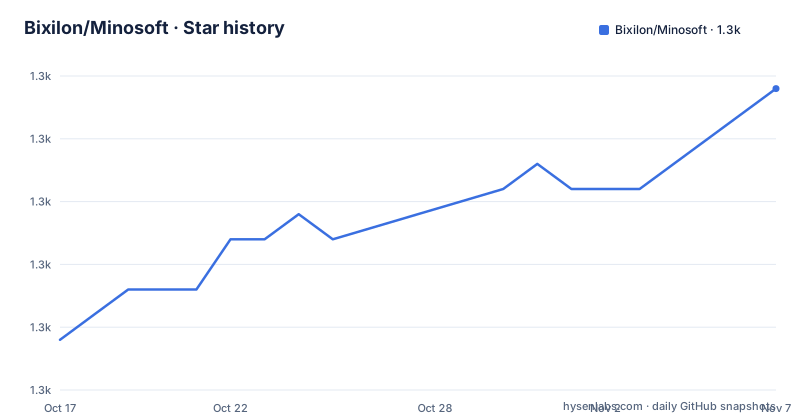
- Bixilon/Minosoft1,322 ★ · +10
| Repository | 2026-10-17 | 2026-11-07 |
|---|---|---|
| Bixilon/Minosoft | 1.3k | 1.3k |
10 Stars in the last 21 days, measured from the daily GitHub snapshot. Compare with other projects
Editorial analysis
A reimplementation, and the distinction the author insists on
Minosoft is described as an open source Minecraft client written from scratch in Kotlin and Java, and the README is careful about what that means. It says in parentheses that this is not a classical clone of Minecraft but completely re-implements it, and separately that the software is not affiliated with Mojang AB, the original developer.
Both statements are load-bearing. A reimplementation need not load the original game's code. A reimplementation is a client that speaks the protocol itself, which means it needs its own renderer, its own physics and its own understanding of the protocol version it talks. That is a far larger surface, and it is the reason the feature list reads the way it does.
The topic tags say reversing, networking and opengl, which is the honest summary of the work: understanding a protocol and a rendering API well enough to reproduce a game client without the original code.
The repository layout supports that reading. src/ is the client, util/ holds utilities, schemas/ holds schema definitions, release/ holds release material, and a doc/ directory carries the architecture design, a rendering explanation, notes on performance, on physics, on headless mode and on version support. That is a project documenting its own internals, not a wrapper tracking someone else's.
What it can do that the standard client does not
The feature list is worth reading for the items that are unusual rather than the ones that are expected. Rendering, connecting, and version support are table stakes for a client; the following are not.
Multiple accounts are supported, and multiple connections to servers in one process. A single JVM running several sessions is a different architecture from several clients, and it is the feature most likely to be the reason someone looks at this project.
Headless mode has its own document, doc/Headless.md, which tells you it is a supported mode rather than a hack. Combined with debugging on the protocol layer, also listed, that is a coherent story: a client you can drive and inspect without a display.
Multithreading and asynchronous loading are called out explicitly, and the performance document is linked with a note about start time. Original physics has its own document, doc/Physics.md, which suggests the physics is the project's own rather than a port.
Profiles, described as settings for servers or for Minosoft in general, are a quality-of-life feature that matters when the same client is used for several servers. LAN servers and modding are also listed, with modding marked as working but still missing some features, tracked in issue 12.
On modding the README makes a promise that is unusual in a project like this: independent, with the note that the author will probably accept almost all patches. For a reimplementation, that is a statement about how the protocol knowledge is treated.
The anti-cheat paragraph is the first thing to read
The README contains a notice in a heading, and it is blunt: the author is not responsible for anti-cheat banned accounts, and the project is still in development.
Put that next to the rest of the feature list and the reason is clear. A client that talks the protocol directly, that can run several accounts in one process, and that can drive a server without a display is exactly the shape of software that a server operator's anti-cheat is looking at. None of those features requires cheating to be useful, and none of them is unique to this project, but the combination is the risk.
The project also lists a botting section whose stated status is that it will be improved in the future, and several screenshots of a server's AFK pooling area, hit boxes and particles. Whatever the intent, the README is candid that accounts used with a from-scratch client can get banned, and that the author disclaims responsibility.
The practical guidance follows from that. This is a client to read, to study and to run on an account that has nothing to lose. Anyone evaluating it for a main account should weigh the disclaimer rather than the feature list.
Version support stops at 1.20.4, and that is a decision not an accident
Almost all versions and snapshots between 1.7 and the latest are supported, with 1.20.4 given as the latest at the time of writing. The initial goal was to support up to 1.20, and the README says that is done. 1.21.x is not supported, with a linked issue.
The reason is stated more bluntly than most projects manage. The author says they are not adding support for new protocol versions because they are bored of it, and that vanilla updates get larger and larger and they cannot keep up.
That is worth taking at face value when planning. A client that supports a fixed range of protocol versions ages in a specific way: it works on the servers that still speak those versions, and it does not gain capability over time. Servers and proxies in front of them move forward, and there is no upstream dependency to pull a fix from.
So the practical question for anyone considering this client is not whether it is good, but whether your target server is in range. doc/VersionSupport.md is named as the place with the details, and there is a separate education branch described as a minimal education edition.
There are no releases, and that is stated rather than implied
The section on releases and beta opens with: no clue, don't wait for it.
The explanation follows and it is the most self-aware paragraph in the README. Many thousands of hours were invested to make it work, a lot of vanilla features are implemented, and a lot is still missing. A release normally means it is stable, has few known bugs, and will not change much soon. The README says none of those requirements are currently fulfilled, that it is way too alpha, and that the current goal was always to play bedwars with this client, which it did on one server according to a linked issue.
The downloads section reflects the same thing. There is no tagged artifact: the latest x64 and arm64 build is uploaded to GitHub Actions, linked as a workflow filtered to successful push builds on master. Arch users can install from the AUR, credited to another contributor, and the package there is a git package.
The mirror arrangement is worth noting for anyone cloning. The main repository is on a self-hosted GitLab at gitlab.bixilon.de, with mirrors on gitlab.com and on GitHub, and this repository is described as a mirror of the GitLab one. Builds run in CI, so the artifact comes from one of them while the history lives on another.
Building and running it
The build is Gradle, with build.gradle.kts, settings.gradle.kts, gradle.properties and the wrapper scripts at the root, plus a .gitlab-ci.yml for the main repository.
The documented sequence is short. Install Java 11 or later, with the example command given for Debian-based systems and a download link for Windows users, and note that Java 8 is not supported. Then clone with a shallow clone:
git clone --depth=1 https://gitlab.bixilon.de/bixilon/minosoft.git
cd minosoft
./gradlew run
Windows users can run the batch wrapper or just double click run.cmd, which is checked in at the repository root. There is an optional step to check out a feature branch, with a warning that it might be unstable and might not even build.
The system requirements are the other half of the decision. Windows, Linux and macOS on x86, x64, arm64 or aarch64. Four or more CPU cores at 2 GHz or above, because the renderer and the async loading want real parallelism. At least 500 MiB of RAM with 1 GiB recommended. 80 MiB of disk plus assets, and the README puts assets at roughly 300 MiB per version, which is the number that catches people out when they try several protocol versions. OpenGL 3.3 or newer, and every modern GPU is said to work and is recommended. Java 11 or newer.
A Minecraft server is struck through in the requirements list and replaced with a note that there is a flat world single player for testing, which is how you check a build without a server.
Maintenance, licence and what a fork would inherit
The repository is not archived and the last push was on 2026-08-31, with no GitHub releases, which matches the releases section's own advice not to wait for one. The maintenance statement in the README is the honest version: the author describes the work as semi active, meaning they work on it when bored or when sitting in the subway, and says the time for adding lots of features is over, with the remaining effort going into performance, refactoring and code quality, and occasionally new features that land.
The licence is GPL-3.0 with a LICENSE.md at the root and a GPLv3 badge in the header. No legal advice is offered here, but for a project distributed as a source repository that anyone can clone and patch, GPL-3.0 plus the statement that almost all patches will be accepted is about the most contributor-friendly arrangement a client can have.
The credits live in Credits.md, the contribution guidance in Contributing.md, and the README closes by saying the project and this readme are work in progress and things may change over time. The README also invites readers to join a Matrix channel.
A fork inherits all of this: a codebase with substantial protocol and rendering work, a maintainer who accepts patches, a version range that will not move forward, and an alpha that has never been cut as a release. That is a good deal for learning and a poor one for anything you need to be reliable.
Editorial conclusion
Use Minosoft if you want to study a complete Minecraft client written from the protocol upward, or if you value features such as several accounts and several server connections in one process, and you can tolerate a client that will not follow new protocol versions. Do not use it on an account you care about, because the README states plainly that the author is not responsible for accounts banned by anti-cheat systems. Verify first the protocol version your target server speaks, since 1.21.x is not supported and is tracked in an open issue, and treat the build as alpha because the project publishes no releases at all.
Frequently asked questions
How do I build and run Minosoft?
Install Java 11 or later, then clone the main repository with `git clone --depth=1 https://gitlab.bixilon.de/bixilon/minosoft.git`, change into the directory and run `./gradlew run`, or `./gradlew.bat run` on Windows, or launch the checked in run.cmd. Java 8 is not supported.
Which Minecraft versions does Minosoft support?
Almost all versions and snapshots between 1.7 and 1.20.4, with 1.20.4 given as the latest at the time of writing. Version 1.21.x is not supported and is tracked in a linked issue, and doc/VersionSupport.md is named as the detailed reference.
Does Minosoft have releases?
No. The README says there is no clue and tells readers not to wait for one, explaining that the stability requirements for a release are not met. Builds are uploaded to GitHub Actions instead, and Arch users can install the git package from the AUR.
Can I get banned for using Minosoft?
The README carries a notice saying the author is not responsible for anti-cheat banned accounts, and that the project is still in development. It pairs that with a feature list that includes multiple accounts, multiple server connections in one process and headless mode.
Official sources
Add this badge to your README
If you maintain this project, the badge below links readers to this analysis and shows its maintenance status from the daily GitHub snapshot. Paste the markdown into your README; add ?metric=license or ?metric=stars to the image URL for a different field.

[](https://hysenlabs.com/projects/bixilon-minosoft)Star history chart for your README
[](https://hysenlabs.com/projects/bixilon-minosoft)Was this useful?