Script-server turns shell scripts into a web app without touching the script
Web UI for your scripts with execution management
At a glance
- What is it?
- Script-server is a Tornado web UI that generates a form for every script you drop into conf/runners, then validates parameters, streams output over websockets and records history. Its own README tells you to run it only on a trusted network, and the Windows path lacks the command injection protection the Linux path has.
- Who is it for?
- Adopt Script-server when you have a pile of working scripts and non-technical colleagues who keep asking you to run them, since generating a form from conf/runners is the whole point. Do not adopt it for scripts that build shell commands from free text, and do not put it on an internet-facing host.
- Can I use it commercially?
- Check first. The repository uses a licence we do not classify automatically, so read its LICENSE file before any commercial use.
- Is it still maintained?
- Yes. The repository last received commits 79 days ago.
- What is it written in?
- Mainly Python, according to GitHub's language statistics.
Answers come from the project's GitHub data, last synced on November 6, 2026, and from our analysis. They are not legal advice.
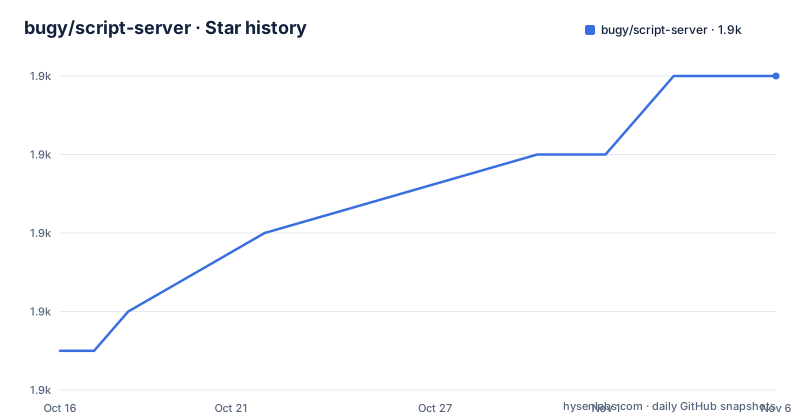
Star history
- bugy/script-server1,882 ★ · +7
| Repository | 2026-10-16 | 2026-11-06 |
|---|---|---|
| bugy/script-server | 1.9k | 1.9k |
7 Stars in the last 21 days, measured from the daily GitHub snapshot. Compare with other projects
Editorial analysis
The form is generated from a JSON config, not from the script
The central trick is that script-server never parses your script. You describe it in a JSON file under `conf/runners`, and the server builds the UI, validates the input, runs the process and manages the output. The README's claim is explicit: "No script modifications are needed - you configure each script in Script server and it creates the corresponding UI with parameters and takes care of validation, execution, etc."
The parameter types are what make that usable rather than a novelty. The feature list names text, flag, dropdown and file upload, and then recommends typed parameters explicitly on security grounds: "It's recommended to use typed parameters when appropriate, because they are validated for proper values and so they are harder to be subject of commands injection. Such attempts would be easier to detect also." That sentence is a design hint, not a footnote. A dropdown cannot carry `; rm -rf /`, a typed integer cannot carry anything at all, and the server rejects values outside the declared type before the process starts.
The rest of the feature list covers the things an operations tool needs: real-time script output, the ability for a user to send input while the script is still running, alerts, logging and auditing, execution history, downloads of output files, and formatted output with colors, styles, cursor positioning and clearing. The formatted-output support is the detail that separates this from a plain job runner: a script that prints progress in place renders the way it looks in a terminal, including overwriting a line.
A demo server is published at script-server.net, which is the fastest way to see whether the UI suits your users before you install anything.
Installation is a zip, and the dev path needs an init script
For production the README describes no package manager workflow at all. You download `script-server.zip` from the latest release or the `dev` release tag, create a script-server folder anywhere on your PC, and extract the zip into it. A Docker image exists on Docker Hub at `bugy/script-server`, with usage documented in issue 171.
For development you clone the repository and run one command:
tools/init.py --no-npmThat script must be re-run after pulling new changes, which is the sort of step that quietly breaks a long-lived dev environment if nobody remembers it. If you touch web files, the README points at `npm run build` or `npm run serve`, which explains the separate `web-src/` directory next to `src/`.
Server-side requirements are Python 3.7 or higher and Tornado 5 or 6, which matches `pyproject.toml`, where the only dependency is `tornado (>=5, <7)` and `requires-python = ">=3.7"`. Note that `requirements.txt` is looser still, asking only for `tornado>=4`, so the two files disagree about the supported floor. The project also declares a console entry point, `script-server = "main:main"`, though the README's run instructions use the script directly rather than that command.
On the client side nothing is fetched from the internet. The README states an internet connection is not needed and that all files load from the server, which matters for an internal tool on an isolated network.
Setup is a JSON file, a launcher, and an admin page
Three steps get you running. Put script configurations in the `conf/runners` folder. Launch `launcher.py` from the script-server folder, typing `launcher.py` on Windows and `./launcher.py` on Linux. Then add or edit scripts on the admin page, which lives at `admin.html`, for example `http://localhost:5000/admin.html`.
The default bind is `http://localhost:5000`, and that default is doing quiet work: the project ships a security section that tells you to run it only on a trusted network, and localhost is the safest possible interface for an unauthenticated default.
Server-wide settings live in `conf/conf.json`, and the file is optional. The README says it is allowed not to create it, in which case defaults are used, so a fresh install has no configuration to write before the first launch.
Optional authentication is the other notable setting. The feature list names LDAP, Google OAuth and an htpasswd file as the available mechanisms, alongside access control, so a deployment can be either open on an internal network or gated by a directory. Alerts are also configurable in the same file, per the statement that "All the features listed above and some other minor features can be configured in `conf/conf.json`".
For a trial run, the `samples/` folder holds bundled demo configs at `samples/configs/*.json`. Linking or copying those into `conf/runners` gives you working scripts to click through before you write your own.
Parameters are passed as arguments but are never escaped
The security section is the most valuable part of this README, and it should be read as a contract with two halves. The first half is reassuring: "Script server guarantees that all user parameters are passed to an executable script as arguments and won't be executed under any conditions. There is no way to inject fraud command from a client-side."
The second half is the one that will bite you. "However, user parameters are not escaped, so scripts should take care of not executing them also." The README's general recommendation for bash is "at least to wrap all arguments in double-quotes". So the guarantee is about how the server spawns the process, not about what your script then does with `$1`. A script that runs `eval "$1"`, or that interpolates a text parameter into a command string, reopens the hole the server was trying to close.
And the platform caveat is explicit: "Command injection protection is fully supported for Linux, but only for .bat and .exe files on Windows." If your scripts are Windows batch files, you are outside the protected path the project advertises.
The other half of the security story is XSS and CSRF. Versions 1.0 through 1.16 were vulnerable to both. From 1.17 onward the server is protected against XSRF via a special token, and the XSS code is written against the OWASP DOM Based XSS Prevention Cheat Sheet, with one known vulnerability left: `output_format`=`html_iframe`. That single remaining hole is a script configuration choice, so if you do not set `html_iframe` you are not exposed to it. The project also asks for security reports directly rather than through a public channel.
Platform support is one tested OS and two lightly tested ones
The requirements section is unusually blunt about where this runs. Linux is listed as the main target and is "Tested and working on Debian 10,11". Windows and macOS are both marked "additional. Light testing".
There is a known OS-specific failure the project links a wiki page for: an issue running on OpenBSD, and possibly other UNIX systems, described as process termination issues. The existence of that page tells you process teardown is not uniform across kernels, which combined with the PID-1-style ownership model some tools use, means a script that forks and leaves orphans behind may not be reaped the same way everywhere.
The maintenance picture needs reading carefully too. The repository is not archived and the last push was on 2026-08-21, so work is landing. The tagged releases tell a different story: 1.18.0 from 2023-08-25 is the last numbered version, with 1.17.1 before it in 2022, and there is a rolling `dev` tag dated 2025-12-26 that carries ongoing work between numbered releases. The default branch is `master`, not `main`.
Practically, that means an install from the latest release tag is running 2023 code, The source does not specify which release the Docker images use. Those are different risk profiles, and choosing between them is a decision about whether you want the last numbered build or the newest commit.
Where this sits against Jenkins, Rundeck or a hand-rolled form
The obvious comparison is to a general-purpose job scheduler. It can be compared with other tools that provide browser-based script execution and history, although their specific requirements are outside this project's documentation. Script-server assumes the opposite: your script is already a working command someone runs by hand, and you want it exposed without restructuring it.
That is a real difference in approach, not a feature gap. Script-server uses script configurations in `conf/runners` to generate the user interface and manage execution. If your scripts already print everything to stdout and take positional arguments, script-server fits. If they read config files, expect a working directory or signal success in non-standard ways, you will be writing glue.
The other alternative is the one with no dependencies at all: a shared shell script over SSH, or a small form in whatever internal tool already exists. The README lists SSH among the project topics, and the log filename format `{script_name}_{client_address}_{date}_{time}.log` records the client address, so the server does track who ran what. For a small number of scripts, a hand-rolled page may require less maintenance.
Script-server is suited to making configured scripts available to users who are not comfortable in a terminal. It does not earn it at three scripts.
Editorial conclusion
Adopt Script-server when you have a pile of working scripts and non-technical colleagues who keep asking you to run them, since generating a form from conf/runners is the whole point. Do not adopt it for scripts that build shell commands from free text, and do not put it on an internet-facing host. Before deploying, check whether your scripts quote their own arguments, because the README states parameters are passed as arguments but are not escaped, and confirm that every script you expose lives on Linux rather than Windows if injection resistance matters to you.
Frequently asked questions
How do I install Script-server?
For production, download `script-server.zip` from the latest release or the `dev` release tag, create a script-server folder and extract the zip into it. Pre-built Docker images are published at `bugy/script-server` on Docker Hub. For development, clone the repository and run `tools/init.py --no-npm`.
Do I have to modify my scripts to use Script-server?
No. You describe each script in a JSON file under `conf/runners`, and the server generates the UI with parameters, handles validation and manages execution. The README states that no script modifications are needed.
Is Script-server protected against command injection?
Parameters are passed to the executable as arguments and are never executed by the server, but they are not escaped, so scripts must quote their own arguments. The README also notes that this protection is fully supported on Linux but only for .bat and .exe files on Windows.
Which Python version does Script-server need?
Python 3.7 or higher with Tornado 5 or 6. `pyproject.toml` declares `requires-python = ">=3.7"` and `tornado (>=5, <7)`, while `requirements.txt` asks only for `tornado>=4`.
Can Script-server authenticate users?
Authentication is optional. The README lists LDAP, Google OAuth and an htpasswd file as the available mechanisms, along with access control, and all of these are configured in `conf/conf.json`, which you do not have to create at all.
Official sources
Add this badge to your README
If you maintain this project, the badge below links readers to this analysis and shows its maintenance status from the daily GitHub snapshot. Paste the markdown into your README; add ?metric=license or ?metric=stars to the image URL for a different field.

[](https://hysenlabs.com/projects/bugy-script-server)Star history chart for your README
[](https://hysenlabs.com/projects/bugy-script-server)Was this useful?