lucky-canvas: a Canvas draw plugin for wheels, nine-grid and slot machines
A lottery/prize-wheel plugin built with TS + Canvas, supporting wheel, grid and slot-machine style draws. One codebase adapts to multiple frameworks (JS/Vue/React/Taro/UniApp/WeChat mini program, etc.). Prizes, text, images, colors and buttons are all configurable, with synchronous or asynchronous drawing, front-end- or back-end-controlled probability, and automatic DPR-based clarity adjustment for mobile.
At a glance
- What is it?
- buuing/lucky-canvas draws lottery UI on Canvas and ships separate packages for JS, Vue, React, UniApp, Taro and WeChat Mini Programs. The repository description lists configurable prizes, async draws and front- or back-end probability, while the README routes usage details to the official site.
- Who is it for?
- Adopt lucky-canvas if you need a wheel, nine-grid or slot machine drawn on Canvas and you are shipping to more than one of JS, Vue, React, Taro, UniApp or WeChat Mini Programs, since the same source is published per framework and the dpr handling is built in.
- Can I use it commercially?
- Yes. Apache-2.0 is a permissive licence: you can use, modify and sell software built on it, as long as you keep its copyright and licence notices.
- Is it still maintained?
- Yes. The repository last received commits 108 days ago.
- What is it written in?
- Mainly TypeScript, according to GitHub's language statistics.
Answers come from the project's GitHub data, last synced on November 15, 2026, and from our analysis. They are not legal advice.
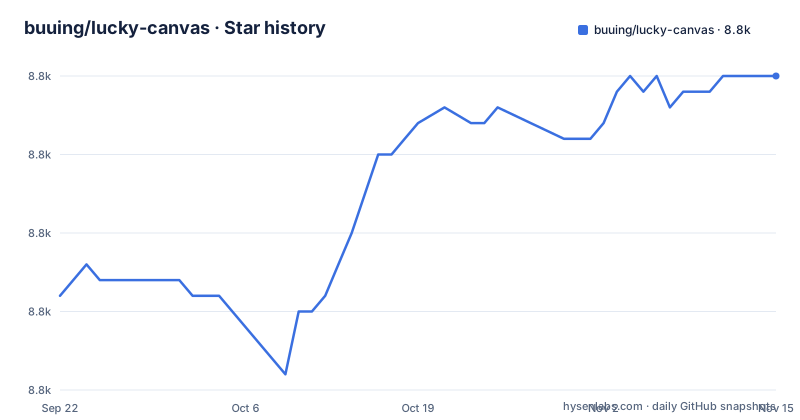
Star history
- buuing/lucky-canvas8,785 ★ · +14
| Repository | 2026-09-22 | 2026-11-15 |
|---|---|---|
| buuing/lucky-canvas | 8.8k | 8.8k |
14 Stars in the last 54 days, measured from the daily GitHub snapshot. Compare with other projects
Editorial analysis
The problem lucky-canvas solves for multi-platform lottery UI
A prize wheel is not hard to draw once. It is hard to draw the same way on a Vue web app, a React admin page, a Taro build and a WeChat Mini Program, where there is no DOM and the drawing surface behaves differently. lucky-canvas aims at that gap: the README describes it as a JavaScript-based cross-platform lottery plugin for the three common formats, a big wheel, a nine-grid board and a slot machine, and it publishes one package per framework rather than one package with adapters.
The intended user is a front-end developer who has to put a draw interaction into an existing product and does not want to write Canvas geometry, rotation easing and image preloading per platform. The repository description lists the configurable surface directly: prizes, text, images, colours and the button are all configurable, draws can be synchronous or asynchronous, and the probability can be controlled on the front end or the back end. The last point matters most in practice. A front-end-controlled probability is fine for a demo; a real campaign normally needs the server to decide the prize and the client only to animate to it.
How the Canvas drawing and per-framework packages fit together
The repository is a Lerna monorepo. The root package.json is private, declares workspaces over packages/*, and pins lerna ^4.0.0 as the only devDependency. Scripts such as install (lerna bootstrap), build (lerna run build --sort --stream) and publish-to-npm (lerna publish from-package) show that every framework package is built and published from the same tree.
The README table maps each target to its own npm name: lucky-canvas for plain JS and jQuery, @lucky-canvas/vue, @lucky-canvas/react, @lucky-canvas/uni, @lucky-canvas/taro for Taro 3.x, and @lucky-canvas/mini for WeChat Mini Programs. That split is the architecture: the core drawing logic is shared, and each package carries the binding layer its host framework needs. It also means you cannot install one package and expect it to work everywhere. The repository description also states that the plugin adjusts sharpness automatically according to dpr, which is the part most hand-rolled wheels get wrong on high-density phone screens.
The README does not describe the draw algorithm, how images are preloaded, or what happens when a network request for the prize result fails mid-animation. Those details are not in the repository text.
Installing lucky-canvas and running a first draw
Pick the package that matches your framework from the README table. For a plain page, the JS package is lucky-canvas; the README links its usage page at 100px.net/usage/js.html. Install it with npm, then import and mount it against a container element.
npm install lucky-canvasThe README does not print a full JS initialisation snippet, so the exact option names for prizes, the button and the draw callback should be taken from the usage page for your framework rather than guessed. What the repository description does commit to is the shape of the configuration: prizes, text, images, colours and the button are all settable, and the draw can be synchronous or asynchronous.
For a Vue project the package name differs, and so does the registration step:
npm install @lucky-canvas/vueAfter installing, the component is registered in the usual way for that framework and given the prize list. Because the README routes all option details to 100px.net, treat that site as the reference for key names and for the async draw signature. The English version of the documentation does not exist yet: the README states that anyone who can help translate it should contact the author at [email protected], so the practical reference today is the Chinese documentation.
Where lucky-canvas is the wrong tool
The repository description is explicit that probability can be controlled on the front end or the back end, and that is the main risk. If the browser holds the probability table, anyone who reads the bundle can see the odds, and a client-side draw cannot be trusted for anything with real value. The project supports the server-decided pattern, but the README does not document a reference implementation for it, so you are writing that request and the failure handling yourself.
Canvas is also a closed surface. Everything inside the wheel is painted, not laid out, so you cannot target a prize with CSS, and you cannot rely on the accessibility tree to announce a result. If your page must be screen-reader friendly or themed by an existing design system, a DOM-based wheel will cost you less work.
Finally, the documentation language is a real constraint. The README offers a Chinese site at 100px.net and states that an English translation does not exist and that volunteers should email the author. A team without Chinese readers will be reading source and examples instead of prose.
How lucky-canvas differs from building on a DOM or CSS animation
The obvious alternative is a CSS or SVG wheel: absolutely positioned segments rotated by a transform, with the browser handling layout and hit testing. That approach gives you inspectable elements, CSS variables for colours, and text that a screen reader can reach. It also breaks down on WeChat Mini Programs and Taro, where the rendering model is not the browser DOM, and it needs manual work to stay sharp on high-dpr screens.
lucky-canvas takes the opposite trade. It paints into Canvas, which is why one source can serve JS, Vue, React, UniApp, Taro and WeChat Mini Programs, and why the README can claim automatic dpr-based sharpness. The cost is that you give up DOM styling and accessibility, and you accept a configuration-driven API instead of markup. If your target is a single web app and your design system already has a wheel component, the Canvas route buys you little. If your target is a Mini Program plus a web build, the Canvas route removes an entire second implementation.
Maintenance, releases and the Apache-2.0 licence
The repository is not archived, and the last push was on 2026-07-30. The repository has no published GitHub releases; the README instead shows npm version badges per package, which is where you should check the current version of the package you intend to install.
Upgrade cost is shaped by the monorepo. The root build runs lerna run build --sort --stream, and publishing runs lerna publish from-package, so the JS, Vue, React, UniApp, Taro and Mini Program packages are built and published from one tree. The root scripts also include publish-beta with a beta dist-tag, which tells you prerelease builds exist; the README does not document a support window or a deprecation policy for older majors.
The licence is Apache-2.0, with the LICENSE file at the repository root. Apache-2.0 is a permissive licence that includes an explicit patent grant and requires you to keep the licence and notice files when you redistribute. It is not legal advice, and if you are shipping the plugin inside a commercial product you should have your own counsel read the LICENSE file rather than rely on this summary.
Editorial conclusion
Adopt lucky-canvas if you need a wheel, nine-grid or slot machine drawn on Canvas and you are shipping to more than one of JS, Vue, React, Taro, UniApp or WeChat Mini Programs, since the same source is published per framework and the dpr handling is built in. Do not adopt it if you need a documented probability model in the browser, an English-language reference, or a component you can restyle with CSS, because the README points to 100px.net for usage and does not describe the draw algorithm, error handling or rollback. Before committing, open the usage page for your exact framework, confirm the package name and import path in the README table, and read the Apache-2.0 LICENSE in the repository root.
Frequently asked questions
Which lucky-canvas package should I install for my framework?
The README maps each target to its own npm name: lucky-canvas for JS and jQuery, @lucky-canvas/vue, @lucky-canvas/react, @lucky-canvas/uni, @lucky-canvas/taro for Taro 3.x, and @lucky-canvas/mini for WeChat Mini Programs. There is no single package that covers all of them, so pick the row that matches your host framework.
Does lucky-canvas work in WeChat Mini Programs?
Yes. The README lists a dedicated package, @lucky-canvas/mini, with its usage page at 100px.net/usage/wx.html. Because it is a separate package from the JS and Vue builds, the import and registration steps differ.
Can the prize probability be decided on the server with lucky-canvas?
The repository description states that probability can be controlled on the front end or the back end, and that draws can be synchronous or asynchronous. It does not document a reference request or a rollback path, so the server-side flow is something you implement around the plugin.
Is there English documentation for lucky-canvas?
No. The README points to the Chinese site at 100px.net and states that anyone able to help translate the documentation should contact the author at [email protected]. Until that happens, the English README table and the source are what you have.
Does lucky-canvas handle high-resolution phone screens?
The repository description states that the plugin adjusts sharpness automatically according to dpr, which is the usual cause of blurry Canvas graphics on high-density displays. The README does not describe how the scaling is applied or whether it can be overridden.
What licence does lucky-canvas use?
The repository is licensed under Apache-2.0, with the LICENSE file in the repository root. That is a permissive licence with an explicit patent grant and notice-retention requirements, but it is not legal advice.
Official sources
Add this badge to your README
If you maintain this project, the badge below links readers to this analysis and shows its maintenance status from the daily GitHub snapshot. Paste the markdown into your README; add ?metric=license or ?metric=stars to the image URL for a different field.

[](https://hysenlabs.com/projects/buuing-lucky-canvas)Star history chart for your README
[](https://hysenlabs.com/projects/buuing-lucky-canvas)Was this useful?