Logseq-Git-Sync-101: Git Sync for Logseq Graphs
This repo aims to help Logseq users to sync their data with Git and GitHub.
At a glance
- What is it?
- Logseq-Git-Sync-101 is a Shell-based guide and script collection for syncing Logseq graphs through Git and GitHub across desktop and mobile environments. It covers repository setup, Git hooks, platform paths, and synchronization failures.
- Who is it for?
- Adopt Logseq-Git-Sync-101 if you want Git-based Logseq synchronization and can follow its platform-specific setup. Do not choose it for automatic conflict-free collaboration or unattended iOS operation.
- Can I use it commercially?
- Yes. MIT is a permissive licence: you can use, modify and sell software built on it, as long as you keep its copyright and licence notices.
- Is it still maintained?
- Yes. The repository last received commits 150 days ago.
- What is it written in?
- Mainly Shell, according to GitHub's language statistics.
Answers come from the project's GitHub data, last synced on November 7, 2026, and from our analysis. They are not legal advice.
Star history
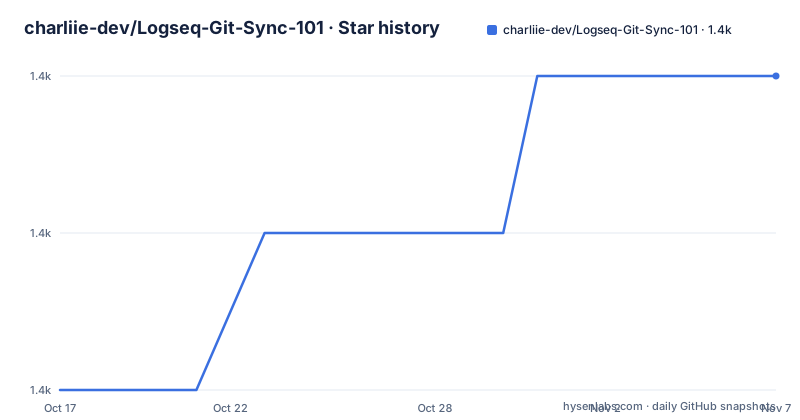
- charliie-dev/Logseq-Git-Sync-1011,369 ★ · +2
| Repository | 2026-10-17 | 2026-11-07 |
|---|---|---|
| charliie-dev/Logseq-Git-Sync-101 | 1.4k | 1.4k |
2 Stars in the last 21 days, measured from the daily GitHub snapshot. Compare with other projects
Editorial analysis
Why Logseq-Git-Sync-101 Uses Git for Graph Sync
This repository addresses a specific problem: keeping a Logseq graph synchronized across devices without depending on a hosted synchronization service. The README presents Git and GitHub as a self-managed approach and points users to prerequisite and workflow documentation before setup begins. It is intended for Logseq users who want control over the repository that stores their notes, particularly across Windows, macOS, iOS or iPadOS, Android, and Linux.
The likely audience includes people who find Git intimidating. The README describes Git as frightening for non-programmers and presents this project as documentation and setup assistance. It is not a general-purpose synchronization daemon. Its contribution is the combination of Git history, GitHub hosting, hooks, and instructions for adapting those tools to Logseq's graph directory.
That approach has clear boundaries. The repository does not claim to resolve conflicting edits, inject Git credentials into every Logseq environment, or run an always-on service that watches every device. Instead, it gives users a repository workflow and links to platform-specific guides. This makes it more suitable for a technically independent Logseq user than for someone expecting a one-click cloud synchronization experience.
Git history can also help users inspect changes to text-based graph files. However, a Git repository does not remove the conceptual burden of branches, merges, authentication, and working-tree state. The project accepts that burden and provides setup guidance for users willing to learn those mechanics.
Pull and Push Hooks in the Logseq Graph
The repository layout contains a dedicated `git-hooks/` directory and platform scripts under `Android-scripts/`. The changelog provides the clearest account of the current hook behavior. The `pre-commit` hook runs `git pull` before a commit and reports a pull failure with an actionable message instead of allowing the operation to proceed on a broken synchronization. It also includes guards for merge and rebase states.
After a successful commit, the `post-commit` hook pushes the current branch using `git push origin HEAD`. That command matters because it selects the current commit as the source rather than assuming that the branch is always named `main`. The changelog identifies repositories whose default branch is not `main` as a reason for this design.
Both hooks set `GIT_TERMINAL_PROMPT=0`. This prevents Git from blocking while it requests credentials through an interactive terminal prompt. The same setting also means credentials must already be available in the environment where the hook executes. A hook failure is therefore meaningful. A failed pull means the local repository did not reach the expected remote state, while a failed push means the commit exists locally but was not delivered to `origin`.
The Android `push-graph.sh` script also handles an empty working-tree case. According to the changelog, it no longer aborts before pushing when there is nothing new to commit. That removes one avoidable interruption. It does not, however, make the Android script a general-purpose scheduler or document automatic background execution.
Platform-Specific Logseq Graph Locations
The README sends users to separate wiki pages for Windows, macOS, iOS and iPadOS, Android, and Linux. This division is necessary because Logseq graphs are accessed through different filesystem and application models on those systems. The repository links to an iOS and iPadOS guide based on Working Copy, while the Android guide uses a Termux-oriented path documented as `~/storage/shared`.
The Android changelog records a correction to that shared-storage path to address an earlier issue. It is a concrete example of why a desktop Git command copied into a mobile environment can fail. The project does not present one universal synchronization command in the README. It expects the user to select the platform guide that matches the graph's location and the Git environment available there.
For iOS and iPadOS, the README points to Working Copy and notes that its instructions were updated for a newer Working Copy version on 2023-11-21. It also mentions Möbius Sync as a possible third-party client for Syncthing on those systems. That reference does not make Syncthing part of this repository's Git workflow. It is background information about a different synchronization approach.
Linux users are told to use the macOS steps as a reference if needed. This is a practical limitation. The README supplies no dedicated Linux guide, so Linux users must adapt the macOS instructions themselves or confirm that their Logseq and Git paths already match. Readers should not infer that the macOS setup transfers to Linux unchanged, especially when storage access differs.
Installing Hooks and Performing a First GitHub Push
The README does not give a self-contained installation command or a complete first-use sequence. It directs users first to the linked Prerequisite and Workflow wiki pages, then to the page for their operating system. The README does not state the exact commands for copying hook files into `.git/hooks`, changing their permissions, or registering a platform-specific script, so those commands cannot be reconstructed safely.
After following the relevant prerequisite and workflow instructions, the first Git operation visible in the README changelog is the push used by `post-commit`. The following is the exact command attributed to the hook. It pushes the current branch to `origin` using the current `HEAD` as the source.
git push origin HEADThe reader should expect this command to push the current branch. It can report an authentication, remote, branch, or network failure. Because the hooks use `GIT_TERMINAL_PROMPT=0`, missing credentials are surfaced as a failure instead of being requested through an interactive prompt.
The README changelog also identifies an SSH diagnostic:
ssh -T [email protected]The repository does not describe the complete SSH setup in the README itself. It refers users to Workflow and FAQ pages that contain an SSH configuration entry intended to address `Permission denied:(publickey)`. The command is a diagnostic, not a graph synchronization command, and its result depends on the user's keys and GitHub account configuration.
A first real check should therefore occur only after the selected platform guide has established the remote, graph path, and authentication method. Attempting the push earlier would test too many variables at once and could make the cause of a failure unclear.
Credential, Hook, and Repository-State Failures
The most direct failure mode is a Git operation that needs authentication inside a hook. Because the hooks set `GIT_TERMINAL_PROMPT=0`, Git cannot pause for a terminal credential request. This is useful in Logseq and mobile contexts where an interactive prompt may not be available. It also requires credentials to have been configured in advance. The README links to FAQ entries about SSH public-key errors, HTTPS authentication inside Logseq, and SSH over port 443.
Repository state creates another boundary. The changelog says the `pre-commit` hook includes merge and rebase guards. Such guards matter when a user attempts to commit while Git is already processing another operation. Committing during that state can obscure the real problem. The hook's documented behavior is to stop rather than continue under an unsupported repository state.
The hooks also expose remote synchronization failures. A pull failure means the repository could not update before the commit operation completed. A push failure means a local commit may already exist even though the remote did not receive it. The changelog specifically says the hooks report these failures rather than silently treating them as successful. Retrying a push can be appropriate after fixing authentication or connectivity, but the README does not prescribe one retry command for every failure.
Logseq-Git-Sync-101 is not documented as a complete conflict-resolution system. The README does not promise automatic rollback, a merge policy for every graph edit, or recovery for every interrupted mobile operation. It links to the project FAQ for troubleshooting, but it does not establish that simultaneous changes are merged without user action.
GitHub Workflows Versus Syncthing and iCloud
The README compares Git with iCloud and Syncthing rather than treating them as interchangeable choices. It characterizes iCloud as slow and problematic. It also notes that Syncthing has no first-party iOS or iPadOS application, while a compatible third-party client such as Möbius Sync can be used on those systems.
Git takes a different approach. It records graph changes in a repository, can use GitHub as the remote, and applies pull and push operations through hooks or scripts. Syncthing synchronizes files between participating devices. It does not model the graph as a Git history of commits and remote branches. That distinction can make change inspection and version history more explicit in Git, but it also introduces merge states, branch names, authentication, remote configuration, and hook execution.
This difference is particularly important on mobile. The project has a Working Copy route for iOS and iPadOS, while Android uses Termux-oriented scripts and storage paths. A file synchronization tool may avoid Git's conflict vocabulary, but it still needs compatible software, filesystem access, and care when files change on several devices. The README presents Möbius Sync and Syncthing as community alternatives, not as components shipped by Logseq-Git-Sync-101.
For a single user comfortable with Git, the repository workflow offers explicit history and remote commits. For users who only want transparent file transfer and already have a compatible Syncthing environment, the file synchronization approach may require fewer Git-specific concepts.
Logseq-Git-Sync-101 Maintenance and License Costs
The repository is not archived, and the last push was on 2026-06-10. That is the concrete maintenance signal available from the repository record. It has no GitHub releases, so the repository does not present a release history with versioned packages or a documented upgrade path through GitHub Releases. The changelog instead records dated changes to hooks, platform documentation, Android paths, SSH instructions, and Working Copy guidance.
Users updating an installation should compare existing hooks and scripts with the current repository. The changelog entry dated 2026-06-11 records changes to pull and push failure handling, current-branch selection, credential prompting, and Android behavior. Retaining an older hook can therefore preserve behavior that the project has since changed, including silent continuation after some synchronization failures.
Platform documentation also needs attention during Logseq or mobile-client changes. The Working Copy instructions were revised on 2023-11-21, and the Android shared-storage path was corrected on 2023-12-27. These dates show that application and filesystem assumptions can change. The README does not publish a compatibility matrix covering every Logseq, Working Copy, Termux, Git, and operating-system version.
The repository is identified as MIT licensed. That license grants permissions and imposes conditions under its terms, but this article does not interpret those terms as legal advice. An engineer modifying or redistributing the scripts should retain the `LICENSE` file and review its text for the relevant use. The README does not document a separate support policy, formal migration process, or service commitment.
Editorial conclusion
Adopt Logseq-Git-Sync-101 if you want Git-based Logseq synchronization and can follow its platform-specific setup. Do not choose it for automatic conflict-free collaboration or unattended iOS operation. First verify that your graph path, Git remote, credentials, and Working Copy or Termux configuration match the relevant wiki guide.
Frequently asked questions
How do I install Logseq-Git-Sync-101?
The README does not provide a self-contained installation command. It directs users to the Prerequisite and Workflow wiki pages, followed by the page for Windows, macOS, iOS or iPadOS, Android, or Linux.
What do the pre-commit and post-commit hooks do in Logseq-Git-Sync-101?
According to the changelog, `pre-commit` runs `git pull` and reports failures. The `post-commit` hook pushes the current branch with `git push origin HEAD`, and both hooks use `GIT_TERMINAL_PROMPT=0` to prevent interactive credential prompts.
Does Logseq-Git-Sync-101 support iOS and iPadOS?
The README links to an iOS and iPadOS guide based on Working Copy. It also mentions Möbius Sync as a possible third-party Syncthing client, but that is separate from the repository's Git synchronization workflow.
Official sources
Add this badge to your README
If you maintain this project, the badge below links readers to this analysis and shows its maintenance status from the daily GitHub snapshot. Paste the markdown into your README; add ?metric=license or ?metric=stars to the image URL for a different field.

[](https://hysenlabs.com/projects/charliie-dev-logseq-git-sync-101)Star history chart for your README
[](https://hysenlabs.com/projects/charliie-dev-logseq-git-sync-101)Was this useful?