forgit: 29 fzf-powered git shortcuts for Bash, Zsh and Fish, some of them destructive
:zzz: A utility tool powered by fzf for using git interactively.
At a glance
- What is it?
- forgit wraps everyday git commands in fzf selectors, so you pick files, commits or branches from a list with a preview instead of typing them. It needs fzf 0.60.0 or newer, installs through a dozen different routes, and a few of its short aliases run force deletes.
- Who is it for?
- forgit suits developers who live in a Bash, Zsh or Fish terminal and want git actions such as adding hunks, picking a commit to cherry-pick or switching branches to be chosen from a fuzzy list. It is a poor fit if your system package manager ships an old fzf and you will not install a newer one, or if you want a full-screen git interface.
- Can I use it commercially?
- Yes. MIT is a permissive licence: you can use, modify and sell software built on it, as long as you keep its copyright and licence notices.
- Is it still maintained?
- Yes. The repository last received commits 1 day ago.
- What is it written in?
- Mainly Shell, according to GitHub's language statistics.
Answers come from the project's GitHub data, last synced on November 14, 2026, and from our analysis. They are not legal advice.
Star history
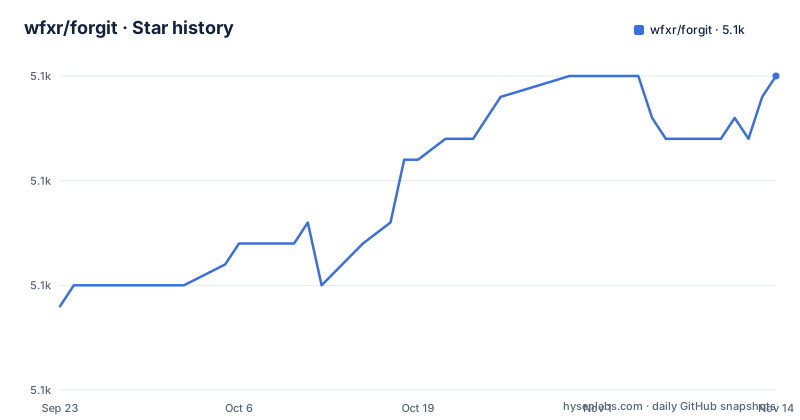
- wfxr/forgit5,095 ★ · +11
| Repository | 2026-09-23 | 2026-11-14 |
|---|---|---|
| wfxr/forgit | 5.1k | 5.1k |
11 Stars in the last 52 days, measured from the daily GitHub snapshot. Compare with other projects
Editorial analysis
It needs fzf 0.60.0, which distribution packages may not provide
forgit is described as a utility tool for using git interactively, powered by fzf, and as lightweight and easy to use. The one stated requirement is fzf version 0.60.0 or higher. If your operating system's package manager bundles an older fzf, the README suggests installing fzf with its own install script instead.
That requirement is the first thing to check when forgit commands fail or behave oddly: the tool is a layer of shell code around fzf, so an old fzf is the most likely mismatch. forgit supports Bash, Zsh and Fish, as the shell badge in the README lists, and ships a shell plugin file for each, forgit.plugin.sh and forgit.plugin.zsh, plus a conf.d directory for Fish.
Twenty-nine commands cover add, diff, log, checkout, rebase and worktrees
The command table is long. ga is an interactive git add selector, gd a diff viewer, glo a log viewer, gso a show viewer and gi an interactive .gitignore generator, with gat doing the same for .gitattributes. Reset and restore have grh and grs. Checkout has gcf for a file, gcff for a file from a commit, gcb for a branch, gct for a tag and gco for a commit, and gsw is a switch selector.
Further down are grc for revert, gss and gsp for stash, gcp for cherry-pick, grb for interactive rebase, grl for reflog and gbl for blame. Three commands automate commit rewriting: gfu runs commit --fixup then an autosquash rebase, gsq does the same with squash, and grw uses fixup=reword. Worktrees get gwt, gwa and gwd. The point is that you choose the target from a list, so you never type a hash.
The table also shows how much git surface is covered. Alongside the everyday commands there are selectors for the less common ones: gcff checks out a file as it was in a chosen commit, gbl picks a file to blame, and grl views the reflog, which is the list you consult when you need to recover a lost commit. Each command is named after the git command it fronts, so the aliases are close to the abbreviations many git users already type.
Some short aliases run force deletes and cleans
A few aliases map to commands that discard work. gbd is described as an interactive git branch -D selector, and the capital D means the branch is deleted even if it has unmerged commits. gclean is an interactive git clean selector, which removes untracked files. grs restores a file, which overwrites local changes, and grh resets files out of the index.
Because each one starts with a few letters and a list, it is easy to press Enter on the wrong line. The selector gives you a moment to look, but it does not make the action reversible. Before relying on gbd or gclean in muscle memory, read the preview carefully, and consider disabling all aliases and calling the long forgit function names instead, so a typo cannot reach a destructive command. The reset, restore and checkout-file selectors deserve the same care, since each one throws away local edits to the file you pick.
Aliases can be renamed or switched off before the plugin loads
You change the default alias names by defining variables before you source the plugin, and you can switch them all off with the FORGIT_NO_ALIASES flag. The variables follow one pattern, for example:
forgit_log=glo
forgit_add=ga
forgit_diff=gd
forgit_switch_branch=gsw
forgit_branch_delete=gbd
The full list covers every command in the table. Note a small inconsistency: in the alias list the worktree add variable is shown as forgit_worktree_add=gw, while the command table names that command gwa, so check which spelling your installed version really uses. Setting the variables after the plugin has loaded has no effect, because the aliases are created at load time.
A dozen installation routes, and one pins an old release
The README lists plugin manager lines for zplug, zgen, antigen, fisher, omf, zinit, oh-my-zsh and sheldon. Fisher needs version 4.4.3 or higher. The oh-my-zsh route is a git clone into the custom plugins directory. The antigen line points at the main branch, and the sheldon example pins rev 26.01.0 with a comment telling you to check the releases page for the latest version.
That pin is worth noticing: the latest release is 26.11.0, so copying the sheldon example as written installs a much older version. Homebrew users run:
brew install forgitand then add a line to their shell config that sources the plugin from the Homebrew share directory, with separate lines for Fish, Zsh and Bash. Arch users have two AUR packages maintained by the developers: forgit for the latest release and forgit-git for the latest commits from the default branch.
Completions are manual unless Homebrew or the AUR installed forgit
Forgit offers completions for all supported shells. They are set up automatically when you install through Homebrew or the AUR, but every other method requires manual setup. For Bash you place completions/git-forgit.bash in the user completions directory for git forgit, or source it to complete forgit functions and aliases, so that gsw followed by Tab completes branches. For Fish you place git-forgit.fish in the Fish completions directory. For Zsh you place _git-forgit in a directory on your fpath.
If commands such as forgit::add or the alias ga stop working after an update, the README says to remove the completions cache and restart the shell:
> rm ~/.zcompdump
> zsh
This is a Zsh-specific fix, so it does not apply to Bash or Fish.
Calendar-versioned releases and a git sub-command mode
You can also use forgit as a git sub-command by making git-forgit available in your PATH, and the completions mention git forgit and configured git aliases. The repository has a bin directory for that script.
Releases use calendar version numbers: 26.11.0 on 2026-11-01, 26.10.0 on 2026-10-01 and 26.09.1 on 2026-09-09, roughly one per month, and the last push was on 2026-11-01. The license is MIT. The repository includes a tests directory, a pre-commit configuration, a changelog generator configuration and a contributing guide, plus an AGENTS.md file. Because versions are dates, a number like 26.11 tells you when it was cut, not how large the change is.
Editorial conclusion
forgit suits developers who live in a Bash, Zsh or Fish terminal and want git actions such as adding hunks, picking a commit to cherry-pick or switching branches to be chosen from a fuzzy list. It is a poor fit if your system package manager ships an old fzf and you will not install a newer one, or if you want a full-screen git interface. Review the aliases that delete or reset before you memorise them, and set completions up by hand unless you used Homebrew or the AUR.
Frequently asked questions
What does forgit do?
forgit is an fzf-powered shell tool that turns common git commands into interactive selectors, such as ga for git add, glo for log, gsw for switch and grb for interactive rebase.
Which fzf version does forgit need?
fzf version 0.60.0 or higher. If your package manager ships an older version, the README suggests using fzf's own install script.
How do I install forgit with Homebrew?
Run brew install forgit, then source the forgit plugin file from your shell config. Completions are configured automatically for Homebrew and AUR installs.
Official sources
Add this badge to your README
If you maintain this project, the badge below links readers to this analysis and shows its maintenance status from the daily GitHub snapshot. Paste the markdown into your README; add ?metric=license or ?metric=stars to the image URL for a different field.

[](https://hysenlabs.com/projects/wfxr-forgit)Star history chart for your README
[](https://hysenlabs.com/projects/wfxr-forgit)Was this useful?