Skate stopped syncing to Charm Cloud, and it is now just a local badger store
A personal key value store 🛼
At a glance
- What is it?
- skate is a small Go key value store for saving and retrieving anything, including binary data, with keys carrying an optional database suffix. Since v1.0.0 it operates locally and no longer syncs to Charm Cloud, and the Charm Cloud service itself sunsets on 29 November 2024, so what remains is a CLI over a badger database in your user data directory.
- Who is it for?
- Adopt skate if you want a scriptable local scratch space with multiple named databases and shell redirection for binary values, and you do not need the values to follow you between machines. Skip it if you were relying on Charm Cloud sync, which stopped at v1.0.0, or if you need a password manager, since nothing in the documentation indicates the local store is encrypted.
- Can I use it commercially?
- Yes. MIT is a permissive licence: you can use, modify and sell software built on it, as long as you keep its copyright and licence notices.
- Is it still maintained?
- Yes. The repository last received commits 6 days ago.
- What is it written in?
- Mainly Go, according to GitHub's language statistics.
Answers come from the project's GitHub data, last synced on November 7, 2026, and from our analysis. They are not legal advice.
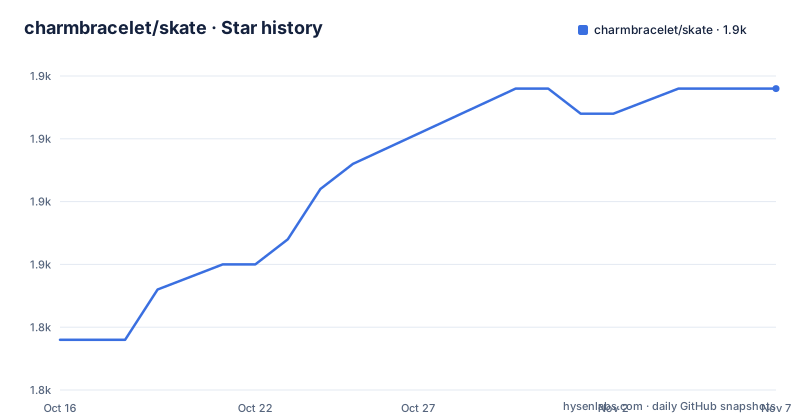
Star history
- charmbracelet/skate1,857 ★ · +10
| Repository | 2026-10-16 | 2026-11-07 |
|---|---|---|
| charmbracelet/skate | 1.8k | 1.9k |
10 Stars in the last 22 days, measured from the daily GitHub snapshot. Compare with other projects
Editorial analysis
The sync that made skate useful is gone
The warning at the top of the README is the most important line in it.
As of v1.0.0, skate operates locally and no longer syncs to the Charm Cloud, with a link to why and to the v1.0.0 release notes for a migration guide. The Charm Cloud sunsets on 29 November 2024.
That changes what the tool is. Before, the pitch was a personal key value store you could read from any device. After, it is a personal key value store on this machine, and the network is gone.
That is a real loss of function and worth being blunt about: if you installed skate to share a value between your laptop and a server, or to read a token set on your phone while working at a desk, that no longer works without a migration path of your own.
What remains is still coherent. The tool stores and retrieves anything you like, the README says including binary data, and it does that through a simple command line. The Go source is a single `main.go` beside `go.mod`, `go.sum` and the build configuration, so it is a small program you can read in an afternoon and fork.
The current release is v1.1.0, published on 2026-09-28, after v1.0.1 in March 2025 and v1.0.0 in August 2024. The last push was on 2026-10-04.
Three verbs, and the @db suffix on the key
The command surface is small enough to learn in a minute.
`skate set` stores a key and a value, `skate get` reads one back, and `skate list` shows everything. Values with spaces are quoted normally, so `skate set "kitty litter" "smells great"` stores a two-word key, and the README notes spaces are fine.
Binary data goes in and out through shell redirection rather than an argument:
skate set profile-pic < my-cute-pic.jpg
skate get profile-pic > here-it-is.jpg
That is the design decision that makes skate more than a config file. Because the value is read from stdin and written to stdout, a file of any type is just a value, and there is no upload command or size limit implied by the interface.
Unicode keys work, with the example using a Chinese word for cat and its call.
The interesting part is the database suffix. A key can carry an `@` followed by a database name, so `skate set secret-boss-key@work-stuff password123` puts that value in a database called `work-stuff`. Databases are created on demand, and most commands accept an `@db` argument, which is how you list a whole database: `skate list @work-stuff`.
That suffix syntax is what turns a flat store into something you can organise without prefixes, and the README's `skate list-dbs` command exists because otherwise you would have to remember what you named them.
Two usage patterns in the README show what it is for. One keeps a token out of a script, so the script calls `skate get gh_token` instead of containing a credential. The other keeps passwords in a separate database, `skate set [email protected] PASSWORD`, and uses a date as the key in a bookmarks database so entries accumulate over time.
Store location is a flag and an environment variable
By default skate stores its databases in your operating system's user data directory, and there are two ways to change that.
The `--store` flag takes a parent directory and applies per command:
skate --store ~/.local/share/my-skate-store set kitty meowThe `SKATE_STORE` environment variable applies to a whole shell session, which is the form you want in a script:
export SKATE_STORE=~/.local/share/my-skate-storeThe second is the more useful one, since a script that sets `SKATE_STORE` can point at a different store for a different purpose, such as a throwaway database for a test run.
The go.mod file includes dgraph-io/badger/v4 v4.8.0.
Two dependencies in go.mod point at features the README does not document. `atotto/clipboard` suggests the tool can put values on the system clipboard, and `agnivade/levenshtein` is an edit distance library, which suggests some form of fuzzy key matching when a key is not found exactly. If you have relied on a typo suggesting a near key, that is where the behaviour comes from.
Six install routes and one repository to add
Installation is the longest section of the README, which reflects how many platforms the project wanted to cover.
For macOS or Linux, the README uses Homebrew:
brew tap charmbracelet/tap && brew install charmbracelet/tap/skateThe README gives package-manager commands for Arch Linux and Nix: `pacman -S skate` and `nix-env -iA nixpkgs.skate`.
Debian and Ubuntu need an APT repository registered by hand, and the commands do it properly rather than the usual `curl | sh`. The GPG key is downloaded and dearmoured into `/etc/apt/keyrings/charm.gpg`, the source list is written with `signed-by=` pointing at that keyring, then `apt update` and `apt install skate`. Using a keyring file instead of a key in the trusted key list is the current best practice.
Fedora and RHEL get a yum repository definition written to `/etc/yum.repos.d/charm.repo` with `gpgcheck=1`, then `yum install skate`.
If you would rather not add a repository, packages are published in Debian and RPM formats and binaries for Linux, macOS and Windows are on the releases page. And for anyone with Go installed, the shortest route of all is:
go install github.com/charmbracelet/skate@latestThe module requires Go 1.26.7, which is a recent floor and one thing to check if you are on an older toolchain.
list is a filterable stream, not just a table
The list command has five flags and the README presents them as a group, because the real use of skate is piping.
# list keys only
skate list -k

# list values only
skate list -v

# reverse lexicographic order
skate list -r

# add a custom delimeter between keys and values; default is a tab
skate list -d "\t"

# show binary values
skate list -b
The delimiter flag is the one that tells you the output format is designed for machine consumption. A tab between key and value means `skate list | xargs -n 2 printf '%s loves %s.\n'` works, and the README shows that as the creative example. Two words per invocation, the first the key and the second the value.
The `-b` flag for showing binary values is the small safeguard that makes the others safe. Without it, a store containing an image produces terminal control characters, and the sensible default is to suppress them.
Combined with the `@db` argument and the `--store` flag, you can build a shell pipeline per database per store and treat the whole thing as a very small database with a query language made of `grep`.
The licence is MIT, and the project is part of Charm, with a Chinese line in the footer reading that Charm loves open source.
Where skate is the wrong tool
Three cases, and the first is the one the documentation invites you into.
Do not treat it as a password manager. The README's own example stores a password in a database named `password.db`, and it is a bad idea for two reasons. Nothing in the documentation says the badger files are encrypted, so the values are as readable as any file in your user data directory. And there is no access control, no audit trail and no expiration, so a backup or a sync tool that sweeps your user directory copies your passwords with it.
The token-in-a-script example is a different case and is defensible, because it moves a secret out of a file that gets committed into a store that does not. That is a real improvement over the alternative, and it is the pattern the tool is actually good at.
Second, if you need your values on more than one machine, skate is now the wrong choice outright. The sync is gone, the service is sunset, and the store is local files. Anything that needs to be readable from a laptop, a server and a phone needs a real secret store or a deployment tool.
Third, if you need concurrent access from several processes with strong consistency guarantees, a badger file opened by two machines over a network filesystem is not what you want.
Within its actual scope, though, skate is genuinely good: a key value store where the value can be any bytes, the key can be any Unicode, namespacing is a suffix on the key rather than a command flag, and the output is pipeable. That is a small tool doing one thing well.
Editorial conclusion
Adopt skate if you want a scriptable local scratch space with multiple named databases and shell redirection for binary values, and you do not need the values to follow you between machines. Skip it if you were relying on Charm Cloud sync, which stopped at v1.0.0, or if you need a password manager, since nothing in the documentation indicates the local store is encrypted. Verify first which store path is in use by checking `SKATE_STORE` or the `--store` flag before you script against it.
Frequently asked questions
Does skate still sync between devices?
No. As of v1.0.0 skate operates locally and no longer syncs to the Charm Cloud, and the Charm Cloud sunsets on 29 November 2024. The v1.0.0 release notes include a migration guide.
How do I separate data in skate?
Append `@dbname` to the key, for example `skate set secret-boss-key@work-stuff password123`. Databases are created on demand, most commands accept an `@db` argument such as `skate list @work-stuff`, and `skate list-dbs` shows what exists.
Can skate store files or non-text values?
Yes. Values are read from stdin and written to stdout, so `skate set profile-pic < my-cute-pic.jpg` and `skate get profile-pic > here-it-is.jpg` round-trip binary data. Use `skate list -b` to show binary values when listing a store that contains them.
Official sources
Add this badge to your README
If you maintain this project, the badge below links readers to this analysis and shows its maintenance status from the daily GitHub snapshot. Paste the markdown into your README; add ?metric=license or ?metric=stars to the image URL for a different field.

[](https://hysenlabs.com/projects/charmbracelet-skate)Star history chart for your README
[](https://hysenlabs.com/projects/charmbracelet-skate)Was this useful?