httpjail denies network traffic by default and makes you script the exceptions
HTTP(s) request filter for processes
At a glance
- What is it?
- httpjail is a Rust command line tool that intercepts the HTTP and HTTPS requests of a running process and blocks whatever your rules do not approve. It suits people who need to run untrusted or AI driven code with a closed network, and it pays for that control with sharp platform requirements on Linux and a lack of filesystem isolation.
- Who is it for?
- httpjail fits teams that must run code with a restricted network and can accept Rust toolchain setup, a trusted certificate authority in client trust stores, and the Linux strong mode prerequisites. It does not fit anyone who needs filesystem isolation, Unix socket clients, or a stable command line contract, since the project itself is marked experimental with no API or CLI compatibility guarantees.
- Can I use it commercially?
- Yes. CC0-1.0 is a permissive licence: you can use, modify and sell software built on it, as long as you keep its copyright and licence notices.
- Is it still maintained?
- Yes. The repository last received commits 3 days ago.
- What is it written in?
- Mainly Rust, according to GitHub's language statistics.
Answers come from the project's GitHub data, last synced on November 7, 2026, and from our analysis. They are not legal advice.
Star history
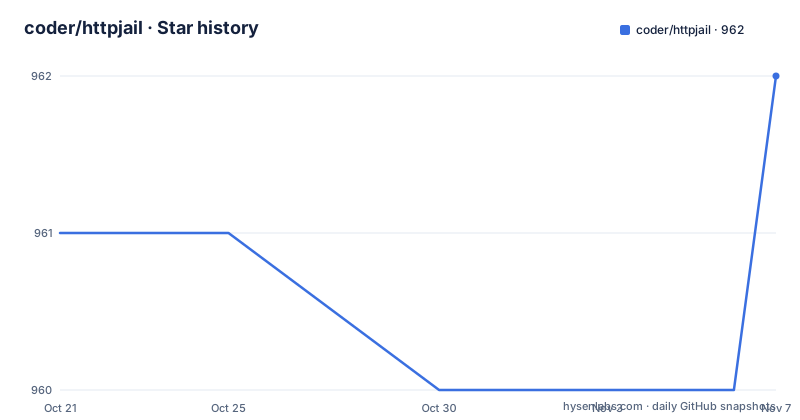
- coder/httpjail962 ★ · +1
| Repository | 2026-10-21 | 2026-11-07 |
|---|---|---|
| coder/httpjail | 961 | 962 |
1 Stars in the last 17 days, measured from the daily GitHub snapshot. Compare with other projects
Editorial analysis
httpjail puts a process behind a closed network by default
httpjail is a command line tool written in Rust that watches the HTTP and HTTPS requests made by a process you launch and decides, request by request, whether the traffic may leave the machine. The default position is closed. With no rule in place, every request is denied, so an application that tries to phone home simply stops working until you write a policy.
The project describes itself as a cross platform tool for monitoring and restricting HTTP and HTTPS requests from processes using network isolation and transparent proxy interception. That combination is the point. A plain proxy that a program can read its own proxy variables from is advisory at best, because the program under test can ignore it. httpjail instead puts the process inside a restricted network environment and inserts itself in the path as an intercepting proxy that the process cannot easily step around.
The intended audience is visible in the repository topics, which list ai, firewall and security. The case that fits best is running an AI coding assistant, a package install, or some other third party build step on a machine where outbound traffic should be limited to a short allow list. The Cargo package description is the plainest summary of the goal: monitor and restrict HTTP and HTTPS requests from processes. What the project is not is a general purpose firewall replacement or a content inspector. It operates on the traffic of the process it wraps, and it decides using rules you write.
Three evaluators decide a request: JS expressions, shell scripts, and line processors
A filtering tool is only useful if you can express the policy. httpjail offers three evaluation approaches, and they differ in cost, latency, and how much you can express.
The first is a JavaScript expression evaluated against the request. The dependency list includes the v8 crate, so a full JavaScript engine is embedded rather than a small expression parser. This is the fastest to write for simple host or method checks. The second is a shell script invoked per request, which spawns a process for every single decision. The third is a line processor, a persistent program that receives one JSON object per line on standard input and answers with an allow or deny decision on standard output. The documentation notes that the line processor is the efficient option when you have many requests to judge.
The contract on both sides of the pipe is strict, and that strictness is deliberate. A structured rule result must explicitly set allow to true, or set an allow byte limit policy, before traffic is permitted. An empty object denies. A result that contains only a deny message denies. Stalled input or output from a processor times out and the request is denied. Output from both the shell evaluator and the processor is capped at 64 KiB. The default is deny because the author assumes a bug in your policy should stop traffic rather than leak it.
Two example programs ship in the repository, a console log demo written in JavaScript and a line based filter written in Python, which gives you working starting points for both the JS and the processor path.
TLS interception depends on a certificate authority you have to trust by hand
Inspecting HTTPS means the proxy has to present a certificate the client accepts, so httpjail generates its own certificate authority. The dependency list includes rcgen for creating certificates, rustls and tokio-rustls for the TLS termination, and webpki-roots for the trust store on the outgoing side. The generated keys are new assets on your machine and they end up in the trust configuration of whatever client you want to monitor, which is the part of the setup that takes planning rather than typing.
On Linux the privileged files live under /var/lib/httpjail/ca rather than in a home directory that sudo would preserve, and the directory ancestors must not be writable by other users. The documentation calls out one upgrade consequence directly. Moving from a CA that lived in a user home directory produces a fresh root only CA, so you must add trust in the new certificate on the client side and remove trust in the old one. Until you do that, HTTPS traffic appears broken.
Interrupted CA writes are repaired at startup: a valid signing key is preserved, but a missing or corrupt key causes a new CA to be generated, which again means renewing client trust. Newly created CA private keys and request logs get owner only permissions on Unix systems. When httpjail runs as root under sudo, request logs must live in a directory owned by the invoking user, and existing logs must already belong to that user. Symlinks and protected host files are rejected.
One detail worth carrying into any threat model: logs record full URLs including query strings, so a log written for auditing can itself contain secrets carried in URLs.
Linux strong mode needs sudo, nft, and evaluators the payload cannot touch
Linux offers a strong mode that is far more involved than the macOS path, and its requirements are the single biggest factor in whether httpjail fits your environment.
Strong mode requires a non root invoking user through sudo. Running directly as root is refused, because a jailed root process could edit its own firewall rules. The payload runs with no_new_privs and no supplementary groups. The jail blocks connections to host Unix domain services using seccomp, so local stream socketpairs remain usable for in process communication while Unix socket clients and agents may not work.
When httpjail runs as root, including in test mode, every evaluator must be a standalone executable in a root owned path whose ancestors cannot be written by other users. Inline shell command strings passed to the shell evaluator are refused outright. Evaluators themselves run as an unprivileged identity with a clean environment. Scripts that rely on user owned imports, local agents, or privileged access need a separately trusted setup. These restrictions do not apply to weak mode or to non root server mode.
Strong mode also expects trusted system helpers at fixed paths: /usr/sbin/ip, /usr/sbin/nft and /usr/bin/setpriv, plus /usr/bin/docker in Docker mode. Privileged setup and cleanup never search a payload controlled PATH. Native Linux strong mode gives the payload a private PID namespace and a private /proc mount so it cannot import file descriptors from other host processes running as the same user, and /usr/bin/unshare is required for that. A setup that lacks these binaries fails, and the documentation describes no workaround short of installing them.
Installing and running the first policy
Installation is a single Cargo command, or a pre-built binary from the releases page. The Cargo package is published on crates.io and the version in Cargo.toml is 0.6.2.
cargo install httpjailThe first useful run wraps a command and allows one host. The expression after the js flag is evaluated against each request, and the double dash separates the policy from the command you want to launch.
httpjail --js "r.host === 'github.com'" -- your-appThe rule file path is more convenient once the policy grows. Writing the expression to a file avoids shell quoting problems, and in command mode the policy is frozen for the run so the application cannot edit it.
echo "/^api\\.example\\.com$/.test(r.host) && r.method === 'GET'" > rules.js
httpjail --js-file rules.js -- curl https://api.example.com/health
To see what the tool decided, request a log. The format is a timestamp, a plus or minus sign where plus means allowed and minus means blocked, then the method and the URL.
httpjail --request-log requests.log --js "true" -- npm installA line processor is the option to reach for when the decision needs real logic. The program reads one JSON object per line and prints true to allow.
httpjail --proc /path/to/filter.py -- ./my-app{"method": "GET", "url": "https://api.github.com", "host": "api.github.com", ...}Server mode turns httpjail into a proxy your application opts into
Not every use case launches a command. In server mode httpjail runs as a standalone proxy and executes nothing, which is what you want when the process to be monitored is already running or is started by something else.
httpjail --server --js "true"The server listens on port 8080 for HTTP and 8443 for HTTPS by default. The application points at it through the usual proxy variables.
HTTP_PROXY=http://localhost:8080 HTTPS_PROXY=http://localhost:8443The policy reload behaviour differs by mode, and the distinction matters when you edit a rule file while a long job runs. In server mode, file changes are detected and the rule file is reloaded on each request. In command mode the policy is frozen for that run so the application cannot edit it. The same js-file flag therefore means two different things depending on which mode you are in.
Server mode also changes the trust requirements. The root restrictions on evaluators and the strong mode helpers do not apply to weak or non root server mode, which makes server mode the far easier path on a Linux host where installing nft, setpriv and unshare is not an option. What you give up in exchange is the jail. A process that simply ignores the proxy variables, or opens its own socket, is not filtered by this mode.
Docker mode hands the container only the public certificate
Linux can run the payload inside a container with the network namespace applied there.
sudo httpjail --js "r.host === 'api.github.com'" --docker-run -- --rm alpine:latest wget -qO- https://api.github.comThe daemon has to be the local one at /var/run/docker.sock. Remote Docker contexts are ignored, so pointing at a remote daemon does not work.
The container receives only the public certificate, never the signing key, so a container that escapes cannot mint certificates for other hosts. The container drops NET_RAW. Only a restricted set of docker run flags is accepted before the image name, covering environment, user, working directory, resource limits, read only mode, init and the --rm flag. Network, DNS, privileged, volume and port publishing flags are rejected, as is any other unrecognized flag. Arguments after the image name are passed through unchanged, which is how the wget example above reaches the container.
On Linux, strong mode canaries and the Docker public certificate files live under root owned /var/lib/httpjail rather than a sudo preserved HOME or TMPDIR, and the ancestor directories must not be writable by other users. One cleanup note is worth repeating: legacy canaryless namespaces, networks and leftover firewall tables need manual inspection by an administrator. The tool refuses to delete them automatically.
What httpjail deliberately leaves alone
Several limits are stated plainly and are worth weighing before adoption.
The jail is a network jail, not a container. It does not isolate the filesystem and it does not close explicitly inherited file descriptors, so policy files and their parent directories have to sit outside payload write access. That is a documentation instruction to the operator rather than an enforced guarantee, which makes it the weakest part of the design.
The byte accounting is also approximate. max_tx_bytes counts the request line, header, body data and trailer fields, and the documentation describes it as a logical byte limit rather than an exact HTTP wire byte cap, because chunked framing can add bytes. A request body and an upgraded connection do not inherit the 10 second read deadline that applies to HTTP/1 request headers, so a slow body can hold a connection open past that limit.
Process cleanup has an edge. The timeout flag terminates the command process group before cleaning up the jail, but a process that deliberately leaves that group, or a separately daemon managed process, may need additional supervision. The project states plainly that it is experimental and offers no API or CLI compatibility guarantees, so flags and behaviour can change between releases. Releases went v0.6.0 on 2025-11-11, v0.6.1 on 2025-12-27 and v0.6.2 on 2026-09-24, and the last push was on 2026-09-24. The license is CC0-1.0, a public domain dedication that places no conditions on reuse of the code.
Editorial conclusion
httpjail fits teams that must run code with a restricted network and can accept Rust toolchain setup, a trusted certificate authority in client trust stores, and the Linux strong mode prerequisites. It does not fit anyone who needs filesystem isolation, Unix socket clients, or a stable command line contract, since the project itself is marked experimental with no API or CLI compatibility guarantees. Before adopting it, verify that your evaluator scripts live outside payload write access, that client trust for the generated certificate has been renewed after a CA upgrade, and that the requests you expect to allow are actually allowed by a rule you can read.
Frequently asked questions
Does httpjail block all network traffic by default?
Yes. The documentation states that httpjail denies all network requests by default, and a rule must explicitly set allow to true, or set an allow byte limit policy, before any traffic passes. An empty rule result or one carrying only a deny message blocks the request.
How do I install httpjail on Linux?
The install line is cargo install httpjail, and pre-built binaries are offered on the releases page. Beyond that, strong mode expects trusted helpers at /usr/sbin/ip, /usr/sbin/nft, /usr/bin/setpriv and /usr/bin/unshare, and it requires a non root invoking user through sudo.
What is the difference between --sh, --proc and --js for writing rules?
A js flag holds an inline JavaScript expression evaluated against each request, a sh flag runs a shell script per request, and a proc flag keeps one persistent program that reads JSON request objects on standard input and writes allow or deny decisions. The documentation describes the processor as the efficient option for many requests.
Why does my HTTPS traffic fail after upgrading httpjail?
Upgrading from a certificate authority stored in a user home directory generates a new root only CA under /var/lib/httpjail/ca. You then have to trust the new certificate on the client and remove trust in the old one, and a missing or corrupt signing key produces the same situation on startup.
Can httpjail run an existing application instead of launching it?
Yes. In server mode httpjail runs as a standalone proxy with no command execution, listening on port 8080 for HTTP and 8443 for HTTPS by default, and your application points at it with HTTP_PROXY and HTTPS_PROXY. In this mode rule files are reloaded on each request when they change.
Does httpjail isolate the filesystem or block Unix socket connections?
No. The native Linux strong jail blocks connections to host Unix domain services using seccomp, but it does not isolate the filesystem and does not close explicitly inherited file descriptors. Local stream socketpairs stay available for in process communication, while Unix socket clients and agents may not work.
Official sources
Add this badge to your README
If you maintain this project, the badge below links readers to this analysis and shows its maintenance status from the daily GitHub snapshot. Paste the markdown into your README; add ?metric=license or ?metric=stars to the image URL for a different field.

[](https://hysenlabs.com/projects/coder-httpjail)Star history chart for your README
[](https://hysenlabs.com/projects/coder-httpjail)Was this useful?