me_cleaner: shrinking an Intel ME firmware image until it stops talking to your system
Tool for partial deblobbing of Intel ME/TXE firmware images
At a glance
- What is it?
- A single Python script that rewrites Intel ME and TXE firmware regions so the management engine only runs during boot. Useful, well scoped, and honest about the fact that flashing is the part that can brick a board.
- Who is it for?
- me_cleaner does one thing precisely: it takes an Intel firmware dump and produces a smaller image in which the management engine is confined to the boot window. It suits people with a spare SPI programmer, a backup of the original dump, and a specific reason to distrust a coprocessor that already holds DMA and network access.
- Can I use it commercially?
- Yes, with conditions. GPL-3.0 is a copyleft licence: if you distribute software that includes it, you must release that software's source code under the same licence. Running it internally without distributing it does not trigger that obligation.
- Is it still maintained?
- Yes. The repository last received commits 21 days ago.
- What is it written in?
- Mainly Python, according to GitHub's language statistics.
Answers come from the project's GitHub data, last synced on October 23, 2026, and from our analysis. They are not legal advice.
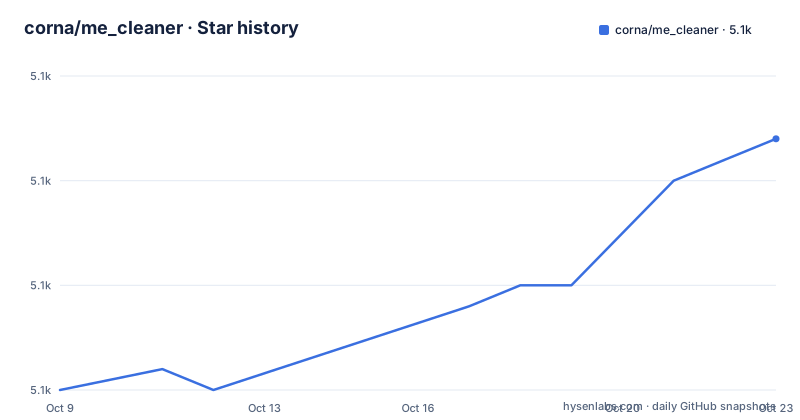
Star history
- corna/me_cleaner5,062 ★ · +12
| Repository | 2026-10-09 | 2026-10-23 |
|---|---|---|
| corna/me_cleaner | 5.1k | 5.1k |
12 Stars in the last 14 days, measured from the daily GitHub snapshot. Compare with other projects
Editorial analysis
A coprocessor on every Intel board since 2006
The README opens by explaining what the target is. Intel ME is a co-processor integrated into all post-2006 Intel boards, and it is the hardware base under a long list of Intel features: Intel AMT, Intel Boot Guard, Intel PAVP and others. What makes it uncomfortable is not the feature list but the privilege. The README states that ME requires full access to the system, including memory through DMA, and network access that is invisible to the user.
Two consequences follow, and both shape what me_cleaner can and cannot do. The first is that ME firmware can be neither disabled nor reimplemented, because it is tightly integrated into the boot process and it is signed. The second is that projects like coreboot are forced to carry a proprietary, always-on blob they cannot inspect, which the README names as a shared problem between free firmware efforts and privacy-minded users.
So the tool is not trying to remove a driver or patch a bootloader. It operates on a signed blob inside the SPI flash chip, and it works by rewriting that blob so it stops doing most of its job once the machine has booted.
Why the firmware cannot simply be deleted on newer hardware
Before Nehalem, meaning ME version 6 from around 2008 and 2009, ME firmware could be removed completely from the flash chip by setting a couple of bits inside the flash descriptor. The coprocessor stopped existing. The README says that for generation 1 hardware, before Nehalem with ME version 5 or lower, me_cleaner removes the whole firmware and disables it completely. That case is tidy and rarely interesting today.
From Nehalem onward the picture changes. The README states that the ME firmware cannot be removed anymore, because without a valid firmware the PC shuts off forcefully after 30 minutes, which it reads as an attempt to enforce Intel anti-theft policies. A hard shutdown 30 minutes into normal use is not an acceptable outcome, so full deletion is off the table as a general strategy.
What remains is a compromise the README describes plainly: ME can be modified up to the point where it is active only during the boot process, effectively disabled during normal operation. That is the entire purpose of me_cleaner, and it explains why the tool still leaves four modules behind on generation 3 hardware even when the user asks for the maximum reduction.
Running the deblobbing command on a firmware dump
The usage section is one command, and the README says it should handle every step of the modification itself:
python me_cleaner.py -S -O modified_image.bin original_dump.binThe `-S` flag and the `-O` output path are what the README actually shows, so anything beyond that is guesswork. Read the output for the compressed size of the Huffman modules on generation 2 and the value of the HAP or AltMeDisable bit, both of which the v1.2 release notes list as new reporting rather than new capability.
The repository is small in a way that is worth noting. The tree holds `me_cleaner.py`, `setup.py`, a `man/` directory and the `COPYING` file, so the script is a single file rather than a package with dependencies. That is why installing it with pip is a reasonable option:
name="me_cleaner",
version="1.2",
description="Tool for partial deblobbing of Intel ME/TXE firmware images",
scripts=['me_cleaner.py'],
license="GPLv3+",
Those five lines are the substance of the packaging metadata, and they are also the first place a version contradiction shows up, which the last section returns to.
What survives on each hardware generation
The results section is the most useful part of the README because it quantifies what you actually keep. On generation 2, covering Nehalem through Broadwell with ME versions 6 to 10, the tool removes almost everything and leaves only two modules required for a correct boot, `ROMP` and `BUP`. The firmware size drops from 1.5 MB for non-AMT firmware or 5 MB for AMT firmware to roughly 90 kB.
On generation 3, from Skylake onwards with ME version 11 and up, the ME subsystem and the firmware structure changed, which the README says required substantial changes to me_cleaner itself. Four modules now have to remain, `rbe`, `kernel`, `syslib` and `bup`, and the floor rises to about 300 kB from a starting point of 2 MB for non-AMT firmware and 7 MB for AMT firmware.
That third-generation floor is the single most important number for anyone setting expectations. A 300 kB residue is still a large fraction of a 2 MB region, so the win shrinks on exactly the modern boards where AMT is most common. The README also warns that on some boards the OEM firmware fails to boot without a valid ME firmware, while in other cases the system boots with minor inconveniences such as longer boot times or warning messages. Whether your board falls in the first group is not answerable from the README. The project status wiki linked from the platform support section is where that question goes.
Flashing the image back is where the risk actually lives
The README is unusually candid about this, and the candour is the most valuable part of the page. After giving the one-line command, it says that obtaining the original firmware and flashing back the modified one is usually not trivial. The ME firmware region is often non-writable from the operating system, and the README calls writing it from the OS not a safe option anyway, which leaves an external SPI programmer as the realistic path.
Read that alongside the boot warning above and the risk profile becomes clear. me_cleaner is a reliable text transformation, but the operation it feeds into, rewriting the firmware region of a flash chip, is a hardware-level write with a hard failure mode. The project links a "How to apply me_cleaner" guide and a "How does it work?" page in its wiki for exactly this reason, and those two pages carry the operational weight that the repository itself does not.
There is also the obvious functional cost, stated in one line: the features provided by Intel ME are no longer functional after the modification. Anyone relying on AMT for out-of-band management, or on Boot Guard for a measured boot chain, is trading a working capability for a quieter coprocessor. That is a legitimate choice on a machine you control, and a bad one on a work laptop you do not.
Version 1.2 in the packaging metadata, commits dated 2026
Two facts about the project's version state do not sit together neatly, and a reader trying to work out which release they would install should look at both.
The first is that `setup.py` declares `version="1.2"` and classifies the package as `Development Status :: 4 - Beta`, listing both Python 2 and Python 3 as supported interpreters. The second is that the only published release is v1.2, dated 2018-03-31, and its notes are a specific list: a fix for ME permission removal on generation 3, a public key match, compressed size reporting for generation 2 Huffman modules, wiping of ME6 Ignition images, a fix for removing the last partition on ME6, region size fixes, a new manpage and the addition of setup.py. Meanwhile the repository's last push is dated 2026-10-02.
So there is code being written years after the last tagged release, while the packaged version string and the Beta status remain pinned to the 2018 tag. A `pip install me_cleaner` therefore gets the 1.2 tree unless something changed since, and a clone of the default `master` branch gets newer code carrying the same version label. The practical check is straightforward: read `me_cleaner.py` and confirm the generation 3 handling described in the v1.2 notes is present in the file you are about to run, and treat the manpage in `man/` as covering the older behaviour rather than assuming it describes current output. The repository is not archived, and no newer release exists to arbitrate between the two.
Editorial conclusion
me_cleaner does one thing precisely: it takes an Intel firmware dump and produces a smaller image in which the management engine is confined to the boot window. It suits people with a spare SPI programmer, a backup of the original dump, and a specific reason to distrust a coprocessor that already holds DMA and network access. It does not suit anyone hoping to save a little disk space, and it will make AMT, Boot Guard and every other ME-backed feature stop working on that machine. Verify first that your exact board appears on the project status wiki, because the README itself says firmware implementations differ between boards, then dump and store the original image before you touch anything.
Frequently asked questions
What does Intel ME actually do?
Intel ME is a co-processor integrated into post-2006 Intel boards that provides full system access, including memory through DMA and network access the user cannot see. It is the hardware base for features such as Intel AMT, Intel Boot Guard and Intel PAVP, and because it is signed and tightly integrated into the boot process it cannot simply be disabled or replaced.
Should I disable Intel ME?
On pre-Nehalem hardware the README says it can be removed completely, since generation 1 machines are fully disabled. From Nehalem onwards full removal is not an option, because a PC without valid ME firmware shuts off forcefully after 30 minutes. The practical choice there is whether the ME-backed features you use, such as AMT or Boot Guard, matter more to you than having the coprocessor idle after boot.
Is an Intel management engine needed?
A minimal part of it is needed for the boot to succeed. me_cleaner leaves two modules, `ROMP` and `BUP`, on generation 2 hardware, and four, `rbe`, `kernel`, `syslib` and `bup`, on generation 3, which is why the reduced image is around 90 kB or 300 kB rather than nothing. The README also warns that on some boards the OEM firmware fails to boot without a valid ME firmware at all.
Official sources
Add this badge to your README
If you maintain this project, the badge below links readers to this analysis and shows its maintenance status from the daily GitHub snapshot. Paste the markdown into your README; add ?metric=license or ?metric=stars to the image URL for a different field.

[](https://hysenlabs.com/projects/corna-me-cleaner)Star history chart for your README
[](https://hysenlabs.com/projects/corna-me-cleaner)Was this useful?