rmfakecloud: A Self-Hosted Cloud Replacement for reMarkable
host your own cloud for the remarkable
At a glance
- What is it?
- rmfakecloud gives reMarkable users control over file synchronization, backup, rendering services, and integrations by replacing the official cloud. Its Go backend and web interface cover several sync generations, but official software newer than 3.27.1 is outside the documented compatibility boundary.
- Who is it for?
- rmfakecloud fits users who want hosted control over reMarkable synchronization and backup, especially owners of the supported tablet generations who can operate a host, proxy, and certificate setup. It is a poor choice for someone requiring tested compatibility with reMarkable software newer than 3.27.1, handwriting search, OneDrive support, or web document rendering.
- Can I use it commercially?
- Yes, with strict conditions. AGPL-3.0 is a network copyleft licence: if people use a modified version over a network, for example as a hosted service, you must offer them its source code under the same licence.
- Is it still maintained?
- Yes. The repository last received commits 10 days ago.
- What is it written in?
- Mainly Go, according to GitHub's language statistics.
Answers come from the project's GitHub data, last synced on November 7, 2026, and from our analysis. They are not legal advice.
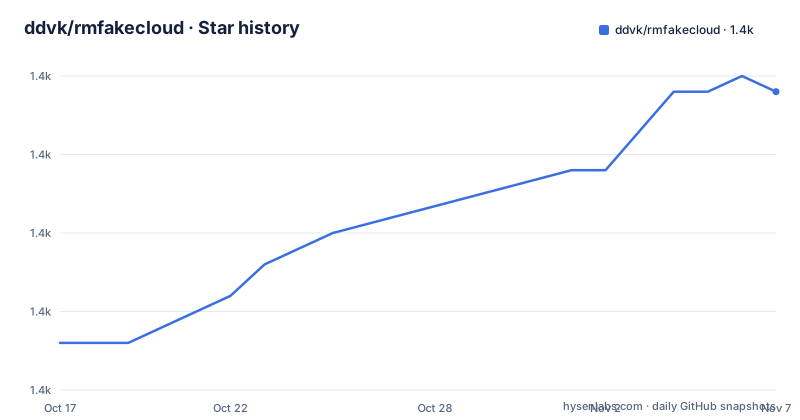
Star history
- ddvk/rmfakecloud1,374 ★ · +16
| Repository | 2026-10-17 | 2026-11-07 |
|---|---|---|
| ddvk/rmfakecloud | 1.4k | 1.4k |
16 Stars in the last 21 days, measured from the daily GitHub snapshot. Compare with other projects
Editorial analysis
Why rmfakecloud Replaces the Official reMarkable Cloud
rmfakecloud is intended for reMarkable owners who want to host the cloud endpoint used for document synchronization and backup themselves. The README describes it as a replacement for the official cloud, with the explicit goal of keeping files under the user's control while controlling the hosting environment. This is useful when the official service is not the desired place for the tablet's document set, or when users need additional server-side integrations.
The repository presents a Go backend under `cmd/` and `internal/`, a separate user interface under `ui/`, and deployment files including `Dockerfile`, `Makefile`, `helm/`, and `docker/`. The Go module includes libraries for Gin, WebSockets, MQTT, FTP, WebDAV, Dropbox, PDF generation, calendar data, and PDF and text-related processing. Those dependencies indicate that this is more than a simple file copy service. It is designed to reproduce several cloud-facing functions and connect documents to external systems.
The project does not present a simple CLI as its primary user experience. Its documentation links to setup and configuration pages, while the README provides a development command for starting the UI and backend. That positioning matters for adoption: the intended operator is likely comfortable deploying a server-side service and connecting a tablet to a private endpoint, rather than someone looking for a desktop synchronization utility.
Supported reMarkable Devices and Sync Boundaries
The README lists support for reMarkable 1, reMarkable 2, reMarkable Paper Pro, reMarkable Paper Pro Move, and reMarkable Paper Pure. It also separates file synchronization into several formats or generations, listing synchronization 1.0 as supported and synchronization 1.5, 2, 3, and 4 as supported.
There is an important version boundary. The current release is documented as supporting file synchronization up to reMarkable software 3.27.1. Newer releases have not been tested. This is not a minor compatibility footnote. A private cloud replacement depends on the tablet accepting the configured endpoint, certificates, proxy behavior, and protocol exchanges. The project itself gives no evidence that software versions beyond 3.27.1 are compatible.
The README also records breaking changes around storage URL configuration, user ownership in `/data`, and the optional `sync15` diff synchronization mode. For software 3.15 and later, `STORAGE_URL` should not be set, or it should point to an HTTPS host without a port. The `sync15` option can be enabled through the documented `setuser` command or a profile setting, and enabling it requires a full resynchronization. Old files are retained, while new data is placed in a new directory. These changes imply that upgrades can require operational work and data-layout awareness, not just replacing an executable.
Backend, Tablet Routing, Certificates, and Sync Data
The visible repository structure supports a service-based architecture. The Go entry point is `github.com/ddvk/rmfakecloud`, the command target is `./cmd/rmfakecloud`, and the Docker image builds the UI first with Node and pnpm, then compiles the Go binary. The final container exposes port 3000 and runs `/rmfakecloud-docker` as its entry point. This indicates a web service with a separately built interface rather than a file-only background agent.
The troubleshooting instructions show that the tablet is expected to resolve `my.remarkable.com` and `local.remarkable.com` to the host or local service. They also refer to `local.appspot.com`, a proxy service, installed certificates, and `xochitl`, the tablet-side reMarkable software component. The expected routing is therefore not merely a DNS change. It involves directing cloud-related hostnames, proxying requests, and installing a certificate authority so the tablet accepts HTTPS connections to the private service.
The README's connectivity check expects the host-side HTTP endpoint to return `Working...` and the HTTPS endpoint to return the same response. The certificate check uses `openssl s_client` against `localhost:443` with hostname verification for `local.appspot.com`. These commands are diagnostic rather than installation steps, but they show the operational boundary clearly: host reachability, Wi-Fi isolation, proxy state, certificate installation, tablet TLS behavior, and synchronization logs all form separate failure points.
The repository also includes an `internal/` package tree and tests under `test/`, but the README does not document a public API contract. Integrations are implemented through server-side features rather than a documented plugin interface.
Initial Deployment and First Host Check
The README links to the project documentation for setup and configuration, but the repository excerpt does not include a complete installation command, Docker Compose file, Helm values file, or environment-variable reference. Those instructions should be taken from `https://ddvk.github.io/rmfakecloud/` rather than reconstructed from the repository entry names. The Dockerfile confirms that port 3000 is exposed, but it does not document required secrets, user creation steps, storage mounts, or proxy settings.
For a first local check after following the setup guide, the README documents this HTTP request. It should return `Working...` from the host that serves rmfakecloud:
wget -qO- http://host:3000The hostname in that example is a placeholder in the README, not a value that can be copied literally into a working environment. Substitute the actual host only after the documented deployment has configured the service.
The repository also documents a certificate verification check. Run it on the host after the proxy and certificate setup described in the documentation:
echo Q | openssl s_client -connect localhost:443 -verify_hostname local.appspot.com -CAfile /etc/ssl/certs/ca-certificates.crt 2>&1 | grep VerifyThe expected line is `Verify return code: 0 (ok)`. If the service is reachable but the certificate check fails, the tablet may reject the private endpoint even when the server itself is running. The README does not document rollback for the complete setup, so a failed deployment should be handled according to the linked configuration documentation.
Feature Parity Is Broad but Uneven
The feature table makes clear that rmfakecloud is intended to replace more than synchronization. It lists email sending of documents, handwriting recognition, screen sharing, storage integrations, messaging integrations, webhook messaging, and calendar integration using ICS. WebDAV and FTP integrations are supported, with Nextcloud and Owncloud given as examples. PIN reset is supported on reMarkable 1 and reMarkable 2.
The gaps are equally important. Handwriting search is marked unsupported. OneDrive is unsupported. Dropbox and Google Drive integrations are marked work in progress. Direct Slack integration is not available; the README points to a webhook with services such as Zapier, Make, or n8n. Archive-document functionality works, but the README says the information is not saved. Document rendering in the web interface is unsupported and marked work in progress.
This pattern makes rmfakecloud a partial parity project. It is a reasonable candidate for self-hosted document transfer and selected integrations, but it should not be selected by assuming that every official cloud capability has been reproduced. The web interface also cannot be assumed to be a complete document browser because the README explicitly marks document rendering as unsupported.
A practical distinction is between local file synchronization and external integration behavior. WebDAV and FTP are listed as supported, while OneDrive is not. ICS is listed for calendar integration. Users should compare the specific workflows they depend on, rather than relying on the phrase “cloud replacement” as a feature guarantee.
Failure Modes That Affect Host Data
The most serious operational warning concerns synchronization semantics. The README says that deleting files from the host's users directory causes those files to be deleted from the device on the next sync. Deleting an entire user directory can therefore have a direct effect on tablet content. Before experimenting with cleanup commands, operators need to understand the user directory layout and preserve a separate copy.
The README also documents a caveat for security and versions at or below 0.0.3: connecting to the API can delete all files unless files are marked as not synchronized with `synced:false` beforehand. This is a narrow historical warning tied to those versions, but it demonstrates why an upgrade plan should include data verification and backup rather than an immediate endpoint switch.
Official tablet updates create another predictable failure mode. The README states that an official update removes proxy and hosts-file changes, after which the tablet disconnects from the private cloud by receiving an invalid token from the official cloud and a 403 response. Reinstalling the proxy and reconnecting the tablet to rmfakecloud is then required. That is a maintenance cost for any self-hosted solution that depends on device-level routing and certificate changes.
The troubleshooting section also calls out client isolation on Wi-Fi access points. A host and tablet can be on the same wireless network while remaining unable to communicate. The documented checks cover connectivity, proxy status, certificate installation, TLS errors, and `rm-sync` logs, but they do not turn these distributed components into one-click monitoring.
Maintenance, Upgrades, and AGPL-3.0
The repository is not archived, and its last push was on 2026-07-10, which is within the six-month window used for maintenance judgments. Recent releases listed in the repository context include v0.0.31 on 2026-05-09, v0.0.30 on 2026-05-08, and v0.0.29 on 2026-03-17. Those dates show release activity, but they do not establish that every newer tablet release is compatible.
The README identifies upgrade-sensitive behavior explicitly. Users of `sync15` need a full resynchronization when changing to that mode, and old files remain in their previous directory. Earlier changes also required manually moving `/data` files to the user created after v0.0.3. A deployment therefore needs a data migration plan, especially if it has accumulated local documents and external integration state.
The repository is licensed under AGPL-3.0. That license governs use and distribution of the software, including obligations that may apply when a modified version is offered to users over a network. The repository's license text should be reviewed for the intended deployment and modification model. This is a licensing consideration, not a determination about a particular deployment, and the README excerpt does not provide legal interpretation.
The Go toolchain is declared in `go.mod` as Go 1.23.3 with `toolchain go1.24.1`. The Makefile can build Linux targets for x64, ARM variants, ARM64, Windows x64, and Docker. The UI build uses pnpm, while the Docker build uses `node:lts` for the interface and `golang:bookworm` for the backend. Building from source therefore has more moving parts than installing a single prebuilt binary.
Editorial conclusion
rmfakecloud fits users who want hosted control over reMarkable synchronization and backup, especially owners of the supported tablet generations who can operate a host, proxy, and certificate setup. It is a poor choice for someone requiring tested compatibility with reMarkable software newer than 3.27.1, handwriting search, OneDrive support, or web document rendering. Before adoption, check the documented setup requirements for the device, confirm the release and compatibility status, and review what happens to host-side user files before allowing the first synchronization.
Frequently asked questions
What reMarkable software versions are supported by rmfakecloud?
The README says the current release supports file synchronization up to reMarkable software 3.27.1. It also states that newer releases have not been tested.
Does rmfakecloud support the reMarkable Paper Pro and Paper Pro Move?
Yes. The supported-device table lists reMarkable 1, reMarkable 2, reMarkable Paper Pro, reMarkable Paper Pro Move, and reMarkable Paper Pure.
What happens if files are deleted from rmfakecloud's host user directory?
The README warns that deleting files from the users directory on the host causes those files to be deleted from the device during the next sync. Deleting the entire user directory requires disconnecting and reconnecting the cloud from the device.
Does rmfakecloud support OneDrive, handwriting search, and web document rendering?
The feature table marks OneDrive, handwriting search, and document rendering in the web interface as unsupported. Dropbox and Google Drive integrations are marked work in progress.
How can I check the first rmfakecloud HTTP endpoint?
The README gives a connectivity check using `wget -qO- http://host:3000`. The host placeholder must be replaced with the actual deployed host, and the expected response is `Working...`.
Official sources
Add this badge to your README
If you maintain this project, the badge below links readers to this analysis and shows its maintenance status from the daily GitHub snapshot. Paste the markdown into your README; add ?metric=license or ?metric=stars to the image URL for a different field.

[](https://hysenlabs.com/projects/ddvk-rmfakecloud)Star history chart for your README
[](https://hysenlabs.com/projects/ddvk-rmfakecloud)Was this useful?