disler/claude-code-hooks-mastery: a working reference for all 13 Claude Code hook events
Master Claude Code Hooks
At a glance
- What is it?
- The repository is a Python demo of every Claude Code hook lifecycle event, wired to UV single-file scripts, TTS feedback and a validation subagent team. It is a teaching fixture, not a library, and the README is the real documentation.
- Who is it for?
- Adopt this if you already run Claude Code and want a concrete payload example for a hook event you have not wired up yet, especially PreToolUse blocking or SessionStart context loading. Do not adopt it if you want a pip-installable hook framework or a supported product; the README states the optional integrations (ElevenLabs, Firecrawl, OpenAI, Ollama) are optional setup, not requirements.
- Can I use it commercially?
- Not without permission. GitHub finds no licence file in the repository, and without a licence all rights are reserved by default: you may read the code but not reuse it. Check the README, or ask the authors, before using it.
- Is it still maintained?
- Activity is slowing. The repository last received commits 8 months ago.
- What is it written in?
- Mainly Python, according to GitHub's language statistics.
Answers come from the project's GitHub data, last synced on November 15, 2026, and from our analysis. They are not legal advice.
Star history
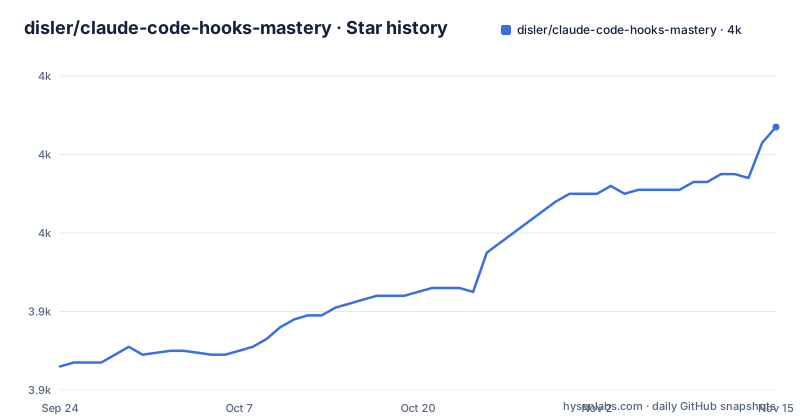
- disler/claude-code-hooks-mastery3,987 ★ · +61
| Repository | 2026-09-24 | 2026-11-15 |
|---|---|---|
| disler/claude-code-hooks-mastery | 3.9k | 4k |
61 Stars in the last 52 days, measured from the daily GitHub snapshot. Compare with other projects
Editorial analysis
The problem: Claude Code hooks are JSON payloads with no reference implementation
Claude Code exposes hook lifecycle events, and each one hands your script a different JSON payload. The hard part is not writing a shell command. It is knowing what arrives on stdin at each of the 13 events, which ones can block a tool call, and which ones fire asynchronously where a return value does nothing. The README positions the repository as a way to "quickly master how to use Claude Code hooks to add deterministic (or non-deterministic) control over Claude Code's behavior."
The audience is narrow and specific: someone already using Claude Code who wants to intercept prompts, audit permissions, block a destructive command, or inject context at session start. The repository answers that with working scripts rather than prose. It also bundles material beyond hooks, namely subagents, a meta-agent, a team-based validation system, output styles and custom status lines, which makes it a broader Claude Code configuration sample than the name suggests.
How the hook lifecycle is structured in this repository
The README documents 13 events, grouped into session lifecycle, the main conversation loop, subagent lifecycle and maintenance. SessionStart fires with a `source` value of "startup", "resume" or "clear". UserPromptSubmit fires before Claude processes the prompt and receives the prompt text, a session id and a timestamp. PreToolUse fires before tool execution with `tool_name` and `tool_input`, and the README states it is used to block dangerous commands such as `rm -rf` and `.env` access. PostToolUse receives the tool response; PostToolUseFailure receives an error object with the tool name, input and `tool_use_id`.
Two events are worth separating from the rest. Notification fires asynchronously when Claude Code sends a notification, so a script that plays audio there cannot influence the conversation. PermissionRequest fires when the user is shown a permission dialog, and the README describes auto-allow for read-only operations including Read, Glob, Grep and safe Bash. PreCompact fires before a compaction operation with a `trigger` of "manual" or "auto" and, for manual compaction, `custom_instructions`; the repository uses it for transcript backup. The Setup hook persists environment through `CLAUDE_ENV_FILE` and can inject context through `additionalContext`, which is the mechanism behind loading git status and recent context at session start.
Installing the prerequisites and running a first hook
There is no package to install. The README lists two prerequisites: Astral UV, described as a fast Python package installer and resolver, and Claude Code itself. The repository layout puts hook scripts under `.claude/`, with sample environment and MCP configuration at the top level as `.env.sample` and `.mcp.json.sample`.
Start by installing UV, then copy the environment sample and fill in only the keys your hooks will actually use.
curl -LsSf https://astral.sh/uv/install.sh | sh
cp .env.sample .env
The `.env.sample` file defines the keys the demo reads: `ANTHROPIC_API_KEY`, `DEEPSEEK_API_KEY`, `ELEVENLABS_API_KEY`, `FIRECRAWL_API_KEY`, `GEMINI_API_KEY`, `GROQ_API_KEY`, `OLLAMA_HOST`, `OPENAI_API_KEY` and `ENGINEER_NAME`, which the sample sets to Dan. Leaving a key empty is fine unless a hook you enabled calls that provider.
Because the scripts are single-file UV scripts, a hook command points at the script path and UV resolves the dependencies declared in its header. The exact command string lives in your Claude Code hook configuration, not in the README, so read the script header before wiring it up. Run a script directly to see the payload shape it expects and what it prints; if it waits on stdin, paste a sample JSON object to exercise the parsing path before you register the hook.
Where the demo gets in your way
The README states that 11 of the 13 hook events are validated via automated testing. That is an honest number, and it means two events are implemented and logging but not covered by the test harness. If you plan to depend on an event, check which side of that line it falls on before you build on it.
The optional integrations are the second constraint. ElevenLabs, the ElevenLabs MCP server, Firecrawl, OpenAI, Anthropic and Ollama are all listed as optional setup, but the stop hook's completion messages and the notification hook's spoken alerts depend on a provider being reachable. The README describes an LLM priority order of OpenAI, then Anthropic, then Ollama, then random, and a voice priority of ElevenLabs, then OpenAI, then pyttsx3. A machine with no API keys and no local model still gets a working hook, but not the audio behaviour the demo is built around.
This is also the wrong tool if you want a maintained library with a versioned interface. The repository is a demonstration whose value is in the scripts you copy out of it. Nothing in the README describes a stable API contract, and the last push was on 2026-03-04, so treat the code as a snapshot of one working configuration rather than a dependency.
Compared with writing hooks by hand against the Claude Code docs
The alternative is the Claude Code hooks documentation itself. That approach gives you the authoritative event list and payload schema, and nothing else: no example scripts, no logging pattern, no demonstration of what a blocking PreToolUse hook looks like in practice.
This repository inverts that trade-off. You get runnable Python for each event, a consistent logging style, and the surrounding apparatus of subagents and validation, but you inherit the author's choices about TTS providers, environment variables and file layout. If your team writes hooks in Node or shell, most of the Python here is still readable as a specification of what each event receives, and the mermaid diagram in the README is the fastest way to see the ordering. If you want a single hardened hook, copying one script and deleting the audio calls is less work than adapting the whole demo.
Maintenance cost, licensing and what to check before depending on it
The last push was on 2026-03-04. The repository is not archived, but it has no published releases and no version tags in the README, so there is no upgrade path to follow and no changelog to diff against. Upgrading means re-reading the README and re-copying the scripts you took, then re-checking them against the current Claude Code hook documentation, because the payloads are defined by Claude Code and not by this repository.
The license is not stated in the README, which matters if you intend to lift the scripts into a commercial codebase. The top-level entries are `.claude/`, `.env.sample`, `.gitignore`, `.mcp.json.sample`, `CLAUDE.md`, `README.md`, `ai_docs/`, `apps/`, `images/`, `ruff.toml`, `specs/` and `ty.toml`. There is no LICENSE file among them, so confirm the terms with the author before redistributing anything. Keep `.env` out of version control; the sample contains API key slots for several providers.
Editorial conclusion
Adopt this if you already run Claude Code and want a concrete payload example for a hook event you have not wired up yet, especially PreToolUse blocking or SessionStart context loading. Do not adopt it if you want a pip-installable hook framework or a supported product; the README states the optional integrations (ElevenLabs, Firecrawl, OpenAI, Ollama) are optional setup, not requirements. Verify first that Astral UV is installed, that your Claude Code hook configuration points at the script paths you actually copied, and that the .env.sample keys you fill in match the providers your stop and notification hooks are configured to call.
Frequently asked questions
What are the best hooks in Claude Code?
The repository does not rank them, but it treats PreToolUse and UserPromptSubmit as the two with the most control: PreToolUse can block dangerous commands such as rm -rf and .env access, and UserPromptSubmit validates and enhances the prompt before Claude sees it. SessionStart and Setup are used for context loading, and PreCompact for transcript backup.
Are Claude Code hooks useful?
The README frames hooks as a way to add deterministic control over Claude Code's behavior, which is the point of blocking a command or auditing a permission dialog outside the model's judgement. The demo also uses them for non-deterministic work, such as generating completion messages with an LLM and playing them through a TTS provider.
How can I master Claude Code hooks with this repository?
Install Astral UV and Claude Code, copy .env.sample to .env, and run the individual single-file scripts under .claude/ with uv run to see the payload each event receives. The README documents all 13 hook events with their payload fields, and states that 11 of the 13 are validated via automated testing.
How do I define hooks in Claude Code with this project?
The README does not reproduce the hook configuration file format. The scripts are single-file UV programs, so a hook entry points at a script path and UV resolves its declared dependencies; the README links to the Claude Code hooks documentation for the configuration itself.
Official sources
Add this badge to your README
If you maintain this project, the badge below links readers to this analysis and shows its maintenance status from the daily GitHub snapshot. Paste the markdown into your README; add ?metric=license or ?metric=stars to the image URL for a different field.

[](https://hysenlabs.com/projects/disler-claude-code-hooks-mastery)Star history chart for your README
[](https://hysenlabs.com/projects/disler-claude-code-hooks-mastery)Was this useful?