obsidian-second-brain: a markdown memory layer that seven CLI agents share
Persistent memory for Claude Code and 6 other CLI agents, stored as plain markdown in your Obsidian vault. Stop re-explaining your projects, decisions and people every session. 45 commands: hybrid semantic search, self-rewriting notes, key-less web research, and scheduled agents that maintain the vault while you sleep.
At a glance
- What is it?
- The project turns an Obsidian vault into persistent memory for Claude Code, Codex, Gemini CLI and four other agents, with 45 slash commands and four scheduled agents that edit existing notes rather than appending new ones. Its main bet is that the vault, not the agent, should own the memory.
- Who is it for?
- Adopt it if you already keep a working Obsidian vault and want the same facts available to Claude Code, Codex, Cursor, Gemini CLI, OpenCode and Grok Bot without re-explaining your projects each session. Do not adopt it if you want a database-backed memory with transactional guarantees, or if you are unwilling to let a scheduled agent rewrite notes you wrote by hand.
- Can I use it commercially?
- Yes. MIT is a permissive licence: you can use, modify and sell software built on it, as long as you keep its copyright and licence notices.
- Is it still maintained?
- Yes. The repository received new commits within the last day.
- What is it written in?
- Mainly Python, according to GitHub's language statistics.
Answers come from the project's GitHub data, last synced on November 15, 2026, and from our analysis. They are not legal advice.
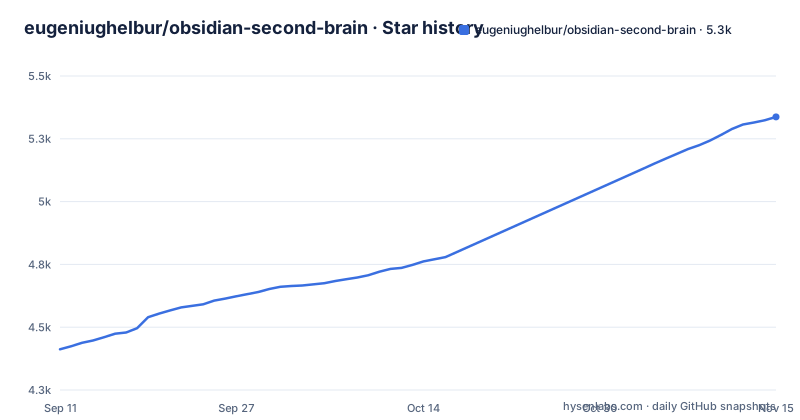
Star history
- eugeniughelbur/obsidian-second-brain5,337 ★ · +925
| Repository | 2026-09-11 | 2026-11-15 |
|---|---|---|
| eugeniughelbur/obsidian-second-brain | 4.4k | 5.3k |
925 Stars in the last 65 days, measured from the daily GitHub snapshot. Compare with other projects
Editorial analysis
The gap it targets: session memory versus vault memory
The README states the problem directly: Claude Code has no persistent memory across sessions, and neither does Grok Bot, Codex, Gemini or the others. A session ends and the context is gone. Meanwhile the notes accumulate in Obsidian and stay inert. The project's framing is that you already own the long-term memory, and the tool doing the thinking cannot reach it.
The intended user is named in the README: developers, founders and operators, writers, researchers, with four role presets chosen at setup. That is a narrower audience than "anyone with an Obsidian vault". The workflow assumes you talk to a CLI agent daily, that decisions and people recur across projects, and that you would rather have those facts in files you can open than in a provider's memory store. If you use one agent occasionally and your notes are a personal journal, the 45 commands are mostly surface area you will never touch.
What the commands actually do to a note
The README's demo caption describes one /obsidian-save turning a conversation into five cross-linked notes. The starting set is three commands: /obsidian-init for setup, /obsidian-save to capture, /obsidian-find to recall. The remaining 42 cover synthesis, reconciliation, research, scheduled maintenance and a /create-command interview flow for authoring your own.
The part that distinguishes this from a note-taking plugin is where the writes land. The comparison table in the README sets Karpathy's LLM Wiki pattern against this project: new sources in the original pattern append pages and cross-reference them, while here they rewrite existing pages, so people get updated, claims revised and stale facts replaced. Contradictions are handled by /obsidian-reconcile rather than left for manual resolution, and /obsidian-synthesize writes synthesis pages for patterns you never asked about.
That rewrite behaviour is the whole design. It is also the risk.
OKM and the AI-first note format
The freshness model is called OKM, Open Knowledge Metabolism, documented in references/freshness-policy.md. The rule stated in the README is that every stored fact is timeless, dated, or a pointer, so the knowledge base does not fill with facts that used to be true. A dated fact presumably carries its date and degrades visibly; a pointer defers to a source that can be re-read.
The note format is explicitly not for human reading. Notes get a `## For future agent` preamble plus frontmatter aimed at LLM retrieval. The README calls this AI-first, and it is a real trade-off: a vault full of preambles and structured frontmatter is less pleasant to browse in Obsidian's reading view than prose notes. If you value the vault as something you read yourself, this convention works against you. The repository root carries an AI-FIRST.md file, and the README lists a write-time AI-first validator.
Install paths and the platform surface
The README's install section is referenced by anchor. The README names Claude Code, Grok Bot, Codex CLI, Gemini CLI, OpenCode and Cursor, and its command-list anchor reads 49 commands while the description and body text say 45. That discrepancy is worth resolving against the live README before you plan around a specific command count.
v0.18, Crew (October 2026), is the headline release in the README: Claude Code, Codex, Cursor and Grok Bot share one logbook of job records in any plain folder or the vault, read through each agent's own hooks, and lessons agents leave each other become rules only when you keep them.
The scheduled agents are the part to think hardest about
Four agents run on a schedule: a morning brief, a nightly consolidation, a weekly review, and a vault-health check. The README's line is that the vault compounds while you sleep. Nightly consolidation is the one that rewrites notes without you watching.
This is where the project's ambition and its failure modes sit in the same place. An agent that revises claims overnight can silently drop a nuance you wrote deliberately, or reconcile two facts that were both true in different contexts. The freshness policy is the mitigation, and the reconcile command is the other one. If your notes contain anything you cannot afford to have paraphrased, the honest answer is that this tool is not built for that vault. Run the scheduled agents against a separate vault, or keep the nightly consolidation off until you have read what it produces for a week.
A second constraint is retrieval quality. The README claims hybrid semantic search, which implies both embedding-based and lexical matching.
Where a plain markdown vault or a hosted memory API wins
The obvious alternative is doing nothing special: keep the Obsidian vault, and let each CLI agent read files when you point it at them. That costs you the cross-linking, the reconcile step and the scheduled maintenance, but it also means nothing rewrites your notes behind your back, and there is no install to maintain across seven agents. For a vault under a few hundred notes, this is often the right call.
The other direction is a hosted memory service attached to one provider. Those give you managed storage and retrieval without asking you to keep a vault in a particular shape, but the memory is tied to that provider, so switching agents means starting over. The README's pitch is the inverse: your vault outlives whichever CLI you switch to. That is a genuine architectural difference, not a slogan, and it is the strongest argument for this project. It is also the reason the note format is AI-first rather than pretty, because portability across agents requires a convention all of them can read.
A third option is a general knowledge-graph tool layered over the vault. Those tend to be query tools, not writing tools; they will not create the five cross-linked notes from a conversation, and they will not reconcile contradictions. The difference is that obsidian-second-brain writes, and writing is where the risk lives.
Maintenance, licence and what to check before adopting
The licence is MIT, which permits commercial use, modification and redistribution provided the copyright notice and permission notice are retained. That is a permissive licence and imposes no copyleft obligation on your own notes or on tooling you build around the skill. This is a description of the licence text, not legal advice; if you are embedding it in a product, have counsel read the file.
The maintenance picture from the release history is active. Three releases are listed in October 2026: v0.18.1, v0.19.0 The Check-In and v0.20.0 The Batch. The last push date is 2026-10-15. The v0.18 notes credit source quality labels and German triggers to contributors, which suggests the project accepts outside patches.
The upgrade cost is the thing to weigh. A skill that rewrites notes on a schedule will interact with every format change the project makes. Before adopting, verify three things against your own vault: that /obsidian-init produces a layout you recognise, that a single /obsidian-save round-trips a conversation into notes you would have written yourself, and that the scheduled agents can be disabled per agent rather than as a group. If the third is not configurable, the nightly consolidation is an all-or-nothing decision.
Editorial conclusion
Adopt it if you already keep a working Obsidian vault and want the same facts available to Claude Code, Codex, Cursor, Gemini CLI, OpenCode and Grok Bot without re-explaining your projects each session. Do not adopt it if you want a database-backed memory with transactional guarantees, or if you are unwilling to let a scheduled agent rewrite notes you wrote by hand. Before trusting it, run /obsidian-init on a copy of the vault, trigger /obsidian-save once, and read the diff it produces against the source conversation.
Frequently asked questions
What is the Obsidian Claude second brain?
It is a vault that rewrites itself. Every source updates existing pages instead of appending new ones, contradictions reconcile automatically through /obsidian-reconcile, and /obsidian-synthesize finds unnamed patterns and writes synthesis pages on its own, rather than waiting for you to ask.
How do I set up obsidian second brain?
Run /obsidian-init to set things up, then use /obsidian-save to capture and /obsidian-find to recall, which are three of 45 commands. A preset is picked at setup, with four role presets for developers, founders and operators, writers and researchers, and the research toolkit's .env.example marks OBSIDIAN_VAULT_PATH as required.
What is obsidian second brain used for?
It gives CLI coding agents persistent memory across sessions, since agents such as Claude Code, Grok Bot, Codex and Gemini keep none of their own. Memory is plain markdown in your Obsidian vault, so it survives switching from one CLI to another instead of being rebuilt each session.
How do I use obsidian second brain with Claude Code?
Point it at your vault and start with /obsidian-save to capture and /obsidian-find to recall, then let the four scheduled agents run: morning brief, nightly consolidation, weekly review and vault-health check.
Official sources
Add this badge to your README
If you maintain this project, the badge below links readers to this analysis and shows its maintenance status from the daily GitHub snapshot. Paste the markdown into your README; add ?metric=license or ?metric=stars to the image URL for a different field.

[](https://hysenlabs.com/projects/eugeniughelbur-obsidian-second-brain)Star history chart for your README
[](https://hysenlabs.com/projects/eugeniughelbur-obsidian-second-brain)Was this useful?