dmytrodanylyk/circular-progress-button: a Java button that morphs into a spinner
GitHub describes it as Android Circular Progress Button. The repository metadata lists Java as its primary language. The metadata lists the MIT license. This article stays within the project description and details documented in the GitHub repository README.
At a glance
- What is it?
- An Android library that turns a regular button into a circular progress indicator on click. It is a small, MIT-licensed Java project from 2014, with the author pointing users toward a newer successor.
- Who is it for?
- Adopt this library if you need a quick, self-contained way to turn a button into a circular spinner in a legacy Java Android app, and you are comfortable with a project that has seen no meaningful updates since 2023. Do not adopt it for new Kotlin or Compose projects; the author explicitly directs users to android-morphing-button for an updated version.
- Can I use it commercially?
- Yes. MIT is a permissive licence: you can use, modify and sell software built on it, as long as you keep its copyright and licence notices.
- Is it still maintained?
- Yes. The repository last received commits 10 days ago.
- What is it written in?
- Mainly Java, according to GitHub's language statistics.
Answers come from the project's GitHub data, last synced on October 21, 2026, and from our analysis. They are not legal advice.
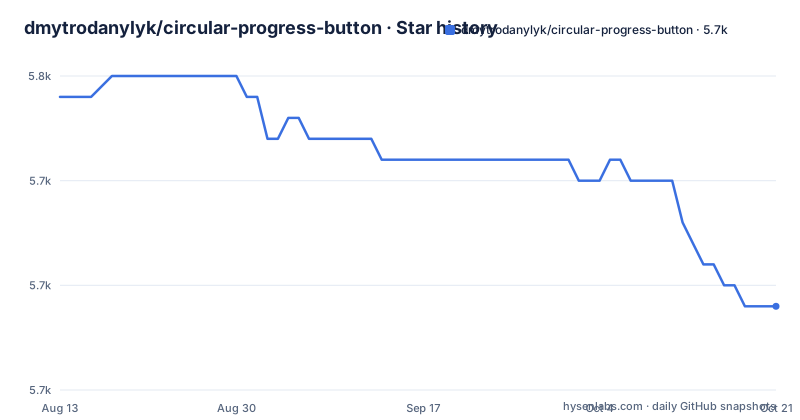
Star history
- dmytrodanylyk/circular-progress-button5,739 ★ · -10
| Repository | 2026-08-13 | 2026-10-21 |
|---|---|---|
| dmytrodanylyk/circular-progress-button | 5.7k | 5.7k |
-10 Stars in the last 69 days, measured from the daily GitHub snapshot. Compare with other projects
Editorial analysis
What this button actually does
The library provides an Android Button that can morph into a circular progress indicator. The README describes it in one line: an Android Button which can morph to Circular Progress. The use case is straightforward: a user taps a button, the button collapses into a spinning circle, and the app performs an asynchronous task. When the task finishes, the button returns to its normal state. This pattern is common for login forms, file uploads, or any action where you want to show progress without leaving the current screen. The target audience is Android developers working in Java, using the classic View system rather than Jetpack Compose. The library is small and focused, which is both its strength and its limitation.
How the morph works under the hood
The repository is a Java library, and the key class appears to be StrokeGradientDrawable, based on the ProGuard rule that mentions it. The rule keeps a method setStrokeColor(int) on that class, which suggests the button's background is a custom drawable that can change its stroke color, likely to indicate progress states. The morph itself is a visual transition: the button's shape changes from a rounded rectangle to a circle, and the circle shows a progress arc. The README does not explain the animation mechanics in detail, but the presence of StrokeGradientDrawable implies the progress is drawn as a stroke on a gradient drawable. The library also has a sample app on Google Play, which demonstrates the behavior. Without running the code, I cannot confirm the exact animation timing or state handling, but the architecture is simple: a custom view class and a drawable that handles the visual states.
Getting it running: JitPack and Gradle
Integration is done through JitPack, not Maven Central, despite the README saying the lib is available on Maven Central. The README gives two snippets. First, add the JitPack repository to your project-level build.gradle: maven { url 'https://jitpack.io' }. Second, add the dependency: implementation 'com.github.dmytrodanylyk:circular-progress-button:$latest' where $latest is a version tag like 1.4. The latest release is 1.4, pushed on 2023-10-06. The README also warns about ProGuard: if you use ProGuard, you must add a keep rule for StrokeGradientDrawable's setStrokeColor method. Without that rule, the method could be stripped, and the progress stroke color might fail at runtime. The sample app is available on Google Play, but the README does not include source code for the sample, so you would need to clone the repo to see a working example.
A real limitation: the author says it is outdated
The most important limitation is in the README's first line: a note that an updated version of this library will be available at github.com/dmytrodanylyk/android-morphing-button. That is a clear signal that circular-progress-button is not the author's recommended path. The last push was in October 2023, and the releases are sparse: 1.4 in 2023, 1.3 in 2022, 1.2 in 2021. The project is not archived, but it is dormant. For a new project, using a library whose own author points elsewhere is a risk. The library is Java-based, so it will not work with Compose without a wrapper. It also does not appear to support Kotlin extensions or modern AndroidX lifecycle components. If you need a progress button in 2025, you are likely better off with the morphing-button library or a custom implementation.
The alternative: android-morphing-button
The README explicitly names the successor: android-morphing-button, also by dmytrodanylyk. That project is the updated version of this one, and it likely addresses the same problem with a more modern approach. The key difference is that the author has moved development there, which means circular-progress-button is effectively legacy. If you are starting a new project, you should evaluate android-morphing-button first. The alternative approach is to write your own button with a custom drawable and an ObjectAnimator, which gives you full control but requires more code. The library's own sample shows the intended usage, but the README does not include the sample source, so you cannot copy-paste a working example without cloning the repo.
Maintenance and license: what you are signing up for
The project is MIT licensed, which is permissive. You can use, modify, and redistribute the code with attribution. The README includes the full MIT license text, so there is no ambiguity. Maintenance is a different story. The last release was in 2023, and the author has moved on to another project. There is no indication of active issue triage or feature development. The ProGuard rule is a sign that the library requires configuration to work correctly in release builds, and that is a maintenance burden. If you adopt this library, you must verify that it compiles with your Android Gradle Plugin version. The library was written in 2014, and Android has changed significantly since then. The README mentions a Wiki with a User Guide, but the links are not expanded in the cleaned material, so you may need to visit the GitHub wiki for detailed usage instructions. In short, this is a small, permissively licensed component that works, but it is not a living project.
Who should adopt it and what to verify first
Adopt this library if you have a legacy Java Android app and you need a simple progress button without adding a large dependency. It is also fine for learning how to build a custom drawable and animate a view. Do not adopt it for a new Kotlin or Compose project; the author's own note points you elsewhere. Before you integrate, verify three things. First, that the JitPack dependency resolves with your Gradle version. Second, that the ProGuard rule is in place if you use minification. Third, that the library's minimum SDK matches your app's minSdk. The library does not appear to have any dependencies beyond the Android framework, so the integration risk is low, but the dormancy risk is real. The concrete next step is to clone the repository and run the sample app to see if the morph animation works on your target devices, because the README does not provide a usage code snippet, only the dependency and ProGuard rule.
Editorial conclusion
Adopt this library if you need a quick, self-contained way to turn a button into a circular spinner in a legacy Java Android app, and you are comfortable with a project that has seen no meaningful updates since 2023. Do not adopt it for new Kotlin or Compose projects; the author explicitly directs users to android-morphing-button for an updated version. Before integrating, verify that the current Gradle and AndroidX setup works with the library's old dependencies, and check the ProGuard rule for StrokeGradientDrawable if you ship with minification enabled. The library is MIT licensed, so licensing is permissive, but you take on the maintenance burden of a dormant codebase.
Frequently asked questions
What does circular-progress-button do in Android?
It provides an Android button which can morph to a circular progress indicator, so a submit control can turn into a spinner while work is in progress. The library is written in Java, released under the MIT license, and its documentation is split across a wiki with Home, Screenshots and a User Guide page.
How do I add circular-progress-button to an Android project?
Add the jitpack.io repository to the repositories block in your Gradle allprojects configuration, then declare the dependency as com.github.dmytrodanylyk:circular-progress-button at the latest version. The readme also states the library is available on Maven Central and links to a third-party service that generates the Gradle snippet for a given plugin version.
Does circular-progress-button need ProGuard configuration?
Yes. If you use ProGuard you are asked to add a keep rule for the public setStrokeColor method on the com.dd.StrokeGradientDrawable class, otherwise a release build strips a member the library depends on. The class name in that rule also shows the Java package is com.dd, which differs from the com.github.dmytrodanylyk coordinate the artifact is published under.
What is the latest version of circular-progress-button?
The newest tag is 1.4, dated 2023-10-06, after 1.3 in January 2023 and 1.2 in October 2021. The default branch was pushed on 2026-10-03 and is not archived, so the tree has moved on without a release cut from it. The readme also opens by pointing at a separate repository as the updated version of this library.
Which branch should I send a pull request to for circular-progress-button?
The dev branch. The readme asks for pull requests there, while the default branch of the repository is master, so branching from what is checked out by default gives you the release line rather than the development line.
Official sources
Add this badge to your README
If you maintain this project, the badge below links readers to this analysis and shows its maintenance status from the daily GitHub snapshot. Paste the markdown into your README; add ?metric=license or ?metric=stars to the image URL for a different field.

[](https://hysenlabs.com/projects/dmytrodanylyk-circular-progress-button)Star history chart for your README
[](https://hysenlabs.com/projects/dmytrodanylyk-circular-progress-button)