TilingShell: custom layout tiling for GNOME with Snap Assistant and FancyZones
Extend Gnome Shell with advanced tiling window management. Supports multiple monitors, Windows 11 Snap Assistant, Fancy Zones, customised tiling layouts and more.
At a glance
- What is it?
- TilingShell is a GNOME Shell extension that replaces the built-in 2-column window snap with custom grid layouts, a Windows 11-style Snap Assistant and keyboard-driven tile placement. It supports GNOME 42 through 49 on X11 and Wayland, with a release candidate adding GNOME 51.
- Who is it for?
- TilingShell suits GNOME desktop users who want tiling layouts beyond the built-in 2-column snap and who are willing to manage layouts manually rather than relying on automatic tiling. Skip it if you need GNOME 50 support: v18.0-candidate adds GNOME 51 but no stable release covers version 50.
- Can I use it commercially?
- Yes, with conditions. GPL-3.0 is a copyleft licence: if you distribute software that includes it, you must release that software's source code under the same licence. Running it internally without distributing it does not trigger that obligation.
- Is it still maintained?
- Yes. The repository last received commits 6 days ago.
- What is it written in?
- Mainly TypeScript, according to GitHub's language statistics.
Answers come from the project's GitHub data, last synced on October 23, 2026, and from our analysis. They are not legal advice.
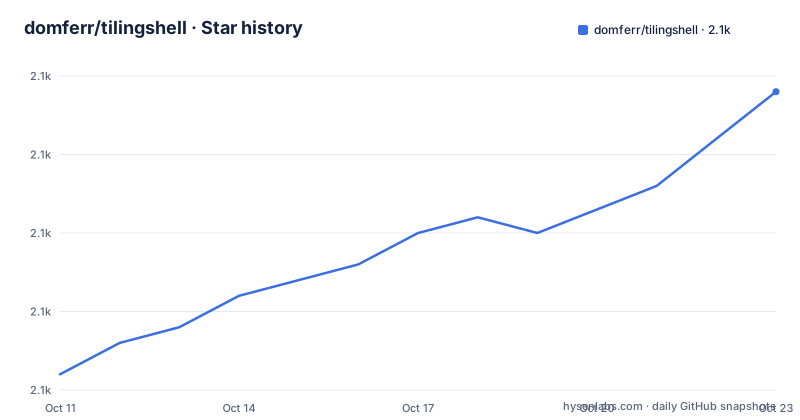
Star history
- domferr/tilingshell2,099 ★ · +18
| Repository | 2026-10-11 | 2026-10-23 |
|---|---|---|
| domferr/tilingshell | 2.1k | 2.1k |
18 Stars in the last 12 days, measured from the daily GitHub snapshot. Compare with other projects
Editorial analysis
Replacing GNOME's 2-column window snap with custom grid layouts on X11 and Wayland
GNOME's built-in window management allows snapping to a left or right half of the screen. TilingShell replaces that with a grid of tiles whose count and arrangement is set by the user and can be edited at any time through a built-in layout editor. Any number of columns and rows is possible, and layouts can span across uneven splits.
The extension works on both X11 and Wayland sessions, across GNOME Shell versions 42 through 49, per the README. The v18.0 release candidate, published on 2026-06-22, adds GNOME 51 support. GNOME 50 is not mentioned in either the README or the release notes, leaving it as a gap in the documented compatibility range.
TilingShell operates as an extension on top of GNOME rather than a replacement for it, which means the rest of GNOME's own window management continues to work alongside the tiling features. Window placement into tiles requires a deliberate gesture or keyboard shortcut, because windows do not snap to tiles automatically unless auto-tiling is enabled. That interactive design suits users who sometimes want windows outside a tiled grid, but it differs significantly from tiling Wayland compositors like Sway or Hyprland where every new window is automatically assigned a tile without any gesture.
CTRL-drag, Snap Assistant and right-click activation: 3 ways to place a window
When moving a window, pressing CTRL shows the tile overlay over the current monitor. Moving the window over any tile highlights it, and releasing places the window there at full tile size. CTRL is the default activation key and is configurable from preferences.
Snap Assistant is the second input method. While a window is being dragged, a panel appears at the top of the screen, and moving the window toward that panel activates it. Once active, the mouse position within the panel determines which tile is selected, and releasing the window places it there. Snap sensitivity is adjustable from preferences. The v18.0 release candidate added the right mouse button as a 3rd way to trigger the tiling overlay.
Holding ALT while using the tiling system (configurable in preferences) selects multiple tiles at once, so a window can span 2 or more adjacent tiles. This is what allows an asymmetric arrangement like a wide center pane plus 2 narrow side columns without creating a dedicated custom layout for that split.
Keyboard shortcuts also move windows between tiles. SUPER+Left, SUPER+Right, SUPER+Up and SUPER+Down cycle a window through the tile grid, and those bindings are customizable in preferences. Both keyboard tiling and smart resize can be individually enabled or disabled from preferences.
Installing from extensions.gnome.org or building with npm run build
TilingShell is distributed through the GNOME Extensions website at extensions.gnome.org/extension/7065/tiling-shell/. Installing from there requires the GNOME Extensions browser integration and the gnome-shell-extensions package on the target system. No command-line steps are needed for that path.
Building from source uses npm scripts defined in package.json. The build step runs a clean, esbuild compilation, schema compilation and resource compilation:
npm run buildAfter a successful build, the install:extension script in package.json copies the compiled files to ~/.local/share/gnome-shell/extensions/[email protected]/. It creates that directory if it does not exist. For GNOME 42 through 44, the script automatically selects the dist_legacy directory based on the installed shell version, so no separate command or flag is needed when targeting older GNOME releases.
After installing either way, the extension must be enabled through GNOME Extensions or the gnome-extensions CLI before any tiling behavior appears.
The built-in layout editor: left-click to split, right-click to delete
Layouts are created and edited through a panel editor accessible from the Tiling Shell icon in the system panel. Inside the editor, a left click on any tile splits it horizontally. Left click plus CTRL splits the same tile vertically. Right click removes a tile.
This means the only operations are split and delete. There is no tile-merge operation listed in the editor documentation; removing a divider between 2 adjacent tiles is not described in the README. Complex layouts are built by splitting from the default state rather than by merging smaller tiles.
Layouts created in the editor appear in the panel menu for selection. Selecting a layout from the menu applies it to all connected monitors. Each monitor shows the same layout when one is chosen from the panel, which is a constraint on multi-monitor setups where different monitors might benefit from different grids. Per-workspace layout, a separate feature, assigns a different layout per workspace rather than per monitor, which partially addresses that constraint.
Multiple monitors with different scaling factors and per-workspace layout
Multiple monitor support is stated as a key feature in the README, with explicit mention of support for different scaling factors across displays. When 2 or more monitors are connected, the active layout applies to all of them simultaneously when selected from the panel menu.
Per-workspace layout is a separate mechanism. Each workspace can carry its own active layout, so switching between a coding workspace with a 3-column grid and a writing workspace with a single large pane does not require manually selecting a different layout each time. This is independent from the monitor layout selection.
Edge tiling is documented as moving a window to the screen edge to tile it. The v17.3 release notes list enhanced edge tiling as a new feature, but the README does not describe the exact edge behavior beyond that phrase. Smart resize lets adjacent tiled windows be resized together, changing both tiles at once; it can be enabled or disabled from preferences.
Auto-tiling and Windows Suggestions are both listed in the usage table in the README, but the visible portion of the README ends before those sections are reached. They are implemented features whose behavior is not described in the sections available here.
GNOME-only scope, GPL licence discrepancy and why automatic tiling works differently
TilingShell runs only as a GNOME Shell extension, which means KDE, Xfce, Sway, Hyprland and every other non-GNOME environment cannot install or use it. For GNOME users who want fully automatic tiling, where every new window is assigned a tile without any gesture or shortcut, switching to a tiling Wayland compositor like Sway or Hyprland is the only path forward, though switching compositors is a major system change unrelated to the extension itself.
Licence documentation shows a discrepancy that affects redistribution decisions. Repository metadata records GPL-3.0 as the licence, while package.json states GPL v2.0, and those 2 identifiers describe licences with meaningfully different compatibility terms for derived projects. The LICENSE file at the repository root is the authoritative text, but comparing it against the package.json value is a necessary step before incorporating TilingShell code into another project or redistributing a modified build.
Graphics tablet support was added in v17.3, released on 2026-01-31, though the README does not describe what that support covers in terms of tablet input devices or which subset of the tiling gestures it applies to.
Last push on 2026-09-19, v18.0-candidate features and upgrade considerations
The repository was last pushed on 2026-09-19 and is not archived. Version 18.0-candidate, published on 2026-06-22, added GNOME 51 support, the right mouse button as an activation key, and a keybinding to untile all windows at once. That release was marked as a candidate rather than a stable release.
Version 17.3 from 2026-01-31 was the most recent stable release, adding enhanced edge tiling, the ability to reorder layouts, new translations and graphics tablet support. Version 17.2 from 2026-01-02 made no feature changes, updating only the build system to generate multiple files.
Upgrade cost is moderate for GNOME extension users. Extensions installed through extensions.gnome.org receive updates through the same browser interface. Source builds require re-running npm run build and npm run install:extension after pulling new commits. GNOME Shell version changes are the main compatibility risk: a new GNOME release can change the extension API, and TilingShell requires a corresponding update before it works on the new version. The gap between the stable v17.3 release and the v18.0 release candidate covers that update cycle for GNOME 51.
Editorial conclusion
TilingShell suits GNOME desktop users who want tiling layouts beyond the built-in 2-column snap and who are willing to manage layouts manually rather than relying on automatic tiling. Skip it if you need GNOME 50 support: v18.0-candidate adds GNOME 51 but no stable release covers version 50. Before installing on a system where modified code will be redistributed, read the LICENSE file and compare it against the package.json value of GPL v2.0, because the repository metadata and the package licence identifier disagree.
Frequently asked questions
What is TilingShell?
TilingShell is a GNOME Shell extension that adds a customizable tiling window system with a built-in layout editor, Snap Assistant, multiple monitor support and keyboard-driven tile placement. It supports GNOME versions 42 through 49 on X11 and Wayland, and implements Windows PowerToys FancyZones on the GNOME desktop.
How do I install TilingShell?
Install from the GNOME Extensions website at extensions.gnome.org/extension/7065/tiling-shell/ using the GNOME Extensions browser integration. Building from source requires npm run build followed by npm run install:extension, which copies the compiled files to the user extensions directory.
Does TilingShell work on Wayland?
Yes. The README states TilingShell can be installed on GNOME Shell versions 42 to 49 on both X11 and Wayland.
What GNOME versions does TilingShell support?
The README badge lists GNOME 42 through 49 as the supported range. The v18.0 release candidate from 2026-06-22 adds GNOME 51 support; GNOME 50 is not mentioned in either the README or the release notes.
Does TilingShell implement FancyZones?
Yes. The README states that TilingShell implements Windows PowerToys FancyZones, making the same grid-based tiling approach available on the GNOME desktop.
Official sources
Add this badge to your README
If you maintain this project, the badge below links readers to this analysis and shows its maintenance status from the daily GitHub snapshot. Paste the markdown into your README; add ?metric=license or ?metric=stars to the image URL for a different field.

[](https://hysenlabs.com/projects/domferr-tilingshell)Star history chart for your README
[](https://hysenlabs.com/projects/domferr-tilingshell)Was this useful?