DUpdateSystem/UpgradeAll: Android Update Discovery for Apps and Magisk Modules
Check updates for Android apps, Magisk modules and more!
At a glance
- What is it?
- UpgradeAll is an open source Android application for discovering updates across app sources, including GitHub, GitLab, F-Droid, Google Play, Coolapk, and configured source lists. It is aimed at Android users who want one place to search for updates and review installed or added apps and Magisk modules.
- Who is it for?
- Adopt UpgradeAll if you want a source-based Android update checker and already manage apps or Magisk modules outside a single store. Do not choose it if you require silent installation, a documented rollback process, or evidence that Android 12L is fully tested.
- Can I use it commercially?
- Yes, with conditions. GPL-3.0 is a copyleft licence: if you distribute software that includes it, you must release that software's source code under the same licence. Running it internally without distributing it does not trigger that obligation.
- Is it still maintained?
- Yes. The repository last received commits 1 day ago.
- What is it written in?
- Mainly Kotlin, according to GitHub's language statistics.
Answers come from the project's GitHub data, last synced on November 6, 2026, and from our analysis. They are not legal advice.
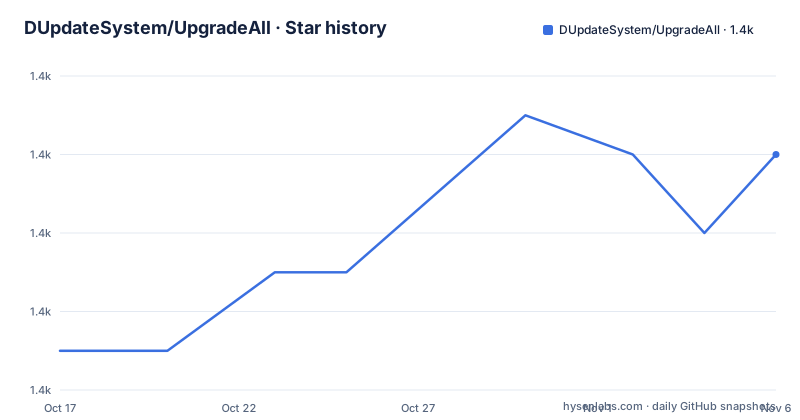
Star history
- DUpdateSystem/UpgradeAll1,358 ★ · +5
| Repository | 2026-10-17 | 2026-11-06 |
|---|---|---|
| DUpdateSystem/UpgradeAll | 1.4k | 1.4k |
5 Stars in the last 20 days, measured from the daily GitHub snapshot. Compare with other projects
Editorial analysis
UpgradeAll's Android Update-Checking Scope
UpgradeAll addresses a specific gap in Android update management: an update may be available from a source that is not the store used to install the application. The README says the application checks updates for Android apps, including apps the user did not install, and for Magisk modules. That distinction matters because a single app store cannot represent every release channel a user may care about.
The project is for Android users who want to search a collection of sources, add applications or modules to a list, and return to a page containing available updates. Its documented workflow separates discovery from tracking. App Hub configures the sources. Discover searches for apps or modules. Apps shows updates for installed or added items. This is different from treating UpgradeAll as a general package manager, since the README describes an external downloader and does not claim that UpgradeAll performs installation itself.
The official source list includes GitHub, GitLab, F-Droid, Play Store, Coolapk, and Source List. Source List points to the UpgradeAll-rules repository, where source configurations are maintained separately from the Android application. That separation gives the project a data-driven extension point, but it also means update availability depends on whether the selected source has a usable configuration and whether its upstream release information is current.
How UpgradeAll Connects Sources to Installed Items
The repository layout indicates that the Android client is divided into modules with names such as core-getter, core-downloader, core-installer, core-shell, core-websdk, and core-android-utils. The README identifies supporting libraries including Jsoup, JsoupXpath, OkHttp, Gson, LitePal, Rhino, and AndroidShell. Based on that layout and the documented workflow, source discovery is separated from download and Android-specific handling rather than being implemented as one undifferentiated screen.
The user-facing flow is explicit. After installing UpgradeAll, the user opens App Hub and switches on the desired sources. The user then visits Discover, waits for the search, and finds or searches for the required apps or modules. Items can be added from there, and the Apps page collects updates for installed or added items. In app market mode, the README states that UpgradeAll automatically checks installed applications when it opens.
That design leaves some implementation questions unanswered. The README does not identify the exact polling schedule, comparison algorithm, update metadata format, or behavior when two sources publish different versions. The developer documentation is described as covering cloud directory structure, tracking entries, and software source configurations, but the README does not reproduce those details. As a result, an adopter can confirm the intended workflow and supported source categories, but cannot confirm from the README how version precedence or source failures are resolved.
Installing UpgradeAll and Performing a First Check
The README does not provide a command-line installation procedure or a Gradle-based consumer setup. It directs users to the GitHub Releases page or F-Droid, where the application can be obtained as an Android package. The documented first-use sequence is therefore an in-app workflow rather than a shell tutorial.
First, download and install the latest version listed on the project’s release channel. The README specifically links to GitHub Releases and F-Droid, and does not document an APK filename, package installation command, signing procedure, or sideloading permission. After opening UpgradeAll, go to App Hub and enable the sources that match the apps and modules being tracked. Return to Home, open Discover, wait for the results, and search for the relevant application or module. Finally, open Apps to review the available updates.
No code block is included because the README contains no install command or configuration snippet that can be copied accurately. It would be incorrect to invent an `adb` command, an F-Droid command, or a release URL path. The first real verification should therefore be visual: confirm that App Hub shows the intended source as enabled, that Discover returns the target item, and that the Apps page presents an update or indicates that none is available.
Source Coverage, Downloads, and Android Compatibility
UpgradeAll distinguishes source discovery from file transfer. The README lists downloading files with an external downloader as a feature, so the application is not documented as a self-contained replacement for every installer. That boundary can be useful for users who want to control where downloads are handled, but it also means the update check and the installation step are separate operations.
The documented platform range is Android 5.0 through Android 12L. The README adds that Android 12L was not tested. This is an explicit compatibility qualification, so a user on that release should treat the application as unverified rather than assume equivalent behavior. The repository also contains Android-specific modules, including `core-shell` and `core-installer`, but the README does not explain whether those modules are used for every update type or how their privileges are handled on a particular device.
The source set is broad, but breadth does not guarantee identical coverage. GitHub and GitLab releases can depend on repository conventions, while F-Droid, Play Store, and Coolapk have different publication models. The README does not document authentication requirements, rate limits, regional access behavior, or how an unavailable source appears in the interface. Those are relevant adoption questions for anyone who depends on a particular source.
Limitations of UpgradeAll Compared with Store-Based Management
The clearest limitation is that UpgradeAll is centered on finding and presenting updates, while the README does not claim that it automatically installs every discovered file. Its documented external-downloader feature suggests that users may need to complete or delegate the transfer step. That makes it a poor fit for someone who wants a single store-managed upgrade path and does not want to compare releases across sources.
The automatic check is narrower than the full product workflow. The README states that app market mode checks installed apps when the application opens, but it does not say that Magisk modules receive the same automatic treatment. It also does not document rollback, update scheduling, notification behavior, or recovery after an interrupted download. For a user who relies on upgrades for system stability, those omissions are more important than the number of supported sources.
A real alternative is to use the application store or Magisk’s own update process for each item, rather than a cross-source checker. Store-based management has fewer source comparisons and less configuration, but it generally limits updates to the store’s distribution channel. UpgradeAll is the more appropriate choice when releases are distributed across GitHub, GitLab, F-Droid, or other configured sources and the user accepts separate source configuration and manual download handoff.
UpgradeAll Maintenance, Licensing, and Upgrade Cost
The repository is not marked as archived, and its last push was on 2026-10-15. The release history lists 0.13-beta.4 as the most recent named release on 2023-04-24, followed by earlier beta releases. The difference between repository activity and release recency should be considered when planning an installation, because the README does not explain the project’s release policy or compatibility guarantees for newer Android versions.
The project is primarily written in Kotlin and is licensed under GPL-3.0. The README states that use of the software code is subject to the GNU General Public License v3.0. That license matters for redistribution, modification, and incorporation into other software, but this review does not provide legal advice. The repository also includes multiple modules and a separate rules repository, so adopters who modify the client, source configuration, or bundled code should inspect the applicable license files and notices themselves.
An upgrade may involve more than replacing the APK. Users may need to review changed source configurations, verify Android compatibility, and confirm that the external downloader remains available. The README documents neither a migration guide for app data nor a rollback procedure, so the upgrade cost cannot be reduced to an application update.
Editorial conclusion
Adopt UpgradeAll if you want a source-based Android update checker and already manage apps or Magisk modules outside a single store. Do not choose it if you require silent installation, a documented rollback process, or evidence that Android 12L is fully tested. Verify the selected app source, download handoff behavior, and the version you install before enabling automatic checks.
Frequently asked questions
What does UpgradeAll check updates for?
UpgradeAll checks for updates to Android apps, including apps that were not installed by the user, and for Magisk modules. It presents updates through configured app sources.
How do I install and start using UpgradeAll?
The README directs users to download the application from GitHub Releases or F-Droid and install it on Android. After opening the app, enable sources on App Hub, search on Discover, and review updates on Apps.
Does UpgradeAll install updates automatically?
The README states that UpgradeAll can check installed apps automatically when app market mode opens. It also says that files can be downloaded with an external downloader, but it does not claim that all updates are installed automatically.
Which app sources are officially supported?
The README lists GitHub, GitLab, F-Droid, Play Store, Coolapk, and Source List. Source List refers to configurations maintained in the UpgradeAll-rules repository.
Official sources
Add this badge to your README
If you maintain this project, the badge below links readers to this analysis and shows its maintenance status from the daily GitHub snapshot. Paste the markdown into your README; add ?metric=license or ?metric=stars to the image URL for a different field.

[](https://hysenlabs.com/projects/dupdatesystem-upgradeall)Star history chart for your README
[](https://hysenlabs.com/projects/dupdatesystem-upgradeall)Was this useful?