DustinWin/proxy-tools: ARM64 proxy artifact downloads
自动同步 mihomo 内核、sing-box 内核、sing-box reF1nd 版内核、Dashboard 面板和 AdGuard Home 最新版
At a glance
- What is it?
- DustinWin/proxy-tools republishes mihomo, sing-box, Dashboard, and AdGuard Home artifacts, with installation examples centered on ShellCrash and ARM64 Linux. It is an artifact distribution layer rather than a proxy configuration manager, and its custom builds exclude several networking features.
- Who is it for?
- Adopt this repository if you need its ARM64 Linux artifacts, UPX-compressed binaries, or ShellCrash-oriented download paths. Do not treat it as a general installer or configuration platform.
- Can I use it commercially?
- Not without permission. GitHub finds no licence file in the repository, and without a licence all rights are reserved by default: you may read the code but not reuse it. Check the README, or ask the authors, before using it.
- Is it still maintained?
- Yes. The repository last received commits 15 days ago.
- What is it written in?
- GitHub does not report a main language for this repository.
Answers come from the project's GitHub data, last synced on October 23, 2026, and from our analysis. They are not legal advice.
Star history
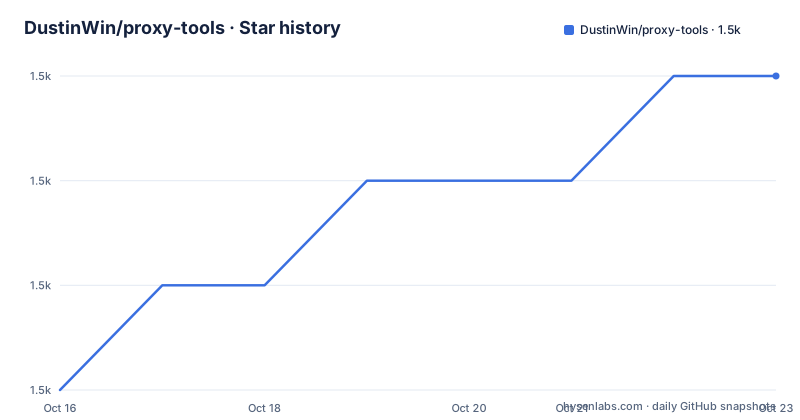
- DustinWin/proxy-tools1,509 ★ · +3
| Repository | 2026-10-16 | 2026-10-23 |
|---|---|---|
| DustinWin/proxy-tools | 1.5k | 1.5k |
3 Stars in the last 7 days, measured from the daily GitHub snapshot. Compare with other projects
Editorial analysis
Why proxy-tools republishes proxy components
DustinWin/proxy-tools addresses a packaging and delivery problem for users who run proxy software on Linux systems, especially ARM64 routers, NAS devices, and small servers. Its README says the project automatically builds artifacts each day at midnight, Beijing time, covering mihomo Meta and Alpha, sing-box Stable and Testing, the reF1nd sing-box variants, four Dashboard packages, and AdGuard Home Release and Beta.
The repository is not presented as a source-code fork that introduces a separate proxy protocol or manages subscriptions. Based on the repository layout, which contains `.github/` and `README.md`, its visible role is to produce release files and document how to place those files into existing software. The clearest supported workflow targets ShellCrash, where the downloaded binary is saved as `CrashCore.upx` and discovered by that script.
This distinction matters. Teams expecting a complete proxy stack, including routing policy, DNS design, certificate management, and subscription handling, will find that proxy-tools addresses only binary acquisition. Its audience is narrower: users who already understand mihomo or sing-box and need particular packaged variants or an ARM64 download path.
Inside the mihomo and sing-box build matrix
The release matrix separates upstream branches and downstream compatibility choices. For mihomo, proxy-tools publishes builds from the Meta and Alpha branches. For the main sing-box project, it publishes Stable and Testing builds. A second set comes from reF1nd, including `reF1nd-Stable` and `reF1nd-Testing`. The README states that the reF1nd Linux artifacts also produce Android packages and support provider configuration described as similar to mihomo `proxy-providers`.
These files are not interchangeable drop-ins merely because several are named `sing-box`. The release paths identify upstream lineage and channel, while the README treats Stable, Testing, Meta, Alpha, and reF1nd as distinct selections. Stable-oriented deployments can use the Stable artifact, but the Alpha and Testing artifacts carry the channel designation assigned by their respective upstream trees.
The builds also differ by feature. proxy-tools says its Linux mihomo build removes `fake_tcp` for Hysteria 1, Tailscale, ZeroTier, EasyTier, and `gvisor`. Its Linux sing-box build removes Tailscale and `gvisor`. Those exclusions are more consequential than a compression detail because a protocol or TUN stack can be required by the intended configuration. There is no documented command in the README for restoring an omitted component, so these are fixed boundaries of the distributed builds.
ShellCrash installation on an ARM64 Linux host
The README's first concrete step is to confirm the target CPU architecture over SSH. The documented command prints the machine name and machine architecture.
uname -msThe README says an output containing `linux aarch64` identifies an ARM64 host. The URLs in the tutorial use ARM64 file names, so users with another architecture must change the link suffix. This repository does not present a multi-architecture selection command in its README.
For an existing ShellCrash setup, the upgrade example downloads the selected artifact into `${CRASHDIR}` and restarts ShellCrash. The following command selects mihomo Meta:
curl -fo "${CRASHDIR}/CrashCore.upx" -L https://ghfast.top/https://github.com/DustinWin/proxy-tools/releases/download/mihomo/mihomo-meta-linux-arm64.upx && "${CRASHDIR}/start.sh" restartIt downloads `mihomo-meta-linux-arm64.upx` into the ShellCrash directory and then invokes `start.sh restart`. The README notes that the ShellCrash version display may not refresh after a replacement, so the absence of a changed displayed version should not be treated by itself as proof that the download failed. The first-import section in the README is truncated after `&& sc`, so this article does not supply the remainder of that sequence.
Dashboard deployment through the ShellCrash UI directory
proxy-tools repackages four browser interfaces as `.tar.gz` files: `Yacd-meta`, `metacubexd`, `zashboard`, and `sing-box-dashboard`. The README maps each package to its corresponding dashboard site. The shell workflow streams an archive through `tar` into `${CRASHDIR}/ui/` and then restarts ShellCrash.
This example installs zashboard:
curl -fL https://ghfast.top/https://github.com/DustinWin/proxy-tools/releases/download/Dashboard/zashboard.tar.gz | tar -zx -C "${CRASHDIR}/ui/" && "${CRASHDIR}/start.sh" restartAfter successful extraction, the archive is expected under the existing ShellCrash UI directory and the command invokes a restart. The other documented packages use the same destination with different release paths. The Dashboard is a management interface, not the proxy engine itself, so installing one does not replace the selected mihomo or sing-box binary.
There is also a browser-side constraint. The README says Chromium-based browsers may block an online Dashboard when it is loaded in a context that does not permit insecure content. Its Chrome example asks the user to add the dashboard domain under Privacy and safety, Site settings, More content settings, Insecure content, or to open `chrome://settings/content/insecureContent`. This is a browser configuration issue, not a failed archive extraction.
AdGuard Home placement and executable preparation
The AdGuard Home workflow is more direct than the ShellCrash examples. It creates `/data/AdGuardHome`, downloads the selected ARM64 executable to `/data/AdGuardHome/AdGuardHome`, and grants execute permission.
mkdir -p /data/AdGuardHome
curl -fo /data/AdGuardHome/AdGuardHome -L https://ghfast.top/https://github.com/DustinWin/proxy-tools/releases/download/AdGuardHome/AdGuardHome_release_linux_arm64
chmod +x /data/AdGuardHome/AdGuardHome
The README also provides a `AdGuardHome_beta_linux_arm64` URL for the Beta channel. Both the binary and channel are distribution artifacts from proxy-tools, while AdGuard Home remains the underlying DNS filtering application. The README begins an OpenRC service script after these steps but does not show the complete script, so this article does not assert additional service configuration.
Proxy-tools states that its Linux mihomo, sing-box, and AdGuard Home artifacts use UPX compression. Compression can reduce download size, but the repository documentation does not explain startup behavior, signature verification, checksum publication, decompression tooling, or recovery from a corrupted download. Users who require reproducible binary verification should first establish whether upstream projects provide matching checksums or signatures for the exact asset.
Maintenance, licensing, and operational trade-offs
The repository is not archived, and its last push was on 2026-10-08. That is recent activity, but the repository listing's three most recent named releases are dated 2024-11-15. The README describes a daily automated build process, yet it does not provide build logs, release signatures, retention rules, or a supported rollback procedure. A recent push therefore confirms repository activity, not the provenance or continuous availability of every release asset.
The repository's own license is not stated in the README or repository listing. It republishes components governed by separate upstream projects, including mihomo, sing-box, several Dashboard projects, and AdGuard Home. The README does not reproduce their license texts or explain redistribution obligations. An engineer considering production use must inspect the license attached to each upstream project and each exact packaged artifact rather than infer permissions from proxy-tools.
The wrong tool is a deployment that needs zero-touch installation, configuration generation, rollback, signed builds, multi-architecture selection, or the features removed from these binaries. The right tool is a narrower ARM64 artifact source for operators who have already chosen an engine and channel, accept the feature exclusions, and know where the resulting files belong.
Editorial conclusion
Adopt this repository if you need its ARM64 Linux artifacts, UPX-compressed binaries, or ShellCrash-oriented download paths. Do not treat it as a general installer or configuration platform. First verify CPU architecture, required networking features, upstream artifact licenses, and the selected channel before replacing an existing binary. The most important check is whether your deployment needs an omitted component.
Frequently asked questions
Which CPU architecture do the proxy-tools installation examples use?
The examples use ARM64. The README says to run `uname -ms` over SSH and identifies an output containing `linux aarch64` as ARM64; other architectures require changing the URL suffix.
Does proxy-tools include every mihomo and sing-box networking feature?
No. The Linux mihomo build omits Hysteria 1 `fake_tcp`, Tailscale, ZeroTier, EasyTier, and `gvisor`, while the Linux sing-box build omits Tailscale and `gvisor`.
How are Dashboard packages installed through ShellCrash?
The README's commands stream a selected `.tar.gz` Dashboard package into `${CRASHDIR}/ui/` and invoke `"${CRASHDIR}/start.sh" restart` after extraction.
Does the README document licensing for the redistributed software?
No. The README does not state proxy-tools' own license or provide a consolidated license list for mihomo, sing-box, Dashboard packages, or AdGuard Home.
Official sources
Add this badge to your README
If you maintain this project, the badge below links readers to this analysis and shows its maintenance status from the daily GitHub snapshot. Paste the markdown into your README; add ?metric=license or ?metric=stars to the image URL for a different field.

[](https://hysenlabs.com/projects/dustinwin-proxy-tools)Star history chart for your README
[](https://hysenlabs.com/projects/dustinwin-proxy-tools)Was this useful?