EDK2 for Rockchip RK3588: a UEFI firmware with a public support matrix
EDK2 UEFI firmware for Rockchip RK3588 platforms
At a glance
- What is it?
- The edk2-rk3588 repository delivers UEFI firmware for Rockchip RK3588 boards, with two clearly stated support tiers, an ACPI mode that is developed against Windows, a Device Tree mode for Linux, and a peripheral table that marks what does not work.
- Who is it for?
- The edk2-rk3588 firmware fits a developer who wants a PC-like boot on an RK3588 board, who needs Windows 11 to install on ARM hardware, or who wants mainline Linux to boot a board that the vendor firmware handles poorly, and who is willing to work within the documented peripheral gaps.
- Can I use it commercially?
- Not without permission. GitHub finds no licence file in the repository, and without a licence all rights are reserved by default: you may read the code but not reuse it. Check the README, or ask the authors, before using it.
- Is it still maintained?
- Yes. The repository last received commits 14 days ago.
- What is it written in?
- Mainly C, according to GitHub's language statistics.
Answers come from the project's GitHub data, last synced on November 7, 2026, and from our analysis. They are not legal advice.
Star history
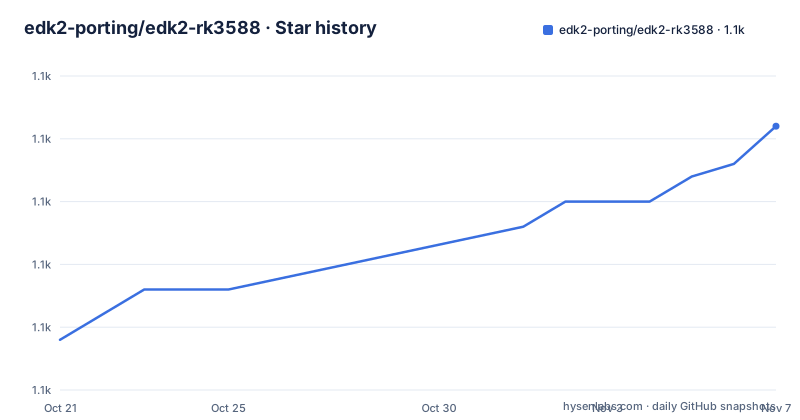
- edk2-porting/edk2-rk35881,071 ★ · +17
| Repository | 2026-10-21 | 2026-11-07 |
|---|---|---|
| edk2-porting/edk2-rk3588 | 1.1k | 1.1k |
17 Stars in the last 17 days, measured from the daily GitHub snapshot. Compare with other projects
Editorial analysis
A UEFI firmware for boards that never shipped with one
The edk2-rk3588 repository contains a UEFI firmware implementation based on EDK2 for various RK3588 boards. The stated goal is a PC-like standardised boot experience, supporting multiple operating systems such as Windows, Linux, BSD and VMware ESXi.
That framing matters because the RK3588 platform normally does not boot that way. The point of an EDK2 port is to give a board the firmware interface that an operating system expects from a PC, with ACPI tables, a UEFI boot path and drivers for the peripherals the firmware needs, so that an installer for Windows 11 on ARM or a generic Linux distribution can run on it.
The primary language is C, the default branch is `master`, and the project is not archived, with the last push on 2026-09-30. The released versions are v1.1 from 2025-04-09, v1.0.1 from 2025-03-21 and v1.0 from 2025-03-18, so the project is on a stable 1.x line with the last release more than a year before the last commit.
The repository is a workspace rather than a single tree. Alongside the `edk2` and `edk2-platforms` components it carries `edk2-rockchip/` and `edk2-rockchip-non-osi/`, the `edk2-non-osi` tree, an `arm-trusted-firmware/` directory with a matching `arm-trusted-firmware-patches/` directory, a `configs/` directory, a `devicetree/` directory, `images/`, `misc/` and a `build.sh` at the root, with `.gitmodules` recording the components that are pulled in separately.
The licence field on the repository is not classified by GitHub, which is worth noting for a firmware project: the tree contains upstream components that each carry their own terms, so the licensing has to be read component by component rather than assumed from the repository.
Platinum and Bronze: how the support tier is decided
The support list is not a list of boards that happen to work. It is a list of boards with a declared tier, and the criteria for each tier are written down.
Platinum means the best overall support, judged on three factors. The first is a Device Tree and peripherals compatible with mainline Linux, marked as required. The second is active interest from the vendor in supporting their hardware. The third covers hardware design choices: if an Ethernet port is present, it has to be a Realtek PCIe NIC or an integrated GMAC, also marked as required, and SPI NOR flash for dedicated firmware storage is preferred.
Bronze means the device may have limitations such as missing one or more of those required features, low interest from vendors and the community, and a lack of proper validation that may affect functionality.
The Platinum list is the Radxa ROCK 5B, ROCK 5A and ROCK 5 ITX, the Orange Pi 5 and Orange Pi 5 Plus, the Khadas Edge2, the BuzzTV P6, the FriendlyELEC NanoPC T6, NanoPi R6C, NanoPi R6S and NanoPC CM3588-NAS, and the ameriDroid Indiedroid Nova. The Bronze list is longer and includes the Radxa ROCK 5B+, the Fydetab Duo, the Firefly AIO-3588Q, ITX-3588J and ROC-RK3588S-PC, the StationPC Station M3, the Mekotronics R58X and R58 Mini, the Mixtile Blade 3, the FriendlyELEC NanoPi M6 and the Hinlink H88K.
The list is explicitly subject to change at any time as devices gain support or fall behind, which is a sensible thing to say about a matrix that depends on vendor behaviour as much as on code.
ACPI mode is a Windows-first path with caveats for everyone else
The operating system support is split by firmware mode, and the split is the most important thing in the repository.
In ACPI mode, the table lists Windows 11 with a link to a hardware support status page, NetBSD 10 with display, UART, USB, PCIe including NVMe, SATA, eMMC and GMAC Ethernet, the VMware ESXi Arm Fling from 1.12 with display and USB, and Linux tested on Ubuntu 22.04 with kernel 5.15.0-75-generic, covering display, UART, USB, PCIe including NVMe and Ethernet, and SATA.
The caveats are where the honesty is. For ESXi, PCIe devices hang at boot and have to be disabled in settings or the ports left empty, and GMAC Ethernet is detected but does not work. For Linux, the note says that for full hardware functionality you need a kernel with RK3588 support and should switch to Device Tree mode.
And the note under the table is the one to read twice: ACPI support is only being developed and tested against Windows, there are no plans to further improve functionality for other operating systems, and Device Tree should be considered instead where it applies, for instance on Linux.
So the mode is designed for the PC-like experience the project advertises, and the PC-like experience in practice means Windows on ARM. Anyone expecting the same quality of ACPI experience on Linux or BSD is reading a table that explicitly says otherwise.
Device Tree mode is where mainline Linux actually lives
Device Tree mode has two flavours, and the difference between them is the difference between the vendor's kernel and the upstream kernel.
The vendor compatibility mode targets the Rockchip SDK Linux with kernel 5.10 or 6.1, tested with the Armbian rk3588 live ISO, and the note says the hardware support is platform dependent but that most peripherals work, with a pointer to the Device Tree configuration for other kernels.
The mainline compatibility mode targets generic upstream Linux with kernel 6.10 or newer, tested with Ubuntu 24.10, Fedora Workstation 41 and Fedora Workstation Rawhide. The support note points at Collabora's RK3588 upstream status document, and there is a specific limitation: kernels older than 6.15 lack display output, with a workaround in the Device Tree configuration. The note under that table says mainline support is only available on Platinum platforms.
That last line is the practical rule. On a Bronze board, the vendor kernel path is available and the upstream path is not, which means a board in that tier will track the vendor's SDK rather than upstream Linux.
The three-way split between the firmware modes, the vendor kernel and the upstream kernel is the part that needs a decision before any work starts, and the repository is unusually clear about which combination is supported.
The peripheral table says what does not work
Firmware documentation usually lists what works. This one lists the gaps, and the gaps are the interesting part of a board port.
The working entries include USB 3, 2.0 and 1.1 in host mode only, with the note that USB 3 devices on a Type-C port only work in one orientation, PCIe 3.0 and 2.1, SATA, SD and eMMC, HDMI output, GMAC Ethernet, Realtek PCIe Ethernet, SPI NOR flash, the HYM8563 real-time clock, the RNG, the status LED and the RK806 and RK860 voltage regulators. Low-speed interfaces, GPIO, UART, I2C, SPI and PWM, are working, with the UART2 console available at a 1500000 baud rate.
The partial ones are where a user will lose time. DisplayPort over USB-C has no hot-plug detection and no EDID, works only in one orientation of the Type-C port, and some displays may not work regardless. eDP output is disabled and needs manual configuration depending on the platform and the panel. DSI output works but is only enabled on the Fydetab Duo and also needs manual configuration.
One entry is a outright failure. The FUSB302 USB Type-C controller is listed as not working, and it is required for PD negotiation and connector orientation switching, which explains the orientation problem in the USB and DisplayPort rows above.
Two more entries need care rather than debugging. Realtek PCIe Ethernet works, but some platforms do not have MAC addresses set and networking may not work in that case. The cooling fan is supported on most platforms, with the fan connector where present and otherwise a 3-pin PWM fan on the GPIO header, and the table warns explicitly not to connect a 2-pin fan there, giving the exact pins for the Orange Pi 5, GPIO4_B2, and the Indiedroid Nova, GPIO4_B4.
Only devices relevant to the firmware itself are listed, not the operating system's own devices, and the table applies to all platforms unless noted.
Where this port is the wrong choice
The limits are visible in the support tiers and in the peripheral table, and they come in three kinds.
The first is the tier. A Bronze board is explicitly described as possibly missing required features, low on vendor and community interest, and lacking proper validation that may affect functionality. A team that has to guarantee a boot on a specific board should assume a Bronze board is a research project, not a product.
The second is the ACPI ceiling. If the goal is a Windows 11 install on ARM hardware, this firmware is aimed squarely at it. If the goal is a uniform experience across several operating systems on the same board, the ACPI path is documented as being developed and tested against Windows alone, with no plans to improve it further, which means the other systems depend on Device Tree mode and on a kernel the board vendor supports.
The third is the peripheral set. A product that needs USB-C display output, or a panel over eDP, or power delivery negotiation over Type-C, will hit the partial and not-working rows. There is no configuration flag in the documentation that turns the FUSB302 controller on, so that is a hard boundary for a design that depends on it.
The alternative for a board with this chip is the vendor's own firmware, which is what the vendor compatibility mode in Device Tree mode is designed to sit alongside, with the Rockchip SDK Linux kernels 5.10 and 6.1. The difference in approach is the one the whole repository is about. EDK2 gives a standard firmware interface, ACPI, mainline Linux, Windows and a set of tools that are common across chips, at the cost of a longer list of things that do not work and a support matrix that changes as vendors pay attention.
For a board that is going to run mainline Linux, the trade is worth it. For a board that only ever runs the vendor stack, it is extra work for nothing, and the vendor firmware is the better answer.
Editorial conclusion
The edk2-rk3588 firmware fits a developer who wants a PC-like boot on an RK3588 board, who needs Windows 11 to install on ARM hardware, or who wants mainline Linux to boot a board that the vendor firmware handles poorly, and who is willing to work within the documented peripheral gaps. It is the wrong choice for a board that is only in the Bronze tier, where validation is explicitly thin, and for a deployment that needs every peripheral in the firmware, since the Type-C controller does not work and DisplayPort over USB-C and eDP are partial. Before flashing it, check the tier of your exact board, read the peripheral table for the interfaces you actually use, and if you run Linux on a Bronze board, plan to stay in Device Tree mode, because mainline compatibility mode is limited to Platinum platforms.
Frequently asked questions
Which RK3588 boards have Platinum UEFI support?
The Platinum list covers the Radxa ROCK 5B, ROCK 5A and ROCK 5 ITX, Orange Pi 5 and Orange Pi 5 Plus, Khadas Edge2, BuzzTV P6, FriendlyELEC NanoPC T6, NanoPi R6C, NanoPi R6S, NanoPC CM3588-NAS and ameriDroid Indiedroid Nova. Mainline Device Tree mode is only available on Platinum platforms.
Does the RK3588 EDK2 firmware support Windows?
Windows 11 is the operating system the ACPI mode is developed and tested against. NetBSD 10, the VMware ESXi Arm Fling and Linux are listed with caveats, and the documentation states that ACPI support is only being developed and tested against Windows, with no plans to further improve it for other systems.
Which peripherals do not work in the RK3588 UEFI firmware?
The FUSB302 USB Type-C controller is listed as not working, and it is required for PD negotiation and connector orientation switching. DisplayPort over USB-C and eDP output are only partial, with eDP disabled by default, and some platforms do not have MAC addresses set, so Realtek PCIe Ethernet may not work there.
What is the difference between ACPI mode and Device Tree mode for RK3588?
ACPI mode gives a PC-like standardised boot and is developed against Windows, while Device Tree mode has a vendor compatibility mode for Rockchip SDK Linux kernels 5.10 and 6.1 and a mainline compatibility mode for upstream kernels 6.10 or newer, where kernels older than 6.15 lack display output.
Official sources
Add this badge to your README
If you maintain this project, the badge below links readers to this analysis and shows its maintenance status from the daily GitHub snapshot. Paste the markdown into your README; add ?metric=license or ?metric=stars to the image URL for a different field.

[](https://hysenlabs.com/projects/edk2-porting-edk2-rk3588)Star history chart for your README
[](https://hysenlabs.com/projects/edk2-porting-edk2-rk3588)Was this useful?