Inbox Zero: an open source AI email assistant you can run on your own Docker host
The world's best AI personal assistant for email. Open source app to help you reach inbox zero fast.
At a glance
- What is it?
- Inbox Zero is an open source AI email assistant that pre-drafts replies, applies rules you write in plain English, and bulk-unsubscribes and archives. It comes as a hosted service or a Docker-based self-hosted install, and the self-hosted route is where its privacy argument holds up.
- Who is it for?
- Self-host Inbox Zero if you want an AI email assistant whose data sits in your own Postgres and you are prepared to set up Google or Microsoft OAuth yourself. Run npx @inbox-zero/cli setup, change the default Postgres password, and pin a version tag such as 2.30.0 instead of following the latest image.
- Can I use it commercially?
- Check first. The repository uses a licence we do not classify automatically, so read its LICENSE file before any commercial use.
- Is it still maintained?
- Yes. The repository received new commits within the last day.
- What is it written in?
- Mainly TypeScript, according to GitHub's language statistics.
Answers come from the project's GitHub data, last synced on November 14, 2026, and from our analysis. They are not legal advice.
Star history
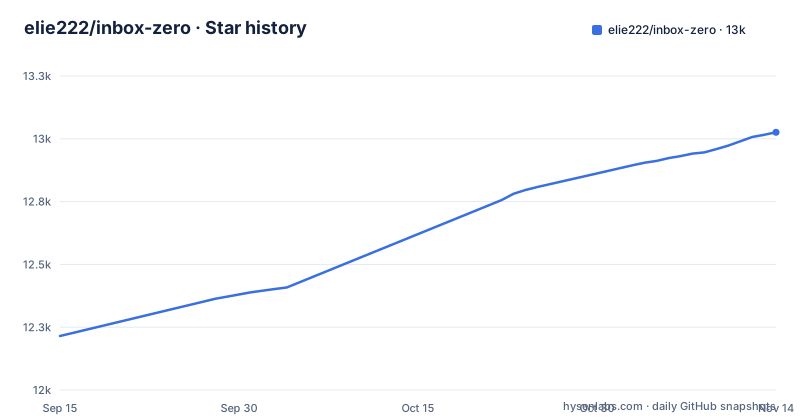
- elie222/inbox-zero13,026 ★ · +811
| Repository | 2026-09-15 | 2026-11-14 |
|---|---|---|
| elie222/inbox-zero | 12.2k | 13k |
811 Stars in the last 60 days, measured from the daily GitHub snapshot. Compare with other projects
Editorial analysis
What Inbox Zero automates in an inbox
Inbox Zero describes itself as an AI email assistant that works around the clock. The feature list in the README covers two kinds of work. The first is judgement: an assistant that organizes the inbox and pre-drafts replies in your tone, rules for email that you write in plain English, Reply Zero for tracking what you owe a reply and what is waiting on others, and meeting briefs that pull context from email and calendar before each meeting. The second is cleanup: a bulk unsubscriber, a bulk archiver for old mail, a cold email blocker and analytics on your activity over time.
It also reaches outside the inbox. Smart Filing saves attachments to Google Drive or OneDrive, and a Slack and Telegram integration lets you ask the assistant about your inbox from those apps. The README positions the project as an open source alternative to Fyxer that is more customizable and more secure. The people it suits are those who get enough mail that sorting it is a daily chore, and who would rather write rules than click through the same newsletters every morning.
The monorepo and services behind the app
The project is a TypeScript monorepo. The README lists Next.js, Tailwind CSS, shadcn/ui, Prisma, Upstash and Turborepo, and the root package.json builds and runs only the web app through turbo filters, with separate scripts for a desktop app and a worker. The top level holds apps/ and packages/ directories, a Helm-style charts/ folder, and a docker-compose.yml that describes the services a self-hosted instance needs.
That compose file is the clearest picture of the runtime. It defines Postgres 16 and Redis 7, a serverless-redis-http container that exposes Redis over HTTP in the shape Upstash clients expect, and the web image from ghcr.io. Postgres and Redis ports bind to 127.0.0.1 by default, so they are not published to the network unless you change the bind host. The desktop app ships on its own release track: desktop-v0.1.20, 0.1.21 and 0.1.22 were published between 2026-10-19 and 2026-10-28, and the repository's last push was on 2026-11-02.
Self-hosting Inbox Zero with the CLI
The README's fastest self-hosted route needs Docker and Node.js 24 or newer, and uses the project's CLI in two steps:
npx @inbox-zero/cli setup
npx @inbox-zero/cli start
The first command is a one-time setup wizard and the second starts the containers; the app is then at http://localhost:3000. The README sends everything beyond that, including production deployment, OAuth setup and configuration options, to the self-hosting documentation. OAuth is the step that takes time. To read and draft mail the app needs access to the mailbox, and on a self-hosted instance that means registering your own application with Google or Microsoft and pasting its credentials into the environment. The hosted version at getinboxzero.com skips that work, at the cost of your mail being processed on someone else's servers.
Local development and the mail emulators
Contributors get a local path that needs macOS or Linux (WSL on Windows), Node.js 24, the pnpm version pinned in package.json, and either Docker Desktop with Compose or native PostgreSQL and Redis:
git clone https://github.com/elie222/inbox-zero.git
cd inbox-zero
pnpm install
pnpm local:start
The launcher starts an isolated database, Redis and its HTTP endpoint, both mail-provider emulators, billing and email-delivery emulators, an LLM emulator, and Next.js, and applies migrations; no OAuth credentials or AI API keys are required. You then open http://localhost:3000/mail and sign in with Google as [email protected] or Microsoft as [email protected]. AI responses are canned, so this mode exercises application flows, not model quality. For development against real providers, the README points to pnpm setup, your own environment files and pnpm dev.
What self-hosting asks of you
A few defaults need changing before an instance faces the internet. The compose file falls back to password as the Postgres password when POSTGRES_PASSWORD is unset, which is fine on a laptop and not on a server. The web service pulls ghcr.io/elie222/inbox-zero:latest with pull_policy set to always, and the README explains that the latest tag always points to the most recent build of the main branch, since images are built on every push. Formal releases carry version tags such as v2.30.0, published as image tags without the v prefix (ghcr.io/elie222/inbox-zero:2.30.0), and pinning one is the difference between upgrading when you choose and upgrading whenever the container restarts.
The development setup has its own quirk: the root package.json runs a postinstall script, clone-marketing.sh, after every pnpm install, which is worth reading before installing in a restricted environment. None of this is unusual for a self-hosted web app, but together it means Inbox Zero behaves like a small production system you maintain, not a desktop tool you install once.
Licence, contributor agreement and the hosted option
GitHub reports the licence as NOASSERTION, which means it could not match the LICENSE file to a standard licence. The file is in the repository, and anyone planning to run a modified copy for other people should read it directly rather than assume a familiar licence. The repository also contains a CLA.md, so contributions go through a contributor licence agreement.
The practical choice is between that self-hosted route and the hosted service the same team runs. The hosted version needs no OAuth registration, containers or database upkeep. Self-hosting keeps the mailbox content, the rules and the drafts on infrastructure you control, which is the substance behind the README's claim of being more secure than closed alternatives. For a single person with a busy personal inbox, the hosted service is the lighter option; for a company that cannot send mail content to another processor, the self-hosted stack is the reason this project exists.
Editorial conclusion
Self-host Inbox Zero if you want an AI email assistant whose data sits in your own Postgres and you are prepared to set up Google or Microsoft OAuth yourself. Run npx @inbox-zero/cli setup, change the default Postgres password, and pin a version tag such as 2.30.0 instead of following the latest image.
Frequently asked questions
What is Inbox Zero?
Inbox Zero is an open source AI email assistant. It organizes your inbox, pre-drafts replies in your tone, manages your calendar and files attachments, and you can use it hosted at getinboxzero.com or run it yourself with Docker.
How do I set up Inbox Zero?
Either sign up for the hosted version, or self-host it with Docker and Node.js 24 or newer by running npx @inbox-zero/cli setup and then npx @inbox-zero/cli start, and open http://localhost:3000. OAuth and production setup are covered in the self-hosting documentation.
How do I get to inbox zero with Gmail using this app?
Connect your Gmail account, then use the Bulk Unsubscriber and Bulk Archiver to clear old mail, the Cold Email Blocker for unsolicited messages, and plain-English AI rules to handle new mail as it arrives.
Is Inbox Zero about deleting everything?
Not in this app. Its cleanup tools archive and unsubscribe: the Bulk Archiver archives old emails and the Bulk Unsubscriber unsubscribes and archives mail you never read. The README's feature list does not describe deleting mail.
Official sources
Add this badge to your README
If you maintain this project, the badge below links readers to this analysis and shows its maintenance status from the daily GitHub snapshot. Paste the markdown into your README; add ?metric=license or ?metric=stars to the image URL for a different field.

[](https://hysenlabs.com/projects/elie222-inbox-zero)Star history chart for your README
[](https://hysenlabs.com/projects/elie222-inbox-zero)Was this useful?