Eli's Dotfiles: an Arch Linux and Hyprland desktop to clone
My Hyprland Dotfiles For Arch!
At a glance
- What is it?
- This repository is one person's Arch Linux configuration for Hyprland, with a script that installs it, a package manager TUI that lists what the installer pulled in, and a Waybar, Wofi and Swaync setup built around Pywal themes. The author marks the install script as experimental, and the Pywal coupling is the first thing to understand before you run it.
- Who is it for?
- Eli's Dotfiles is worth a look if you run Arch with Hyprland and want a working, opinionated desktop in one clone, and you are the kind of person who reads a shell script before running it. It is the wrong choice if you want a clean slate, if you are not on Arch, or if you expect Pywal to be optional without touching every style file.
- Can I use it commercially?
- Yes, with conditions. GPL-3.0 is a copyleft licence: if you distribute software that includes it, you must release that software's source code under the same licence. Running it internally without distributing it does not trigger that obligation.
- Is it still maintained?
- Yes. The repository last received commits 1 day ago.
- What is it written in?
- Mainly QML, according to GitHub's language statistics.
Answers come from the project's GitHub data, last synced on November 7, 2026, and from our analysis. They are not legal advice.
Star history
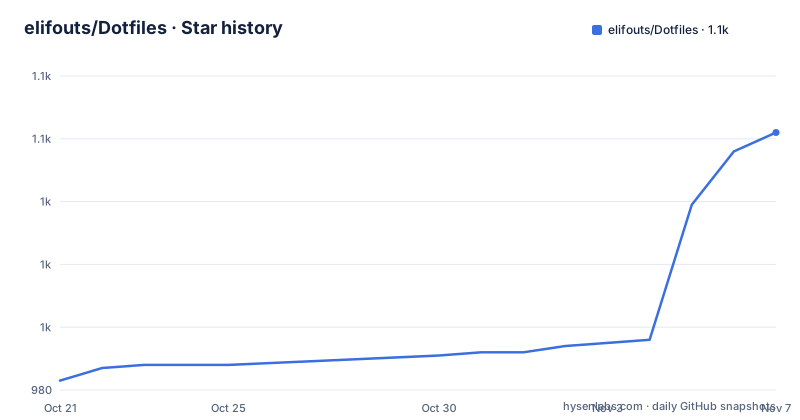
- elifouts/Dotfiles1,062 ★ · +79
| Repository | 2026-10-21 | 2026-11-07 |
|---|---|---|
| elifouts/Dotfiles | 983 | 1.1k |
79 Stars in the last 17 days, measured from the daily GitHub snapshot. Compare with other projects
Editorial analysis
A personal desktop rather than a product
The scope is narrow and worth stating first. The repository contains Arch Linux dotfiles for a clean looking, lightweight Hyprland setup, written by one person, Eli F., and the language statistics reflect that the bulk of the content is configuration, with QML as the primary language because of the styled components in the panels. What you are cloning is a working desktop: a window manager configuration, a status bar, a launcher, a notification centre, a lock screen, a shell configuration, icons and wallpapers. The top level makes the shape obvious, with a .config directory holding the application configuration, a .bashrc, an .icons directory, an InstallScripts folder, wallpapers and images. The intended reader is someone setting up Arch with Hyprland who would rather start from a configuration that already works than from an empty home directory, and who is prepared to replace the parts they dislike.
The install script is flagged as experimental, and it is optional per application
The installation section opens with a caution: the script is experimental and might not work properly, and the reader is told to make sure they know what they are doing. The script itself is cloned with the repository and run from the InstallScripts folder:
cd && git clone https://github.com/elifouts/Dotfiles.git
cd ~/Dotfiles/InstallScripts
chmod +x install.sh
./install.sh
Two features of the script are worth knowing before you launch it. It can install everything together, or you can install the applications and their configurations individually, which is the sensible route if you want the desktop but not the whole opinion set. And it only really installs what is needed unless you select the everything script, so the difference between the minimal path and the maximal path is a choice rather than a side effect. The individual applications also have their own smaller instructions, such as installing Waybar and copying the Dotfiles/.config/waybar folder into ~/.config, so you can assemble the setup piece by piece and never run the script at all.
Pywal coupling is the configuration you inherit whether you want it or not
Every configuration in the repository is meant to be used with Pywal, the wallpaper colour generator, and the warning is repeated at the top of the readme. The escape route is described: you can remove Pywal from the given applications' style.css and add valid colour values, though the author recommends Pywal and says it is worth the effort. The consequences of ignoring that are concrete. The Waybar section states that a Pywal theme must be set or Waybar will not load at all, which is the kind of failure that looks like a broken panel rather than a theme problem. The Wofi section explains the mechanics: the install and apply scripts update the Wofi style imports to your Pywal cache path, and if you copy the configuration by hand you have to update the hostname in the @import path yourself, because the cache is stored per host. If you do not want Pywal colours, you remove the top line of the style.css and replace the colours at the top with your own. That is a small edit in each application's stylesheet, and doing it before you copy the configuration is easier than doing it after.
A package manager TUI that knows what the installer did
The repository ships a utility that the author calls a package manager TUI, and it is the piece of tooling that makes the dotfiles manageable after installation. It shows explicitly installed applications and packages from the full installer, including AUR packages, along with the source, the installed status and the disk size:
cd ~/Dotfiles
./.config/hypr/utilities/package-tui.sh
The interaction is keyboard driven. Arrow keys or j and k scroll, Enter or d uninstalls, r reinstalls packages that came with the full installer, and q quits. There is also a non-interactive mode, ./.config/hypr/utilities/package-tui.sh --list, which prints the list instead of drawing it. The design is worth copying even if you never use these dotfiles: recording what a setup script installed, and being able to undo it, is what turns a pile of configuration files into something you can maintain. A dotfiles repository that cannot tell you what it changed on your system is a dotfiles repository you are afraid to update.
Waybar, the Hyprpicker widget and the blur rules
The Waybar setup is described as minimal and designed for Hyprland, with the essential features the author wanted. Volume control is handled by swaync instead, triggered from Waybar. The workspaces are configured so that a dot appears darker when a workspace has content, which the author credits to inspiration from Gbar, and the widgets that are not always needed are hidden and revealed through the group/expand section of ~/.config/waybar/config. Two widgets carry real behaviour. The network widget was configured not to display your IP, for a reason the author does not explain, and clicking it opens nmtui in kitty. The Hyprpicker widget runs hyprpicker, shows the picked values on hover and copies the hex value to the clipboard, which is the sort of small convenience that a hand tuned setup accumulates. The dependency list for the bar itself is waybar, hyprpicker, pywal, blueman, bluez, networkmanager, swaync and yay. Blur is not built into the bar configuration but added to hyprland.conf as layer rules:
layerrule = blur, waybar
layerrule = ignorezero, waybar
layerrule = ignorealpha 0.5, waybar
The three lines together do the work: blur the layer, ignore zero alpha, and halve the alpha of what remains.
Wofi and Swaync, and the same three blur rules again
The launcher is Wofi, installed from the system repositories with sudo pacman -S wofi, and launched as wofi --show drun -n. The notification centre is Swaync, whose own dependencies are swaync, pywal, gvfs and libnotify. Both get the same blur treatment, appended to hyprland.conf, and the Swaync version has to name two windows because the centre and the notification window are separate layers:
layerrule = blur, swaync-control-center
layerrule = blur, swaync-notification-window
layerrule = ignorezero, swaync-control-center
layerrule = ignorezero, swaync-notification-window
layerrule = ignorealpha 0.5, swaync-control-center
layerrule = ignorealpha 0.5, swaync-notification-window
Hyprlock is documented in the same style, with its own screenshots and configuration, and the pattern across all of these sections is identical: install the package, copy the.config folder into your own, and add the blur rules to hyprland.conf. The blur rules are the part most likely to conflict with a different compositor version, since they depend on how the compositor layers are exposed, so they are also the part to check first if something renders as a black box.
What you are really inheriting
The honest cost of adopting somebody else's desktop is that you inherit their decisions, and the parts you cannot see are the parts that will surprise you. Keybindings, animation timings, workspace behaviour and the .bashrc all come from one person's habits, and none of them are documented as decisions you can undo. There is no release history to consult either, since the repository tags no releases, so the only version marker is the last push, which was on 2026-10-16. The licence is GPL-3.0, so you can copy, modify and redistribute the configuration, which is the usual reason to publish dotfiles at all. The counterpoint to all of this is that the cost of trying is low, since the whole thing is a git clone you can delete, and the alternative, building the same setup from scratch, means making every one of these decisions yourself.
Editorial conclusion
Eli's Dotfiles is worth a look if you run Arch with Hyprland and want a working, opinionated desktop in one clone, and you are the kind of person who reads a shell script before running it. It is the wrong choice if you want a clean slate, if you are not on Arch, or if you expect Pywal to be optional without touching every style file. Before you run the installer, read InstallScripts/install.sh, decide whether to take the full install or the per application route, and remember that the repository ships no releases, so the last push date of 2026-10-16 is the only version marker you have.
Frequently asked questions
How do I install Eli's Dotfiles?
Clone the repository, change into the InstallScripts folder, make the script executable and run it. The script can install everything together or let you install the applications and their configurations individually, and it only installs what is needed unless you select the everything script.
Do I need Pywal to use these dotfiles?
The configurations are meant to be used with Pywal, and Waybar will not load without a Pywal theme set. You can remove Pywal from each application's style.css and add your own colour values, and when copying a configuration by hand you must update the hostname in the @import path to the Pywal cache.
What does the package manager TUI show?
It lists the applications and packages explicitly installed by the full installer, including AUR packages, with the source, the installed status and the disk size. You scroll with the arrow keys or j and k, uninstall with Enter or d, reinstall with r, quit with q, and use the --list flag for a non-interactive list.
How is blur added to Waybar, Wofi and Swaync?
By appending layer rules to your hyprland.conf, one set per application, each with a blur rule, an ignorezero rule and an ignorealpha rule at 0.5. The Swaync rules name both the swaync-control-center and the swaync-notification-window layers.
Official sources
Add this badge to your README
If you maintain this project, the badge below links readers to this analysis and shows its maintenance status from the daily GitHub snapshot. Paste the markdown into your README; add ?metric=license or ?metric=stars to the image URL for a different field.

[](https://hysenlabs.com/projects/elifouts-dotfiles)Star history chart for your README
[](https://hysenlabs.com/projects/elifouts-dotfiles)Was this useful?