eseckel/ai-for-grant-writing: A Curated Link List, Not a Tool
A curated list of resources for using LLMs to develop more competitive grant applications.
At a glance
- What is it?
- The repository is a CC-BY-4.0 collection of links and prompt snippets for using LLMs in grant applications. It ships no tool to install or run, and the decision it supports is which service or prompt to try first.
- Who is it for?
- Adopt this repository if you already write grants and want a short, human-filtered starting point for prompts and reading, and you accept that it is a reading list, not a tool. Do not adopt it if you need a tool that ingests a funding announcement and produces a draft, or if you need machine-readable data about services: the comparison table is prose in a README, not a dataset.
- Can I use it commercially?
- Yes, with credit. CC-BY-4.0 allows commercial use as long as you credit the authors and indicate what you changed. It is written for creative content, so check how it applies to any code.
- Is it still maintained?
- Yes. The repository last received commits 162 days ago.
- What is it written in?
- Mainly Python, according to GitHub's language statistics.
Answers come from the project's GitHub data, last synced on November 15, 2026, and from our analysis. They are not legal advice.
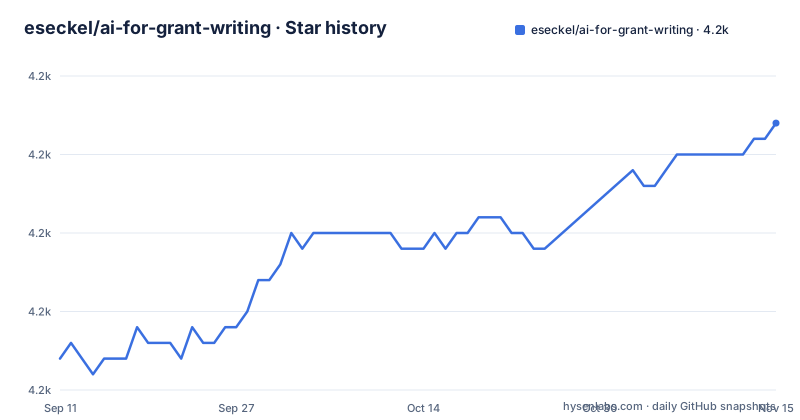
Star history
- eseckel/ai-for-grant-writing4,202 ★ · +15
| Repository | 2026-09-11 | 2026-11-15 |
|---|---|---|
| eseckel/ai-for-grant-writing | 4.2k | 4.2k |
15 Stars in the last 65 days, measured from the daily GitHub snapshot. Compare with other projects
Editorial analysis
What the repository actually is
The README opens by calling itself "a curated list of resources for using AI to develop more competitive grant applications." That is the whole product. There is no package to install, no CLI, no library to import. The repository holds a README, a banner image, a CONTRIBUTING.md, a licence and a CITATION.cff, plus mkdocs.yml, a docs/ folder, requirements.txt (mkdocs packages) and a mkindex.py script; nothing in the README describes a script, a module, or an entry point. If you arrive expecting to pip install something, you will leave with a page of links instead. The audience is narrow and identifiable. It is a researcher, often a postdoc or early-career faculty member, who is already drafting an NIH, NSF, or foundation application and wants to know which LLM service to open and what to type into it. The list assumes you know what a Specific Aims page is, what a Significance section contains, and what a review criterion means. It does not teach grant writing from zero, and it does not pretend to.
The service comparison table and what its columns mean
The Useful Services section is a table of eleven entries (ChatGPT, Gemini, Grok, Copilot, Grammarly, Grantable, Curie, DeepL, Midjourney, Firefly, Proposia) scored across six columns: Checks Spelling and Grammar, Text Generation, Translation, Mock Review, Image Generation, and Free Tier. The table is the only structured comparison in the repository, and it is the part most likely to age badly. A check mark in the Free Tier column records that a free option existed when the row was written; it says nothing about rate limits, model access, or whether the free tier covers the features marked in the other columns. DeepL, for instance, is marked only for Translation and Free Tier, which is consistent with what DeepL is, but the table gives no sense of how much text the free tier accepts. The Mock Review column is the most interesting one for grant work, because it is the capability that distinguishes a general chatbot from a writing assistant. ChatGPT, Gemini, Grok, Copilot, Grammarly, Grantable, and Proposia all carry that mark. The table does not explain what a mock review produces, how it is prompted, or how faithful it is to a real study section. Treat those check marks as an index of features, not as an evaluation.
The prompt library: short, task-shaped, and usable as-is
The Quick Prompts section is the part with the most immediate value, because the prompts are written for specific grant artifacts rather than for writing in general. They are grouped by intent: enhancing clarity, making text more compelling, improving structure and flow, aligning with a funder's mission, aligning with review criteria, developing a title, identifying challenges in the aims, and building a timeline. Several prompts carry explicit placeholders. The mission-alignment example reads: "How can I better align my proposal to specifically address the <insert specific criteria> outlined in this funding announcement for <insert name of funding opportunity>?" The review-criteria prompt uses the same pattern with <insert fellowship name> and <insert specific review criteria>. The title prompt asks for "five potential titles" from an abstract summary. The timeline prompts ask for milestones tied to a project summary or a career development plan over a stated number of months. This placeholder convention is the repository's real interface. It tells you that the prompt is a template, not a finished instruction, and it forces you to supply the funder-specific text that an LLM cannot infer. The clarity, persuasiveness and structure prompts are the exception: they are generic revision requests with no placeholders, and they will work in any chatbot.
How you use it: no install, just copy and paste
There is no build step. The workflow the README implies is: open the repository, pick a service from the Useful Services table, open the Quick Prompts section, copy a prompt, replace the angle-bracket placeholders with your own text, and paste it into the chatbot alongside the passage you want revised. The only configuration is the text you substitute. If you want the repository locally, git clone https://github.com/eseckel/ai-for-grant-writing.git gives you the README, the contributing guidelines and the mkdocs site sources; there is no tool to run afterward. Contributions follow the CONTRIBUTING.md linked from the README, which is the standard path for adding a service, a prompt, or a reading item. The absence of releases is consistent with this: a link list does not need versioned artifacts, and the repository has no published GitHub releases. That also means there is no changelog to consult when a link rots. Your only signal that something changed is the commit history on the main branch.
Where the list stops being useful
The failure mode is staleness, and it is structural rather than accidental. Every service row is a set of claims about a commercial product's features and pricing, written by hand, with no test that would fail when a vendor changes its free tier or renames a feature. The same applies to the linked reading list: the NSF guide points at an nsf.gov URL from 2004. A curated list is only as good as its last review, and the repository offers no schedule for that review. The second limitation is scope. The prompts are written for biomedical and fellowship-style applications, with named examples from the American Heart Association and references to Specific Aims, Significance, and a research strategy. If you are writing a humanities or social science proposal, the structure prompts map poorly onto your application, and you will be adapting rather than using. The third limitation is that the list cannot tell you which service to trust with unpublished research. It compares features, not data handling terms, and nothing in the README addresses confidentiality, institutional policy, or funder rules on AI-assisted writing. Those are the questions that decide whether you can use any of these services at all, and the repository is silent on them.
What to read instead, and how it differs
The Grant Writing-Specific Resources section links a PLOS Computational Biology piece titled "Ten simple rules to leverage large language models for getting grants." That article is the natural alternative to this repository, and the difference in approach is sharp. The repository gives you a menu: here are services, here are prompts, choose. Only the title of the PLOS piece is given, so read it for its own rules. The other linked items serve a third purpose: the Stanford R01 Countdown material, the biosciencewriters anatomy of a Specific Aims page, and the NSF and NIH guides are about grant writing itself, with no AI component. They are the baseline the AI prompts are meant to accelerate, and reading them is not optional if the prompts are to produce anything a reviewer would accept.
Licence, maintenance, and what that means for reuse
The repository is licensed CC-BY-4.0. That permits sharing and adaptation with attribution, including commercially, which matters if you want to fold the prompt list into an internal lab wiki or a course handout. It also means you cannot relicense the collection under stricter terms and expect the attribution requirement to disappear. This is a description of the licence text, not legal advice; check the terms yourself if you plan to redistribute. Maintenance cost is the honest concern. The repository shows no releases, so there is no version to pin and no upgrade path to plan. Updating it means editing a Markdown table and a list of links, and the effort scales with how many services you track. For a lab, the practical cost is not the edit; it is the periodic re-verification of every URL and every Free Tier mark. Nothing in the repository automates that check, so it falls to whoever owns the fork.
Editorial conclusion
Adopt this repository if you already write grants and want a short, human-filtered starting point for prompts and reading, and you accept that it is a reading list, not a tool. Do not adopt it if you need a tool that ingests a funding announcement and produces a draft, or if you need machine-readable data about services: the comparison table is prose in a README, not a dataset. Before relying on it, open the Useful Services table and check the Free Tier column against each vendor's current pricing page, because the repository has no releases and no automated check that those links and claims are still accurate.
Frequently asked questions
Which AI is best for writing grants?
The list does not rank services; it compares them. Eleven services are scored across six capabilities: spelling and grammar, text generation, translation, mock review, image generation, and free tier. Only two, ChatGPT and Copilot, are marked in all six columns, and seven are marked as able to do mock review.
Can I use ChatGPT for grant writing?
Yes, and it is marked in every column of the capability table, including a free tier. The list also supplies sixteen ready-made prompts grouped by purpose, covering clarity, persuasiveness, structure, funder mission alignment, review criteria, titles, challenges to the aims and timelines.
Do people use AI to write grants?
The repository exists because the author thinks they should use it to develop more competitive applications. Among its resources is a paper offering ten simple rules for leveraging large language models when getting grants.
Can AI help me apply for a grant?
Yes, and the mock review column is where the list makes that concrete. Seven of the eleven services it compares are marked as able to review a draft, and two of the prompt groups are specifically about aligning a draft with a funder's mission and with its published review criteria.
how to use ai for grant writing?
Start with the quick prompts, which are grouped by the section of a proposal they target and are written to be pasted with your own text substituted into the placeholder slots. For technique, the list links a cloud provider's blog post, a help centre article on one API's practices, and a community resource list.
is there ai for grant writing?
This repository is the curated answer: a comparison table of eleven services across six capabilities, five links about prompt technique, sixteen ready prompts, and eleven grant writing-specific resources.
Official sources
Add this badge to your README
If you maintain this project, the badge below links readers to this analysis and shows its maintenance status from the daily GitHub snapshot. Paste the markdown into your README; add ?metric=license or ?metric=stars to the image URL for a different field.

[](https://hysenlabs.com/projects/eseckel-ai-for-grant-writing)Star history chart for your README
[](https://hysenlabs.com/projects/eseckel-ai-for-grant-writing)Was this useful?