docker-sync: A Ruby Tool for Faster Code Mounts on macOS and Windows
GitHub describes it as Run your application at full speed while syncing your code for development, finally empowering you to utilize docker for development under OSX/Windows/ Linux. The repository metadata lists Ruby as its primary language. The metadata lists the GPL-3.0 license. This article stays within the project description and details documented in the GitHub repository README.
At a glance
- What is it?
- docker-sync addresses slow bind mounts in Docker for macOS and Windows by syncing code into volumes. It is a mature but dormant project, last updated in 2022, with a Ruby-based approach that still works for many legacy setups.
- Who is it for?
- Adopt docker-sync if you are on macOS or Windows and your current Docker bind mounts are painfully slow, and if you are comfortable with a Ruby-based tool that has not seen updates since 2022. Do not adopt it if you are on Linux with native filesystem performance, or if you need long-term maintenance guarantees.
- Can I use it commercially?
- Yes, with conditions. GPL-3.0 is a copyleft licence: if you distribute software that includes it, you must release that software's source code under the same licence. Running it internally without distributing it does not trigger that obligation.
- Is it still maintained?
- Activity is slowing. The repository last received commits 10 months ago.
- What is it written in?
- Mainly Ruby, according to GitHub's language statistics.
Answers come from the project's GitHub data, last synced on October 21, 2026, and from our analysis. They are not legal advice.
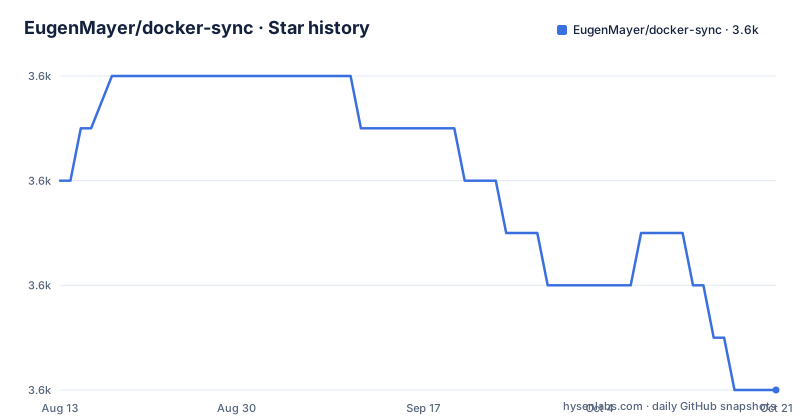
Star history
- EugenMayer/docker-sync3,552 ★ · -4
| Repository | 2026-08-13 | 2026-10-21 |
|---|---|---|
| EugenMayer/docker-sync | 3.6k | 3.6k |
-4 Stars in the last 69 days, measured from the daily GitHub snapshot. Compare with other projects
Editorial analysis
The Problem: Slow Bind Mounts on macOS and Windows
Docker on macOS and Windows runs inside a virtual machine, and bind mounts that map your host code into a container go through a filesystem bridge. That bridge is slow, especially when your codebase has thousands of files, like a Node.js or PHP project. Every read and write crosses a virtualization boundary, and tools like file watchers can grind to a halt. docker-sync exists to solve that specific pain. It syncs your host code into a Docker volume, which lives inside the VM and is fast, while keeping the two sides in sync. The target user is a developer on macOS or Windows who wants to use Docker for local development without the performance penalty. The README states it also works on Linux, but the primary motivation is clear from the description: 'Run your application at full speed while syncing your code for development, finally empowering you to utilize docker for development under OSX/Windows/*Linux'.
How It Works: Sync Strategies and Volumes
The mechanism is not a bind mount. Instead, docker-sync creates a Docker volume and runs a sync process that mirrors your host directory into that volume. The container mounts the volume, not your host path. The README points to the documentation for details, but the core idea is that you define a sync configuration in a file called docker-sync.yml. That configuration specifies the source directory on your host and the destination volume name. docker-sync then runs a sync strategy. The project supports multiple strategies, including native, unison, and rsync, each with different trade-offs. Native sync uses Docker's own volume mounting, which is faster than bind mounts on macOS because it avoids the filesystem bridge. Unison and rsync are more portable but add latency. The README does not list the strategies explicitly, but the documentation does, and the project has been around long enough that these are the well-known options. The key point is that the container sees a volume, so the application reads and writes at near-native speed inside the VM.
Getting Started: Installation and Configuration
Installation is via Ruby, since the project is a Ruby gem. The README does not include the install command, but the badge shows it is on RubyGems, so the typical command would be gem install docker-sync. After installation, you create a docker-sync.yml file in your project root. The documentation, linked from the README, provides the full configuration reference. A basic configuration would define a sync name, the source host path, and the destination volume. Then you run docker-sync start to start the sync, and docker-sync stop to stop it. You also need to adjust your docker-compose.yml to use the volume instead of a bind mount. The README does not give a full example, but the documentation does. The project requires Ruby 2.5 or higher, as the latest release 1.0.5 dropped support for Ruby 2.4. That is a real constraint: if you are on an older Ruby, you cannot use the latest version.
Limitations and Failure Modes
The most obvious limitation is that docker-sync is not a real-time filesystem. Sync strategies like unison and rsync work in batches, so there is a delay between a file change on your host and it appearing in the container. That delay can break tools that rely on immediate file events, like hot-reloading development servers or test runners that watch for changes. The README does not mention this, but it is a known trade-off with any sync-based approach. Another limitation is that the project is effectively dormant. The last push was in November 2022, and the latest release is 1.0.5 from that same month. No releases since then. That means if you hit a bug with a newer Docker version or a newer macOS, you are on your own. The README asks for contributions, which is a sign that the maintainers are not actively developing it. Also, the project is GPL-3.0 licensed, which may be a concern for some organizations that prefer permissive licenses. You should check the license terms yourself, but GPL-3.0 can impose obligations if you distribute derivative works.
Alternatives: Docker's Native Solutions and Other Tools
The direct alternative is to use Docker's own solutions. On macOS, Docker Desktop now has a feature called VirtioFS, which improves bind mount performance significantly, and on Windows, there is WSL2 with its own filesystem integration. These are built-in and require no extra tool. The difference in approach is that VirtioFS and WSL2 still use bind mounts but optimize the underlying filesystem bridge, whereas docker-sync replaces the mount with a volume and a sync process. Another alternative is mutagen, which is a separate tool that also syncs files but uses its own daemon and protocol. Mutagen is more actively maintained and offers more control, but it is a different project with a different configuration model. The README does not mention these alternatives, but they are the obvious comparisons. If you are on Linux, you may not need any of this, because bind mounts are native and fast. docker-sync's README says it works on Linux, but the performance problem it solves is primarily a macOS and Windows issue.
Maintenance and Upgrade Cost
Maintenance is a real concern. The project has not been updated since 2022, and the README explicitly asks for contributors. That means you cannot expect fixes for new Docker versions or operating system updates. Upgrade cost is low in the sense that it is a single Ruby gem, but the cost is in compatibility. If you upgrade Docker or your OS, you may need to test whether docker-sync still works. The release notes for 1.0.3 mention a fix for 'default sync excludes for native OSX', which shows that even in 2022, they were still fixing platform-specific issues. That is a sign that the tool is sensitive to the host environment. The license is GPL-3.0, which is a strong copyleft license. If you are using docker-sync as part of a product you distribute, you need to be aware of the obligations. This is not legal advice, but you should consult the license text if that matters to you.
Editorial conclusion
Adopt docker-sync if you are on macOS or Windows and your current Docker bind mounts are painfully slow, and if you are comfortable with a Ruby-based tool that has not seen updates since 2022. Do not adopt it if you are on Linux with native filesystem performance, or if you need long-term maintenance guarantees. Before adopting, verify that your Docker version and OS are compatible with the latest release 1.0.5, and check the documentation for any known issues with your specific sync strategy (native, unison, rsync). Also confirm that your project does not rely on real-time file events that may be lost during sync. The project is GPL-3.0 licensed, so review that license's implications for your use case.
Frequently asked questions
What is EugenMayer/docker-sync?
A Ruby gem that keeps a container's working copy synchronised with the host during development, so the application runs at full speed inside a container while the code on both sides stays in step. Its repository description says it exists so that Docker can be used for development on macOS, Windows and Linux. The command line is built with a Ruby task framework and the gem is published to a Ruby package index.
How do I configure eugenmayer/docker-sync?
The front page does not show it. The only configuration file in the repository is in the examples folder, alongside two compose files and five numbered data directories, and the full documentation is hosted on a separate documentation site. So the practical route is to read the example configuration, or to read the gem's source directory where the defaults live.
What version of eugenmayer/docker-sync is current?
It depends where you look. The newest published release is from November 2022 and its title says it requires a particular Ruby runtime. The branch has been pushed to since, most recently on 2025-11-30, and carries its own version file, so installing from the branch and installing from the package index give different things. The release tags are plain numbers with no letter prefix, and nothing in the repository reconciles the three places a version is recorded.
Does eugenmayer/docker-sync still need contributions?
The front page asks for help with code and with documentation, and points at issue searches filtered by a label for each. It is worth weighing that against the state of the repository: the newest release is from 2022 and the branch was last pushed to on 2025-11-30. An issue template file also sits at the repository root rather than where the issue tracker reads templates from, so contributors get the default form.
Who maintains eugenmayer/docker-sync?
The front page lists five main contributors with profile links, and the repository's owner is not among them. There is no authors or contributors file in the tree, so those five links are the only contributor record the project keeps. The documentation, the project site and the two orphaned link definitions at the bottom of the page are the only other pointers to maintainers.
Official sources
Add this badge to your README
If you maintain this project, the badge below links readers to this analysis and shows its maintenance status from the daily GitHub snapshot. Paste the markdown into your README; add ?metric=license or ?metric=stars to the image URL for a different field.

[](https://hysenlabs.com/projects/eugenmayer-docker-sync)Star history chart for your README
[](https://hysenlabs.com/projects/eugenmayer-docker-sync)