Openship picks your deployment mode for you, and the difference matters
Self-hosted deployment platform. This is the flavor that hosts your deployed apps on the same box, with automatic domains + Let's Encrypt TLS.
At a glance
- What is it?
- A self-hostable deployment platform with built-in CI/CD that runs as a desktop app, a server control plane, or a managed cloud, and which of those you get changes what it can host for you.
- Who is it for?
- Openship suits a solo developer on a Linux box with Docker who wants apps, domains, and certificates on the same machine, and it suits a team that will dedicate an always-on server to the control plane. It does not suit a Mac or Windows user expecting the same-box flavor without installing Docker, and it does not suit anyone who wants a control plane that stays up without a process running somewhere.
- Can I use it commercially?
- Yes. Apache-2.0 is a permissive licence: you can use, modify and sell software built on it, as long as you keep its copyright and licence notices.
- Is it still maintained?
- Yes. The repository last received commits 1 day ago.
- What is it written in?
- Mainly TypeScript, according to GitHub's language statistics.
Answers come from the project's GitHub data, last synced on November 13, 2026, and from our analysis. They are not legal advice.
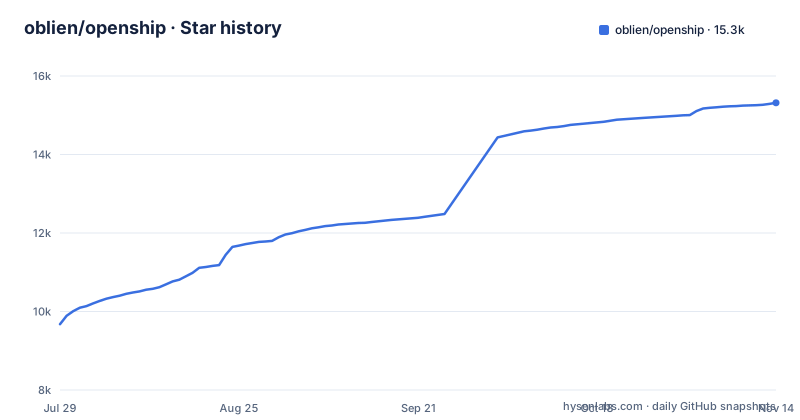
Star history
- oblien/openship15,289 ★ · +5,612
| Repository | 2026-07-29 | 2026-11-13 |
|---|---|---|
| oblien/openship | 9.7k | 15.3k |
5,612 Stars in the last 107 days, measured from the daily GitHub snapshot. Compare with other projects
Editorial analysis
openship up reads your platform and picks compose or bare without asking
The mode is not a prompt you get to answer. On Linux with Docker, `openship up` takes the Compose path, bringing up Postgres, Redis, the API, the dashboard, and a containerized OpenResty edge listening on :80 and :443, all from published images. That is the flavor which hosts your deployed apps on the same box, hands out automatic domains, and terminates TLS with Let's Encrypt. Everywhere else, meaning macOS, Windows, or Linux without Docker, it takes bare mode instead: one lightweight process with an embedded database that pushes apps out to a server over SSH or to the cloud.
openship up                                       # install + start as a background service (boots + auto-restarts)
openship up --public-url https://openship.example.com   # + serve the dashboard on your domain (edge + TLS handled)
You can override the guess with `--compose` or `--bare`, which is the escape hatch when the automatic choice is wrong for you.
The desktop app's control plane stops when you close the app
The desktop flavor runs Openship's control plane on your own machine and only while the app is open. Nothing is left on an always-on server and nothing is exposed publicly. There is no login, no terminal, no public surface, and downloads exist for macOS on Apple Silicon and Intel, for Windows, and for Linux as an AppImage that needs `chmod +x` before it will run. `openship install` will fetch and launch it if you already have the CLI. From there you connect a server over SSH, or Openship Cloud, and deploy to it; the app does not host public apps on your laptop.
The limitation is stated plainly: push-to-deploy, team access, and hosting apps on that box all need an always-on server install. So a desktop-only setup gives you a control plane that runs only while the window is open.
Two compose files, and the control plane is deliberately denied a Docker socket
The root docker-compose.yml is the control plane only. It builds the api, dashboard, and web from source and runs postgres and redis, and it is the same stack used for the openship.io SaaS and for a local from-source contributor. Ports are fixed: postgres private on :5432, redis private on :6379, api on :4000 overridable by API_PORT, dashboard on :3001 overridable by DASHBOARD_PORT, and web on :3000 overridable by WEB_PORT. The mode is decided entirely by .env, with no profiles and no per-mode service variants. In SaaS mode the comment is explicit that there is deliberately no Docker socket and no edge, because deployed apps run in sandboxes elsewhere. Self hosting, meaning your apps as host containers behind the OpenResty edge, is a different file at docker/docker-compose.yml, or the stack `openship up` installs. Run the root compose by mistake and you have a control plane with nowhere to put containers.
An empty DATABASE_URL quietly swaps Postgres for an embedded engine
Storage is one line. Set DATABASE_URL and you get the Postgres driver; leave it empty and you get PGlite embedded, which the reference marks as dev only and explicitly not for a multi-tenant SaaS. The defaults around it are development defaults: POSTGRES_USER, POSTGRES_PASSWORD, and POSTGRES_DB are all openship, and the sample URL is postgresql://openship:openship@localhost:5432/openship. The mode switch is CLOUD_MODE, false by default for self hosting with no billing, alongside DEPLOY_MODE=docker and an OPENSHIP_TARGET value that the SaaS sets to cloud-saas.
Two consequences for a self-hoster. The caps that limit a SaaS tenant, CLOUD_MAX_PROJECTS_PER_USER defaulting to 2 and enforced at project create and ensure, are ignored by self-hosted, so nothing stops one account from filling your disk with containers. And if you expose that Postgres port with the shipped password, you have published a known credential.
The install script brings its own Node, the npm route does not
There are two install routes and they make different promises about your runtime:
curl -fsSL https://get.openship.io | sh          # install  (or: npm i -g openship — needs Node 22+)
openship                                          # guided setup, then control panel
The script route carries its own Node when the one on your system is older than 22. The package manager route runs on whatever Node you already have, so an older runtime leaves you stuck with an install that cannot start. What runs after install is also worth knowing: bare `openship` opens an interactive wizard that creates the first admin, wires your domain, and installs Openship as a boot service, and running it again manages the instance. A self-hosted instance always requires login as the admin created in that wizard. Headless boxes are told to skip the wizard and drive `openship up` directly, which means admin creation and domain wiring become your own steps.
Static completion files survive an upgrade as a stale copy
Tab completion has two routes and both have a cost written next to them.
openship completion bash > /etc/bash_completion.d/openship
openship completion zsh  > ~/.zsh/completions/_openship
openship completion fish > ~/.config/fish/completions/openship.fish
The static file is the recommended one because shell startup stays instant, and the trade-off is that you have to regenerate it after upgrading to pick up newly added commands. The alternative is adding `source <(openship completion zsh)` to your shell config, which always reflects the currently installed version but adds a small delay to every new shell session. The failure mode here is quiet rather than loud: run `openship update` and your completions keep working while quietly missing every flag added since, so you are typing commands that finish in ways the tab key never offered.
openship-dev keeps its own home so a bad rebuild cannot reach production
There is an unofficial path for running a build straight from source, ahead of the next release:
curl -fsSL https://get.openship.io/dev | sh                  # main (default)
curl -fsSL https://get.openship.io/dev | OPENSHIP_REF=dev sh  # a branch/tag (var goes on sh, not curl)
openship-dev                                     # same CLI, built from source
openship-dev update                              # pull latest source + rebuild (no release needed)
The isolation is the useful part: it installs as a separate `openship-dev` command with its own home at `~/.openship-dev` and its own boot service, so your production openship and its data are never touched. Note where OPENSHIP_REF goes, on `sh` and not on `curl`. The costs are stated too. It needs Bun and git, it is an unverified dev build, the dashboard compile wants real RAM and CPU, and it is not a production path. `openship-dev update` rebuilding from the latest source is good for checking a fix and bad for reproducibility, since the code under your dev instance can change underneath you.
Editorial conclusion
Openship suits a solo developer on a Linux box with Docker who wants apps, domains, and certificates on the same machine, and it suits a team that will dedicate an always-on server to the control plane. It does not suit a Mac or Windows user expecting the same-box flavor without installing Docker, and it does not suit anyone who wants a control plane that stays up without a process running somewhere. Before installing, decide which of the three flavors you need, read the two compose files so you do not start the wrong one, and replace the published Postgres password if any port of Postgres is reachable.
Frequently asked questions
openship vs coolify
Openship is an open-source, self-hostable deployment platform with built-in CI/CD that builds, ships, routes, and TLS-terminates your app from a desktop app, web dashboard, or CLI. This repository does not describe Coolify or compare the two, so any head to head has to come from somewhere else.
How do I install the Openship control plane on a server?
Run `curl -fsSL https://get.openship.io | sh` to install, then `openship` for the guided wizard that creates the first admin, wires your domain, and installs a boot service. `npm i -g openship` is the alternative and needs Node 22+ on your own runtime.
Does Openship require Docker?
No, but it decides your mode. Linux with Docker gets Compose mode with the full stack and an OpenResty edge on :80 and :443; macOS, Windows, or Linux without Docker get bare mode with an embedded database. Force either one with `--compose` or `--bare`.
Can Openship host my apps on the same machine?
Yes, and only in Compose mode on Linux with Docker, which is the flavor that hosts deployed apps on the same box with automatic domains and Let's Encrypt TLS. Bare mode and the desktop app push apps out to a server over SSH or to Openship Cloud instead.
What do openship init and openship deploy do?
From inside your project directory, `openship init` links that directory to a project and `openship deploy` runs the deploy against it. The full server guide and complete CLI reference live at openship.io/docs.
Official sources
Add this badge to your README
If you maintain this project, the badge below links readers to this analysis and shows its maintenance status from the daily GitHub snapshot. Paste the markdown into your README; add ?metric=license or ?metric=stars to the image URL for a different field.

[](https://hysenlabs.com/projects/oblien-openship)Star history chart for your README
[](https://hysenlabs.com/projects/oblien-openship)Was this useful?