Faveo Helpdesk: a Laravel ticketing system with a Community edition and a paid tier above it
Faveo Open source ticketing system build on Laravel framework
At a glance
- What is it?
- Faveo Helpdesk is a PHP ticketing system built on the Laravel framework, released under the OSL-3.0 licence and shipped in four flavours from a free Community edition upwards. The runtime requirements are PHP 8.1 with MySQL 8.0 or MariaDB 10.6, and the most recent tagged release is v2.0.3 from 2023, while the repository itself is still being pushed to.
- Who is it for?
- Faveo Community suits a support team that wants a self hosted ticketing system with a REST API, plugin hooks and localisation, on an ordinary LAMP stack, and that does not need the paid features. It is the wrong choice for an IT asset management deployment, because that is a separate paid product, and a poor fit for a team that needs a maintained enterprise support contract, since the open repository carries no such commitment.
- Can I use it commercially?
- Yes, with conditions. OSL-3.0 is a weak copyleft licence: you can use it inside commercial and closed-source software, but if you distribute changes to its own files, you must publish those changes under the same licence.
- Is it still maintained?
- Yes. The repository last received commits 3 days ago.
- What is it written in?
- Mainly PHP, according to GitHub's language statistics.
Answers come from the project's GitHub data, last synced on November 7, 2026, and from our analysis. They are not legal advice.
Star history
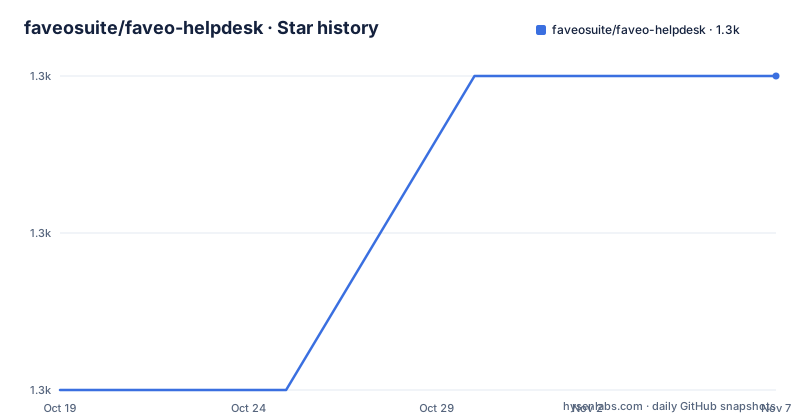
- faveosuite/faveo-helpdesk1,257 ★ · +2
| Repository | 2026-10-19 | 2026-11-07 |
|---|---|---|
| faveosuite/faveo-helpdesk | 1.3k | 1.3k |
2 Stars in the last 19 days, measured from the daily GitHub snapshot. Compare with other projects
Editorial analysis
What Faveo is: a support ticket queue, not a generic ITSM tool
Faveo Helpdesk is described as an open source ticketing system built on the Laravel framework, and the project description says it provides businesses with an automated helpdesk system to manage customer support. The framing is deliberately commercial rather than technical. The word Faveo comes from Latin and means to be favourable, and the README ties that to the product's scope and functionality, arguing that in a competitive startup scenario customer retention is a major challenge and that handling client queries diligently is the difference between retaining and losing a long lasting relationship. The stated audience is therefore a support team rather than a systems administrator, and the reading of the feature set follows from that. The project also says it can be customised according to requirement and that such requests are undertaken, which is a commercial signal as much as a technical one.
Four flavours, and the one you get from GitHub
The README lists four editions, and the difference between them defines what the open repository is worth. Faveo Help Desk Community Edition is the free, open source edition. Faveo Help Desk Freelancer is a free version with the features of the Enterprise edition available for two agents, which is a licensing trick rather than a separate codebase. Faveo Help Desk Enterprise Edition is the paid version with many advanced features and integrations, and Faveo Service Desk is a paid version for IT asset management. The comparison list lives on the pricing page. The practical implication is that the Community edition is the ceiling of what the open code does, and a reader who evaluates the repository against the marketing on the pricing page will be looking at a different product. The feature that matters most for a self-hosted user is the plugin creation guide and the API documentation, both in the project wiki, because they are what makes the system extensible without forking it.
The stack: PHP 8.1, MySQL 8.0 or MariaDB 10.6, and a list of extensions
The requirements section is precise about what the host needs. PHP 8.1 or newer. A database of MySQL 8.0.x or MariaDB 10.6.x. A web server of Apache, IIS or Nginx. A set of PHP extensions, namely Imap, Mbstring, Mcrypt, OpenSSL, PDO, Tokenizer, XML and Zip. And one web server configuration item that is easy to miss: Pretty URLs or Search Engine Friendly URLs have to be enabled in the web server configuration. That last one is a deployment step rather than a code change, and skipping it produces a helpdesk whose agent and ticket URLs are unreadable. The web server choice includes IIS, which tells you the project expects to run on Windows hosting as well, and the README notes that Faveo has been tested on Ladybird Web Host servers, with a thirty day money back guarantee on those packages.
Installation is documented off site, and the environment file is a Laravel default
The README says the installation steps for Faveo Community are the same as those of Faveo and points at the installation guide on the documentation site, so the repository itself does not carry the setup walkthrough. What the repository does carry is the standard Laravel environment template in .env.example, and it is worth reading as a description of what the application expects to be configured. The application section sets APP_NAME, APP_ENV, APP_KEY, APP_DEBUG and APP_URL, the log channel and level, and the database block with the mysql connection, host, port, database, username and password. Then come the service blocks: broadcast, cache, filesystem, queue and session, with the session lifetime at 120, plus Memcached and Redis host settings, an SMTP mail block pointing at mailhog on port 1025, and the AWS and Pusher credential blocks. The presence of the AWS block is a hint that the mail and file handling can be delegated to those services.
APP_NAME=Laravel
APP_ENV=local
APP_KEY=
APP_DEBUG=true
APP_URL=http://localhost

DB_CONNECTION=mysql
DB_HOST=127.0.0.1
DB_PORT=3306
DB_DATABASE=laravel
DB_USERNAME=root
DB_PASSWORD=

CACHE_DRIVER=file
QUEUE_CONNECTION=sync
SESSION_DRIVER=file
SESSION_LIFETIME=120

MAIL_MAILER=smtp
MAIL_HOST=mailhog
MAIL_PORT=1025
The repository layout shows a Laravel application with modern tooling bolted on
The top level of the repository is a complete Laravel application. There is app/ for the application code, bootstrap/, config/, database/, public/, resources/, routes/, storage/ and tests/, plus the artisan console entry point and the.htaccess file. Around that sit the pieces that tell you how the project is built. composer.json and composer.lock manage PHP dependencies, and package.json drives the frontend with laravel-mix, which is invoked through npm run development, watch, hot and production, with axios, lodash and postcss as the dev dependencies and webpack.mix.js as the configuration. Static analysis is configured with phpstan.neon alongside a phpstan-baseline.neon, which is the file that records the issues the project has chosen not to fix yet. phpunit.xml configures the test suite, and there is a.travis.yml, a ci/ directory, a scripts/ directory and a DB/ directory for database assets. A.semgrepignore sits alongside a SECURITY.md, a CONTRIBUTING.md and a code_of_conduct.md.
Localisation follows Laravel, and translations come from pull requests
The language section invites help with translating Faveo into your native language and says the project follows the Laravel localization module, so you create a language file in your branch and send a pull request. The lang/ directory at the repository root is where those files live. The link points at the Laravel 9.x localization documentation, which is a useful anchor for the framework generation this codebase sits in. The mechanism itself is the standard one, translation files per locale rather than strings in the code, and the fact that the README documents it as a contribution path rather than a feature tells you how much of the interface is expected to be translated by the community. For a helpdesk sold into multiple markets, that matters, because the agent interface is where the working day happens.
The contribution workflow is git-flow, and the branch naming is inconsistent
The contributing section gives a specific workflow. You create your own fork of the Faveo master repository and use git-flow to create a new feature, and once the feature is published in your fork you send a pull request to begin the conversation of integrating it. There is a contributing guidelines document to read first. What is worth flagging is a mismatch in the repository itself. The default branch is named development, while the badges at the top of the README point at master, and the contributing instructions say to fork master, and the links to the wiki and the contributing file also use the ladybirdweb path rather than the faveosuite one that now holds the code. In other words, the documentation still describes the project's earlier home. A contributor who follows the contributing guide literally would branch from master, which may no longer be where the work lands.
Licence, releases and where the project actually stands
The licence is OSL-3.0, the Open Software License, and the badge at the top of the README confirms it. That is a reciprocal licence, and it is worth being deliberate about, because it is not the MIT or Apache that most PHP projects ship and because a modification you distribute comes back with the same terms. The listed releases are v2.0.1 on 2023-03-31 with minor bug fixes, v2.0.2 on 2023-06-09 with a theme update and a Clockwork feature addition, and v2.0.3 on 2023-10-31 which added unit test cases. The last push to the repository was on 2026-10-12, so the code is still moving, but there has been no tagged release since October 2023, which means a deployer is choosing between a three year old tag and an untagged branch. The README also notes that Faveo uses Bugsnag to monitor application stability in production, which is where the crash reports behind those fixes come from.
Editorial conclusion
Faveo Community suits a support team that wants a self hosted ticketing system with a REST API, plugin hooks and localisation, on an ordinary LAMP stack, and that does not need the paid features. It is the wrong choice for an IT asset management deployment, because that is a separate paid product, and a poor fit for a team that needs a maintained enterprise support contract, since the open repository carries no such commitment. Before deploying, read the installation guide linked from the documentation site rather than assuming the repository README covers setup, note that the default branch is development while the badges and links still point at master, and check the OSL-3.0 licence text before modifying and redistributing the code, since it is a reciprocal licence and not the permissive MIT or Apache terms many PHP projects use.
Frequently asked questions
What are the system requirements for Faveo Helpdesk?
PHP 8.1 or newer, a database of MySQL 8.0.x or MariaDB 10.6.x, a web server of Apache, IIS or Nginx, and the PHP extensions Imap, Mbstring, Mcrypt, OpenSSL, PDO, Tokenizer, XML and Zip. Pretty URLs or Search Engine Friendly URLs must also be enabled in the web server configuration.
Which editions of Faveo exist?
Faveo Help Desk Community Edition is the free open source edition, Faveo Help Desk Freelancer gives free access to Enterprise features for two agents, Faveo Help Desk Enterprise Edition is the paid edition with advanced features and integrations, and Faveo Service Desk is a paid version for IT asset management.
How is Faveo Helpdesk licensed?
It is released under the OSL-3.0 licence, the Open Software License, as shown by the licence badge and the LICENSE file at the repository root. The GitHub topics and repository description state it is an open source ticketing system built on the Laravel framework.
How do I install Faveo Community?
The README says the installation steps for Faveo Community are the same as for Faveo and points at the installation guide on the docs.faveohelpdesk.com site. The repository ships a .env.example with the Laravel environment settings, including the database, cache, queue, session and mail configuration, which you populate before installing.
How do I contribute to Faveo Helpdesk?
The contributing guide asks you to fork the master repository, use git-flow to create a new feature, publish it in your fork and then send a pull request to start the conversation about integrating it. Translations are also contributed this way, by adding a language file in your branch following the Laravel localization module.
Official sources
Add this badge to your README
If you maintain this project, the badge below links readers to this analysis and shows its maintenance status from the daily GitHub snapshot. Paste the markdown into your README; add ?metric=license or ?metric=stars to the image URL for a different field.

[](https://hysenlabs.com/projects/faveosuite-faveo-helpdesk)Star history chart for your README
[](https://hysenlabs.com/projects/faveosuite-faveo-helpdesk)Was this useful?