Battle City 0.4.0 replaced Redux with zustand and moved the battlefield to PixiJS
🎮 Battle city remake built with react.
At a glance
- What is it?
- battle-city is an MIT-licensed TypeScript remake of the NES tank game, playable in the browser with single player, two player, LAN play, a level editor and AI takeover. The 0.4.0 milestone rewrote the stack on React 19, Vite 6, PixiJS v8 and zustand, and it ships an npm package that starts a local server with npx.
- Who is it for?
- Use this project if you want a working browser remake of Battle City with the level editor and a headless AI arena for tuning bot behaviour, and you are comfortable reading TypeScript game loop code. Do not adopt it as a game engine or as a React component library, since it is one game rather than reusable infrastructure.
- Can I use it commercially?
- Yes. MIT is a permissive licence: you can use, modify and sell software built on it, as long as you keep its copyright and licence notices.
- Is it still maintained?
- Yes. The repository last received commits 40 days ago.
- What is it written in?
- Mainly TypeScript, according to GitHub's language statistics.
Answers come from the project's GitHub data, last synced on November 6, 2026, and from our analysis. They are not legal advice.
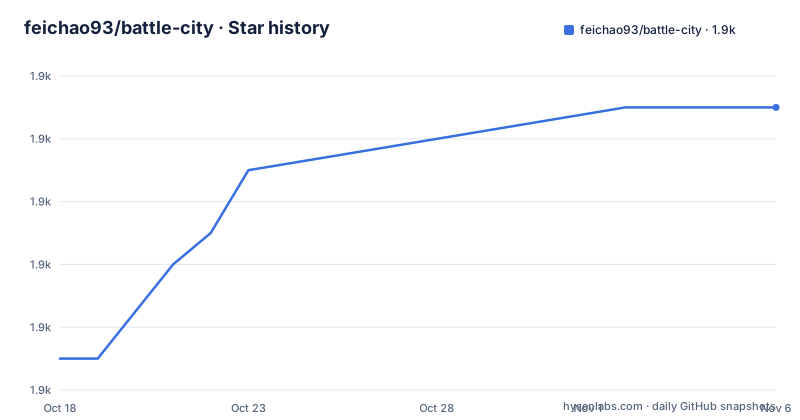
Star history
- feichao93/battle-city1,881 ★ · +8
| Repository | 2026-10-18 | 2026-11-06 |
|---|---|---|
| feichao93/battle-city | 1.9k | 1.9k |
8 Stars in the last 19 days, measured from the daily GitHub snapshot. Compare with other projects
Editorial analysis
One game, not an engine: what the repository contains
battle-city is a remake of the classic NES tank game, written in TypeScript and described in the repository as a React build. It has a homepage at battle-city.js.org where it can be played online.
What is in the repository is one game: a battlefield, tank behaviour, a level editor, and the modes around them. The topics list React, redux, redux-saga and svg, and the older architecture description in the README says versions 0.2 and 0.3 wrapped the original game's assets as components and rendered them with SVG, managing state and logic with Immutable.js, redux and redux-saga.
That older stack no longer describes the code. Milestone 0.4.0, dated 2026-09-28 in the README, is a full rewrite.
The distinction matters if you are evaluating this as a dependency. It is not a game framework you can build other games on. It is a specific game with a specific and non-trivial architecture, which makes it a good reference implementation and a poor foundation for new work.
What changed in the 0.4.0 rewrite
The milestone list in the README is specific enough to be useful.
The stack is now TypeScript with Vite 6, React 19, PixiJS v8 and zustand. The battlefield is drawn with PixiJS while the interface is React and SVG, and the game logic runs as a 60Hz fixed-step engine separated from rendering.
That split is the most interesting engineering decision in the project. A fixed-step simulation decoupled from rendering means the game advances in consistent 60Hz ticks regardless of frame rate, which is what makes the headless arena and snapshot tests possible at all.
Other changes: tank values and bot spawn rules were aligned with the NES original, and player tanks now slide on ice. The bots were reworked to break bricks when pathing to the eagle, wander more at the start and get more aggressive later, and sometimes turn on a side player. Player takeover was added, where the AI takes over after a period of inactivity and can be turned off in Options.
The LAN mode, full keyboard control including remappable keys in Options, a gallery page, and the headless arena with match snapshot tests were all part of the same milestone. The README states the rewrite was done with the help of Claude Opus 5.5, which is worth knowing before you read the code as an example of a particular human style.
npx battle-city starts a server, and the port is negotiated
The package ships a command line entry point. The bin field maps `battle-city` to bin/battle-city.js, and the engines field requires Node.js >=18.
The README gives three invocations:
npx battle-city            # 或者 npm i -g battle-city 之后运行 battle-city
npx battle-city --port 3000
npx battle-city host       # 局域网联机主机,把打印出的地址发给同一网络里的另一位玩家
The default port is 8080, and the README states that if it is taken it keeps looking for the next one. After starting, press Enter to open the game in a browser and Ctrl+C to exit.
The `host` subcommand is the LAN lobby. It starts a server and prints an address that another player on the same network uses to create or join a room. The `ws` package is the single runtime dependency, which is what carries the websocket traffic for that mode.
The `--port 3000` form is worth noting because it is the only way to pin the port. Since the default search moves upward automatically, a test harness that assumes 8080 will silently talk to nothing if something else already holds it.
Local development with pnpm, vitest and two build targets
Development uses pnpm, pinned at [email protected] in the packageManager field. The scripts the README lists:
pnpm install
pnpm dev         # vite 开发服务器
pnpm test        # 单测;pnpm arena 跑托管 AI 对 bot 的无头对局统计
pnpm build       # 按相对路径打包到 dist/,放在任意路径下都能打开
pnpm build:npm   # 按相对路径打包到 www/,npm 包用的就是它
Two build targets exist for a reason. `build` emits to dist/ with `vite build --base ./`, using relative asset paths so the output works from any directory on disk, including opening index.html directly from the filesystem. `build:npm` emits the same way to www/ instead, and that is the directory the published package ships. The prepack hook runs build:npm, so a published tarball always matches the current source.
Both build scripts run `tsc --noEmit` first, so a type error blocks the build rather than shipping.
Testing is vitest, with jsdom in the dev dependencies for DOM tests. The arena script is separate: it sets an ARENA environment variable and runs only test/arena.test.ts, which is the headless mode where the takeover AI plays against bots and produces statistics. That is the feedback loop for tuning bot behaviour, and it is the piece most transferable from this repository even if you never play the game.
The level editor and custom level management
A level editor was part of milestone 0.2 in April 2018 and survives into the current version, along with custom level management.
In the 0.4.0 milestone the editor is covered by the full keyboard control work: the README lists the title page, level selection, level list, editor, gallery and dialogs as all keyboard operable, with an Esc pause menu and remappable keys on the Options page.
That combination is what makes the editor usable in practice. A mouse-driven editor that requires clicking is fine on a desktop, but the current version treats the editor as one screen among several in a fully keyboard-navigable interface, and the level list is a first-class destination rather than a hidden settings page.
The gallery is also keyboard reachable. Given that the original game's assets are being reused, the gallery is the place where the remake exposes what it has, and making it a normal screen rather than a demo page says something about how the author expects the project to be looked at.
The README does not document a level file format or how custom levels are stored, so if you want to author levels as data rather than through the UI, that is a question for the source.
Two player over LAN is a websocket server with two participants
The LAN feature is described in one line: `battle-city host` starts a lobby, and two people on the same network create or join a room to play.
The mechanism is visible in the dependencies. `ws` is the only runtime dependency of the package, and `@types/ws` is a dev dependency. So the multiplayer path is a websocket server started by the CLI, not a peer-to-peer connection and not a third-party service.
That has a consequence worth stating plainly. Two players must be on the same network, which in practice means the same local network. There is no relay, no signalling server and no NAT traversal in the description, so playing across two homes or across a corporate network is not something this covers.
The host mode therefore has a narrow operating envelope: a shared LAN, an automatically selected port, and two browsers. It is a feature for two people at one desk or one room, not a multiplayer service.
The README does not describe the message protocol between clients, so extending it to more players or to a different transport means reading the bin and src code directly.
Maintenance, packaging and the licence
The repository is not archived and the last push was on 2026-09-28, the same date as the 0.4.0 milestone. There are no GitHub releases, so version history lives in the README milestone list and in whatever changelog the repository carries.
The gap between milestones is informative. 0.2 was April 2018, 0.3 was November 2018, and 0.4.0 is September 2026. That is a project that spent most of its life quiet and then had one large rewrite, which is a different risk profile from one that ships steadily. There is no evidence in the README about what 0.5 will contain or when.
Packaging is worth noting because it is unusual for a game. The files array publishes bin, www, src, index.html, vite.config.ts and tsconfig.json. Shipping the TypeScript sources means someone can read and modify the game's source from the installed package, and shipping vite.config.ts and tsconfig.json means the built game can be rebuilt.
The licence is MIT, declared in package.json with the LICENSE file at the repository root, which permits commercial use and modification. That is a licensing note and not legal advice. The README does not specify how reuse of the original game's assets is handled.
Editorial conclusion
Use this project if you want a working browser remake of Battle City with the level editor and a headless AI arena for tuning bot behaviour, and you are comfortable reading TypeScript game loop code. Do not adopt it as a game engine or as a React component library, since it is one game rather than reusable infrastructure. Verify first that the LAN mode works on your network, because `npx battle-city host` binds a websocket server whose topology the README describes only in terms of two people on the same network.
Frequently asked questions
How do I play battle-city?
Run npx battle-city with Node.js 18 or later, then press Enter to open the game in your browser and Ctrl+C to exit. The game is also playable online at battle-city.js.org.
How do I play battle-city over a local network?
Run npx battle-city host, which starts a lobby and prints an address. Another player on the same network opens that address to create or join a room. The LAN mode is served over a websocket server from the ws package.
What technology stack does battle-city use?
Milestone 0.4.0 moved the project to TypeScript with Vite 6, React 19, PixiJS v8 and zustand. The battlefield is drawn with PixiJS, the interface uses React and SVG, and the game logic runs as a 60Hz fixed-step engine separated from rendering.
What does the AI takeover feature do?
When a player has not interacted for a period of time, the AI takes over their tank. The README states this can be disabled in the Options page, and that in two player mode the two AIs coordinate, dodge bullets and defend the eagle.
How do I develop battle-city locally?
Use pnpm, which is pinned at [email protected]. Run pnpm install, then pnpm dev for the Vite dev server, pnpm test for unit tests, pnpm arena for headless AI versus bot matches with statistics, and pnpm build to produce a dist/ directory that works from any path.
What licence is battle-city released under?
It is released under the MIT licence, declared in package.json with the LICENSE file at the repository root. This is a licensing note and not legal advice, and it covers the project code rather than the original NES game assets.
Official sources
Add this badge to your README
If you maintain this project, the badge below links readers to this analysis and shows its maintenance status from the daily GitHub snapshot. Paste the markdown into your README; add ?metric=license or ?metric=stars to the image URL for a different field.

[](https://hysenlabs.com/projects/feichao93-battle-city)Star history chart for your README
[](https://hysenlabs.com/projects/feichao93-battle-city)Was this useful?