MiniSearch: a self-hosted SearXNG plus in-browser LLM in one Docker container
Minimalist web-searching platform with an AI assistant that runs directly from your browser. Demo: https://felladrin-minisearch.hf.space
At a glance
- What is it?
- MiniSearch bundles SearXNG, an ONNX cross-encoder reranker and a browser-side inference path into a single container, so queries never need to leave your machine unless you point it at a remote API. The trade-off is that the heaviest part of the pipeline, the language model, runs on whatever GPU or CPU the visitor happens to have.
- Who is it for?
- Adopt MiniSearch if you already want a self-hosted SearXNG and you are comfortable with the model running on the visitor's hardware rather than a server you control. Skip it if you need consistent answer quality across weak client devices or if you need a retrieval API that other services can call.
- Can I use it commercially?
- Yes. Apache-2.0 is a permissive licence: you can use, modify and sell software built on it, as long as you keep its copyright and licence notices.
- Is it still maintained?
- Yes. The repository received new commits within the last day.
- What is it written in?
- Mainly TypeScript, according to GitHub's language statistics.
Answers come from the project's GitHub data, last synced on November 14, 2026, and from our analysis. They are not legal advice.
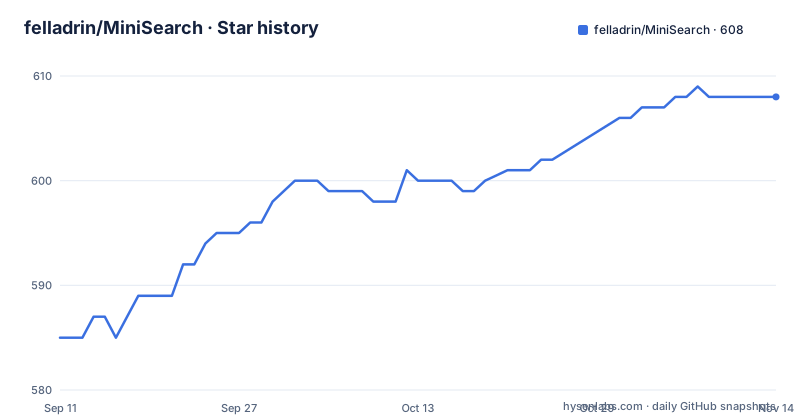
Star history
- felladrin/MiniSearch608 ★ · +23
| Repository | 2026-09-11 | 2026-11-14 |
|---|---|---|
| felladrin/MiniSearch | 585 | 608 |
23 Stars in the last 64 days, measured from the daily GitHub snapshot. Compare with other projects
Editorial analysis
The problem MiniSearch is aimed at
A conventional AI search setup has three moving parts: a metasearch backend, a reranker, and an inference endpoint for the answer. Each one is a separate service to deploy, and the inference endpoint is usually the expensive one, because it wants a GPU and a hosted API key. MiniSearch collapses all three into one container plus the browser tab. The README describes it as a self-hosted search engine with an AI assistant, and states that a working setup needs no API key, no separate inference server, and no third party seeing your queries. The intended user is someone who already runs SearXNG or is willing to, wants cited answers over the result set, and does not want to pay per query or send queries to a hosted provider. It is not a drop-in replacement for a search API you call from your own backend code. Treat it as a user-facing application first.
What actually runs where: browser, container, and the split between them
The architecture diagram in the README separates two trust domains. Inside the Docker container sit the app server, a bundled SearXNG metasearch instance, and a reranker that the diagram labels as ONNX Runtime. Inside the browser sit the search UI, an optional in-browser model running on WebGPU or CPU, and IndexedDB for history and cache. The data flow is stated plainly: the query goes to the app server, the server asks SearXNG to aggregate results from multiple engines, the server reranks them with a small cross-encoder model before returning them, and the browser caches them locally. Answer generation is a separate branch. The browser either runs a model itself or calls an OpenAI-compatible API or AI Horde, and the diagram marks that remote path as optional. That split matters for capacity planning. Search, aggregation and reranking are server-side and scale with the container. Inference is client-side by default, so it scales with the visitor's hardware and costs the server nothing. The README also notes that the server can proxy your own API key, via the INTERNAL_OPENAI_COMPATIBLE_API_ variables, so other people can use your instance without seeing the key.
Getting an instance running
The shortest path is a single published image. The README gives this command: docker run -p 7860:7860 ghcr.io/felladrin/minisearch, then open http://localhost:7860. A Compose variant is also given, with the service name minisearch, the same image tag and the same port mapping. Building from source is a three-step sequence: git clone the repository, cd into it, then docker compose -f docker-compose.production.yml up --build. The repository has no published GitHub releases, so there is no version history to compare against. The README warns that the latest tag moves on every release and recommends pinning the digest instead, showing docker inspect --format '{{index .RepoDigests 0}}' to read the digest and a run command that references it as ghcr.io/felladrin/minisearch@sha256:... The running instance reports which commit it was built from in the menu and under build on the /status endpoint, which is the practical way to confirm what you actually deployed. Images carry provenance and SBOM attestations, inspectable with docker buildx imagetools inspect. A Hugging Face Space is also offered as a duplicate-and-run option, with environment variables set in the Space settings.
Model choice is a client-hardware decision, not a server one
The README says the in-browser assistant can pick from several curated models ranging from 135M to 4B parameters, running on WebGPU where available and on CPU elsewhere, with models downloaded once and cached by the browser. That range is wide enough that the two ends behave like different products. A 135M-parameter model will load quickly on modest hardware, and a 4B model will not. Because the model runs in the tab, answer latency and answer quality depend on the device of whoever is searching, not on the machine you deployed. A user on a laptop with a capable GPU and a user on an older phone hitting the same instance will get different experiences from identical configuration. The README does not state minimum hardware requirements, per-model memory footprints, or download sizes, so those numbers have to be measured on your own target devices before you commit. The first-load cost is also real: models are cached by the browser, which means the initial visit pays a download the later visits do not, and a cleared browser profile pays it again.
Where MiniSearch is the wrong tool
The design puts the answer generator on the client, and that is the limitation to weigh hardest. If you need every user to get the same answer quality, or if your users are on thin clients, kiosks, locked-down browsers without WebGPU, or devices where a multi-gigabyte model download is unacceptable, the default path does not fit. The remote options exist for exactly that case, but they reintroduce the dependency MiniSearch was built to remove: an OpenAI-compatible endpoint, or AI Horde, which is crowdsourced and therefore has its own queueing and availability characteristics that the README does not quantify. A second boundary is programmatic use. The material describes a UI, a browser default search engine pattern of http://localhost:7860/?q=%s, and a Raycast Quicklink, but no documented API for fetching ranked results into another application. If your goal is a retrieval service behind your own product, MiniSearch is the wrong layer. Third, the bundled SearXNG instance is a dependency you inherit: if the upstream engines it aggregates are blocked from your network, or rate-limit the container, result quality degrades in ways MiniSearch itself does not control.
How it differs from running SearXNG alone
Plain SearXNG aggregates results from multiple engines and presents them. It does not rerank with a cross-encoder and it does not generate a cited answer. MiniSearch adds both: the server-side reranker reorders what SearXNG returns before it reaches the browser, and the assistant reads the top results and writes an answer with citations, which the README lists as a feature alongside follow-up questions with conversation memory, on-demand reasoning display, and read-aloud. The difference in approach is where the intelligence lives. A typical RAG stack keeps retrieval and generation on the server, which gives uniform behaviour and central control over the model. MiniSearch moves generation into the tab, which gives privacy and zero marginal inference cost at the price of uniformity. A second comparison point is AI Horde, which MiniSearch can also use: that is crowdsourced inference, so generation happens on someone else's volunteered hardware. MiniSearch's default keeps the prompt and the results on the user's machine, and AI Horde does not.
Operating cost, storage, and the Apache-2.0 terms
The server-side footprint is one container running the app server, SearXNG and an ONNX reranker, exposed on port 7860. The README does not publish memory or CPU figures for that container, so sizing has to come from your own measurements. Client-side storage is IndexedDB, holding history, cached results and chats, with configurable retention and a fuzzy-searchable history that supports pinning and full-session restore. Because that data lives in the browser, clearing site data or switching browsers loses it, and the README does not describe any export path. On licensing, the repository is Apache-2.0, which permits commercial use and modification and includes an explicit patent grant. Apache-2.0 also requires that you keep the licence and notice files and state significant changes when you redistribute. That is a summary of the licence text, not legal advice; if you plan to redistribute a modified build, read license.txt in the repository and, where the stakes are high, consult a lawyer. The README also notes that the project is not archived and that CI runs via a GitHub Actions workflow, but the repository has no published GitHub releases, so upgrade cadence cannot be assessed from release history.
Editorial conclusion
Adopt MiniSearch if you already want a self-hosted SearXNG and you are comfortable with the model running on the visitor's hardware rather than a server you control. Skip it if you need consistent answer quality across weak client devices or if you need a retrieval API that other services can call. Before deploying, verify which build you are running by checking the build field on /status, and confirm that your SearXNG instance can reach the engines you depend on from inside the container network.
Frequently asked questions
Does MiniSearch need an API key to work?
No, not for a working setup. The assistant can run entirely inside the browser tab on WebGPU or CPU using curated models from 135M to 4B parameters, and results come from a bundled SearXNG instance. There is no separate inference server and no third party seeing your queries. An API key is only needed if you point the assistant at a remote endpoint.
How do I pin a MiniSearch image to a known build?
Pin the digest rather than the tag, because latest moves on every release. Read the digest with docker inspect and then run the image by its sha256 reference. The running instance reports its version in the menu and under a build key on the status endpoint, so you can confirm which commit you are on.
Can other people use my MiniSearch instance without seeing my API key?
Yes. Configure the internal OpenAI-compatible API variables and restart the container. A new option named as you chose appears in the AI Processing Location menu, and the key stays on the server rather than being handed to the browser.
Does MiniSearch store my search history on a server?
No. Search history, cached results, and chats are stored in your browser and never leave your machine. Retention is configurable, the history is fuzzy-searchable with pinning and full-session restore, and usage statistics and an activity heatmap are derived from that local storage.
How do I protect a MiniSearch instance with access keys?
Set ACCESS_KEYS to a comma-separated list and leave it blank for unrestricted access. ACCESS_KEY_TIMEOUT_HOURS controls how long a key is remembered, defaulting to 24 hours, and setting it to 0 requires validation on every page load. Both default to open, so an instance you run only for yourself needs neither.
Official sources
Add this badge to your README
If you maintain this project, the badge below links readers to this analysis and shows its maintenance status from the daily GitHub snapshot. Paste the markdown into your README; add ?metric=license or ?metric=stars to the image URL for a different field.

[](https://hysenlabs.com/projects/felladrin-minisearch)Star history chart for your README
[](https://hysenlabs.com/projects/felladrin-minisearch)Was this useful?