The Flipper Application Catalog: manifests, automated builds and a mirror
Flipper Application Catalog
At a glance
- What is it?
- The Flipper Application Catalog is a registry of manifests rather than a code host, where each community app contributes metadata and build information that CI verifies, bundles and publishes to the Flipper Application Mirror for the phone and web companions to install from. It suits app authors who want distribution without a release process of their own, and it moves the trust question from the catalogue to the manifest.
- Who is it for?
- Adopt the Flipper Application Catalog if you maintain a Flipper Zero app and want it distributed automatically to users through the companion apps, because the mirror, the build and the verification are already wired together. Do not treat the repository as a place to publish source, since it holds manifests only, and keep the source in its own repository where contributors can read and review it.
- Can I use it commercially?
- Not without permission. GitHub finds no licence file in the repository, and without a licence all rights are reserved by default: you may read the code but not reuse it. Check the README, or ask the authors, before using it.
- Is it still maintained?
- Yes. The repository last received commits 1 day ago.
- What is it written in?
- Mainly Python, according to GitHub's language statistics.
Answers come from the project's GitHub data, last synced on November 7, 2026, and from our analysis. They are not legal advice.
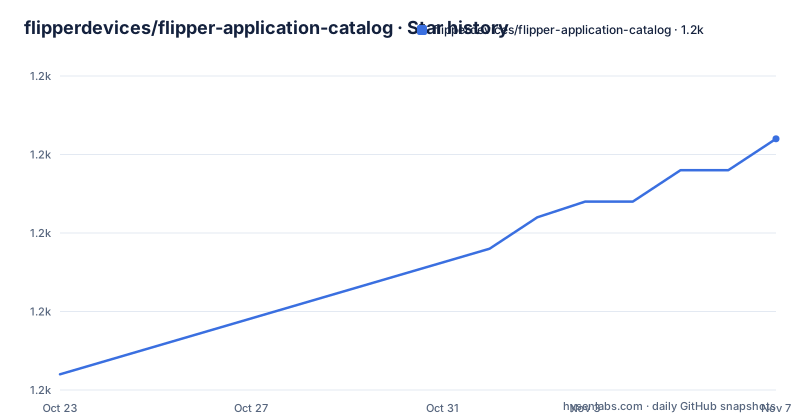
Star history
- flipperdevices/flipper-application-catalog1,211 ★ · +15
| Repository | 2026-10-23 | 2026-11-07 |
|---|---|---|
| flipperdevices/flipper-application-catalog | 1.2k | 1.2k |
15 Stars in the last 15 days, measured from the daily GitHub snapshot. Compare with other projects
Editorial analysis
A registry of manifests, not a source repository
The Flipper Application Catalog is a public repository for community developed apps for Flipper Zero, and the second sentence of the README defines what it is precisely. This repository hosts app manifests that contain app metadata and build information. This repository doesn't host app source code.
That distinction is the whole design, and it is worth sitting with, because most application catalogues work the other way round. Here, the code lives in the author's own repository, and the catalogue holds a small file that says what the app is, who wrote it, and how to build it. The catalogue is a registry, and the registry's job is to make the apps findable, buildable and installable.
The repository layout follows directly. There is an applications directory holding the Apps Catalog manifests, a documentation directory with the catalogue documentation including notes on the build process and architecture, a tools directory with the CI and CD tooling, and an example directory whose manifest.yml is the reference for what a manifest looks like. There is also an AGENTS.md at the root.
Because the code is not here, the rights story is different from a conventional app store. The catalogue is a list of pointers, and the licence recorded for the repository is unknown, so the terms for the catalogue itself are unclear even though each app carries its own terms in its own repository.
The distribution path: build, mirror, companion app
How an app actually reaches a device is the part users care about, and the README describes a three step path that has no manual step in it.
Apps from this repository are automatically built and archived to the Flipper Application Mirror. The build is not something the user does and not something the author does on release day, it happens as part of the catalogue's own pipeline.
The second step is discovery. The README says to use the Flipper companion apps to search and install apps from this repository, and it names three. There is an iOS app, linked from the App Store, and an Android app, linked from Google Play. There is a web option, Flipper Lab, with a note that a chromium-based browser is required for it.
So the whole journey from a pull request to a manifest to a working app on a device is: the author contributes a manifest, the pipeline builds and archives the app to the mirror, and the user searches for it in a companion app and installs it. The user never sees a manifest, and never has to find a source repository.
That is the difference the catalogue makes for an app author. Without it, distribution is a README, a release page and a link that people have to be told about. With it, an app becomes searchable in a store-like interface the moment its manifest is merged, which is why the catalogue is a real distribution channel rather than a list of interesting links.
What a manifest carries, and the reference example
The manifest is the unit of contribution, and the README describes it as containing app metadata and build information. Beyond that, one more detail is given, and it is a useful one: if you have found a bug in an app or want to suggest an improvement, you are told to contact the app's developer using the contact information provided in the app manifest, or by opening an issue in the app's source code repository.
So a manifest carries at least three kinds of information that a user or a catalogue needs. It identifies the app, which is what makes the entry searchable in the companion apps and what gives the built artifact its name. It carries build information, which is what the pipeline uses to compile the app, since the catalogue builds the code itself rather than distributing a prebuilt binary. And it carries contact information for the developer, which is the routing mechanism for support.
The reference for the format is the example directory, which contains manifest.yml. That file is the thing to copy when writing a new one, and the contribution guide in the documentation directory is the place to read about how to add and update an app in the Apps Catalog.
Two design consequences follow from the manifest carrying the build information rather than a binary. The catalogue is reproducing the app from source at build time, so whatever the manifest names has to be reachable and buildable, and the pipeline's verification step, described below, is what checks that. It also means the build is reproducible from a versioned source, which is a stronger property than distributing a binary that nobody can rebuild.
The tools directory: verifying manifests and building code bundles
The tools directory holds the CI and CD tooling for workflow automation, and the README names two jobs for it: verifying the app manifest and its code, and creating app code bundles.
The verification step is the interesting one, because it is what makes a manifest-based catalogue safe to operate. A manifest is a claim, and a claim can be wrong in ways that matter: the build information can point at a repository that does not exist, or at a revision that has moved, or at a source tree that no longer builds, or at code that does not contain what the manifest says it contains. A pipeline that checks the manifest against the code it names is checking that the pointer still resolves to something real, and the tooling in this repository is where that check lives.
The second job, creating app code bundles, is the packaging step. A Flipper app is not a single file, and the pipeline has to collect the source into the form the device expects, with the manifest's build information determining what goes in.
So the tools directory is small in concept and load bearing in practice. It is the difference between a list of links that slowly rots and a catalogue whose entries are known to build.
The documentation directory complements it, holding the Apps Catalog documentation with notes on the build process and the architecture, so a contributor can understand the system they are submitting into rather than only following a checklist.
Contribution, support and where the boundaries are
The README draws three boundaries, and each of them is a deliberate design decision rather than an omission.
Contributions go through the contribution guide, which the README points to for learning how to add and update an app to the Apps Catalog. The update case is as important as the add case, because an app whose manifest points at a moving branch needs updating when that branch changes, and a catalogue full of stale manifests is worse than a small one.
Support is routed to the app's developer, using the contact information in the manifest or an issue in the app's source code repository. The catalogue is not the place to report a bug in an app, because the catalogue does not contain the app.
The third boundary is about abuse. If you want to report abuse or a violation of your rights, you open an issue in this repository with details. That is the one category of report the catalogue itself takes, and it is a sensible split, because abuse of a catalogue entry is a matter for the catalogue and abuse of an application is a matter for the application.
Taken together, the routing is a fair division of responsibility: the catalogue maintains the index and the pipeline, the author maintains the code and answers for it, and the contributor maintains the manifest that links the two.
The limits, and the alternative of building it yourself
Three things to weigh before you build on this model.
The first is that the catalogue is a registry, so everything that matters about trust lives in the manifest. The verification tooling checks the manifest against the code, which catches broken pointers, but a manifest that points at a source repository someone else controls is a supply chain question that no amount of manifest validation answers on its own. The source repository being public and auditable is the thing that makes the model work, not the manifest format.
The second is the boundary of what the catalogue can promise. It is a list of manifests plus a build pipeline, so it inherits the limits of the ecosystem around it. A browser is needed for the web companion, a phone app for the mobile companions, and an up to date source tree for the build. When an app stops building, the catalogue entry becomes an empty promise.
The third is the licensing gap. The repository licence is recorded as unknown, and there is no licence file at the root, so the terms for the catalogue, the documentation and the tooling are not stated where the README points for it. The apps themselves are licensed in their own repositories, which is a reasonable arrangement for a registry, but the catalogue's own terms are worth asking about if you plan to reuse its tooling.
The alternative to the catalogue is the one the project does not need to offer, and it is worth naming. An author can skip the catalogue entirely, keep the source in their own repository, and tell users to build the app themselves with the Flipper build tooling, with the topic list carrying ufbt as the associated project. That route gives complete control over the build and no dependency on a central pipeline, at the cost of every user having to install a toolchain. The catalogue is the version of that where the author keeps control of the code and gives up control of the build and the distribution, and for most community apps that is a good trade.
Editorial conclusion
Adopt the Flipper Application Catalog if you maintain a Flipper Zero app and want it distributed automatically to users through the companion apps, because the mirror, the build and the verification are already wired together. Do not treat the repository as a place to publish source, since it holds manifests only, and keep the source in its own repository where contributors can read and review it. Before you submit a manifest, read the contribution guide and confirm that the build information in the manifest points at a source tree that is public, since the verification step checks the manifest against the code it names.
Frequently asked questions
What is the Flipper Application Catalog?
It is a public repository for community developed apps for Flipper Zero that hosts app manifests containing app metadata and build information. It explicitly does not host app source code, which lives in each app's own repository.
How do I install an app from the catalog?
Apps from the repository are automatically built and archived to the Flipper Application Mirror. You use the Flipper companion apps to search and install them, with apps for iOS from the App Store, for Android from Google Play, and the web option Flipper Lab, which requires a chromium-based browser.
How do I add my own app to the catalog?
Read the contribution guide in the documentation directory, which explains how to add and update an app in the Apps Catalog. The example directory contains a manifest.yml that serves as the reference for the format.
Where do I report a bug in an app?
To the app's developer, using the contact information provided in the app manifest, or by opening an issue in the app's source code repository. To report abuse or a violation of your rights relating to the catalog itself, you open an issue in this repository with details.
Official sources
Add this badge to your README
If you maintain this project, the badge below links readers to this analysis and shows its maintenance status from the daily GitHub snapshot. Paste the markdown into your README; add ?metric=license or ?metric=stars to the image URL for a different field.

[](https://hysenlabs.com/projects/flipperdevices-flipper-application-catalog)Star history chart for your README
[](https://hysenlabs.com/projects/flipperdevices-flipper-application-catalog)Was this useful?