Foam: personal knowledge management that stays plain markdown
A personal knowledge management and sharing system for VSCode
At a glance
- What is it?
- Foam turns Visual Studio Code into a linked note system with graph views, backlinks, and wikilinks, while keeping every note as a markdown file you can still read, commit, and publish without the extension.
- Who is it for?
- Foam's bet is that a knowledge base should be a folder of markdown files, not a database, and that every feature worth having can be layered on top of that folder without touching its contents. That bet explains the whole design: wikilinks that generate portable markdown references so the same vault renders on GitHub, orphan and placeholder panels that keep a large note collection from decaying, and a VS Code extension that holds your files but never owns them.
- Can I use it commercially?
- Check first. The repository uses a licence we do not classify automatically, so read its LICENSE file before any commercial use.
- Is it still maintained?
- Yes. The repository last received commits 1 day ago.
- What is it written in?
- Mainly TypeScript, according to GitHub's language statistics.
Answers come from the project's GitHub data, last synced on October 22, 2026, and from our analysis. They are not legal advice.
Star history
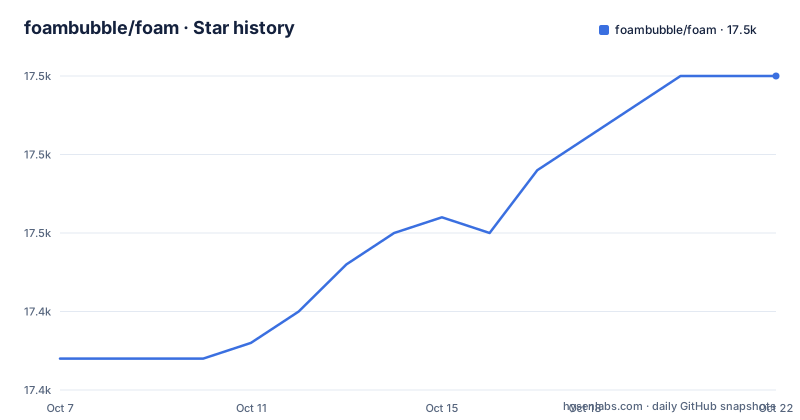
- foambubble/foam17,460 ★ · +18
| Repository | 2026-10-07 | 2026-10-22 |
|---|---|---|
| foambubble/foam | 17.4k | 17.5k |
18 Stars in the last 15 days, measured from the daily GitHub snapshot. Compare with other projects
Editorial analysis
A knowledge base you can still read without the extension
Foam describes itself as a personal knowledge management and sharing system built on Visual Studio Code and GitHub. That pairing is the design, not marketing. The extension contributes graph visualisation, link completion, backlinks and panels, but the notes themselves stay plain markdown in a folder on disk. Nothing is stored in a proprietary store, so if the extension is uninstalled tomorrow your writing is still readable in any text editor, still greppable, and still diffable in Git.
The README is explicit about ownership: you own the information you create with Foam, and you are free to share it and collaborate on it with anyone. The project is MIT licensed as declared in the repository package.json, and the extension ships to the Visual Studio Marketplace under the identifier foam.foam-vscode. As of the 21 September 2026 push the repository reports 17,408 stars, 779 forks and 33 open issues, with main as the default branch. That is a large install base for a notes tool, and it arrives with an unusual amount of visible process: an all-contributors badge counting 134 people, a Discord channel, an AGENTS.md and CLAUDE.md at the repository root, and a devcontainer.
Because Foam extends VS Code rather than replacing it, the familiar editor parts come along for free. You keep the editor's own file handling, its settings, its integrated terminal and its extension host, and you gain a command palette of Foam commands such as Foam: Show Graph, Foam: Open Random Note, Foam: Open Daily Note and Foam: Create New Note. The topic list on the repository spells out the intended lineage: graph-visualisation, markdown-editor, notes-app, pkm, personal-knowledge-base, vscode and zettelkasten.
Wikilinks, duplicate filenames, and section targets
Foam's linking model is where it earns its keep over a stock markdown extension. You write `[[wikilinks]]`, and Foam supplies autocompletion for note names, including placeholders for notes that do not exist yet. Two features around that syntax carry most of the weight.
The first is unique identifiers across directories. Foam supports files with the same name in multiple directories, and it resolves links by using the minimum identifier required. While one file is called meeting-notes.md you link it as `[[meeting-notes]]`; once a second directory gains the same filename, Foam knows the short form is no longer unique and helps you move to the longer path that disambiguates. It also reports wikilinks that are already ambiguous and offers to fix them, which matters because hand-written links break silently otherwise. Syntax highlighting reinforces the same point visually: wikilinks and placeholders are styled differently, so unresolved targets are visible while you write rather than after you publish.
The second is rename safety. Foam updates links when you rename a file, so an index note that points at hundreds of entries does not silently rot. Targets also extend past whole files: sections use the standard `[[resource#Section Title]]` syntax with autocompletion, navigation, embedding and diagnostics, and aliases let a link display different text via `[[wikilink|alias]]`. Note embed pulls the content of another note into the current one, and the May 2026 [email protected] patch fixed embed handling including self-referencing embeds, which previously recursed.
One command closes the loop back to GitHub. Foam can generate markdown reference definitions for its wikilinks, so the same vault stays navigable in the GitHub interface and on GitHub Pages, and keeps working in a workspace where Foam is not installed.
The panels that keep a large vault from decaying
A linked notebook fails in predictable ways, and Foam's panel set is aimed at those failure modes rather than at decoration. The graph view, reached with Foam: Show Graph, shows how notes connect. The backlinks panel answers the reverse question for the active note, listing which notes reference it and showing each occurrence in context with a preview of the source note.
Then there are the two panels that do actual maintenance work. Orphans are notes with no inbound and no outbound links. Placeholders are dangling links, or notes that exist without content. Both accumulate silently as a vault grows, and both are collected into one panel so they can be resolved or deleted on a regular pass. The Tag Explorer groups notes by tag and handles hierarchical tags, which gives a second navigation axis when link structure alone is not enough.
Note creation is the other half of staying current. Templates let you skip the repetitive scaffolding when starting a note, and the Foam: Create New Note from Template command combines with it; the README describes that pairing as the powerful combination rather than either feature alone. Daily notes give the vault a journal rhythm through Foam: Open Daily Note.
Adoption paths are handled with some care for people arriving from elsewhere. The getting-started notes point at the Second Brain and Zettelkasten methods and ask you to keep notes atomic, grouping things that belong together into one document and limiting each to a single topic. For Obsidian users there is a direct answer: an Obsidian vault is usually already a Foam workspace, with a migration recipe published on the documentation site. The recipes page also collects how different people use the tool, since long-form writing and research notes want different structures.
Templates, the CLI, and the export path behind docs.foam.md
Foam is more than an extension. The repository is a monorepo whose packages directory holds foam-vscode, foam-cli and foam-core, and the CLI is what turns a folder of notes into something publishable. Foam recommends custom templates to avoid repetitive work on notes, and template bodies can execute user-supplied JavaScript, which is the detail that drives both the ergonomics and the security work described later in this article.
The clearest demonstration that the CLI is a real product rather than a development convenience is the project's own documentation site. The root package.json publishes docs.foam.md by building the packages and then exporting the docs folder through the compiled CLI:
yarn build && node packages/foam-cli/out/index.js export ./docs --out ./.tmp/foam-docs-site --title "Foam" --description "Using Foam" --content-root user --site-url https://docs.foam.mdThe flags are the interesting part. `--content-root user` selects which side of the docs tree to publish, so user-facing guides and internal design notes can live in one repository without leaking both. `--out` writes to a scratch directory rather than tracking generated HTML in Git, and `--site-url` supplies the canonical base for the links the exporter emits. A single command therefore produces the same static site that the Getting Started guide, the templates page, the tag docs and the Obsidian migration recipe are served from, which keeps documentation and product in one versioned tree.
A Lerna and Changesets monorepo with an ordered release chain
Release order is encoded directly in the scripts. Foam uses Lerna for workspace orchestration, Yarn workspaces over packages/*, and Changesets for versioning, with husky wired in through a prepare script and a .changeset directory in the tree. The root package is private, and the engine requirement is pinned:
"engines": {
  "node": ">=22"
}
Because @foam/core is a dependency of the CLI and the extension depends on both, publishing in the wrong order would put a package on npm pointing at a version that does not exist yet. The release script handles it by chaining three workspace releases and then tagging:
npm login --registry https://registry.npmjs.org/ && yarn release-core && yarn release-cli && yarn release-extension && yarn tag-releaseThe daily work around it is the usual set for a TypeScript monorepo: build, clean, watch with a concurrency of 20, lint, format through prettier with arrowParens set to avoid, plus separate unit and end-to-end test scripts and a bench script run across all workspaces. Note that the release tags are per package. The published history is [email protected] and [email protected] from 1 September 2026 and [email protected] from 14 May 2026, so the extension version moves independently of the core and CLI versions, and the Changesets changelog is what ties a single user-facing patch back to changes spread across packages.
Restricted Mode containment and the scripting split
The most instructive Foam release is [email protected], published 1 September 2026, and it is worth reading as a security story rather than a changelog. It arrived with thanks to a reported issue, credited to @rfreytag.
The first change keeps note creation inside the workspace in Restricted Mode. A template `filepath` that resolves outside the workspace roots, for example by traversing up with `../`, is now refused when the workspace is untrusted. The reasoning is spelled out: opening an unfamiliar workspace should not let note creation become a write anywhere on disk, or worse, a delete through the overwrite strategy. Trusted workspaces are deliberately unchanged, because templates there are the user's own and filing a note into a sibling directory still works. The fix also mirrors containment that @foam/core already applied to noteCreate in the CLI and MCP paths, so the same rule now covers every route into a note.
The second change is architectural. The @foam/core exports that execute user-supplied JavaScript through Node's `vm`, namely TemplateLoader, resolveDailyNote, noteCreate and renderJsQuery, moved out of the main barrel into a new @foam/core/scripting subpath, published as foam-core/scripting. The stated goal is making the barrel safe to bundle for non-Node runtimes such as browsers and React Native, where a `vm` import is dead weight and a bundler hazard. Migration is limited to changing the import specifier, with the APIs unchanged. Platform detection was rewritten as a pure, tested detectPlatform() in the same change.
The preceding day is also instructive. [email protected] made attachment and image links honor workbench.editorAssociations at every settings scope, routed wikilinks and reference-style links through the vscode.open command used by the built-in Markdown extension, and stopped shadowing direct markdown links so the built-in extension handles them. Foam is deferring to VS Code's own markdown behaviour wherever it can, which is a sensible posture for an extension that shares a file format with another one.
Editorial conclusion
Foam's bet is that a knowledge base should be a folder of markdown files, not a database, and that every feature worth having can be layered on top of that folder without touching its contents. That bet explains the whole design: wikilinks that generate portable markdown references so the same vault renders on GitHub, orphan and placeholder panels that keep a large note collection from decaying, and a VS Code extension that holds your files but never owns them. The September 2026 releases are worth reading closely, because the maintainers treated a Restricted Mode escape in template paths as a security fix and split the user-JavaScript exports into a separate entry point rather than leaving them in the main barrel. A tool that lets templates and JavaScript queries run against your notes is a tool that has to decide what happens when you open a folder you do not trust yet. Installing the extension on a vault you already have, an Obsidian folder usually works unchanged, is the fastest way to see whether the graph view earns its place in your editor.
Frequently asked questions
What does Foam add beyond editing markdown in VS Code?
Foam adds a link layer over plain markdown files: wikilink autocompletion, unique identifiers across duplicate filenames, link updates on rename, a graph view, a backlinks panel, and orphan and placeholder panels that surface unreferenced and unfinished notes. Templates, daily notes and a tag explorer round it out.
How do I start using Foam with an existing Obsidian vault?
An Obsidian vault is usually already a Foam workspace, since both work on a folder of markdown files with wikilinks. The project's documentation publishes a Coming from Obsidian migration recipe, and the normal path from there is to install foam.foam-vscode and follow the Getting started guide.
How is Foam versioned and released?
Foam is a Lerna and Changesets monorepo over foam-core, foam-cli and foam-vscode, and the release script publishes core, then the CLI, then the extension, then tags. Because tags are per package, the extension has its own track, with [email protected] and [email protected] published on 1 September 2026.
What security changes landed in Foam 0.44.6?
Note creation is now kept inside the workspace in Restricted Mode, so a template filepath that resolves outside the workspace roots is refused when the workspace is untrusted. The same release moved the JavaScript-executing exports TemplateLoader, resolveDailyNote, noteCreate and renderJsQuery to the @foam/core/scripting subpath.
Official sources
Add this badge to your README
If you maintain this project, the badge below links readers to this analysis and shows its maintenance status from the daily GitHub snapshot. Paste the markdown into your README; add ?metric=license or ?metric=stars to the image URL for a different field.

[](https://hysenlabs.com/projects/foambubble-foam)Star history chart for your README
[](https://hysenlabs.com/projects/foambubble-foam)