Badge Magic Hardware: An Open-Source LED Badge Board
Badge Magic Hardware Board
At a glance
- What is it?
- Badge Magic Hardware is an open-source design for a programmable LED badge with BLE, sound visualization, buttons, and external flash storage. It suits engineers who can work across the separate hardware, firmware, and Android app repositories.
- Who is it for?
- Badge Magic Hardware fits makers who need an inspectable LED badge design and can work across the separate hardware, firmware, and Android app repositories. It does not fit buyers expecting a fully assembled, mass-produced device or a complete firmware build from this repository alone.
- Can I use it commercially?
- Yes. Apache-2.0 is a permissive licence: you can use, modify and sell software built on it, as long as you keep its copyright and licence notices.
- Is it still maintained?
- Yes. The repository last received commits 125 days ago.
- What is it written in?
- GitHub does not report a main language for this repository.
Answers come from the project's GitHub data, last synced on November 7, 2026, and from our analysis. They are not legal advice.
Star history
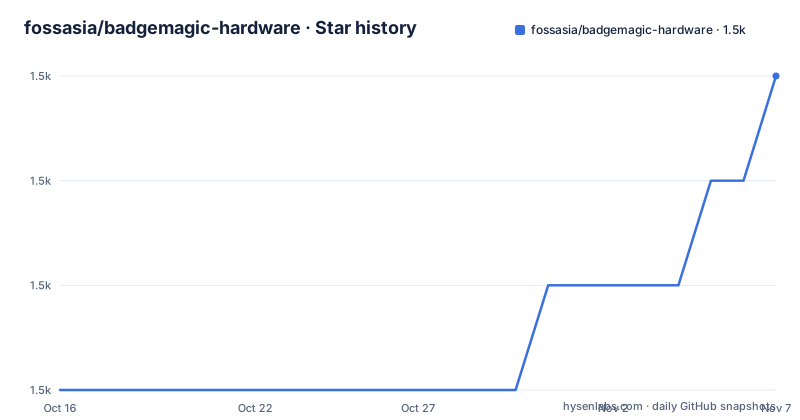
- fossasia/badgemagic-hardware1,546 ★ · +3
| Repository | 2026-10-16 | 2026-11-07 |
|---|---|---|
| fossasia/badgemagic-hardware | 1.5k | 1.5k |
3 Stars in the last 22 days, measured from the daily GitHub snapshot. Compare with other projects
Editorial analysis
What Badge Magic Hardware Adds To An LED Badge
Badge Magic Hardware targets people who want a programmable badge for custom text, clipart, and animation, while also providing hardware inputs beyond a simple LED matrix. The README describes an open-source LED badge platform that can receive such content over Bluetooth through Badge Magic applications or Python libraries. That division of responsibility matters. The board does not contain the applications or firmware in this repository, so it is the physical design layer of a larger system rather than a standalone software product.
The documented hardware includes an 11x44 LED matrix, BLE 5.3, USB 1.1, a built-in electret microphone, external flash storage, and two buttons mounted on the top of the board. The microphone is intended for real-time ambient sound visualization. The buttons can support mini-games and other interactive behavior, provided that the firmware implements those functions. The README points to the dedicated firmware repository for the current support status of features and for code that drives the board.
This combination is aimed at makers, hardware developers, and developers who want to experiment with wearable displays and Bluetooth-controlled badges. It is less directly aimed at someone who only needs a finished badge for an event. The README says that the latest hardware revision may not yet be mass-produced. It also points to the FOSSASIA Shop as a place to obtain the board, but it does not document stock levels, assembly status, or a production schedule.
The WCH RISC-V Board Architecture
The board uses the WCH QingKe RISC-V Bluetooth microcontroller platform, with the parts list identifying a WCH CH582M in a QFN48 package. The README lists the MRS_Toolchain_Linux_x64_V1.91 as the toolchain and wchisp as the programming tool. Those names identify the intended development path, but the hardware repository does not provide a complete flashing tutorial, a firmware build command, or a board configuration file. Firmware implementation belongs in the separate fossasia/badgemagic-firmware repository.
The data path implied by the project is straightforward. An application or Python library sends display content over Bluetooth, and the badge firmware receives that content for presentation on the LED matrix. The microphone provides a separate input stream for ambient sound visualization. Button presses provide user input, while external flash storage supplies additional storage for firmware or application needs. The README does not specify the protocol used by the apps, the storage format, the display refresh strategy, or the exact firmware API for these features.
The board is based on the same RISC-V chip family used by some other LED badges, including examples named in the README, but its stated additions are the microphone, external flash, and two buttons. Sharing a processor family does not mean that firmware is interchangeable. Board pin assignments, peripheral wiring, and firmware support still need to be checked against the relevant revision.
Hardware Files, Schematics, And Parts
The repository layout contains a LICENSE file, README.md, a docs directory, an output directory, and a schematics directory. The README includes front-side and back-side PCB images under docs/images. It also provides a bill of materials at docs/bill-of-materials.csv. This makes the repository useful for inspecting the board rather than treating it only as a product description.
The documented parts list includes the WCH CH582M(QFN48) microcontroller, an XC6206P332MR regulator, an LP4054 battery-related component, a DW03 component, USB-C, an electret microphone, external flash storage, a 32MHz crystal, and a 3.7V 280mAh Li-ion battery. It also lists LEDs, buttons, resistors, capacitors, and other items linked through the BOM. The presence of a USB-C connector does not by itself establish USB-C power negotiation or a particular charging behavior. The README identifies USB 1.1, but it does not provide text documentation of charging, power-budget, or battery-protection details.
The WCH CH582M, external flash, and two-button arrangement create a more interactive design than a display-only badge. They also create additional board bring-up work. A builder must verify the PCB files against the selected schematic revision, source the components named in the BOM, and confirm that the firmware repository supports the same hardware revision. The repository's output directory may contain manufacturing outputs, but the README does not explain which files are current or which fabrication package should be selected.
Getting A First Badge Magic Board Running
The project does not give a self-contained installation or first-use procedure in the hardware README. The README directs readers to the FOSSASIA Shop to get the board, and it links to the firmware repository and the Android app repository for the software components. No installation command, firmware build command, programming invocation, or application setup command is documented. Supplying one would require inventing a flag or workflow.
A first use therefore has two separate paths. A buyer can obtain the board from the FOSSASIA Shop and then consult the firmware repository for the supported flashing process. A developer interested in the mobile side should follow the separate Android app repository. The README also mentions Python libraries as a possible route for sending custom content, but it does not name a package, module, or setup procedure, so the exact API cannot be documented.
Before attempting a first display, check which hardware revision is held and whether the firmware repository lists that revision as supported. The README explicitly says that supported functions and functions in progress are tracked in the firmware repository. This is the first verification point for microphone visualization, button interaction, external flash, Bluetooth content, and the Python route. The hardware files alone do not confirm that every advertised function is implemented by the current firmware.
Practical Limits Of The Hardware Design
The clearest limitation is that this repository is not a complete product package. It contains hardware design resources, while firmware and the Android application live elsewhere. A user who needs a ready-to-use badge, a documented mobile setup, or a demonstrated end-to-end application cannot establish those points from the hardware README alone.
The latest revision may not yet be mass-produced, which creates a sourcing and replication constraint. The parts list names a 3.7V 280mAh Li-ion battery and several small components, but it does not explain assembly tooling, enclosure availability, charging verification, or whether every part is readily available. The two top-mounted buttons and the electret microphone also require firmware support. Without that support, they are hardware capabilities rather than guaranteed user features.
The shared RISC-V processor with other LED badges should not be treated as software compatibility. Another badge may use the same MCU family while presenting a different display matrix, button mapping, microphone circuit, flash layout, or power design. The board revision and schematic files must be checked before reusing firmware examples or assuming that another badge's Python or Bluetooth workflow will work unchanged.
For interactive projects, the microphone creates an additional design concern. Ambient sound visualization is a firmware and signal-processing task, not simply an extra part in the BOM. The README does not document sampling rate, processing latency, sensitivity, or privacy behavior. Those details require checking the firmware and any applicable product documentation before deployment.
Badge Magic Hardware Versus Badge Software Components
The practical alternative is a finished, integrated LED badge rather than this hardware-only design. A buyer who wants immediate use can acquire an assembled product and follow that product's application and firmware documentation. A hardware engineer who wants to modify the board can work with this repository's PCB resources, schematics, BOM, and linked firmware repository.
The difference is architectural rather than cosmetic. A finished product combines the board, firmware, application, assembly, battery integration, and support path. This repository exposes the physical design and identifies the intended WCH toolchain, but it does not include the complete application or firmware implementation. Its strongest use case is hardware review, board-level learning, or preparation for firmware development. Its weakest use case is a user who expects installation and immediate operation from one repository.
For software delivery, the README mentions Badge Magic applications and Python libraries, but it does not provide enough detail to compare their APIs, performance, or platform support. It also links to a separate Android app repository. Those repositories should be treated as the decision points for mobile integration and content delivery, while this repository should be evaluated for board availability and design completeness.
Apache-2.0 Scope And Maintenance Status
The repository is identified as Apache-2.0 licensed. That license is associated with the hardware design files in this repository, but the README does not describe the licensing of linked firmware, applications, Python libraries, third-party datasheets, or purchased hardware. Anyone redistributing a design should inspect the LICENSE file and check the separate repositories rather than assuming one license covers every component.
The repository is not archived, and its last push was on 2026-07-06. It also has no GitHub releases. There is therefore no release entry to use as a stable hardware version marker. The README identifies linked firmware and Android app repositories, but it does not state a compatibility policy or a version matrix for board revisions. Maintenance assessment should be based on dated repository activity and the actual files used, not on the repository name alone.
A builder should record the exact schematic and output files used, confirm the BOM against the selected PCB revision, and verify firmware support before fabrication. If the design is modified, the change should be reflected in the relevant schematic, BOM, and firmware documentation. These checks matter because the repository separates hardware from runtime behavior.
Editorial conclusion
Badge Magic Hardware fits makers who need an inspectable LED badge design and can work across the separate hardware, firmware, and Android app repositories. It does not fit buyers expecting a fully assembled, mass-produced device or a complete firmware build from this repository alone. Check the board revision, BOM availability, firmware support status, and Apache-2.0 obligations before building or redistributing it.
Frequently asked questions
What is Badge Magic Hardware used for?
It is an open-source hardware design for an LED badge that can display text, clipart, and animations. The board also includes Bluetooth, a microphone, external flash storage, and two buttons for supported interactive features.
Does Badge Magic Hardware include the firmware?
No. The repository contains hardware design files and directs readers to the separate fossasia/badgemagic-firmware repository for firmware and supported or in-progress functions.
Can I buy a Badge Magic Hardware board?
The README points readers to the FOSSASIA Shop to obtain the board. It also notes that the latest hardware revision may not yet be mass-produced.
Official sources
Add this badge to your README
If you maintain this project, the badge below links readers to this analysis and shows its maintenance status from the daily GitHub snapshot. Paste the markdown into your README; add ?metric=license or ?metric=stars to the image URL for a different field.

[](https://hysenlabs.com/projects/fossasia-badgemagic-hardware)Star history chart for your README
[](https://hysenlabs.com/projects/fossasia-badgemagic-hardware)Was this useful?